

Which Rendering Approach is Best for SEO on E-commerce Sites?
 Paddy Crier
Published September 29, 2026
This week, we're grateful to Patrick Crier who shares a practical framework for diagnosing how dependent an ecommerce site really is on JavaScript rendering—grounded in real crawl comparisons and case study evidence rather than a blanket CSR-vs-SSR verdict.
Ask most SEOs whether Google can handle JavaScript, and the answer is yes. For e-commerce sites, though, that's the wrong question. The one that actually matters is whether your product and category pages are reachable and readable before a single line of script executes, because on a site with hundreds of thousands of URLs, that distinction can be the difference between organic growth and invisible inventory.
Using crawl comparisons and real e-commerce examples, from Zalando's React-powered Fashion Store to a mid-market retailer that saw a 28% jump in top-3 rankings after moving content out of JavaScript, this piece sets out a practical framework for working out exactly where your site stands, and what to do about it. We'll look at the practical trade-offs between client-side rendering (CSR), server-side rendering (SSR), static rendering and hybrid approaches to assess how each approach performs in practice.
Contents:
Some industries have long favoured JavaScript-heavy architectures. As iGaming experts, here at ICS-digital, we have seen how common these websites are for online casinos and sportsbooks, where modern front-end frameworks are widely used to deliver highly interactive and dynamic user experiences.

Many of the same benefits have driven the adoption of JavaScript-based frameworks across e-commerce. Improved user experience, perceived performance, component reusability and faster development can all make JavaScript an attractive option for e-commerce businesses, particularly where websites need to support complex functionality.Zalando, for example, uses React extensively across its Fashion Store, with its own Rendering Engine supporting server-side rendering, client-side functionality and hydration.

Source:Zalando Engineering
However, e-commerce websites are particularly reliant on efficient crawling and indexation. Organic visibility depends heavily on search engines being able to discover and understand large numbers of products, categories and the internal links connecting them. This means that rendering decisions can have a significant impact on e-commerce websites.
That doesn't mean JavaScript-powered e-commerce websites are inherently problematic. Google is capable of rendering JavaScript, and there are many examples of JavaScript-heavy websites performing well in search.
Zalando is a good example of this. Its Fashion Store uses React extensively while combining server-side rendering with client-side functionality and hydration and has some strong ranking keywords such as position #5 in the UK for “adidas” and position #1 for “clutch bag golden”. Its engineering team has also published details of performance improvements from changes to its rendering and hydration architecture, including improvements to LCP and INP.
The question, therefore, isn't whether Google can render JavaScript, but how different rendering strategies affect crawl efficiency, discoverability and performance.
Rendering isn't just about Googlebot
Before looking at the SEO implications of different rendering approaches, it's useful to understand what each one means.
Different types of rendering appoaches
Client-side rendering (CSR) is where the server initially returns a basic HTML document and JavaScript is then used to generate the page content in the browser. The browser therefore needs to download and execute the JavaScript before the full page is available.
Server-side rendering (SSR) is where the server generates the HTML before sending it to the browser. This means the initial response can contain the page content, internal links and other SEO-critical elements, with JavaScript then used to add functionality and interactivity.
Static Site Generation (SSG) is similar to SSR, but the HTML is generated in advance rather than when the page is requested. The pre-generated HTML can then be served directly, often through a CDN.
Hybrid rendering combines multiple approaches across the same website. For example, an e-commerce site might use SSR or SSG for product and category pages that rely on organic search, while using CSR for account areas, checkout and other highly interactive functionality.
Hydration is where JavaScript is added to HTML that has already been generated through SSR or SSG. This allows a page to be available as HTML immediately while still providing the interactive experience of a JavaScript application.
Dynamic rendering, or prerendering, serves a pre-rendered HTML version of a page to search engine crawlers while serving the JavaScript application to users. It was historically used as a workaround for JavaScript rendering challenges, but Google now recommends SSR, static rendering or hydration instead.
At a high level, the key difference between these approaches is where and when the HTML is generated.
How to check what appears in the response vs the render
View Source shows the HTML returned by the server before JavaScript has executed, making it a useful first step for checking whether content, internal links and metadata are available in the initial response.
View Source
↓
Are SEO-critical elements present in the initial HTML?
↓
YES → SSR / SSG / Hybrid
NO → CSR / CSR-heavy
Inspect Element shows the rendered DOM after JavaScript has run, allowing you to compare what has been added or changed.
Disabling JavaScript provides another simple test. If the page loses its main content or navigation, it's likely heavily dependent on client-side JavaScript.
For larger websites, tools such as Sitebulb can compare rendered and non-rendered crawls at scale, highlighting differences in content, internal links, canonicals, metadata and structured data.
Network requests can also provide useful information. If product listings or category content are being loaded through API requests after the initial HTML has been returned, this suggests that JavaScript is responsible for making that content available.
Finally, Google Search Console's URL Inspection tool can be used to understand what Googlebot was able to retrieve and render for an individual URL. This provides another useful comparison against what is available in the initial HTML.

How Google processes JavaScript
Google processes JavaScript websites through three main stages: crawling, rendering and indexing. When Googlebot first crawls a URL, it receives the initial HTML and can extract links and other information available in that response. Pages can then be added to the rendering queue, where Google's Web Rendering Service uses Chromium to execute JavaScript. Google can then process the rendered HTML, discover additional links and content, and use the information available to help index the page.
This is particularly important for e-commerce websites because the initial HTML can determine what Google is able to discover before rendering takes place.
For example, imagine a category page containing 100 products. If those product links are included as standard <a href> links in the initial HTML, Google can discover them when it first crawls the page.
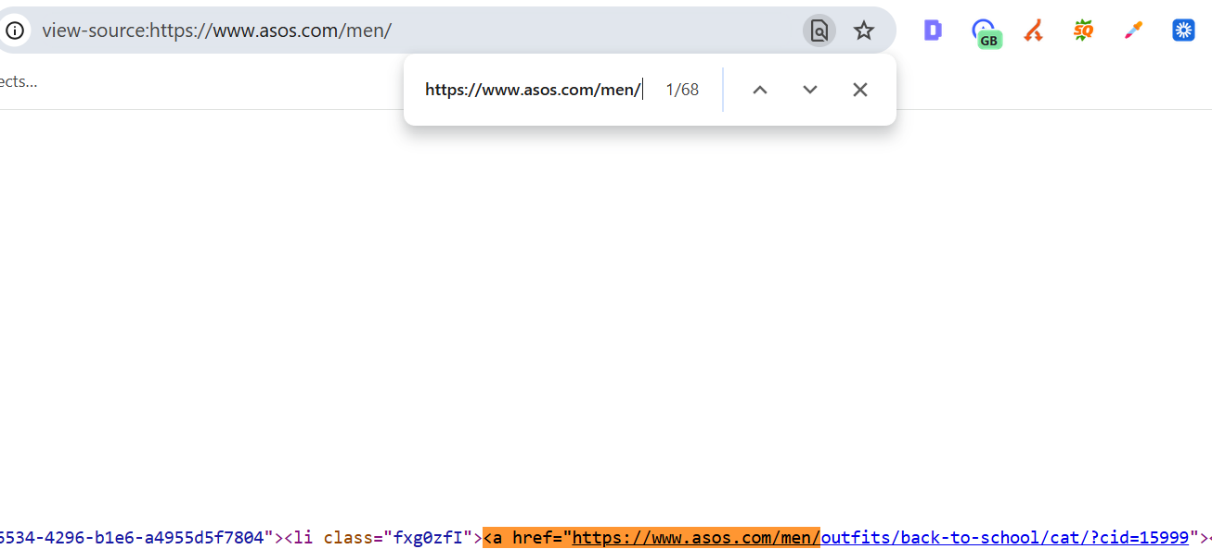
If the product grid is instead populated entirely through JavaScript, Google may need to render the page before those links become available. Google can discover JavaScript-generated links, but links available in the initial HTML can be discovered without relying on the rendering stage.
The same principle applies to other SEO-critical elements. Product descriptions, category content, breadcrumbs, canonicals and structured data can all be generated or modified using JavaScript. Google can process many of these elements after rendering, but this creates an additional dependency that isn't present when the information is available in the initial HTML. Google also recommends putting Product structured data in the initial HTML where possible.
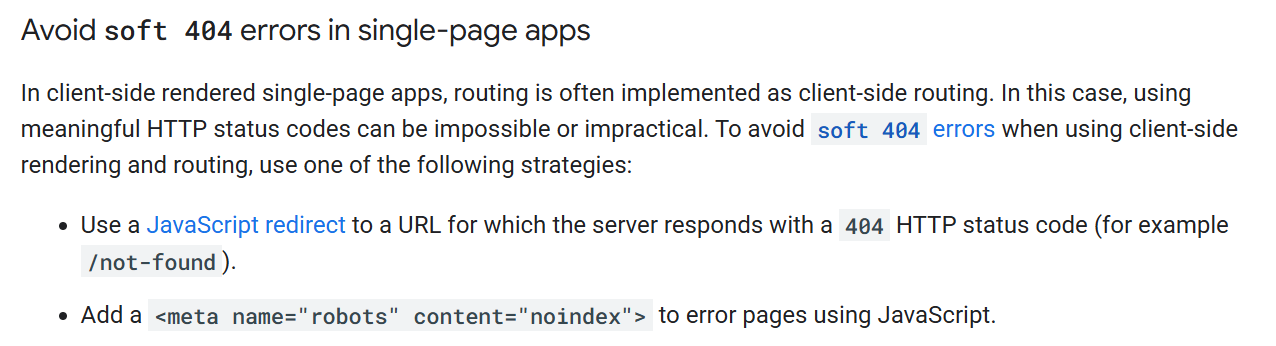
JavaScript-dependent empty states can create another potential issue. A product or category URL may return a valid response but initially contain little or no meaningful content, with the actual products only appearing after JavaScript executes. This can create situations where search engines encounter an empty or “no results” state even though the page appears populated once fully rendered.
Comparing the initial HTML with the rendered version can help identify these issues, particularly on sites where product availability is controlled through APIs.
Source: JavaScript SEO Basics by Google
This becomes more significant as an e-commerce website gets larger. On a site with hundreds of thousands or millions of URLs, unnecessary rendering requirements and JavaScript-generated URLs can increase the amount of processing required to crawl the site efficiently. For example, a poorly controlled faceted navigation system could generate large numbers of URL variations through JavaScript, many of which provide little or no SEO value.
This doesn't mean that every JavaScript-powered page uses more crawl budget, or that rendering automatically causes indexing delays. Google queues pages for rendering and the time they spend waiting can vary. The more useful way to think about it is that rendering creates an additional processing requirement. On a small website this may have little practical impact, but on a large e-commerce website, reducing unnecessary rendering and making important content and links available in the initial HTML can make the site easier for Google to crawl efficiently.
Comparing rendering approaches
One of the most useful ways to compare rendering approaches from an SEO perspective is to look at what is available in the initial HTML versus what only becomes available after JavaScript has executed.
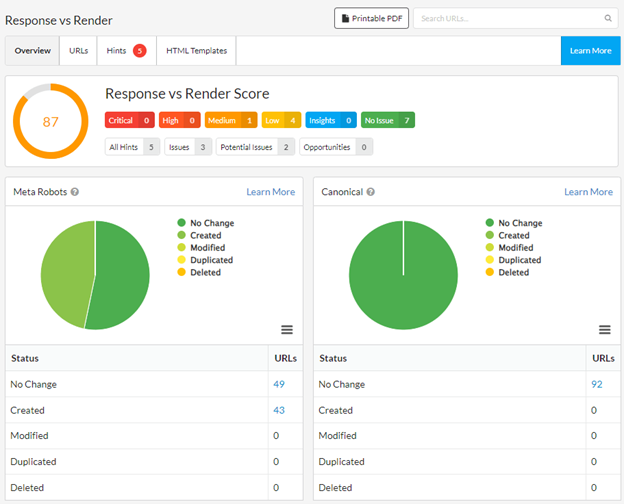
As previously mentioned, this can be measured by comparing a non-rendered crawl with a rendered crawl in Sitebulb.
For example, if a category page contains 500 products in the rendered version but only 50 product links are present in the initial HTML, there is a significant difference in how much of the site's internal linking is dependent on rendering. The same comparison can be made for page content, canonicals, hreflang, structured data, breadcrumbs and other SEO-critical elements.
Infinite scroll is another example of where the user experience and crawlability requirements can differ. Products can be loaded as the user scrolls, creating a seamless browsing experience, but Google doesn't generally trigger the interactions required to load additional content. Google recommends providing a paginated version alongside infinite scroll so that each section of a product listing can be accessed through a crawlable URL.
For example, a category page might initially contain 24 products, with another 24 loaded each time the user reaches the bottom of the page. If those additional products are only accessible through a JavaScript scroll event, the links to them may not be available in the initial HTML. Providing crawlable pagination gives search engines another way to discover those products without relying on the infinite scroll functionality.
Example 1: ASOS
ASOS uses a highly interactive JavaScript-driven experience, but inspecting the initial HTML shows that the core content, internal links, H1 and canonical are already present before JavaScript executes.
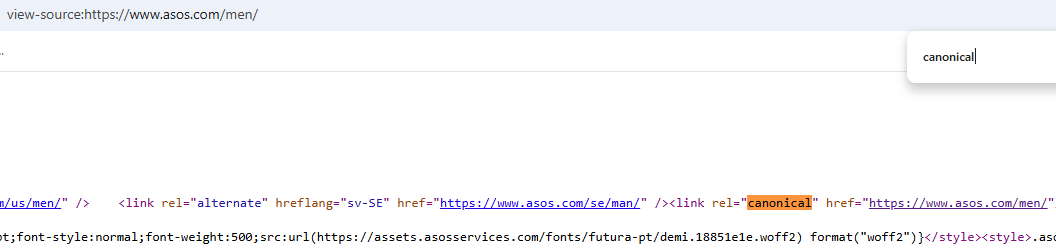
Canonical URL present in view-source:https://www.asos.com/men/
This doesn't mean that the site isn't using JavaScript heavily. A website can use React or another JavaScript framework extensively while still making its important SEO elements available in the initial HTML. In these cases, JavaScript is primarily adding functionality and interactivity rather than generating the content and links that search engines need to discover.
Example 2: Samsung
Samsung provides a contrasting example. On its Smartphones Category Page, the product listings are visible in the rendered page, but the individual product information isn't present as HTML in the initial response. For example, searching the page source for “Galaxy A57” shows the product name within the page's JSON data rather than within the HTML product listing.
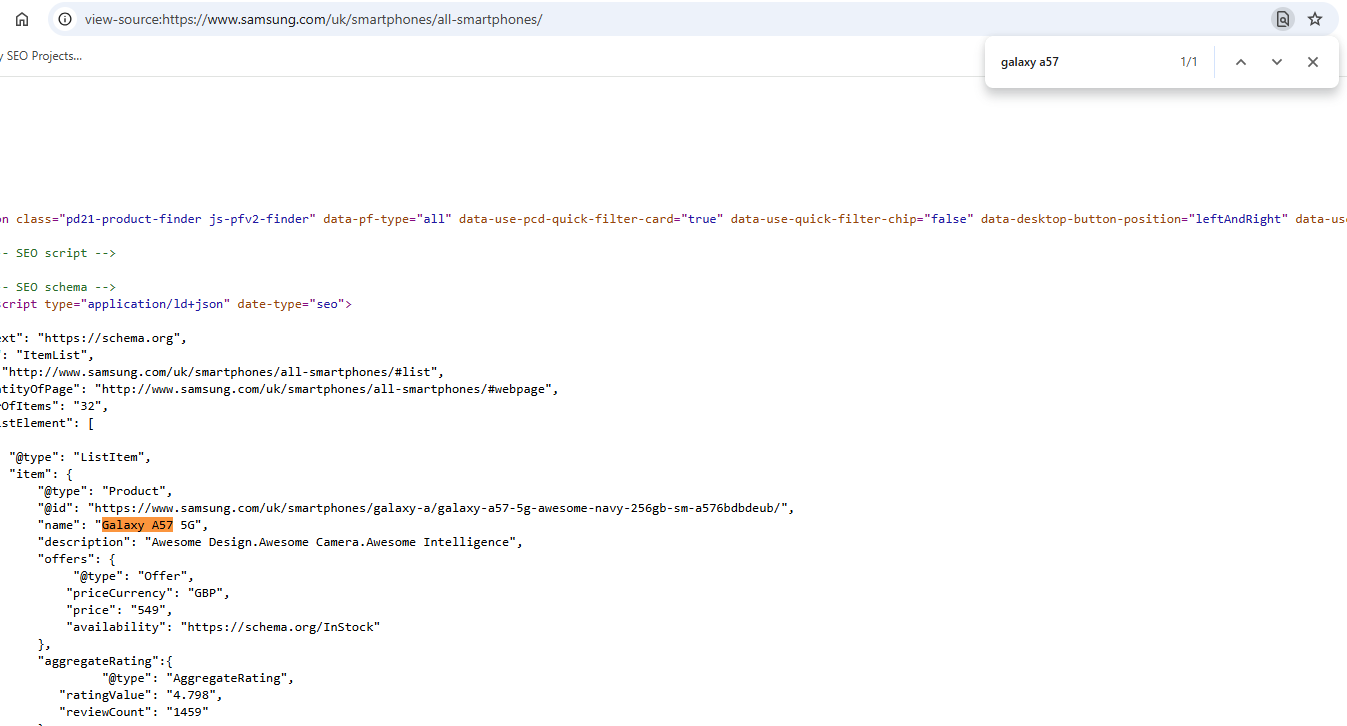
This means that JavaScript is responsible for taking the underlying product data and turning it into the product listings displayed on the page. Google can render and process this content, but the page is more dependent on JavaScript rendering than the ASOS example above, where the core SEO elements are already available in the initial HTML.
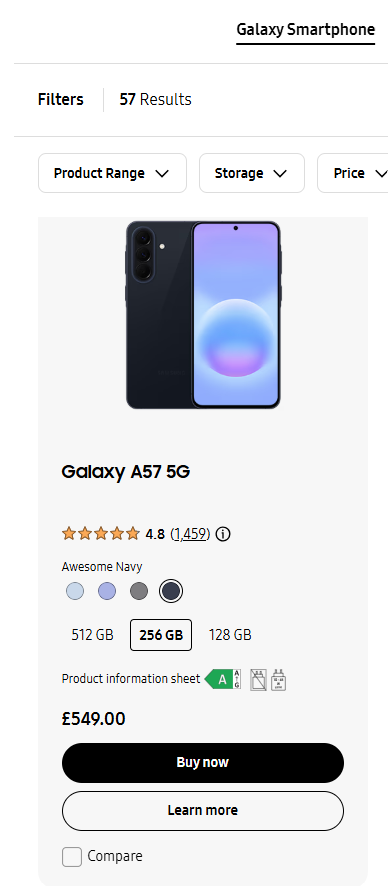
The difference between the two sites is more useful than simply labelling one as “JavaScript-heavy” and the other as “server-rendered”. Both may use modern JavaScript frameworks, but the SEO dependency on rendering can be very different.
This is particularly relevant for large e-commerce websites. If thousands of product and category links only become available after JavaScript has executed, search engines are more dependent on successfully rendering those pages before they can discover the full structure of the site. If those links are already present in the initial HTML, rendering is less critical to basic discovery.
Example 3: StreetStyle
StreetStyle24 provides a useful example of what can happen when a website reduces its reliance on client-side rendering. Before the implementation, key elements of its category pages, including product listings, pagination, descriptions and internal links, were dependent on JavaScript. Only the first six products were available without JavaScript rendering.
In May 2025, the site moved these critical elements into the base HTML, making the full product grids, pagination, H1s, category descriptions and category-level internal links accessible without JavaScript.

The changes were followed by a 28% increase in the number of keywords ranking in positions 1–3, alongside a 22% increase in Top 10 rankings within three months. Organic sessions from Google also increased by more than 4% year-on-year over the same period.
Source:Insightland – StreetStyle24.pl: +28% increase in top 3 rankings
This doesn't mean that moving content from JavaScript to HTML will automatically produce the same results on every website. However, it provides a useful real-world example of how reducing dependency on JavaScript rendering can improve crawlability and, in this case, was followed by measurable improvements in organic visibility.
Performance Trade Offs
Rendering architecture can also affect Core Web Vitals and how quickly an e-commerce page becomes usable. The main performance trade-offs tend to come from server processing, JavaScript execution and the amount of work required on the browser's main thread.
With server-side rendering, the server needs to generate the HTML before returning the response. This can increase TTFB, particularly where pages require significant server-side processing. Static rendering can avoid much of this runtime processing by generating pages in advance and serving them from a CDN.
Client-side rendering shifts more of the work to the browser. Large JavaScript bundles, API requests and client-side processing can increase the amount of work required before a page is fully rendered and interactive. Hydration can add another layer of client-side processing to SSR and SSG implementations, as the browser still needs to execute JavaScript to make the server-rendered page interactive.
However, the real-world performance data shows why it is difficult to say that one rendering approach is inherently faster than another. ASOS, where the core SEO elements are available in the initial HTML, currently has a mobile LCP of 1.6 seconds, INP of 218ms and TTFB of 0.7 seconds. Samsung, where the product listings are more dependent on JavaScript rendering, has slightly better figures of 1.4 seconds LCP, 139ms INP and 0.6 seconds TTFB. Both have a CLS of less than 0.1.
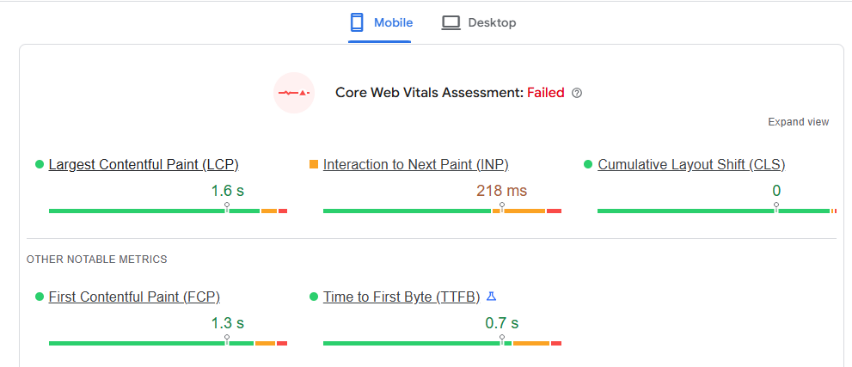
Page Speed performance of the ASOS homepage
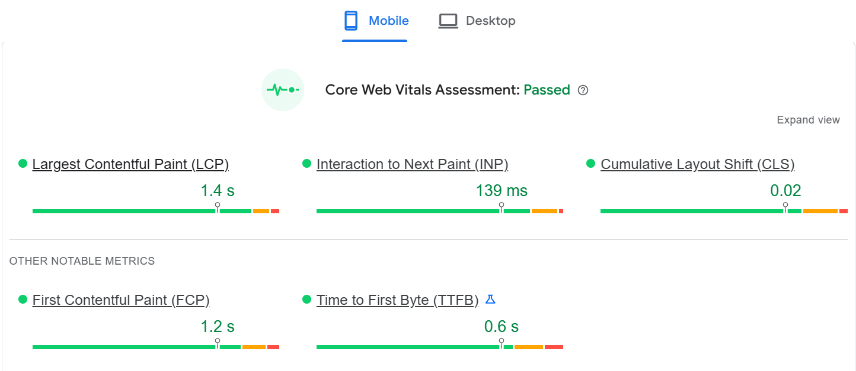
Page Speed performance of the Samsung homepage
This doesn't mean that Samsung's rendering approach is better for performance. Core Web Vitals are influenced by many factors beyond rendering architecture, including image optimisation, JavaScript size, third-party scripts, caching and server infrastructure. What the comparison does show is that rendering architecture alone isn't enough to predict how a website will perform.
The same applies to SSR. Moving content into the initial HTML can reduce a website's dependency on client-side rendering, but a poorly optimised server-rendered implementation can still have a high TTFB. Conversely, a well-optimised client-side implementation can deliver good Core Web Vitals despite requiring JavaScript to build parts of the page.
For e-commerce websites, the best approach is therefore to consider both sides of the equation. The rendering strategy needs to make important content and links accessible to search engines while also keeping server processing, JavaScript execution and main-thread work under control.
Choosing the right rendering strategy
There isn't a single rendering approach that is right for every part of an e-commerce website. The important question is what the page needs to achieve.
Client-side rendering can be perfectly appropriate for areas such as account pages, dashboards, checkout, baskets and wishlists. These pages generally aren't intended to acquire organic traffic, so there is less reason to prioritise making their content available in the initial HTML.
The situation is different for pages that are important organic landing pages. Homepages, category pages, product pages, brand landing pages and editorial content all need to be discoverable and understandable to search engines.Google recommends making e-commerce pages reachable through crawlable links, and notes that the relationships between those pages help it understand the structure and relative importance of the site.
This doesn't mean these pages need to be completely free of JavaScript. A site can use JavaScript extensively for filters, personalisation, animations and other functionality while still making its core content and links available in the initial HTML. Google also supports JavaScript-generated content and structured data, although it recommends putting Product structured data in the initial HTML where possible.
The distinction is therefore less about choosing CSR or SSR for the entire website and more about deciding where each approach makes sense. Google describes SSR as particularly useful for content-driven and e-commerce applications, while acknowledging that it can introduce additional implementation and performance overhead.
The question isn't simply “Does this website use CSR or SSR?” It's “Which parts of the website need to be available before JavaScript executes?”
A framework for evaluating rendering
Rather than asking whether an e-commerce website uses CSR, SSR or a hybrid approach, SEOs should focus on how dependent the site is on JavaScript for its organic search performance.
There are a few simple questions that can help identify whether a website has a problematic dependency on client-side rendering:
Can important pages be discovered through links in the initial HTML? Check whether product, category and other commercially important URLs are linked in the server response, rather than only becoming discoverable after JavaScript executes.
Is meaningful page content available before JavaScript executes? Compare the initial HTML with the rendered page to see whether important product or category content is present without relying on JavaScript rendering.
Are metadata, canonicals and structured data included in the server response? SEO-critical signals should ideally be available in the initial HTML rather than being entirely dependent on JavaScript being executed correctly.
How different are rendered and non-rendered crawls? Sitebulb can be used to compare the two versions at scale. Significant differences in internal links, content or SEO signals can indicate that a site is heavily dependent on rendering.
Does JavaScript enhance the experience, or is it required to expose SEO-critical content? JavaScript isn't inherently an SEO problem. The issue is when it becomes a requirement for search engines to access the content, links or signals they need to understand the page.
There is no universally “best” rendering approach for e-commerce. CSR, SSR, SSG and hybrid architectures can all work well when implemented correctly. The important thing is that pages responsible for organic search aren't unnecessarily dependent on JavaScript for discovery, content or key SEO signals. Where that dependency exists, reducing it through server-side, static or hybrid rendering can make the site more resilient for both search engines and users.

Patrick Crier is a technical SEO specialist with a decade of experience working with brands ranging from charities and e-commerce businesses to, more recently, iGaming. Whatever the field, Patrick is particularly interested in understanding how websites work under the hood and using technical SEO to uncover opportunities as well as identify issues. His work covers technical audits, migrations, international SEO and JavaScript-rendered websites, with a particular focus on turning complex technical findings into practical recommendations

Related Articles
 Enterprise SEO Audit: From Crawl to Prioritised Action Plan


 The M&A Migration Framework: Merging Websites Without Killing Business Value

 Attention, Crawl, Render: The 3 Budgets Shaping Every Architecture Decision

 Sitebulb Desktop
Find, fix and communicate technical issues with easy visuals, in-depth insights, & prioritized recommendations across 300+ SEO issues.
- Ideal for SEO professionals, consultants & marketing agencies.
 Sitebulb Cloud
Get all the capability of Sitebulb Desktop, accessible via your web browser. Crawl at scale without project, crawl credit, or machine limits.
- Perfect for collaboration, remote teams & extreme scale.