

 Jojo Furnival
Sitebulb has been quite vocal about the SEO problems that can arise from JavaScript rendering. But in recent years, the majority of businesses haven’t had to worry about it too much, because a) Google was the only visitor whose opinion counted, and b) Google got pretty good at coping; it learned to run your JavaScript, wait for it, and index whatever appeared.
That competence became the reason nobody was interested in discussing the underlying problem.
But now, the systems shaping how people find things, the non-Google/Bing AI assistants and the crawlers feeding them, mostly don't run JavaScript at all. They read what the server sends first, and then they stop…
Enter Jono Alderson, award-winning technical SEO consultant, to remind everyone we don’t actually need JavaScript 99% of the time today anyway; the browser can now do almost all of it natively!
Here I recap the fantastic webinar he did for us—from why JavaScript is making the internet bloated and slow, to what your developers can use instead to achieve the same result (without the AI visibility issues).
Contents:
Google rendering your JavaScript was never the whole story
"Google renders JavaScript fine now" is the safety net we've all relied on, and for most businesses it’s true. Google's crawling and rendering systems use more or less the same Chrome browser you do, fetch the resources a normal browser needs, and construct something very close to what a human sees. So client-side rendered sites survive, rank, and everyone can relax.
The trouble is that reassurance was only ever about one system. And the ecosystem we're in now, the world of ChatGPT and other large language models, works completely differently.
As Jono put it, those products and platforms almost always don't fetch sub-resources or run JavaScript. They might grab the CSS, they might fetch a response, but executing your JavaScript to see what it builds? Very rarely. They take the raw HTML the server sends and whatever content can be pulled out of it, and that's the page as far as they're concerned.
Which means if your server's first response is a skeleton screen or a spinner, that pulsing grey placeholder is the page those systems see.

“So yeah, if your initial state is just a loading skeleton thing, then the actual content is invisible.”
The obvious hope is that these systems will catch up, that OpenAI and the rest will eventually build Google-grade rendering. Jono doesn't buy it. He doesn't see them having the time, money or runway to prioritise that kind of infrastructure, especially since many of them lean on Google and Bing for the primary crawling and indexing anyway.
So chances are, this isn't a temporary state that will rectify in time. It could well be the shape of things.
The practical takeaway is that a page can be perfectly indexable in Google and completely invisible to an AI answer engine, at the same URL, on the same day. What you need to check is what actually exists in your raw server HTML, before a single line of JavaScript runs. That's what the new audience reads.
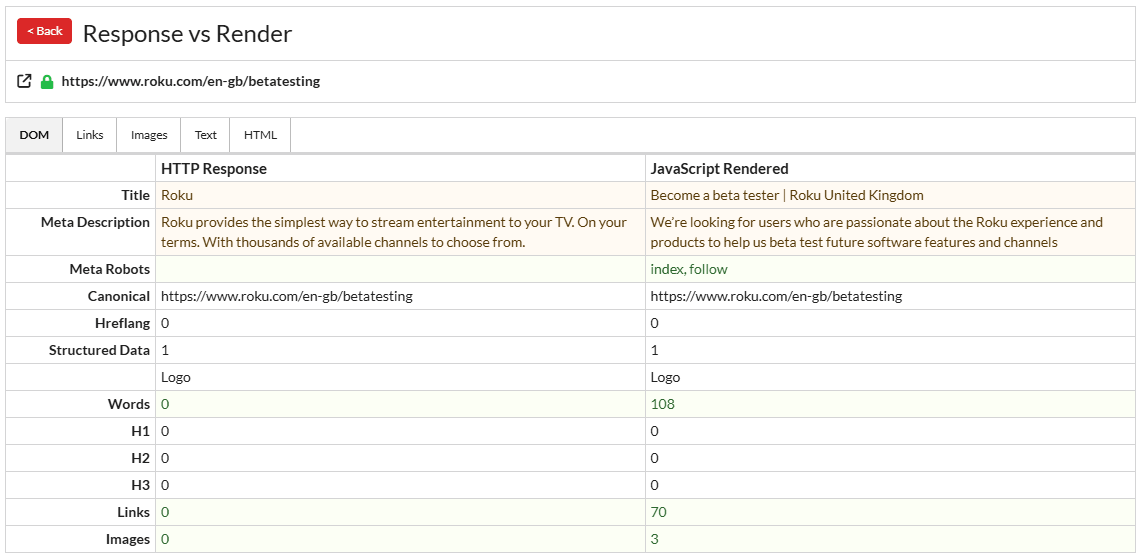
This is one place Sitebulb shines. Sitebulb compares the rendered version of a page against the raw response, so you can see exactly which content only shows up after JavaScript has done its thing. That difference, the stuff that isn't in the raw HTML, is precisely what an LLM fetcher will never see.
"Does it render JavaScript?" is the wrong question
Part of the confusion here is that we keep asking a question that doesn't quite mean anything. "Does Google render JavaScript? Does ChatGPT render JavaScript?"
Jono's point, and he'll happily admit it's a bit pedantic, is that rendering, parsing, executing and fetching are all different things, done by different systems, and JavaScript itself is never actually "rendered" at all. Resources get fetched. Scripts get executed. A document gets constructed. The page gets rendered. Lumping all of that together as "rendering JavaScript" hides where things go wrong.
The bigger idea underneath it reframes how you think about a URL.
A URL does not resolve to one fixed page. There's the raw HTML the server sends. There's the constructed document after the browser loads the CSS, fonts and images. And there are one or more further versions after JavaScript executes, or after the user scrolls, or clicks. Open an FAQ accordion powered by JavaScript and the answer text might not even exist in the page until you click. Scroll down and a script might fetch a row of recent blog posts that weren't there a second ago.
So you don't have "the page". You have several versions of it, spread across time and interaction, and we lazily call all of them "the page" because it's convenient. Whether a system renders your JavaScript matters less than which of those versions it treats as the truth, and whether it can reconcile the ones that disagree.
And they do disagree, constantly. E.g.
The raw HTML declares one canonical URL and JavaScript swaps it for another
JavaScript redirects the user based on their location, or login status, or whether it's a Tuesday
The title changes after execution of JavaScript (this is the #1 JavaScript SEO issue Sitebulb finds in audits)
Google can usually wait for all this to settle and make a reasonable call. The newer systems, reading only that first response, can't. They never see the reconciliation, because they never run the thing that would trigger it.
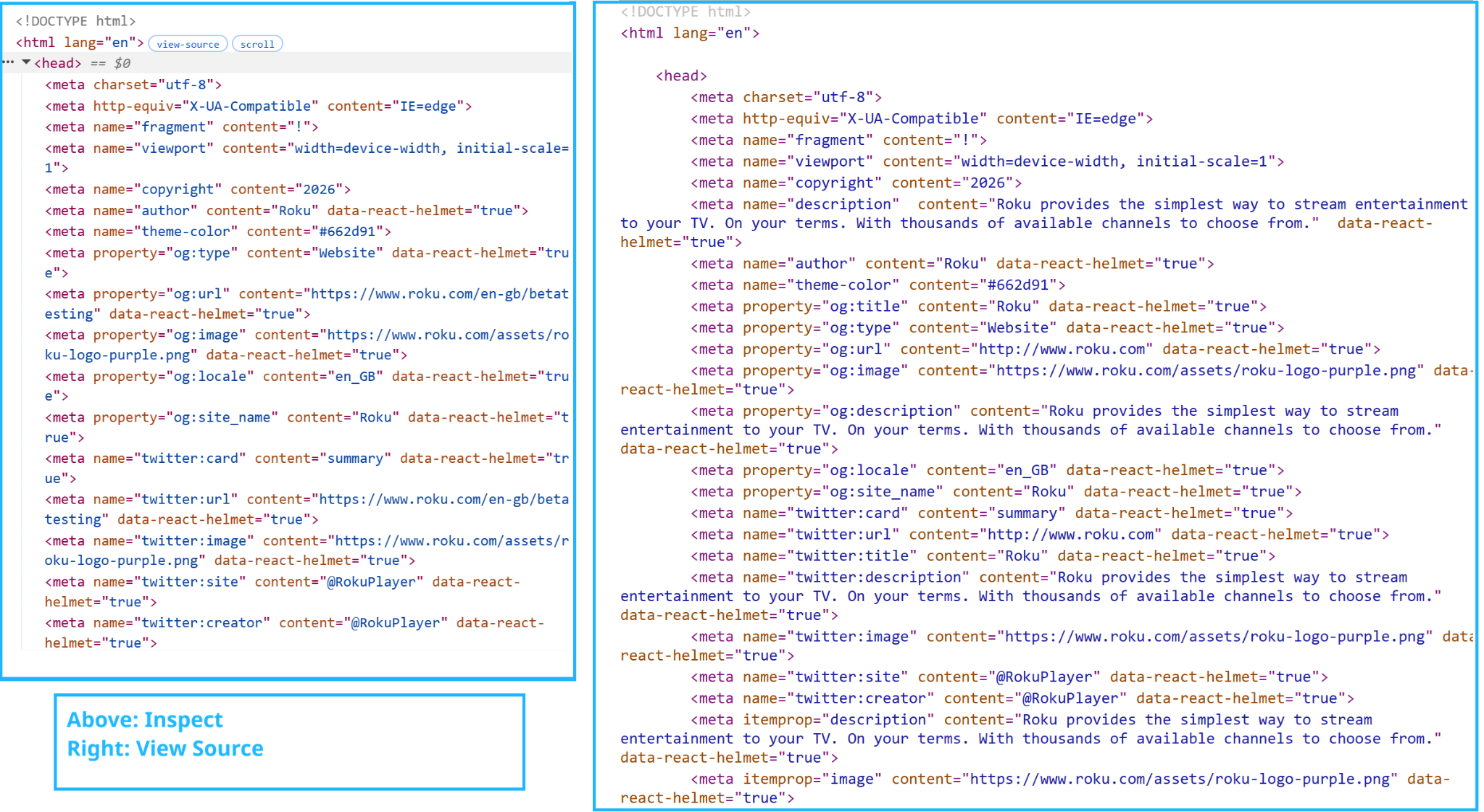
You can prove the whole problem to a sceptical colleague in about ten seconds, no tools required. Hit "view source" and you get the raw server response, the initial HTML. Right-click and hit "inspect" and you get the rendered page as it is right now, which may be a completely different document.
If your content lives in the gap between those two views, you've just found what your new AI website readers can't see.
The browser grew up, here's what to use instead
Jono’s central claim is that the browser grew up while everyone was busy building frameworks. Most of what teams reach for heavy JavaScript to achieve, the browser now does natively, in a few lines of HTML and CSS, and has been able to for longer than most people realise.
His favourite example is the humble accordion, the show-and-hide FAQ pattern. In 2015 that was maybe 50 lines of custom, handwritten JavaScript, and he was being generous. Today it's a few lines of modern HTML and CSS, no JavaScript at all, with full browser support for anything built in the last decade or so.
As a non-developer, you don't need to understand how any of these work. You just need to know their names, so you can ask your developers why you're not using them.
Browser-native CSS & HTML alternatives to JavaScript
App-like page transitions: View Transitions
Instead of a framework shipping megabytes of JavaScript to preload and fade between pages, use native View Transitions. Jono had a client recently loading four megabytes of JavaScript just to fade to the next page. That effect is a few lines of CSS. Add this to both the outgoing and the incoming page, and the browser cross-fades between them on navigation:
@view-transition {
  navigation: auto;
}
NB: cross-document transitions have recently reached the major browsers, and older versions simply fall back to a normal, un-animated navigation, so it's safe to add today.
Carousels and product galleries: CSS scroll carousels
Instead of a framework component and a team of four developers, use a pure CSS carousel, roughly 20 lines. Scroll-snapping does the sliding, and the newer marker and button pseudo-elements add the dots and prev/next controls with no script:
<ul class="carousel">
  <li>Slide one</li>
  <li>Slide two</li>
  <li>Slide three</li>
</ul>
.carousel {
  display: flex;
  overflow-x: auto;
  scroll-snap-type: x mandatory;
  scroll-marker-group: after;          /* generates the dot nav */
}
.carousel > li {
  flex: 0 0 100%;
  scroll-snap-align: center;
}
.carousel::scroll-button(left)  { content: "◀"; }
.carousel::scroll-button(right) { content: "▶"; }
.carousel > li::scroll-marker   { content: ""; }
.carousel > li::scroll-marker:target-current { background: SteelBlue; }
NB: the scroll-snap core works everywhere; the native dots and buttons (::scroll-marker, ::scroll-button()) are Chromium-only for now. Drop those last four rules and you still have a working, cross-browser swipe carousel.
Modals and overlays: the popover attribute
Instead of custom event listeners and a button pretending to be a link, use the native popover attribute, which is keyboard-accessible and screen-reader-friendly out of the box. Two HTML attributes, no JavaScript:
<button popovertarget="signup">Sign up</button>
<div id="signup" popover>
  <p>Your overlay content here.</p>
</div>
Skeleton loaders and below-the-fold content: content-visibility
Instead of React-flavoured lazy-loading machinery, use content-visibility, about two lines of CSS, to defer rendering work until it's needed. Pair it with contain-intrinsic-size so the scrollbar doesn't jump as content comes in:
.below-the-fold {
  content-visibility: auto;
  contain-intrinsic-size: auto 500px;   /* reserve rough height up front */
}
Prefetching the next page: speculation rules
Instead of a framework that downloads megabytes of content nobody asked for, use speculation rules, a small block of script where you define exactly how aggressively to prefetch or prerender. This prerenders same-origin links as the user shows intent:
<script type="speculationrules">
{
  "prerender": [
    { "where": { "href_matches": "/*" }, "eagerness": "moderate" }
  ]
}
</script>
NB: Chromium-only for now, and other browsers ignore the script harmlessly. Swap "prerender" for "prefetch" if you only want the HTML fetched rather than fully rendered ahead of time.
Form validation and styling: :has() and pseudo-classes
Instead of libraries listening for every click in and out of a field, use native pseudo-classes and :has() to describe the logic in CSS. You can turn a form's outline red when it contains an invalid field, without a line of JavaScript:
/* red outline whenever the form contains an invalid field */
form:has(:invalid) {
  outline: 2px solid red;
}
/* or flag just the field, and only after the user has interacted with it */
input:user-invalid {
  border-color: red;
}
NB: both :has() and :user-invalid are available across all current major browsers.
Lazy-loaded video: loading="lazy"
Native as of this year, one line, the same way you already lazy-load images:
<video src="demo.mp4" loading="lazy" controls></video>NB: brand new and Chromium-only at the moment (Chrome 148). For a version that works in every browser today, use preload="none" instead, which defers the download everywhere.
Server-side, semantic HTML is one build for every audience
Underneath every one of those tactics is a single principle; rendering on the server and shipping clean, semantic HTML is the build approach that serves everyone—humans, screen readers, Google, and the AI agents.
Jono's framing is that you can scale up from HTML but you can't scale down from a JavaScript runtime. Start with solid server-rendered markup and you can progressively enhance it for people whose browsers and connections can handle more. Start with a 12-megabyte application and there's no graceful way down for the person on a shaky mobile connection in a region with patchy infrastructure, or for the machine that just wants to read your content.
So the two collapse into one thing. Getting ready for AI and getting the fundamentals right, that’s a single project. It might not be sexy but it’s true. The same choices that make your site accessible to a person using a screen reader, and resilient on a bad connection, are the choices that make it legible to a crawler and an AI agent.
There's a real and growing legal dimension to the accessibility side too, with more jurisdictions treating an inaccessible site as something you can be sued over, so "accessibility" here means both people and machines.
A note on getting there
Jono's advice on actually changing how developers build is characteristically spicy. The sound parts: quantify the problem with tools SEOs already have, like the Chrome network tab and Lighthouse, so "this feels slow" becomes "this ships 138 JavaScript files before it renders".
Where he and I part ways though is the framing. Jono's pitch is to stop buying developers beer and donuts and instead "weaponise shame and fear". While I think his attitude is hilariously and delightfully offensive in theory, in practice I don’t think shame and fear are the way to go.
In my view, cross-team collaboration is about being liked and/or respected, not feared. Maybe Jono has been playing too much Civilization [or insert other world domination game here].
TL;DR key takeaways
💡 Google learned to render JavaScript well enough that client-side sites survived. The AI crawlers now shaping discovery mostly haven't, so your content can be invisible to them at the same URL that ranks perfectly in Google.
💡 Audit what exists in your raw server HTML, before any JavaScript runs. That first response is what AI answer engines actually read. A page that only passes once Googlebot has rendered it is failing the new test.
💡 "Does it render JavaScript?" is the wrong question. A URL has several versions across time and interaction, and what matters is which one a system treats as the truth. Prove the gap to anyone with view-source versus inspect.
💡 Most framework JavaScript now has a native replacement: View Transitions, popover, content-visibility, speculation rules, CSS carousels, :has() form logic, and native lazy-loaded video. Learn the names, not the code, and ask your devs why you're not using them.
💡 Server-side, semantic HTML is one build for every audience: humans, screen readers, Google and AI agents. You scale up from HTML, you can't scale down from a runtime. AI readiness and browser readiness are the same job.
You can watch the full webinar with Jono Alderson for the complete walkthrough.

Sitebulb is a proud partner of Women in Tech SEO! This author is part of the WTS community. Discover all our Women in Tech SEO articles.

Jojo is Marketing Manager at Sitebulb. She has 15 years' experience in content and SEO, with 10 of those agency-side. Jojo works closely with the SEO community, collaborating on webinars, articles, and training content that helps to upskill SEOs.
When Jojo isn’t wrestling with content, you can find her trudging through fields with her King Charles Cavalier.


Related Articles
 Enterprise SEO Audit: From Crawl to Prioritised Action Plan

 Which Rendering Approach is Best for SEO on E-commerce Sites?

 The M&A Migration Framework: Merging Websites Without Killing Business Value

 Sitebulb Desktop
Find, fix and communicate technical issues with easy visuals, in-depth insights, & prioritized recommendations across 300+ SEO issues.
- Ideal for SEO professionals, consultants & marketing agencies.
 Sitebulb Cloud
Get all the capability of Sitebulb Desktop, accessible via your web browser. Crawl at scale without project, crawl credit, or machine limits.
- Perfect for collaboration, remote teams & extreme scale.