

Attention, Crawl, Render: The 3 Budgets Shaping Every Architecture Decision
 Laura Iancu
Published September 1, 2026
This week, we're grateful to Laura Iancu who shares a clear framework for untangling attention, crawl, and render budgets.
Picture this: you're doing a site audit. The internal linking is immaculate, every pillar page connected to its clusters, the anchor text is varied but deliberate, the crawl depth looks dreamy. You hand it off to the dev team, they ship the changes, you crack open the good tea and wait for the index count to climb.
It doesn't.
A month later you're staring at Search Console wondering why your freshly updated category pages, the ones with the actual keywords, the ones that generate revenue, are either not indexed, or indexed with a two-week delay that somehow made your rankings go sideways.
You check the HTML. Looks fine. You check the sitemap. Also fine. What you didn't check was the render queue. Or the fact that Googlebot was busy spending its entire crawl allowance on 69,000 filter URLs that nobody ever linked to intentionally.
Before you beat yourself up over making the "wrong" decision, do a quick sanity check. Every architecture decision has a price tag that gets charged against three different budgets. And more often than not, most of us only think about the crawl budget.
The three budgets:
- Attention budget - will Googlebot even bother showing up?
- Crawl budget - once it shows up, how many pages can it fetch?
- Render budget - of the pages it fetches, how many does it actually render?
Think of it like a restaurant. Googlebot is the food critic, attention budget is whether the restaurant makes the list, crawl budget is how many dishes the critic orders, and render budget is how many of those dishes actually arrive at the table. You can have the best menu in the world, but if the service is slow and half the dishes never show up, the review won't be kind.
By the end of this article, you'll be able to map your own site's architecture against all three budgets, identify where Googlebot is leaking, and use Sitebulb to surface every single one of those leaks before they cost you rankings.
Contents:
- The three budgets: a quick map before we go deep
- 1. Attention budget: the one nobody's managing
- 2. Crawl budget: the one everyone panics about (but often misunderstands)
- 3. Render budget: the invisible se cond queue
- Where the three budgets collide: the architecture decision matrix
- The architecture brief you didn't know you needed
The three budgets: a quick map before we go deep
Before we get surgical, let's agree on what we're actually talking about. These three concepts often get conflated, or people use "crawl budget" as a catch-all for all of them. They're related, but they're not the same thing, and confusing them is exactly how you end up fixing the wrong one.
Attention budget (I should prolly coin this term)
What it is: Google's willingness to follow links and prioritise certain pages, shaped by PageRank flow, topical authority signals, and how your internal linking is structured.
Why it matters for architecture: pages buried 4+ clicks from your homepage, or orphaned from your main navigation, receive almost no attention. Googlebot has finite capacity, it won't go hunting for content that your own site barely acknowledges exists.
Crawl budget
What it is: the number of URLs Google is willing to fetch within a given timeframe (roughly a rolling 24-hour window). Governed by two sub-forces: crawl demand (how much Google wants your content) and crawl capacity (how fast your server responds without breaking a sweat).
Why it matters for architecture: if your site spawns thousands of parameter URLs, thin filter combinations, or redirect chains, those eat your crawl budget before Googlebot ever reaches the pages you care about.
Render budget
What it is: Google's Chromium rendering queue, the second wave of processing that happens after pages are crawled. Even if a URL is fetched, JavaScript content joins a separate queue and can wait days or weeks to be fully rendered and indexed.
Why it matters for architecture: this is the one that bites JS-heavy sites hardest. A page can show up as "crawled" in Search Console while its main content, loaded via React or injected by a script, is still sitting in the render queue, invisible to ranking systems.
Quick summary worth printing out and sticking to your monitor: crawl gets Googlebot to the door, attention determines whether it knocks, and render decides if it can actually see what's inside.
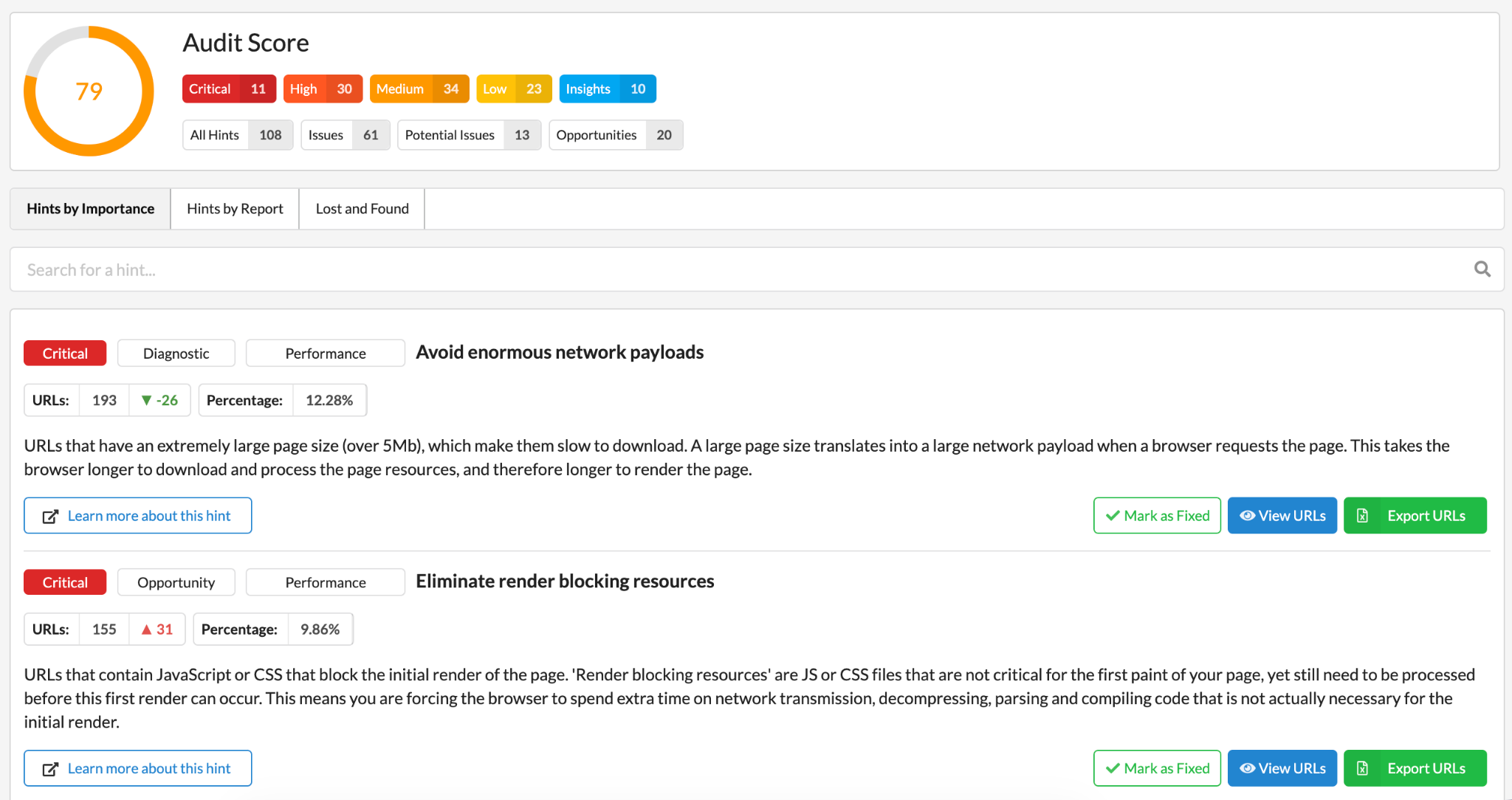
- Crawl budget leaks show up quickest in the URL count and non-indexable pages.
- Attention issues appear in orphaned or deep-buried URLs.
- Render issues surface in the JavaScript-related Hints.
Sitebulb's Overview surfaces all of them, you just need to know where to look.
1. Attention budget: the one nobody's managing
Attention budget is the unsexy sibling of crawl budget. Nobody writes LinkedIn posts about it. Nobody panics in Slack about it. And yet, it's the upstream force that determines whether the other two budgets even get a chance to do their job.
Here's the core idea: Google allocates crawling resources based on signals of importance. Internal links are the single most powerful signal you control. When Googlebot lands on your homepage and starts following links, it's doing a rough calculation of "how interesting is this destination?" based on how many other pages link to it, how prominent those links are, and how topically coherent the neighbourhood is.
Pages that nobody links to from high-authority parts of your site? They get rationed. Pages orphaned entirely from your main navigation? They get forgotten.
Architecture patterns that drain attention
- Flat navigation with no hierarchy: when everything links to everything equally, nothing gets a strong signal. Your /product-category/blue-widgets-large-format-pro-edition page needs links from its parent category page, ideally from related blog content too - not just from a footer menu that links to 500 pages.
- Mega-menus linking to every page: counterintuitively, mega-menus can dilute attention. When your global nav links to 200 pages, the PageRank distributed per link becomes very thin. Better to link to your strongest category pages and let the hierarchy do the rest.
- Faceted navigation without canonical directives: this is the big one for ecommerce and travel sites. /shoes?colour=red&size=42&brand=nike is a unique URL that Googlebot will happily crawl - but it distributes no meaningful attention to your core /shoes/nike page if it's not properly canonicalised.
- Content silos with no cross-links: when your blog, your product pages, and your help centre all live in separate silos with no internal links bridging them, each silo's attention stays isolated. A blog post that naturally mentions a product category should link to it.
Architecture patterns that build attention
- Hub-and-spoke model: one strong hub page (e.g. /running-shoes) with explicit links to spokes (/running-shoes/womens, /running-shoes/trail, etc.), and spoke pages that link back. Attention flows in both directions.
- Contextual internal linking from content: editorial links within article body copy pass more attention signal than nav links or footer links. A paragraph that naturally links from a popular guide to a product page does more work than a sidebar widget.
- Shallow, logical crawl depth: try to keep your most important pages within 3 clicks of the homepage. Every extra click is a drop in the attention signal bucket.
A very effective and visual way to start investigating this is to work directly with a crawl map. Sitebulb’s UI is one of my favourite ones to follow because it captures the full crawl map with nodes coloured by crawl depth. And it also comes with an explainer which helps even the least experienced users gather the confidence and explore further.
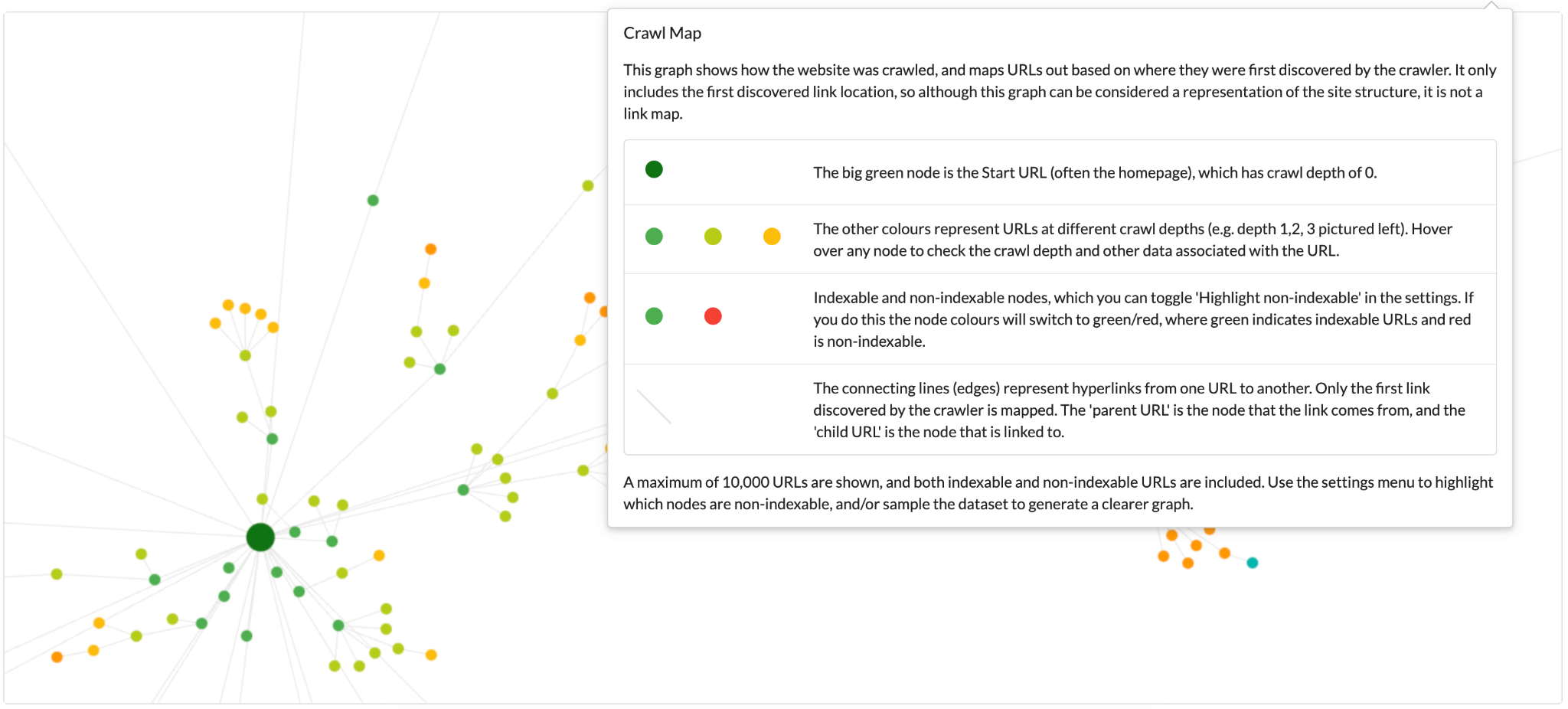
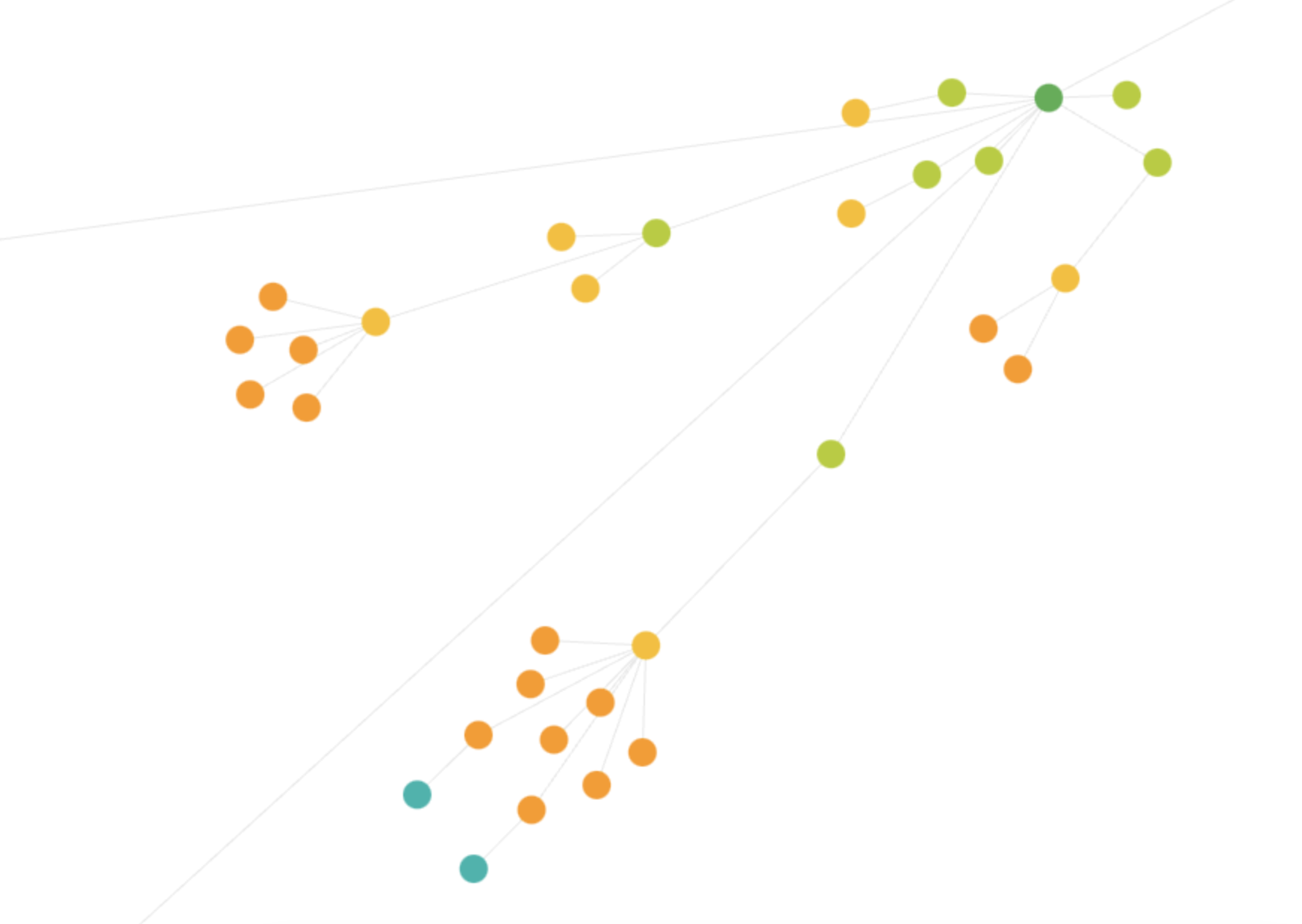
Attention flows like water in this crawl map. As for isolated clusters? Googlebot barely visits it.
2. Crawl budget: the one everyone panics about (but often misunderstands)
Alright, deep breath. Crawl budget is the one that gets the LinkedIn hot takes, the panicked Slack messages, and the 3am "why aren't my pages indexing" spiral. Let's get grounded. Pun intended.
Crawl budget matters most on large sites, typically 100,000+ URLs, or smaller sites with a lot of dynamically generated content. If you're managing a 500-page brochure site, crawl budget is almost certainly not your problem. If you're managing a 500,000 SKU ecommerce catalogue with faceted filters? Different story entirely.
The two forces governing your crawl budget:
- Crawl demand: how much Google wants your content. Sites with strong authority, fresh content, and high user demand get more crawl budgets allocated. This is the lever you build over time.
- Crawl capacity: how fast your server responds without getting overwhelmed. If your server is slow or drops under crawler load, Google backs off, protecting you, but also reducing how much it can crawl per day.
Architecture decisions that waste crawl budget
Parameter URLs without directives:
/products?sort=price&filter=blue&page=3 is a valid URL that Googlebot will crawl - all day, every day, forever, if you don't give it a robots.txt or canonical directive telling it not to. On a large ecommerce site, parameter combinations can generate millions of unique URLs. Most of them are thin, duplicate-ish, and completely useless to Google.
Redirect chains:
Googlebot follows redirects, but each hop costs crawl budget. A chain of A → B → C → D means Googlebot used four crawl requests to reach one piece of content. Do this at scale and you've burned a significant portion of your daily crawl allowance on logistics, not discovery.
Thin or duplicate content accessible via crawl:
Pages that are technically reachable (not blocked by robots.txt or noindex) but are near-duplicates of other pages - URL variants, printer-friendly versions, tracking parameter pages - all compete for crawl budget alongside your important content.
Bloated XML sitemaps:
Including non-indexable or low-value URLs in your sitemap signals to Google that everything in there is worth crawling. A sitemap should be a curated shortlist of your best content, not a census of every URL that exists.
Architecture decisions that protect crawl budget
Canonical tags done right:
Signal clearly which version of a URL is the canonical one. This doesn't prevent crawling, but it helps Google consolidate crawl signals and eventually deprioritise the non-canonical variants.
Robots.txt for parameter URLs:
If you have internal search result pages, sorting parameter combinations, or other URLs that should never be indexed, block them at robots.txt level. Googlebot won't crawl them = budget preserved.
Check out this article: Improving Crawling & Indexing with Noindex, Robots.txt & Rel Attributes
Tight XML sitemaps:
O nly include URLs that are indexable, return 200, and are canonical to themselves. One of the best practices I propose is to review your sitemap quarterly.
Pagination handled cleanly:
If your product listings or blog archives use pagination, make sure each paginated URL is either self-referencing canonical, or that you're using the rel=next/prev pattern if you want Google to crawl the sequence.
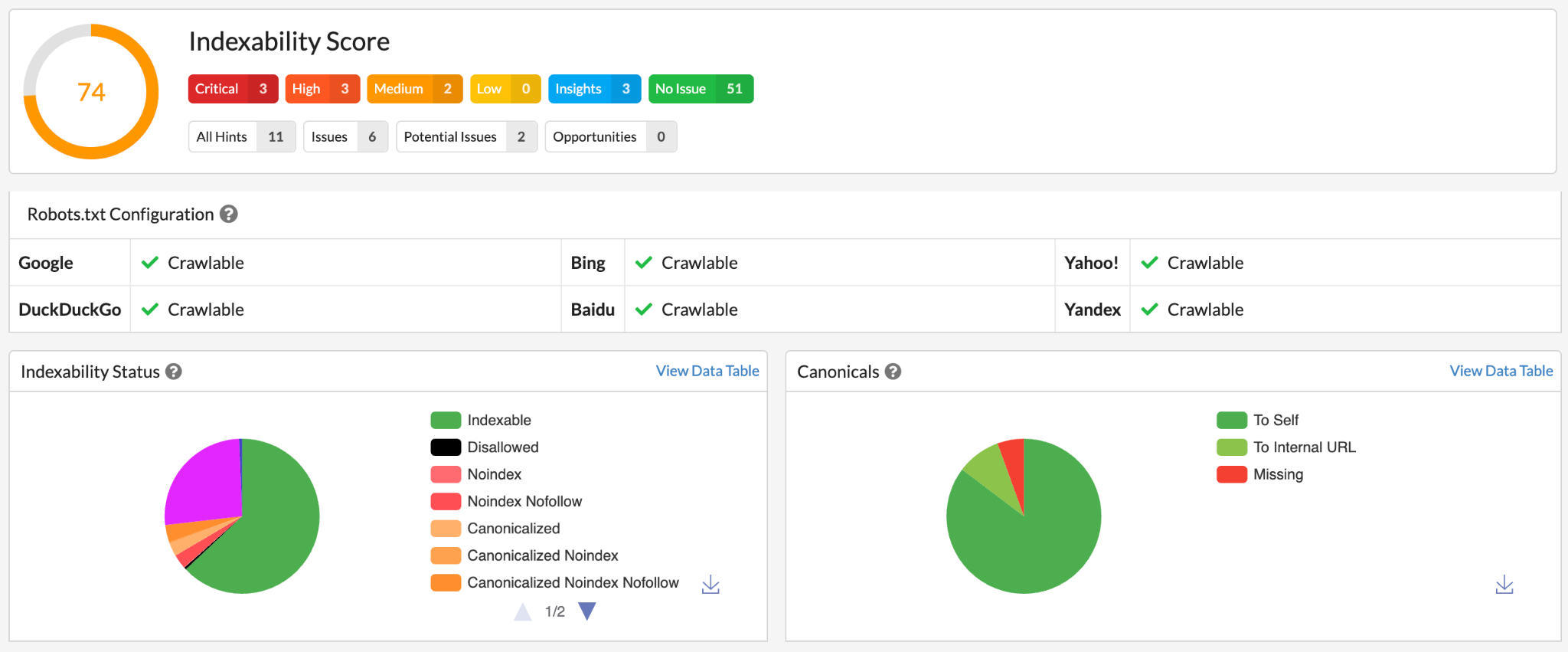
The more “non-indexable” segments there are, the clearer the crawl budget story becomes. Check the Indexability report in Sitebulb, for example, and if 30-50%+ of the crawled URLs are non-indexable, that can make the point particularly clear visually.
3. Render budget: the invisible se cond queue
This is the one that trips up even experienced technical SEOs. Render budget is crawl budget's quieter, sneakier cousin, and on JavaScript-heavy sites, it's responsible for some of the most frustrating indexing delays you'll ever encounter.
Here's what actually happens when Googlebot meets a JavaScript-dependent page:
- Crawl: Googlebot fetches the raw HTML. Fast. This is wave one.
- Queue: the page joins a render queue to be processed by Googlebot's Chromium engine (yes, an actual headless Chrome instance, same thing Sitebulb uses).
- Render: days, sometimes weeks later, Chromium executes the JavaScript, builds the full DOM, and the rendered content is available for indexing. This is wave two.
- Index: only after the render is complete can Google fully index the page's content, links, and structured data.
Here's what that looks like in the real world: a page can spend days showing "Crawled - currently not indexed" in Search Console because it's still waiting to be rendered. Google fetched the HTML, but the content lives behind JavaScript. On that first pass, there's not much there for Google to index.
Architecture decisions that drain render budget
Client-side rendering (CSR) without SSR fallback:
React, Angular, or Vue SPAs where the server sends a nearly empty HTML shell and JavaScript fills in all the content. Google crawls the shell, adds the page to the render queue, and your content waits. On a large site, this means thousands of pages queued for rendering, and Google won't rush.
Deferred or lazy-loaded critical content:
Content that only appears after a user scrolls, clicks, or triggers an event. Google's Chromium doesn't behave exactly like a human user. If your "Load more products" button requires a click, there's a real chance Google never sees what's behind it.
Third-party script sprawl:
Tag managers loading 30 scripts, chat widgets, analytics, A/B testing tools = each one adds to render time. If rendering takes too long, Google's crawler times out and moves on, leaving the page partially rendered.
Blocking render resources:
CSS or JavaScript in the <head> that blocks the page from painting anything until it fully loads. Bad for Core Web Vitals, bad for render budget.
Architecture decisions that protect render budget
Server-side rendering (SSR):
Content is generated on the server before it reaches Googlebot. The raw HTML already contains the full content. No render queue needed for the core page content, it's already there in wave one.
Static site generation (SSG):
Like SSR but even simpler - pages are pre-built at deploy time. Googlebot gets fully-formed HTML every single time.
Hybrid rendering:
Frameworks like Next.js allow you to SSR or SSG your most important pages (categories, product pages, articles) while still using CSR for user-specific or highly dynamic content (wishlists, personalisation zones). Best of both worlds.
Lean JavaScript bundles:
Audit your JS dependencies regularly. Are you shipping 400kb of bundle for a page that uses 10% of it? That render time adds up across thousands of pages.
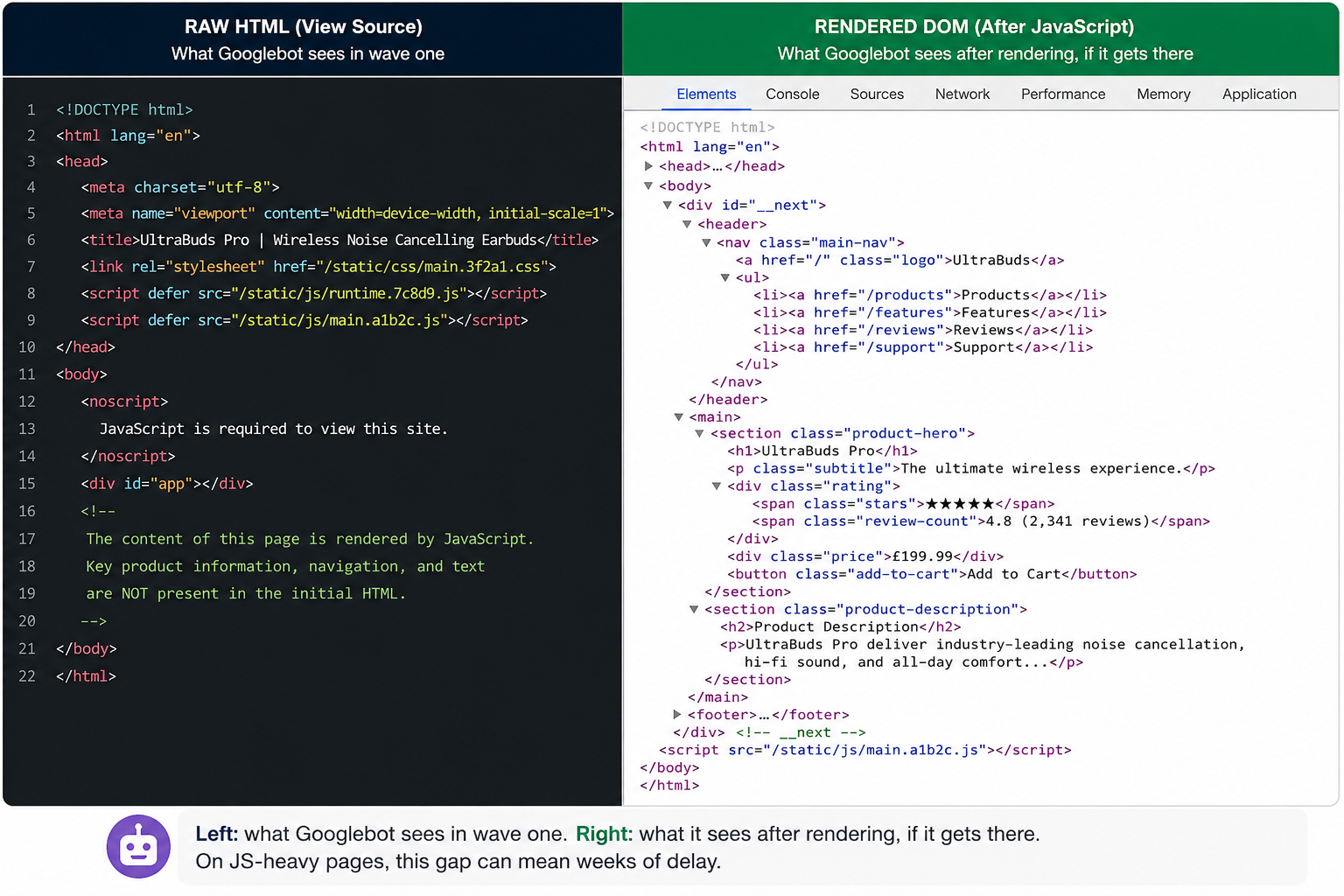
If a product description, navigation links, or heading text is ABSENT from the source but PRESENT in the rendered version, you're making Google work a bit too hard to see it.
JS-rendered content is Schrödinger's HTML: it both exists and doesn't exist until Google opens the box (renders the page). Problem is, Google's only got so many boxes it can open per day, and on a big site, your important content might be sitting in the "to-be-opened" pile longer than you'd like. Important nuance: content stuck behind JS isn't invisible to Google, like a lot of people think, it's just in a queue. Growing up in Romania, I know a thing or two about queues. Worst case for me back then: stale bread acquired at the end of the day. Worst case for you now: lost sales.
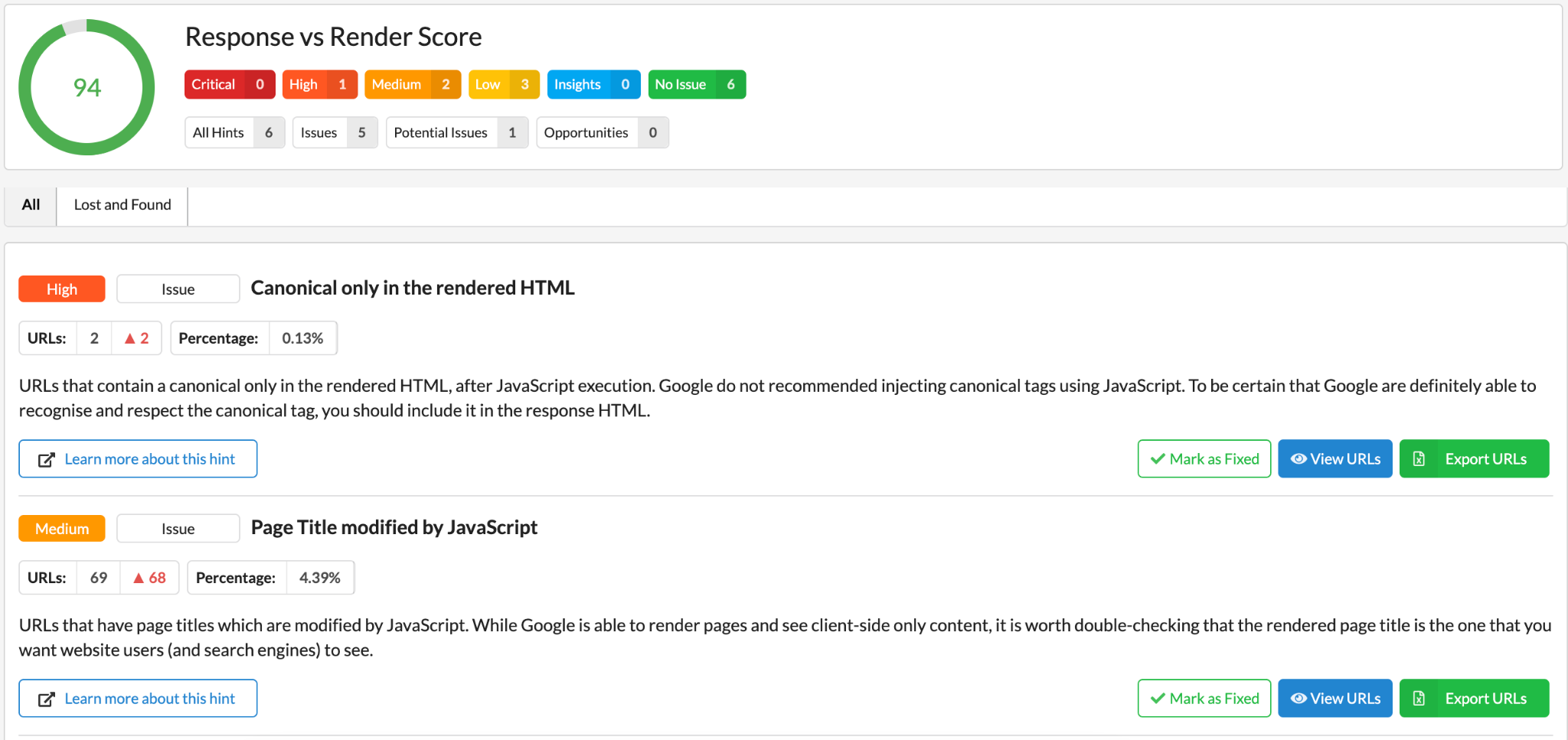
On a less self-deprecating tone and onto a really cool solution to avoid this, apart from installing a JS enabler on your browser, is to use really cool shortcuts like the Response vs Render Score from Sitebulb. It shows you all you need to visit and more importantly how to fix it.
Where the three budgets collide: the architecture decision matrix
I’m now going to repeat my favourite tagline for this article “every architecture decision has a cost somewhere”. And to add some more dramatic effect, let’s continue with: in the world of search experience optimisation, it usually shows up in more than one budget. (lightning strikes)
The thing is once you start thinking in terms of the three budgets, architecture decisions become much easier to evaluate. Please check out my table below as a starting point for this mindset; it’s based on how I think about the trade-offs behind a few common SXO architecture decisions, to give you a start.
How to read this table:
- Green = this decision protects or improves this budget
- Amber = this decision creates moderate risk for this budget
- Red = this decision significantly drains this budget
- Grey = neutral - no meaningful impact either way
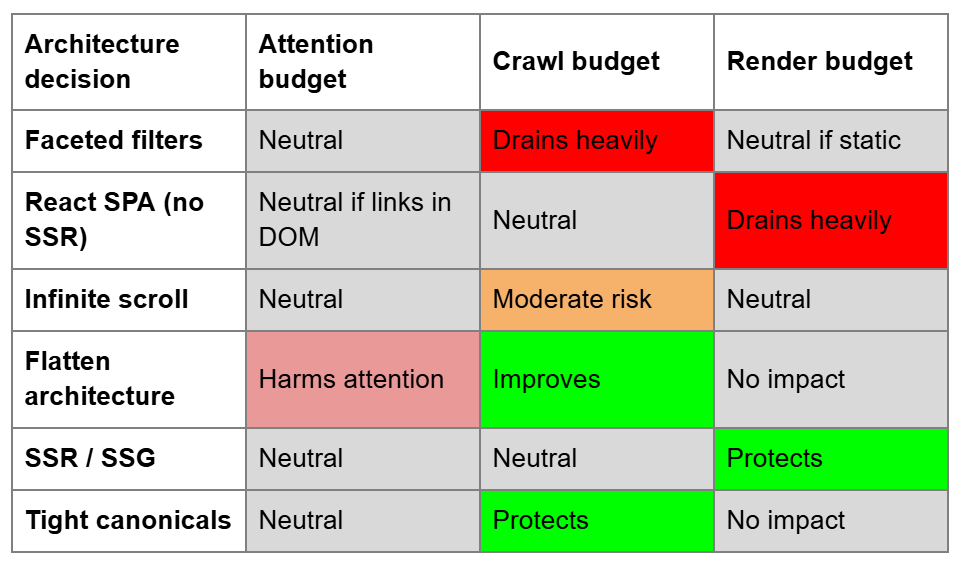
Notes on the above
Why React SPA without SSR is a render budget emergency
A single-page application with no server-side rendering sends Googlebot an empty HTML shell (literally a <div id='root'></div>), and asks JavaScript to fill everything in. Googlebot crawls the shell in wave one, adds it to the render queue, and your actual content waits. On large React SPAs, this can mean thousands of pages sitting in a render backlog for days. One of the most common fixes if you like, is to add SSR (Next.js) or at minimum pre-render your key templates.
Why flattening architecture harms attention
Removing category pages to "simplify the structure", a decision that often comes from product teams, collapses the topical hierarchy that Google uses to understand your site's relevance. Without /shoes/running, your /shoes/running/nike-air-max-2024 page has to float closer to the root and compete for attention against everything else.
Why infinite scroll is sneakier than it looks
Infinite scroll itself doesn't drain crawl budget in the same way parameters do, but if it replaces paginated URLs without providing a crawlable equivalent, Googlebot simply can't discover the products or content loaded in scroll pages 2, 3, 4 onwards. The fix is to provide a parallel pagination structure (/products?page=2) that Googlebot can follow, even if users never see it.
The architecture brief you didn't know you needed
Let's go back to the beginning of this article, the part with the beautiful internal linking, the good tea (Yorkshire, ofc), and the unindexed category pages. What we now know is that fixing the internal links, while genuinely useful, didn't address the crawl waste from 69,000 parameter URLs or the render delay hitting every JS-generated page.
So it really comes down to prioritising right.
Unlike a lot of SEO problems, the three budgets are eminently auditable because they show up in your crawl data. In other words, they leave traces: Sitebulb, with the Chrome Crawler on, will surface signals for all three in a single audit. Your job is to look at all three before making recommendations, not just the one you happened to notice first.
The simplified version, for the next time someone asks you what to prioritise:
- Attention problems → fix internal linking architecture, reduce crawl depth, build topical silos
- Crawl budget problems → clean up parameter URLs, eliminate redirect chains, tighten sitemaps
- Render budget problems → move toward SSR/SSG, audit JS bundle size, eliminate client-side-only content on key templates
And remember, Googlebot isn't judging your taste in JavaScript frameworks. As long as it understands what it's looking at, you’re cool. Just make that easy for it, across all three budgets, and the rest will follow.
Run the crawl. Check the three budgets. Fix the biggest leak first. You've got this.

Sitebulb is a proud partner of Women in Tech SEO! This author is part of the WTS community. Discover all our Women in Tech SEO articles.

By day, Laura helps Octopus Energy tame SEO, AI, and UX beasts of the digital realm. By night, she builds Searchpedia, a personal project cataloguing the weird and wonderful world of search marketing. Equal parts Jedi, Noldorin elf, and Witcher, Laura believes great optimisation is part science, part storytelling, and occasionally, pure magic. They’re also an engaged member of WTS & Neurodivergents in SEO.

Related Articles
 Technical SEO Debt: How to Measure, Prioritise & Fix It

 Technical SEO Audit Reports: How to Turn Them into Client Retention Tools

 Enterprise SEO Audit: From Crawl to Prioritised Action Plan

 Sitebulb Desktop
Find, fix and communicate technical issues with easy visuals, in-depth insights, & prioritized recommendations across 300+ SEO issues.
- Ideal for SEO professionals, consultants & marketing agencies.
 Sitebulb Cloud
Get all the capability of Sitebulb Desktop, accessible via your web browser. Crawl at scale without project, crawl credit, or machine limits.
- Perfect for collaboration, remote teams & extreme scale.