

How to Prioritize Technical SEO Fixes on Ecommerce Sites (For Revenue)
 Jojo Furnival
Published November 10, 2026
Here are two findings from the same ecommerce audit:
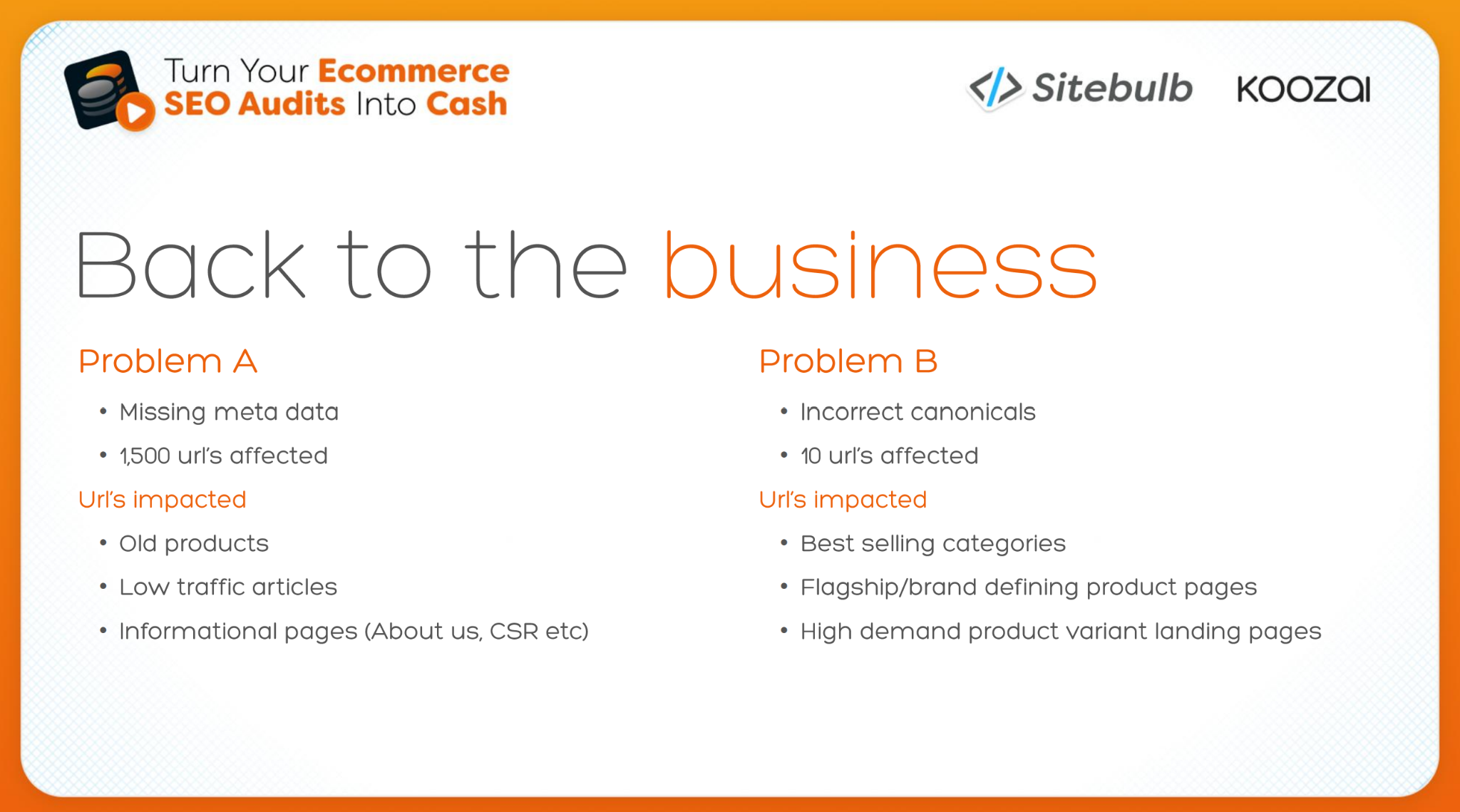
- 1,500 URLs with missing metadata
- 10 URLs with incorrect canonicals
Sort the export by URL count and missing metadata wins without a contest. But Koozai’s Liam Fernie explained why that’s not the best way to prioritise.
Throughout October, Liam took our webinar audience through ecommerce SEO auditing from start to finish in three sessions: auditing with commercial priorities in mind, prioritising what actually gets fixed, then presenting it so it gets signed off. This article pulls together what I learned in order to answer the question: how do you prioritise technical SEO fixes when the whole point of the exercise is revenue?
The 1,500 URLs with missing metadata turned out to be mostly old products and low-traffic articles. The 10 with incorrect canonicals, however, included some of the site's best-selling categories and a dedicated men's Sambas landing page, built because the search demand was there, now canonicalised to a different URL. As Liam put it, that's "a page that was created to serve high intent, high demand audiences that is now telling Google to go and look at others."
Whether you work in-house, agency side or freelance, "You're there to make people more money." So let’s dig into how to prioritise your audit fixes around that single premise.
Contents:
- Prioritisation starts before you crawl
- Why ‘critical’ in your crawler doesn't always mean critical to the business
- The key commercial signals that impact prioritisation
- Out-of-stock pages and filters are commercial calls too
- 3 categories of technical SEO audit fixes to help you prioritise
- A scorecard that ranks each fix and sells it
- Getting the fixes actioned once they're prioritised
- Your roadmap is a live document
- TL;DR key takeaways
Prioritisation starts before you crawl
The first job is marketing 101: know your audience, i.e. know who you're auditing for. Senior leaders and board members care about what you've done to grow revenue. Marketing teams need to know what's happening, what you need from them and why. Developers need to know why your request beats every other priority on their list. Each of those people will judge the same finding differently.
What not to do
Liam gave this example: your point of contact is the managing director, and you hand over a stack of actions to shave a marginal amount off LCP. "From their point of view, all you've done is give them a large list of developer hours that they're gonna have to pay for. And with no indicator of what's in it for them."
What to do instead
Frame a precise LCP recommendation around the PLP template instead, and the MD sees better user experience, more conversions and more return visitors.
Understand the context
Before you do anything, you’re going to need answers to these questions:
What are the bestsellers?
Are there focus categories or products, or goals the client's team has been set?
Is there a seasonal event, or does a product peak at a certain time of year?
Are there product launches coming up?
Are there any stock concerns?
Before the crawl, Liam also goes to Search Console to find out where is Google search struggling, is there a history of instability in the crawl stats report, and cross-references it with GA4:
Which platforms are people coming from?
Are events firing at all?
Are people even adding items to the basket?
If the wrong audience is arriving in the first place, another colour-coded spreadsheet of fixes won't help. "After all, our aim is to increase customers, not viewers."
Become the shopper
His favourite tool, though, is your own eyes: "nothing gives you a better view into the customer journey than just being the customer." Open an incognito window and shop. Does the site guide you to the product? Do the filters help? Does the content actually sell?
All of this feeds the crawl itself.
Why ‘critical’ in your crawler doesn't always mean critical to the business
You’re lying if you’ve never prioritised an audit like this:
You crawl a site, something flags red as critical across 1,200 URLs, and straight to the top of the action items it goes.
Throwing no shade here, but let’s all be honest.
The question to ask of any big number is which URLs are affected. If those 1,200 are old blog posts with no traffic, discontinued products or pages the business doesn't care about, the scale makes the problem look much bigger than it is. Flip it around and the same issue on eight URLs barely registers on an audit sheet, until you realise those eight are some of the business's highest-revenue category pages.

“But critical from an SEO point of view doesn't necessarily mean it's critical to the business, or even critical with the wider context that you will eventually get.”
That's the 1,500 vs 10 comparison from the top of this article. Liam didn't dismiss the missing metadata: "it doesn't mean that the issue has no value at hand and we should just never fix it." The question is what you'd gain from the hours spent fixing 1,500 low-value URLs compared with fixing 10 that sit on the site's revenue. A wrong canonical on a best-selling category is a page telling Google to rank something else instead. Missing metadata on an about us page is a tidy-up.
Liam was clear that this isn't a knock on audit tools (phew!) "Tools like Sitebulb are there to give us the technical evidence and also help us understand the potential significance of a problem. And they're doing an amazing job at that. But our job is to then add the commercial context to that."
Severity tells you how bad a problem is in SEO terms. Even with GA4 connected, the most a crawler can tell you is whether a page converts. It doesn't know your margins, your stock or where the business is heading.
So every prioritisation decision comes down to two questions:
How significant is this to SEO, and how significant is it to the business?
Most roadmaps only ever answer the first.
The key commercial signals that impact prioritisation
There's no single metric that tells you what should come first. Liam combines a set of signals:
search demand and the intent behind it,
current traffic and what those visitors actually do,
revenue and margin,
stock and availability,
what the business wants to focus on,
timing, and then
scale of impact, effort and how confident you are the fix will make a difference.
This example illustrates his point:
Two categories with near-identical SEO problems. Both have weak internal linking, limited supporting content and plenty of room to improve. One has stronger margins, plenty of stock and is a major business focus for the next 12 months. The other has lower margins and a history of availability problems.
Technically, they're the same opportunity. Commercially, they're not even close.
Intent over volume
Liam's example was a sleep therapist selling classes and workshops, considering clock changes as a good topic. "Clocks go back" looks like a big opportunity until you search it and Google hits you with featured snippets, People Also Ask and AI citations of government pages. Those searchers "just really wanna know when the clocks are going back". Even "how do clock changes impact sleep" is informational, not someone looking to book a workshop.
A page targeting the wrong intent has little room to grow, so it shouldn't swallow a month of work while pages aimed at high-intent buyers limp along.
Traffic, and what happens next
It's tempting to sort GA4 landing pages by sessions and work from the top. But a buying guide with 20,000 organic visits a month and a category page with 1,000 clicks aren't comparable: the 1,000 are much closer to buying. That doesn't make the guide unimportant. If it has no internal links or CTAs, or is cut off from the rest of the site, the valuable action might be using its audience to support the commercial pages around it.
Stock and availability
A category with strong demand, rankings just outside the top positions and obvious technical wins looks brilliant in the data. Then you speak to the client and half the products are out of stock, or the range is being phased out, or they don't want to push that demand. There’s no point optimising it, only for visitors to bounce because there’s nothing to buy. xc
Where the business is heading
Historical clicks, rankings and revenue will always make a new range look weak, because the data doesn't exist yet. If the client has secured strong stock for a new category, is building a campaign around it and expects it to matter, technical issues in that section move up the roadmap even though current organic performance looks modest. The reverse applies to ranges being retired: plenty of traffic today, little reason to invest.
“So, again, page priority should also not just reflect where the business has been, but also kinda reflect where we want it to go.”
Timing
A category with average internal linking can sit lower on the roadmap in January. If it's one of the business's best Christmas performers and it's now September, it jumps. Liam's window of opportunity covers more than just your implementation time; there’s the fix, Google noticing the change, rankings responding, and enough time left over to measure the result.
In the session 2 Q&A his advice on Black Friday was to "do it earlier than you think you need to do it. So schedule it in for June, July," because plans slip and anything that depends on another team slips further.
Out-of-stock pages and filters are commercial calls too
Two classic ecommerce problems show how this thinking changes the default SEO fix.
1. Out-of-stock
A discontinued product page with solid backlinks or a steady stream of visitors shouldn't be 404'd and forgotten; redirect it to a relevant replacement that helps the visitor, not just somewhere to park the link equity.
A temporarily unavailable product needs a process so the product schema stops telling search engines it's in stock, and a template that tells customers its status rather than letting them hit an error at the basket.
We had one webinar attendee who said he was working through more than 25,000 out-of-stock URLs (ouch). Liam's advice was to cross-reference GA4, Search Console and backlink data to see where people are still going, then ask the client how likely each product is to come back. Koozai has put lead times in place for some clients, so customers can still order products that aren't currently in stock.
2. Faceted navigation
A filter like “men’s” would usually add a parameter to a Samba category URL and return the same page with fewer products (just the men’s products). It would have the same template, same title, same intro copy.
To a search engine that’s a near-copy of the parent category, so the SEO reflex is to noindex it and move on. But if there’s strong commercial search demand for men’s Sambas, the filter page already performs and the company sells plenty of them, it’s a candidate for a dedicated landing page with its own title, copy and internal links, so it can rank in its own right.
Filter pages that don’t earn that treatment still need managing so they stop competing with the main pages. Pick one signal per URL: canonicalise to the parent category where you want signals consolidated, or block the filter parameters in robots.txt where crawl waste is the problem, which is what Google’s own faceted navigation guidance favours.
3 categories of technical SEO audit fixes to help you prioritise
Once you know which pages matter, you still need an order for the fixes. Liam sorts every finding into one of three buckets based on what it does to performance.
Blocking: something that stops a page doing its job at all. Accidentally noindexed, canonicalised somewhere else, or key content that can't be rendered. These are the easiest to justify moving up, because nothing on the page works until they're fixed.
Restricting: the page can still perform, but something is holding it back. Weak internal linking, crawl waste that means it gets crawled less often than you'd like, missing CTAs or architecture that makes it harder to buy.
Enhancing: the page works, and this would help it grow. Think additional schema, tidier metadata, small content improvements.
Blockers don't automatically beat enhancements, because which pages are affected still matters. But it's a far better starting point than a crawler's high, medium and low labels.
Then he asks what happens if each item waits. An old article missing metadata can sit for a couple of months without anyone noticing. A big category page that's been accidentally noindexed loses visibility, traffic and revenue every day it stays that way.
Some issues also spread; e.g. if a canonical rule on the product template is wrong, every new product or category built on that template inherits it, so something small and contained today becomes a much bigger job at the next audit.
When you're stuck between two valid recommendations, Liam's tiebreaker is to ask "which one becomes more expensive or more damaging or just generally more painful to deal with if you leave it now versus the other one?"
Liam's worked example
Here's how he applied all of this on a real client audit, in the priority order he set.
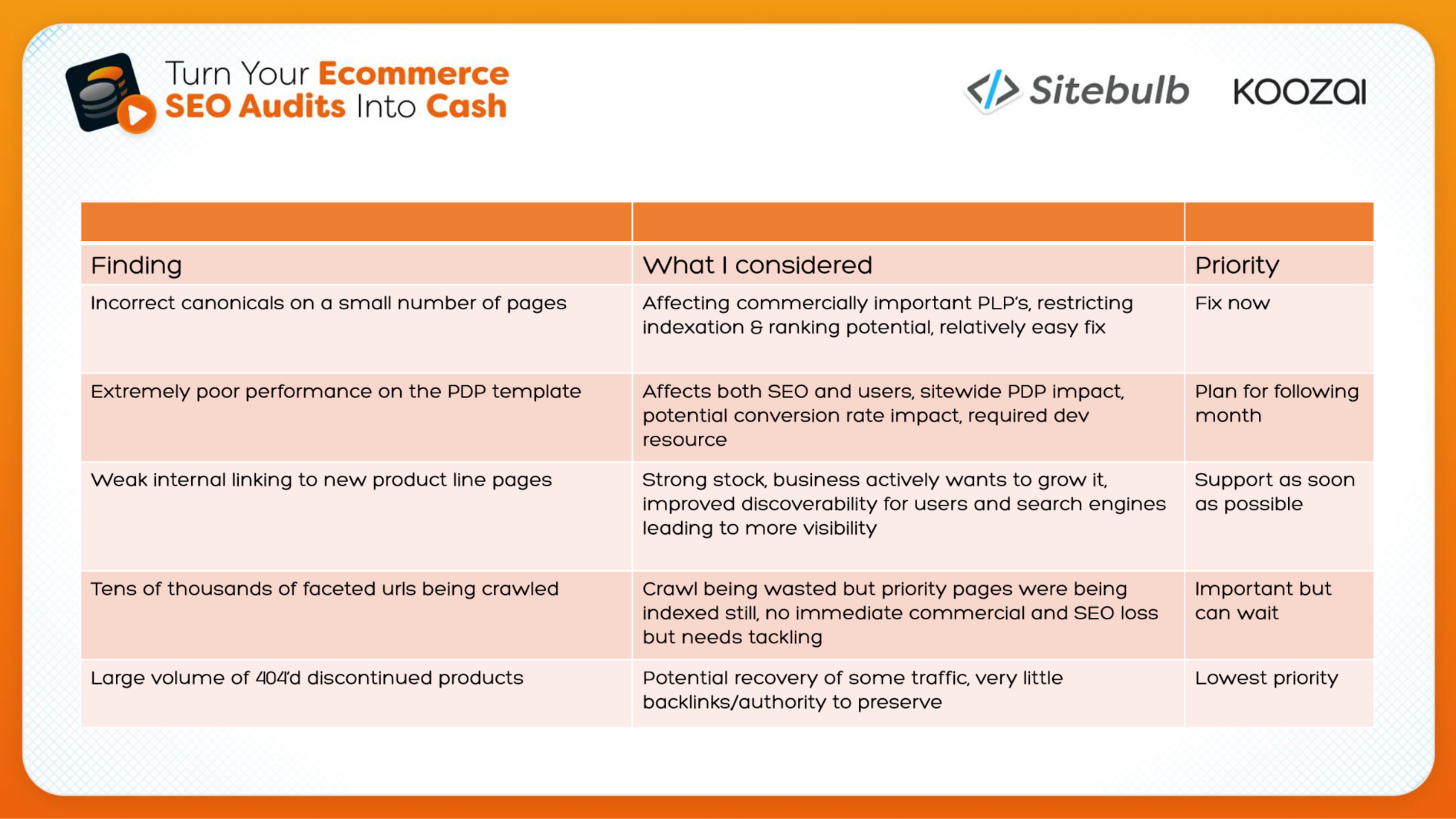
Incorrect canonicals on commercially important PLPs (fix now). A small number of pages, but blocking issues on pages that make money, and relatively easy to fix.
Poor PDP template performance (next). High CLS and slow interaction times, so users chased elements around the page and the add to cart button took ages to respond. Widespread and needing developer time, but because it was a template issue, one fix covered every current product page and every future one.
A new product line with almost no internal links (support ASAP, but after the PDP fix). The client had launched it mid-audit without warning. Strong stock, a clear business push, practically orphaned. An obvious win, yet it sat below the PDP work.
Unmanaged faceted navigation (important, tackle at some point). Crawlers were trying every filter combination, but the main pages were still indexed, so there was no immediate commercial threat.
A large volume of 404s from retired product lines (lower priority). Few backlinks, but a small number of users still hitting them regularly, so redirect them to relevant pages where possible.
Number 3 is the most useful decision in the list. Improving discoverability for a strategically important new range is exactly what you'd expect to come first. Liam held it back for one reason:
“The reason why it fell below the PDP changes at this point is because, even if we did send users to that page and increase the visibility of that page, they'd still ultimately struggle to actually convert there because of those existing problems.”
Fixes don't sit in isolation, and the value of one can depend on another being done first. So Liam's questions for every item are, "If I don't do this now, how will that affect things? How will it affect other actions? Can we live with this?"
A scorecard that ranks each fix and sells it
Ok so how do you get all those hours and hours of reasoning out of your head and into a format that makes sense to a client?
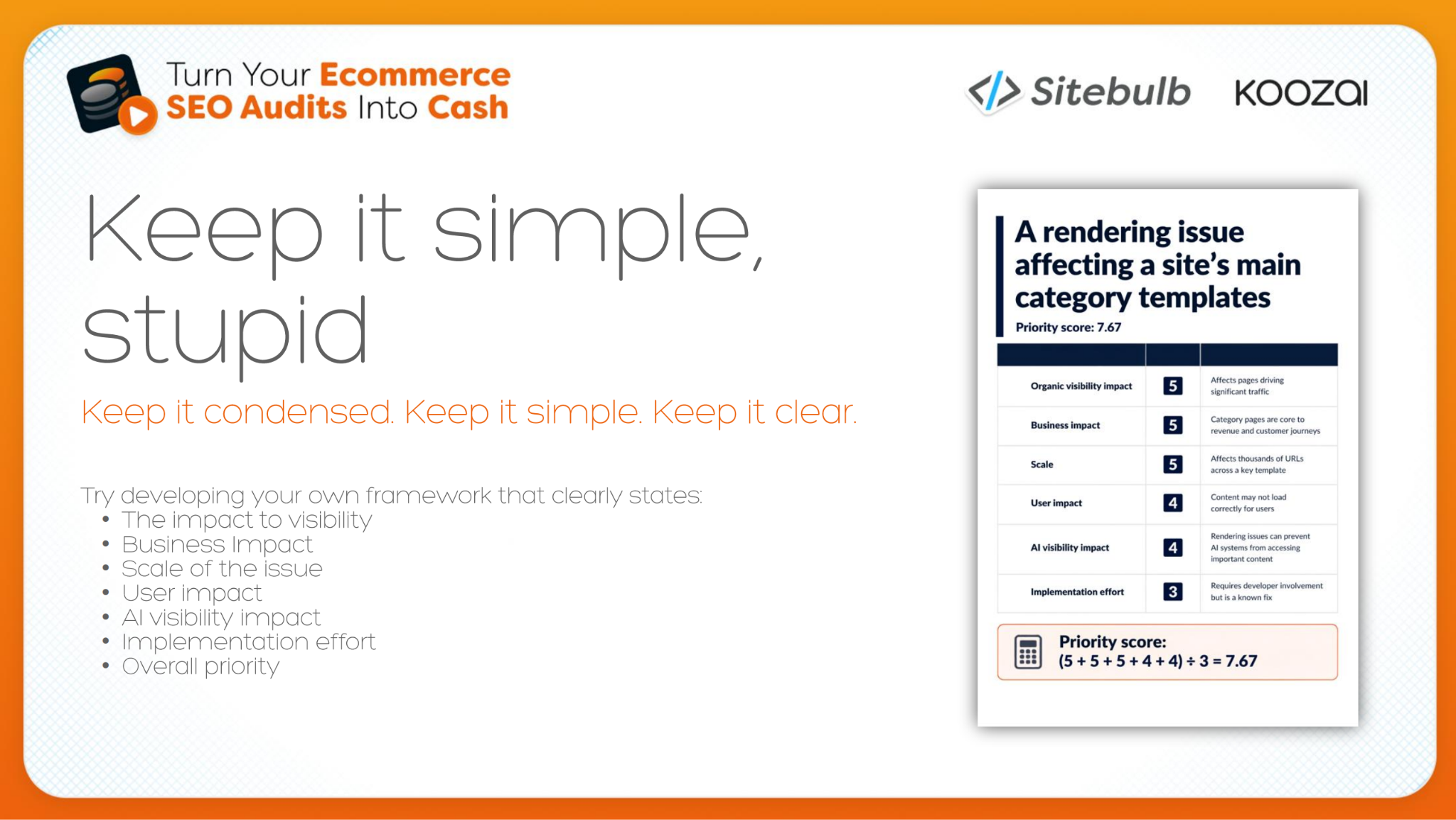
At Koozai, they score each recommendation on the same set of criteria:
The potential impact on organic visibility (rankings and traffic)
What it means to the business (is this a page that puts money in the account, or an article that brings potential customers?)
Whether it creates problems for users, and whether it affects how AI systems access and understand the content
All of that is weighed against the effort to implement. The scores are averaged.
His example was a rendering issue on the main category templates. Visibility and business impact scored very high because these were important category pages all sharing one template, and the scale was large. Implementation was manageable: it needed developer involvement, but it was a known fix. Overall priority score: 7.65.
He was firm that the number isn't the decision. "Now that score isn't there just to replace your SEO judgment at all, or just tell you blindly what to do. But it does give us a more consistent framework for applying that judgment."
Instead of "I think this feels important", you can show why it beats the other recommendations on the same criteria, which is what a client, a stakeholder and "your future self six months down the line" all need when they ask why Task A is happening now and Task C isn't scheduled until September.
In session 3 the same scorecard turned up again, this time doing the selling. "Instead of sharing an Excel sheet with 5,000 rows and just about every colour under the sun", Koozai adds an overview tab with three to six scorecards. A CEO sees significant revenue impact at a fairly low cost. A marketing executive sees the traffic impact, the effect on users and the scale.
If you're crawling with Sitebulb, the MCP integration can help with the first pass. Liam's favourite part is the impact vs effort read it gives you, which he uses both for ordering work and to show stakeholders why one item sits above another. That scoring comes from the set of skills we launched with the MCP, in particular What to Fix First, which builds a prioritised read of an audit. But both of us said the same thing in session 2: you still need to be the brain behind your auditing.
Ultimately, just ensure that you can stand by what you're presenting if you are ever challenged or questioned." If you want a different take on the same problem, Anna Moragli's revenue-led backlog framework scores issues on revenue-page impact, scope, severity and cost, and is worth reading alongside this.
Getting the fixes actioned once they're prioritised
Remember: your SEO roadmap probably makes sense to you and nobody else. Ninety-nine times out of a hundred, the person who reads it won't be an SEO. To them it's a colour-coded sheet full of red cells.
Liam’s fix is simple: step away, then come back and read it as someone seeing it for the first time: Do I know where to start? Can I see what's wrong? What do I get for fixing it?
Translate each finding for the person reading it
Different people need different things from the same finding. Liam used JavaScript as his example: a PLP template that relies heavily on JavaScript to serve its content and links.
Marketing manager: doesn't want to hear about rendering. Wants to know whether it's wasting campaign spend, whether it hurts the customer journey, and whether the impact can be measured.
Developer: doesn't care much about demand or revenue. Wants specifics: what should be in the HTML, whether it's a template or page-level fix, and examples to start from.
CEO or business owner: keep it short and translate it into money. Liam's paraphrase: "we found an issue with the way that your pages are showing content. Essentially, the robots can't see it. So that means the robots won't show it to potential customers. We need a few hours of your developer's time to fix it."
For a junior or non-technical marketer, his analogy is actually kinda helpful: "the HTML code is the bones of a website. JavaScript is the muscle and the flesh, and that does all the flashy bits."
Content and internal links belong in the bones. Search engines can process JavaScript, but it's more expensive and less reliable, and in Liam's experience AI crawlers barely seem to read it at all, so content that depends on it may as well not exist to them. (GPTBot, ClaudeBot and PerplexityBot fetch JavaScript files but don't execute them, according to Vercel's analysis.)
What finally helped Liam get fixes across the line was dropping the jargon and showing the problem wasn't confined to SEO. If users can't add an item to the basket, it doesn't matter whether they arrived from organic or a paid ad, "sometimes you just need to show that SEO impacts more than just SEO. It can impact everything."
Make it easy to say yes
The second half of buy-in is removing friction. "Fix internal linking" is technically a recommendation, Liam said, but it gives nobody a reason to do it. A recommendation that's easy to act on includes:
Evidence: where the issue occurs, with screenshots or a short video.
Expected behaviour: what should happen instead, spelled out ("this is working incorrectly; it should drop down" rather than "fix it").
Dependencies and blockers: anything that could stall the work, flagged up front so the team can plan for it.
A definition of done: whether it comes back to you for review, which teams need to check staging before it goes live, and how everyone knows it's finished.
On that, this article from Gus Pelogia on How to Write the Perfect SEO Ticket for Devs is well worth a read.
“But, ultimately, the easier you make somebody else's job, the easier it is for them to then support you with yours.”
Then make ownership explicit. Agree a named owner and a date, and put both in the action section of your meeting notes. It also gives you a trail: if a fix planned for February shows results in August, you can see when the deadline slipped and why.
When things stall, spell out what inaction costs. Seasonal work that misses its window means missed revenue and stock left in the warehouse. A template issue left alone gets inherited by every new page, so the fix takes developers longer, the marketing team has to explain a bigger bill, and leadership pays for it.
It also helps to show how a fix benefits the people doing it. Automating product schema has obvious SEO value, but it also means developers stop getting a ticket from the SEO every time product information changes.
Liam's last point is the least technical and probably the most effective. Ask how someone's weekend was. Reply in reasonable time. People do more for someone they like and trust! I couldn't agree more.
Your roadmap is a live document
The roadmap doesn't end when the audit does. When asked how often to revisit it, Liam said he builds roadmaps for at least six months and reviews them at the end of every month: "I would review every month at least as a minimum." Client meetings almost always change something, and in January nobody is thinking about Christmas until the roadmap reminds them.
That's the thread through all three sessions. Severity doesn't change much from month to month, but the commercial context does: a range sells out, a launch gets brought forward, peak season gets closer. The same issue can deserve a different place on the list in March than in September. (Liam called his roadmap a representation of his brain. I call my content calendar the external representation of mine, so I felt very seen.)
TL;DR key takeaways
💡 Ask about bestsellers, stock, launches and seasonal peaks before you crawl. Those answers set your priorities.
💡 Judge an issue by which URLs it affects, not how many: 10 wrong canonicals on best-selling categories can outrank 1,500 URLs missing metadata.
💡 Don't optimise what the business can't sell. Check stock, margin and whether a range is being phased out before you invest in it.
💡 Sort fixes into blocking, restricting and enhancing, then ask what happens if each one waits.
💡 Order fixes by dependency: fix conversion problems on the pages you're about to send traffic to first.
💡 Score every recommendation on the same criteria and share three to six scorecards, not the full export.

Sitebulb is a proud partner of Women in Tech SEO! This author is part of the WTS community. Discover all our Women in Tech SEO articles.

Jojo is Marketing Manager at Sitebulb. She has 15 years' experience in content and SEO, with 10 of those agency-side. Jojo works closely with the SEO community, collaborating on webinars, articles, and training content that helps to upskill SEOs.
When Jojo isn’t wrestling with content, you can find her trudging through fields with her King Charles Cavalier.


Related Articles
 Technical SEO Debt: How to Measure, Prioritise & Fix It

 Technical SEO Audit Reports: How to Turn Them into Client Retention Tools

 Enterprise SEO Audit: From Crawl to Prioritised Action Plan

 Sitebulb Desktop
Find, fix and communicate technical issues with easy visuals, in-depth insights, & prioritized recommendations across 300+ SEO issues.
- Ideal for SEO professionals, consultants & marketing agencies.
 Sitebulb Cloud
Get all the capability of Sitebulb Desktop, accessible via your web browser. Crawl at scale without project, crawl credit, or machine limits.
- Perfect for collaboration, remote teams & extreme scale.