

Technical SEO Audit Reports: How to Turn Them into Client Retention Tools
 Mike Hakob
Published October 20, 2026
This week, we're grateful to Mike Hakob who shares a framework for turning technical SEO audits from a monthly pile of issues into the progress report that actually keeps clients around.
Every time the audit is sent, there is a new list of issues. It’s only a matter of time before the client asks the question, “What happened to the old issues?” since they see you finding new problems every month. Most audit reports do not provide an answer to this question.
Contents:
- Why technical SEO audits need a better client communication strategy
- Why traditional SEO audit reports often fail to show progress
- A framework for turning SEO audits into client retention tools
- Advanced ways agencies can use SEO audits to strengthen client relationships
- Common mistakes that reduce the value of technical SEO audits
- Conclusion: The best SEO audits show progress, not just problems
Why technical SEO audits need a better client communication strategy
At Andava, many of my past audits contained the same issue. They would find and document real issues, but they would neither show the client what had changed since the last audit nor demonstrate the significance of the work.
This happened more than once. We would deliver a massive technical SEO audit, walk the client through it, and then watch as they stopped responding around page twelve. Eventually, the only question that was of interest was, "Is this getting better or worse?"
Improvement or regression cannot be demonstrated in a standard audit because an audit is merely a snapshot, and a snapshot does not reveal direction. You can tell a client you found 312 issues, and they still have no clue whether the work done in the previous quarter was even useful.
This gap in client communication causes agencies to lose accounts. The majority of audits are performed to give clients a 'rubber stamp.' The SEO team considers its work fulfilled and moves on to the next task. Only a minority of audits contain information that shows the client what has changed since the agency was hired. Only one of the two approaches is effective in keeping a client.
Why traditional SEO audit reports often fail to show progress
It's important to be clear about what is communicated and what is left to be inferred in a typical SEO audit report before making any changes to its format.
The issue with problem-focused reporting
Generating lists of issues is easy. Evaluating them is not. A client opens up their SEO audit report and stares at hundreds of items on it. They are justified in feeling that their website is in bad shape and that the agency they hired to address these issues has done a bad job.
It's also demoralizing. After roughly three months, you run the crawl again, produce a new list, and it's about the same length.
Reporting is more important than most of us in the SEO industry give it credit for. In the 2026 benchmarks survey conducted by AgencyAnalytics, 494 agency professionals stated that accurate reporting is extremely important for client retention, at 76%, up from 70% the previous year. The same survey stated that a ‘lack of perceived value over time’ is the third most common reason for client churn, at 32%.
Let's call this 'perceived value.' Clients aren't looking at your crawl configuration to judge if the last few months were productive.
I learned this the hard way. After 18 months of positive organic growth, we lost a client. The manager who hired us left, and her replacement was given a binder of audit PDFs that documented nothing about the site’s improvement.
Moving from audit reports to website progress reports
The nature of discussions shifts when we compare different crawls. One individual crawl can be perceived as an isolated symptom of a larger issue. Comparing two crawls shows what has changed, whether there is improvement or if things are getting worse, and the scope of the changes.
A well-structured website progress report provides clear answers to the following questions:
- What issues have we resolved since the previous crawl?
- What was recently added or broken since the last crawl?
- What has been edited on the site that could affect our organic search results?
- What have we found during the comparison that we need to act upon?
This particular format works effectively with the finance team because it closely resembles the business reports they typically review on a regular basis. Focus Digital's study of agency churn reports that retainer agencies have an annual churn of 18%, while project-based agencies have a churn of 42%. Retainer clients stay an average of 56 months, compared to 24 months for project-based clients.
A one-time audit is a project. A crawl comparison delivered every month is a retainer. The format of the report will determine which type of business you will be in the long term.
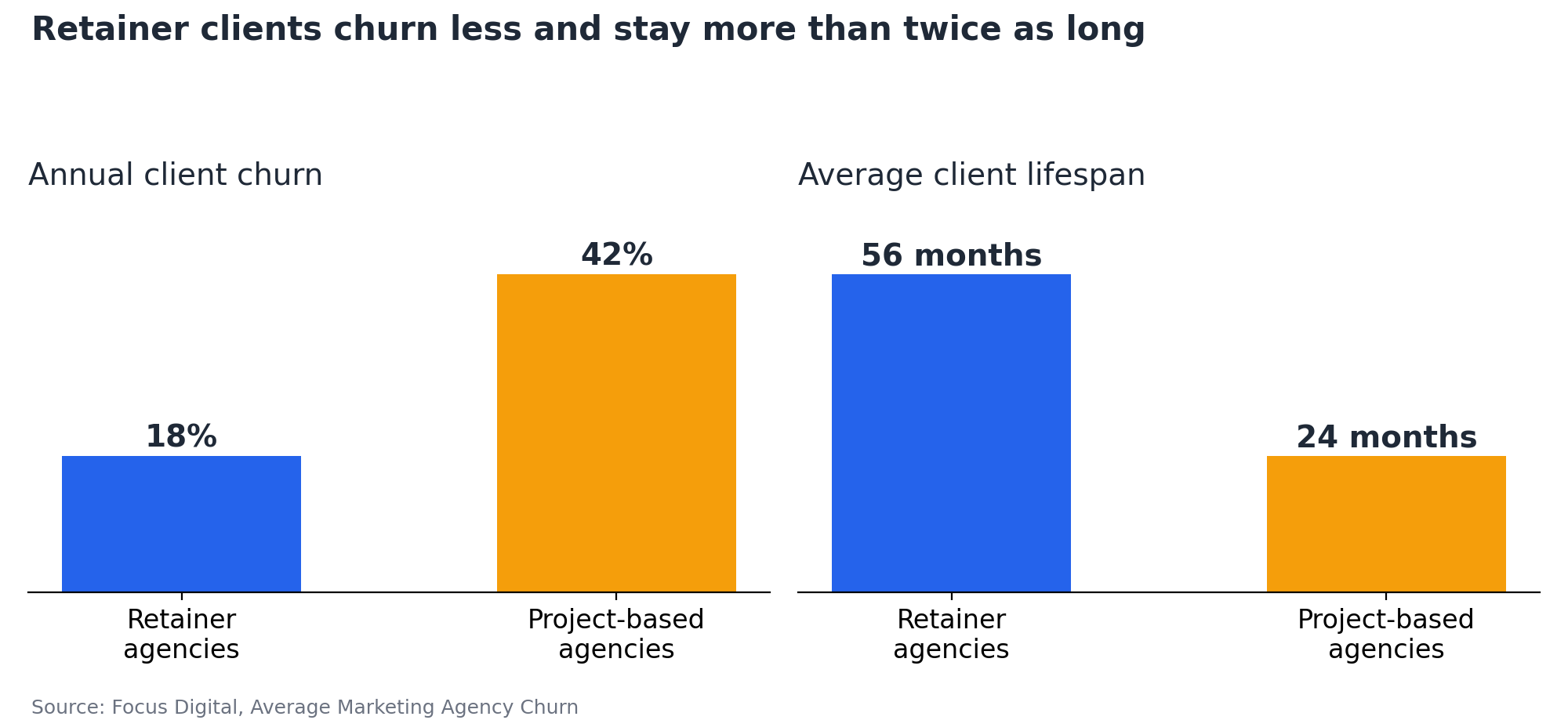
Figure 1: Retainer agencies keep clients more than twice as long as project-based agencies. Data: Focus Digital.
A framework for turning SEO audits into client retention tools
Four simple steps. Nothing fancy. The importance lies in consistently running them in the same order each client cycle, and consistent processes are what transform them into an SEO client retention tool.
1. Establish a technical baseline and prioritise what matters
The first crawl of a site establishes a baseline for us. From here, we can track what is agreed upon: indexable URLs, response codes, canonical conflicts, crawl depth, and page speed.
Then organise what you found by business impact rather than listing every technical detail. Every finding goes into one of three categories:
- Critical risks. Losses that are already happening or will occur soon. Noindexed commercial pages, broken canonicals on revenue templates, and redirect chains on paid landing pages.
- Improvement opportunities. Work that will be beneficial and can be scheduled for later, but that doesn’t depend on this quarter.
- Low-priority items. Everything else. Log it and keep it out of your summary. These will be addressed only after the first two categories are clear.
Agree on those three categories with the client before you fill them. Determine with your client what a lost sale is worth and which templates are revenue-bearing. A five-minute discussion will do wonders to prioritise your to-do list. Quite often, your client will say they don’t have a budget problem, but rather an attention problem.
There is also real pressure on your sponsor. The Spring 2026 CMO Survey, conducted by the Fuqua School of Business at Duke University, surveyed 308 of the most senior marketing leaders in the US. The results indicated that the need to justify the value of marketing hasn’t changed. They also indicated that the collaboration between marketing and finance hasn’t improved. Therefore, one of your client’s team members will have to defend your recommendation and fee.
2. Track website changes between crawls
The second crawl is when things get interesting. With the same settings, scope, and timing, the numbers will be comparable throughout the month.
Sitebulb's audit comparison lets you analyze two audits, view trend lines and the history behind the numbers, and display the numbers. Serious crawlers will have a tool similar to this, but the inclination to compare matters more than the tool itself.
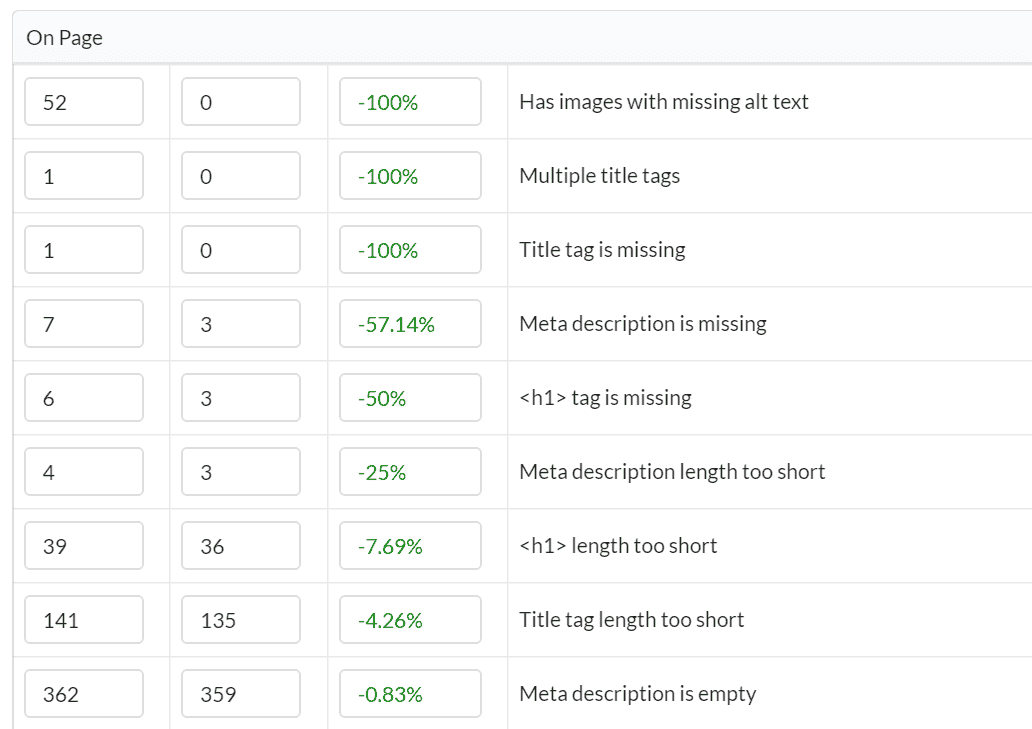
Figure 2: Sitebulb's Audit Comparison shows each hint's count in the previous and current audit, with the percentage change. Image: Sitebulb.
When you follow up, provide the three numbers: the initial number, the current value, and the direction it's moving. The clients will remember how it is going, not what the number is. Keep scope small. By doing a crawl comparison, you could end up with hundreds of deltas, and reporting them all won't solve the problem you are trying to solve.
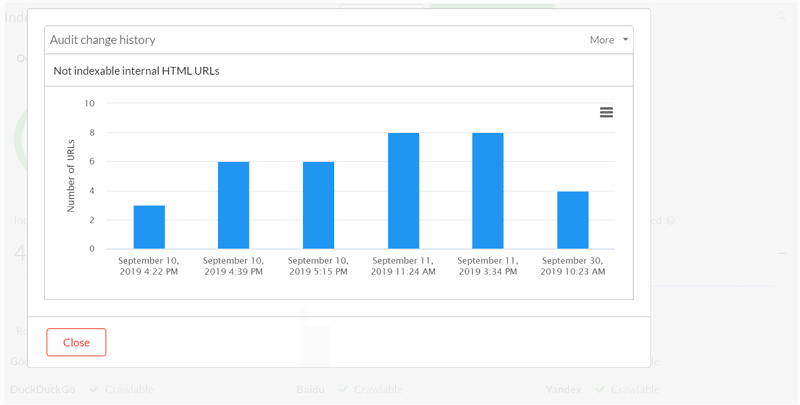
Figure 3: The audit change history view shows how a single metric has moved across every audit in a project. Image: Sitebulb.
Comparing numbers takes out the guesswork. If traffic decreased in March and your crawls showed the template change you made at that time, you're basing your conclusion on evidence. Keep a record of changes outside the site itself, too. If a client switches their WordPress hosting between audits, note the date so you can check whether response times improved after the move.
Make the cadence a contracted deliverable
The service agreement should state the crawl comparison as follows: "Full crawl comparison delivered on the first Tuesday of each month." This is a great example of a firm commitment. Clients can hold you to it, and you can show it to them when someone asks what the retainer covers.
According to the 2025 AgencyAnalytics survey of over 220 agency leaders, 67% of respondents ranked effective communication second for client retention, while 81% ranked strong relationships first. When it comes to the two options, it is better to communicate at the agreed-upon time than to communicate on an ad hoc basis.
Automatically deliver the report at the designated time, even if that means delivering a report that the client won’t like. Your silence will lead the client to assume the worst.
3. Use URL changes to create stronger SEO conversations
The most important signals in a crawl, and the most straightforward examples to teach someone who has never used Search Console, are the URLs that come and go between runs. A URL that gets retired without a redirect will eventually get removed from the index. A URL that comes back in a crawl after a fix is a great sign that the crawler saw it.
Miruna Hadu demonstrates the new Lost and Found URL tracking feature in Sitebulb version 9.2, and the workflow is rather simple. I have found this feature useful because of the URL-level insights it provides. Clients usually respond to these findings.
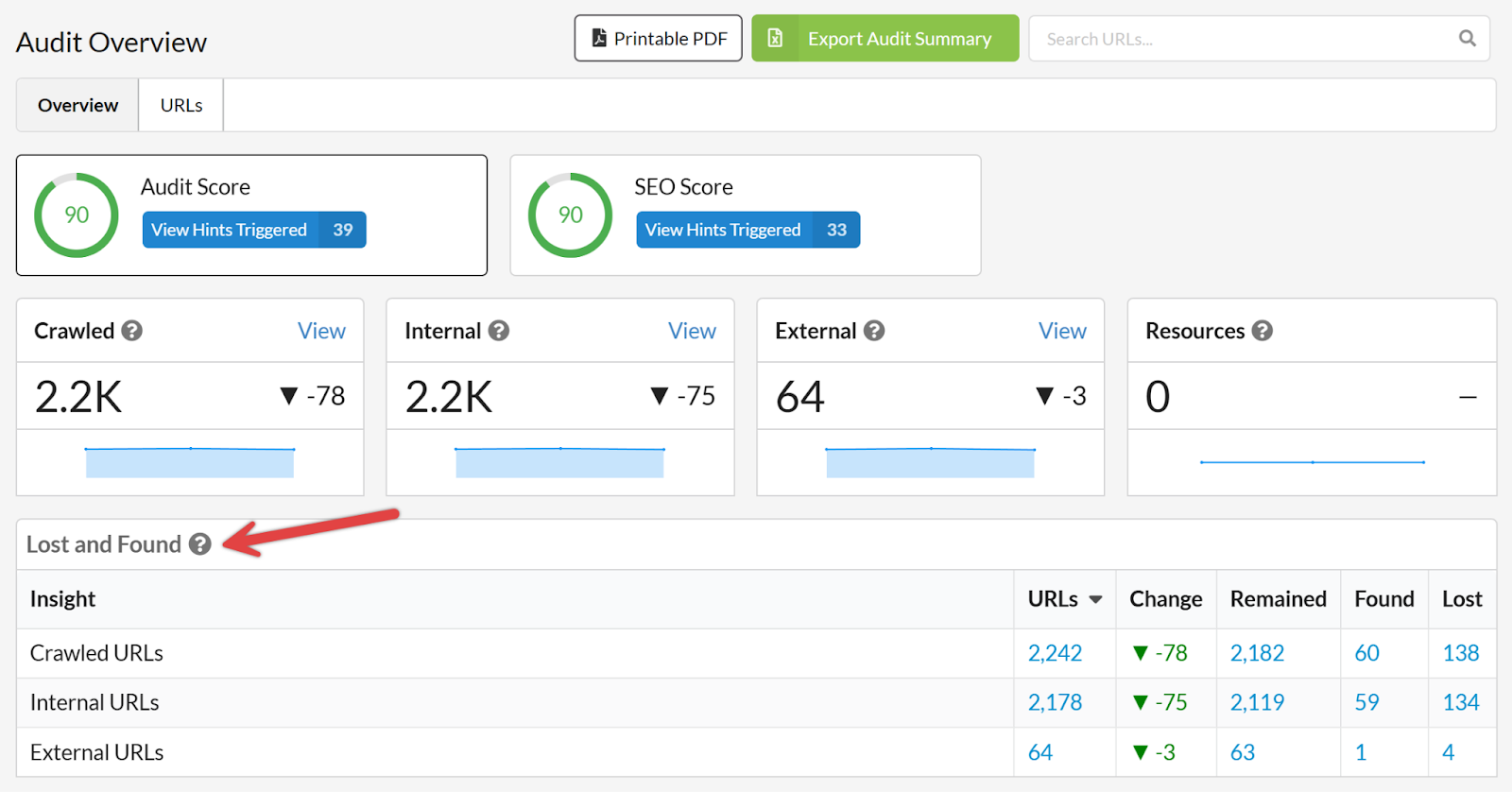
Figure 4: The Lost and Found table in Sitebulb's Audit Overview shows how many URLs remained, were newly found or were lost since the previous audit. Image: Sitebulb.
"Forty-five product pages dropped out of the crawl on 14 March" is a catalyst for a conversation. "Thin content on 400 URLs" is a catalyst for creating a case file.
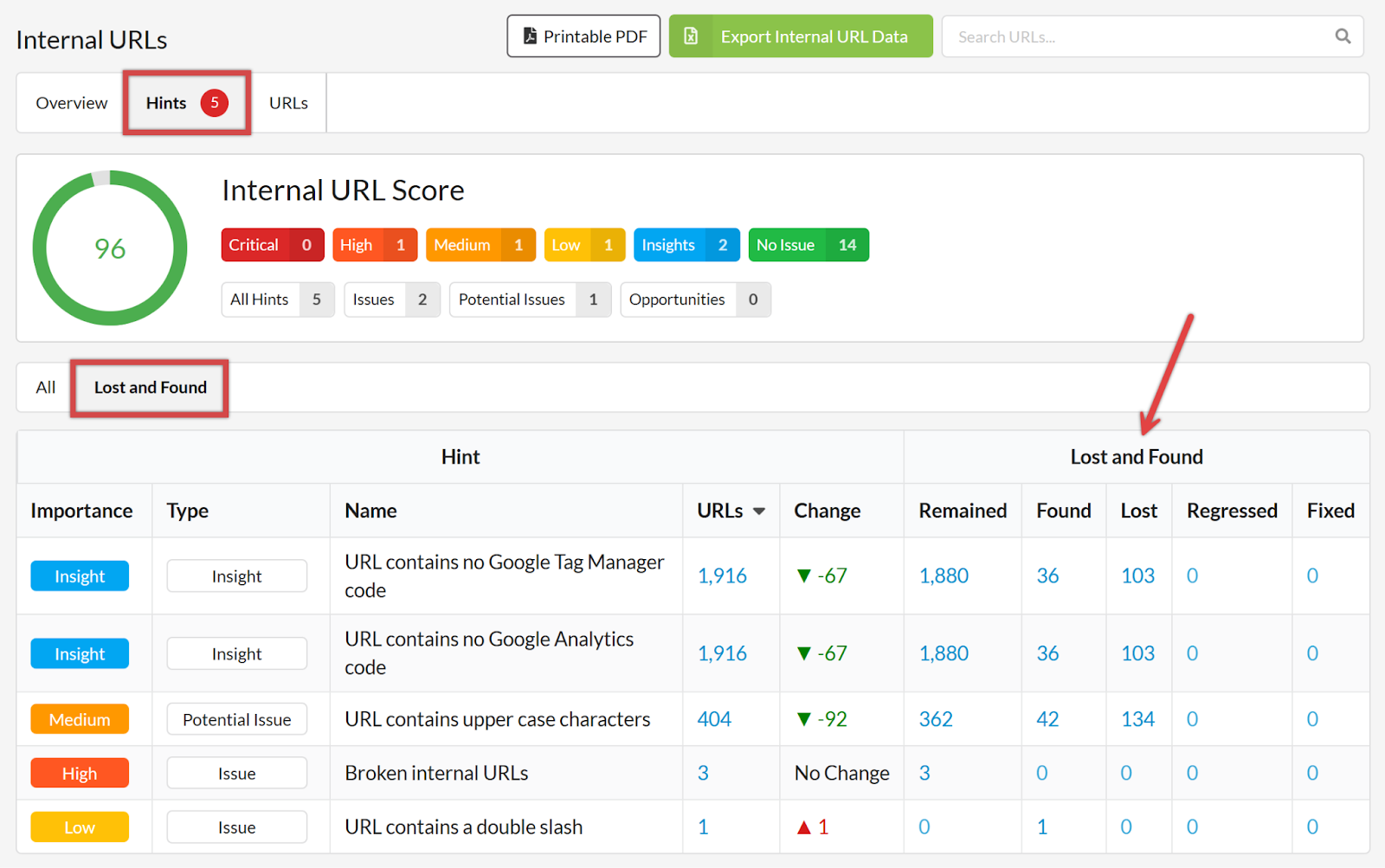
Figure 5: The Lost and Found tab on a Hints list adds Regressed and Fixed columns, so you can confirm which fixes landed and which issues came back. Image: Sitebulb.
Before you send an email, check three things. Are the pages still at a 200 status? Were the page's internal links preserved? Does the page drop correlate with a release date?
4. Translate technical findings into business-focused recommendations
Use the same four points for everything important:
- Finding: What the crawl comparison shows
- Business impact: What it costs or earns, specifically the dollars
- Recommended action: What needs to be done and who owns it
- Expected outcome: What will change on a specific date
Worded this way, a non-technical stakeholder can champion your objective in the budget meeting, even if you aren’t present.
Show the math: a worked example
I did the math and marked my assumptions so that you can quickly add your client’s numbers.
Finding: A comparison of crawls shows that 45 commercial URLs have been removed. Simultaneously, a template was released with a noindex rule for this page type.
Business impact: We estimate that these pages get about 2,000 organic visits per month. At a 2.5% visit-to-lead conversion rate, this would be 50 leads per month, with a 20% win rate, equating to 10 sales per month. If we assume an average order value of $1,200, this would equate to $12,000 in potential monthly loss, or $144,000 in annual loss.
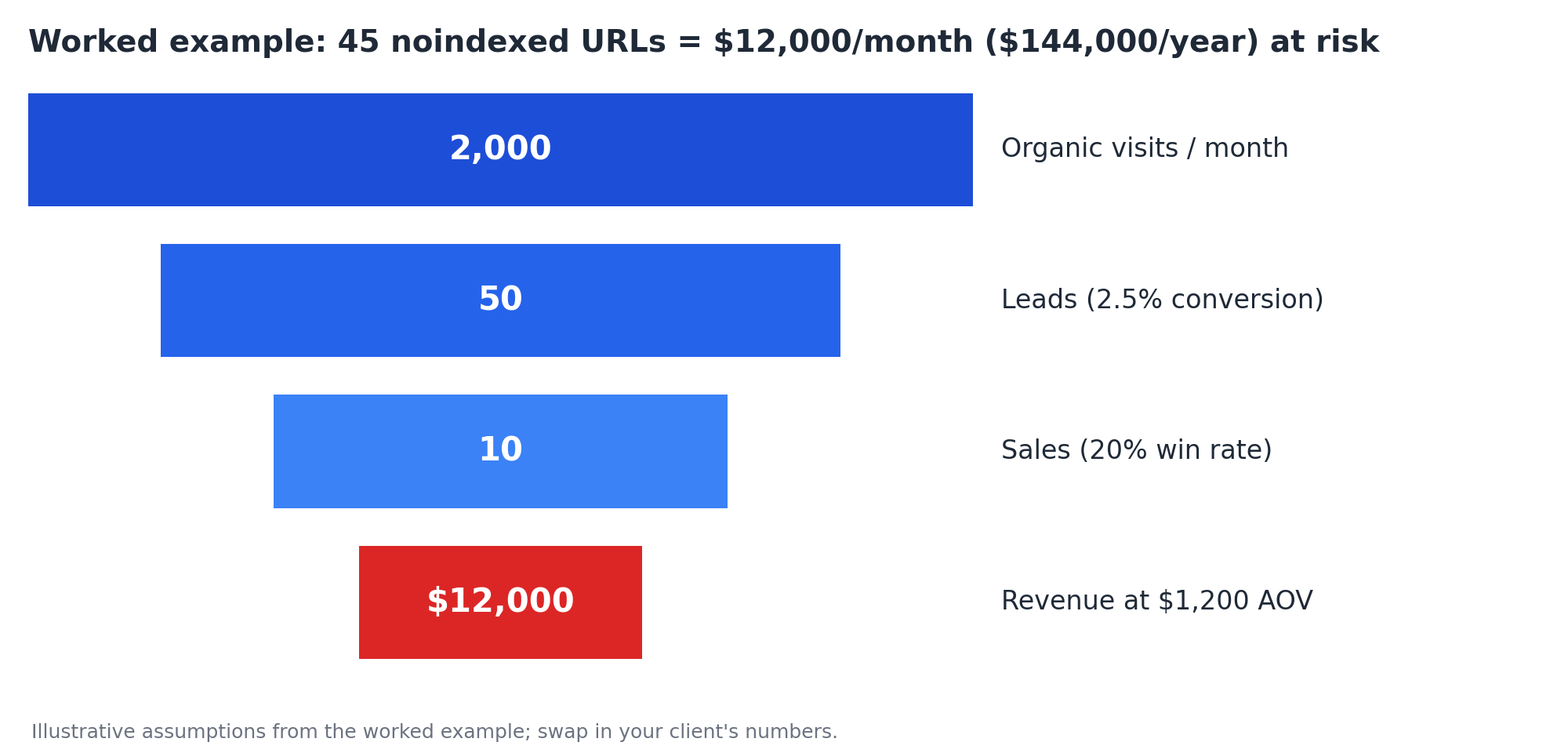
Figure 6: How 45 noindexed URLs translate into $12,000 of monthly revenue at risk, using the worked example's assumptions.
Now let’s look at the alternative. Replacing those 2,000 clicks through Google Ads at a conservative $3.50 per click would cost about $7,000 per month.
WordStream's 2026 Search Advertising Benchmarks, based on more than 13,000 campaigns, estimate the cross-industry average at $5.42. At that rate, the same 2,000 clicks would cost $10,800 per month. Either estimate far exceeds a typical monthly retainer.
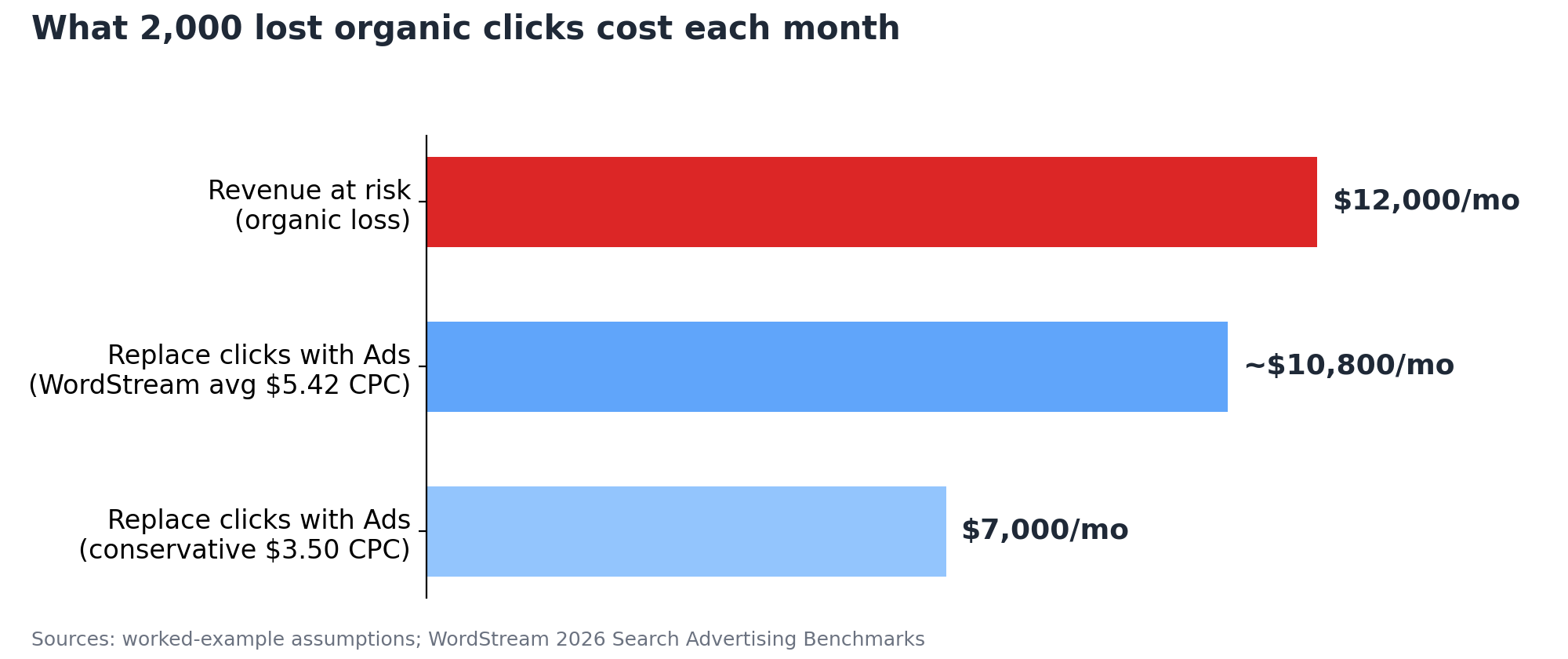
Figure 7: Replacing 2,000 lost organic clicks with paid search would cost $7,000 to $10,800 a month. CPC data: WordStream.
Recommended action: remove the noindex rule, resubmit the affected URLs, and check status recovery every week.
Expected outcome: visits recover within four to six weeks.
That one slide changes how most clients perceive the fee. The retainer shifts from an expense to recovering a $144,000 annual problem that is resolved before the quarter ends.
Advanced ways agencies can use SEO audits to strengthen client relationships
Once reporting has run a few times smoothly, you are promoted from supplier to partner using the same crawl data.
Turning audits into proactive risk management
In my years of technical SEO, the best part has been the timing. During these 15 years, the vast majority of the issues I've seen have happened during one of four events: a migration, a dev release, a new template, or large-scale content changes. Each of these events leaves a unique signature in a crawl comparison.
You can follow Google's guidance on moving a site to new URLs to ensure that there is no unexpected loss of traffic, that the old URLs have been redirected, and that the new URLs are properly initialized. A crawl before and after the move will do the same thing for the site itself and will show what Google Analytics will show weeks later.
So make sure you're included in your client's development release calendar, and crawl the site one week after a release. This will only take you at most two hours and could pay off for the entire year. You'll also stop being the person who reports the issues and will instead be the one who identifies them first.
Creating more valuable client reporting conversations
There are four questions that are asked every time a review is conducted (monthly or quarterly):
- What has improved?
- What has changed?
- What are the risks to consider?
- What will happen next?
Your report is your primary means of proving your work, so you should answer in complete sentences in the body of the email, not as an attachment. This will allow your client to easily forward your message to others.
Bringing up one thing I got wrong and owning up to it before being asked has yielded better results than any template could. It shows accountability and keeps the conversation on track.
Common mistakes that reduce the value of technical SEO audits
Run your last SEO client reporting cycle against this list:
- Watch out for reporting activity instead of impact. "We fixed 40 issues this month" doesn’t summarize your work. "Pages recovered" or "Revenue templates unblocked" are phrases or results that should be communicated.
- Be wary of counting issues instead of prioritising them. Use better ways to communicate an audit than listing 200 issues in descending order of severity. Instead, you should explain two critical risks in detail.
- Be careful with reports that highlight issues but don’t show any progress. Without any wins, your clients will just be anxious to see your bill every month. Be sure to lead with the positive and say what has improved since your last visit.
- Reports don’t defend themselves. The meetings you don’t attend are usually the ones where reports get criticized, and budgets get slashed. Make sure you book a 15-minute meeting to go over the report with the client.
Conclusion: The best SEO audits show progress, not just problems
This doesn't need new tools. It needs a decision that the technical SEO audit is a communication asset as much as a diagnostic one.
Baseline the site. Compare each crawl to the one before it. Put a value on your findings and send them on the date your client has come to expect. Repeat this for a year, and the audit will no longer be a monthly burden. It will become the document that shows the work is paying off and renews the client’s faith without a call to action about the budget.
The strongest client relationships I have built at Andava came from those who could always answer their finance director's most common question: "What did we get for our money?" A progress-focused audit answers that on a single page. A long and exhaustive list of problems will never answer this question, no matter how thorough it is

Mike Hakob, founder and CEO of Andava.com and Formstory.io, brings over 15 years of digital marketing experience, specializing in SEO, organic traffic strategies, and brand exposure. With a graduate degree in Management of Information Systems, Mike combines technical expertise with marketing strategy to drive measurable success for clients. He advocates for a focused, single-tasking approach to productivity, challenging the myths of multitasking in the digital age. Mike’s work blends data-driven insights with innovative strategies, making him a recognized thought leader in the SEO and digital marketing space.

Related Articles
 Enterprise SEO Audit: From Crawl to Prioritised Action Plan


 Which Rendering Approach is Best for SEO on E-commerce Sites?

 The M&A Migration Framework: Merging Websites Without Killing Business Value

 Sitebulb Desktop
Find, fix and communicate technical issues with easy visuals, in-depth insights, & prioritized recommendations across 300+ SEO issues.
- Ideal for SEO professionals, consultants & marketing agencies.
 Sitebulb Cloud
Get all the capability of Sitebulb Desktop, accessible via your web browser. Crawl at scale without project, crawl credit, or machine limits.
- Perfect for collaboration, remote teams & extreme scale.