

Mobile Friendly
Having a mobile friendly website is a big deal, to the point where it is at least as important - if not more important - to have a website that works well as well on mobile as it does on desktop.
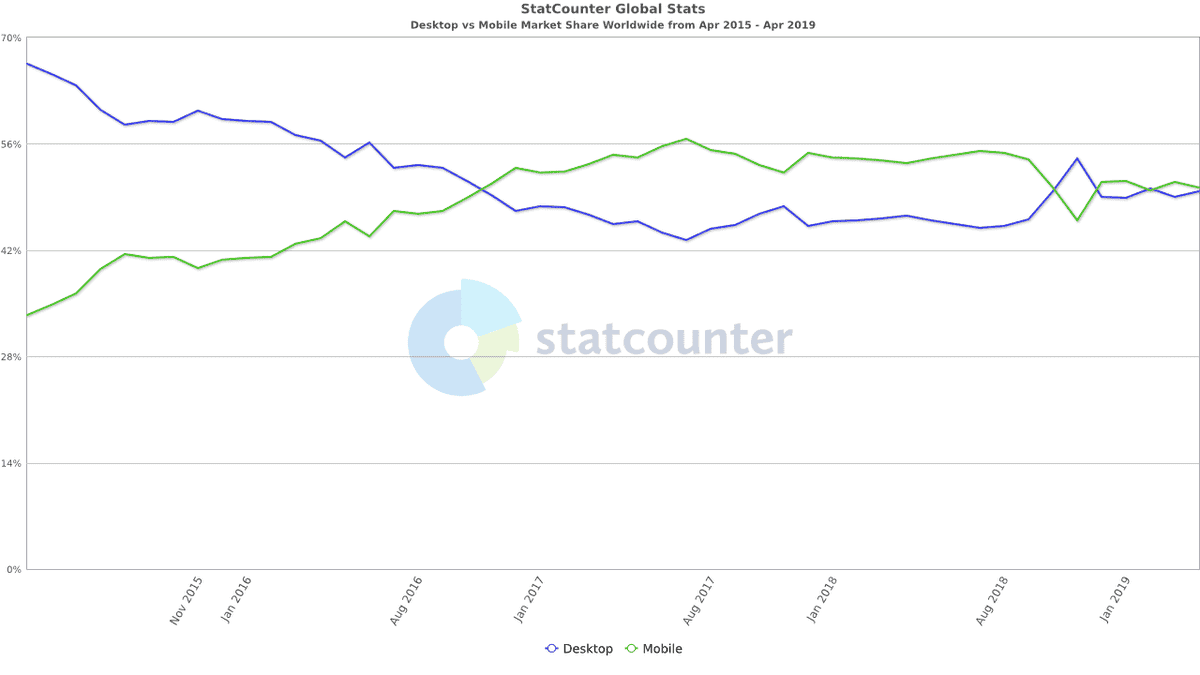
As the penalties for not have a mobile friendly website can be harsh - from users abandoning early to depressed search engine rankings - all professional digital marketers are in complete agreement that a mobile friendly friendly website is table stakes.
Sitebulb's mobile friendly Hints are focused around issues that affect a webpage negatively when viewed on a mobile browser, and may cause the site to not be deemed mobile friendly.
 Sitebulb Desktop
Find, fix and communicate technical issues with easy visuals, in-depth insights, & prioritized recommendations across 300+ SEO issues.
- Ideal for SEO professionals, consultants & marketing agencies.
 Sitebulb Cloud
Get all the capability of Sitebulb Desktop, accessible via your web browser. Crawl at scale without project, crawl credit, or machine limits.
- Perfect for collaboration, remote teams & extreme scale.