

Your SEO Audit Can Now Answer Back: Introducing Sitebulb MCP
 Jojo Furnival
Published September 9, 2026
Every LinkedIn bro would have you believe they’ve developed the secret sauce to getting Claude or ChatGPT to audit a website for technical SEO issues while they sit back and polish their homemade GEO award.
But of course, we know it’s probably mostly rubbish.
Usually in these circumstances, AI will describe in fluent detail the technical problems a site like yours would probably have, not what it actually has, because it’s pattern-matching against the whole internet and hoping you don't notice.
Well that doesn’t need to be the case anymore because we've built the Sitebulb MCP. So let me tell you what it is, why it changes how you work, and where it purposefully stops short.
Contents:
- MCP in one minute (skip this if you already get it)
- Why "just ask ChatGPT" falls apart
- Not all SEO tool MCPs are created equal
- What you can actually ask it
- Not just a data dump: the pre-built Skills
- Automation and working with the rest of your stack
- Where you still very much need a human
- The bigger picture
MCP in one minute (skip this if you already get it)
If you've been anywhere near AI tooling this year, or you’ve attended a talk by Itamar Blauer or Gus Pelogia, you'll have heard the term "MCP". In case you’re not quite sure wtf we’re talking about, here’s the quick version:
MCP stands for Model Context Protocol. An open standard introduced by Anthropic back in November 2024, the easiest way to think of it is as a USB-C port for AI. Before USB-C, every device needed its own cable and its own adapter. Then USB-C came along and meant that everyone could connect using that same cable; MCP does the same job for AI assistants and the tools they connect to.
Basically, it’s the standard way for something like Claude or ChatGPT to plug into an outside source of data and actually use it.
So instead of your assistant guessing, or you exporting a bunch of data from different places and pasting it in, the assistant talks directly to the tool via the MCP. In our case, that tool is Sitebulb, and the data is your audits.
Right, textbook bit done. Here's why it matters.
Why "just ask ChatGPT" falls apart
LLMs are pretty good at reasoning over information that you give them, but terrible at saying “I don’t know.” Ask one about your site and it has two options: refuse, or improvise. It almost always improvises, because that's what it's built to do, and improvisation dressed up in technical vocabulary is very hard to tell apart from fact.
An assistant on its own doesn't have your crawl data. It can't see that you've got 4,000 URLs sitting behind a canonical pointing at the wrong place. It doesn't know your JavaScript rendering is dropping half your H1s. It can guess those things might exist somewhere on someone’s site, but it cannot factually tell you they're on yours unless you give it that data.
You've probably felt this yourself; the quality of anything an AI does for you is capped by the quality of the data it can actually reach. Give it nothing, and you get plausible fiction.
Which is exactly why Sitebulb customers like Dragan Berek have been exporting Sitebulb’s All Hints report and feeding it directly into Claude in order to speed up their workflow. But with the MCP, he doesn’t have to.
Not all SEO tool MCPs are created equal
I’m gonna throw SEO tool MCPs broadly into three buckets to demonstrate why Sitebulb’s is something special.
1. Research-data servers
The first are the research-data servers. These connect your assistant to keyword volumes, backlink profiles, SERP data, the numbers you'd normally pull from a research platform. Really useful if that's the job you're doing. But that's not auditing your site. That's looking at the market around it.
2. Raw-crawl servers
The second are the raw-crawl servers. These hook your assistant up to crawl data, the tables of URLs and status codes and metadata a spider produces.
This is better, because now at least the model can see your actual pages. But there's a catch: raw crawl data hands the AI a giant pile of rows and leaves it to work out what matters. And an AI is not reliably good at that. It might fixate on a handful of harmless 301s and wave past the noindex tag sitting on your money page. The data is real, but the judgement is still guesswork.
3. Sitebulb MCP
The third type, our type, hands the model something different.
When Sitebulb crawls a site, it doesn't just collect data, it audits it. Every audit produces Hints, which are the things worth your attention. From real issues to opportunities, each one is scored by severity and tied to the URLs it affects. Alongside those sit Insights, the contextual findings that aren't problems as such but are worth knowing.
In effect, that's a whole load of technical SEO judgement, baked into the tool, doing some of the prioritisation work up front.
So when you connect the Sitebulb MCP, your assistant isn't reasoning over a spreadsheet it has to interpret cold. It's reasoning over a proper audit. It already knows which issues are critical and which are cosmetic, because Sitebulb told it, the same way Sitebulb would tell you in the app.
The model gets to do the thing it's actually good at, which is explaining, summarising and connecting findings, on top of data that's already been judged by something that knows what it's looking at.
What you can actually ask it
Enough theory. In practice, it turns a fiddly afternoon of data wrangling into a single sentence.
Here's the old way of pulling the top risks out of an audit:
Open the app
Find the project
Open the latest crawl
Scan the Hints
Filter by severity
Export the URLs
Tidy the columns
Write up what it means.
Call it twenty minutes if you know exactly where everything lives. Longer if you're doing it for a client who needs hand-holding.
Here's the new way:
Summarise the latest completed audit for example.com and highlight the top technical SEO risks by severity and affected URLs.
You get the Sitebulb site score out of 100, the issues ranked and the sample URLs, in the time it takes to make a coffee.
A few more that map straight onto jobs you already do:
Triage what actually matters
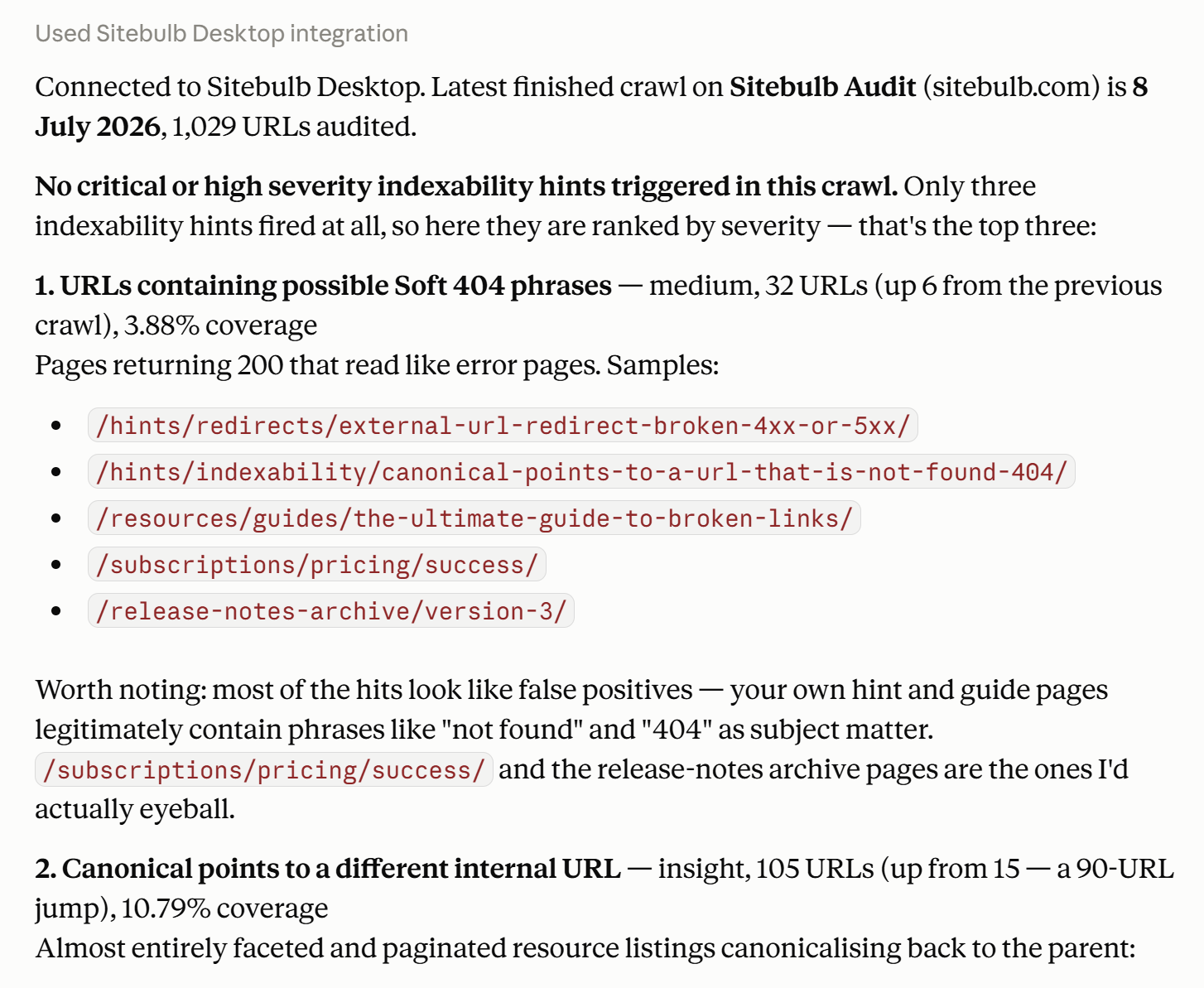
Find the critical and high severity indexability issues and show me sample affected URLs for the top three.
Instead of clicking through report after report, you get straight to the stuff that's costing you SERP visibility.
Interrogate a single URL
Inspect this URL in the latest audit and explain its crawl status, indexability, canonicals, redirects and associated Hints.
Perfect for when a developer swears blind a page is fine and you need to see exactly what Sitebulb saw.
Catch regressions between crawls
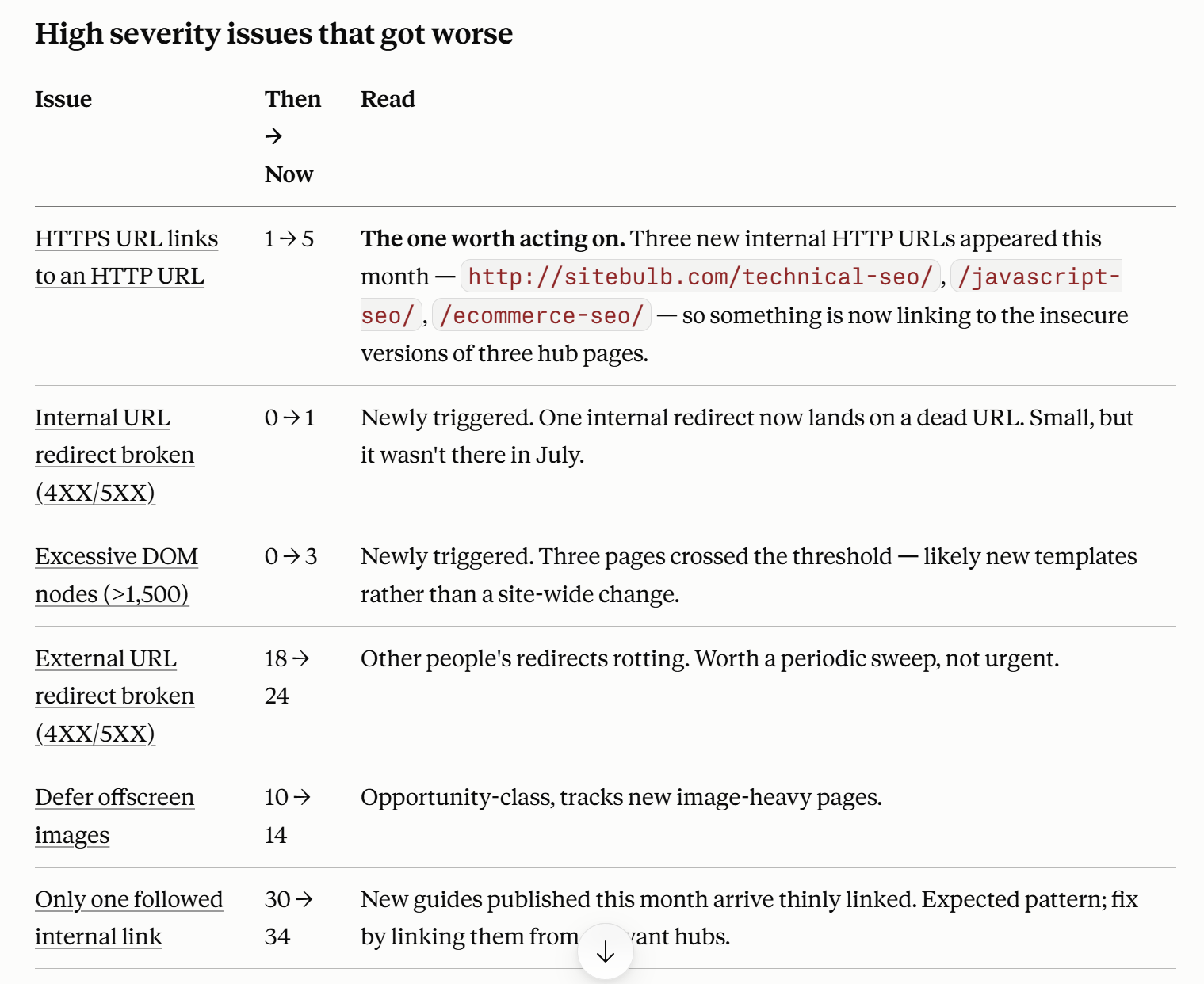
Compare this audit with the previous one. Which high severity issues got worse, and which URLs are newly missing?
Being able to ask what changed, in plain language, turns a monthly crawl into something close to real monitoring. You don’t have to hunt for what broke. You just ask!
See the direction of travel
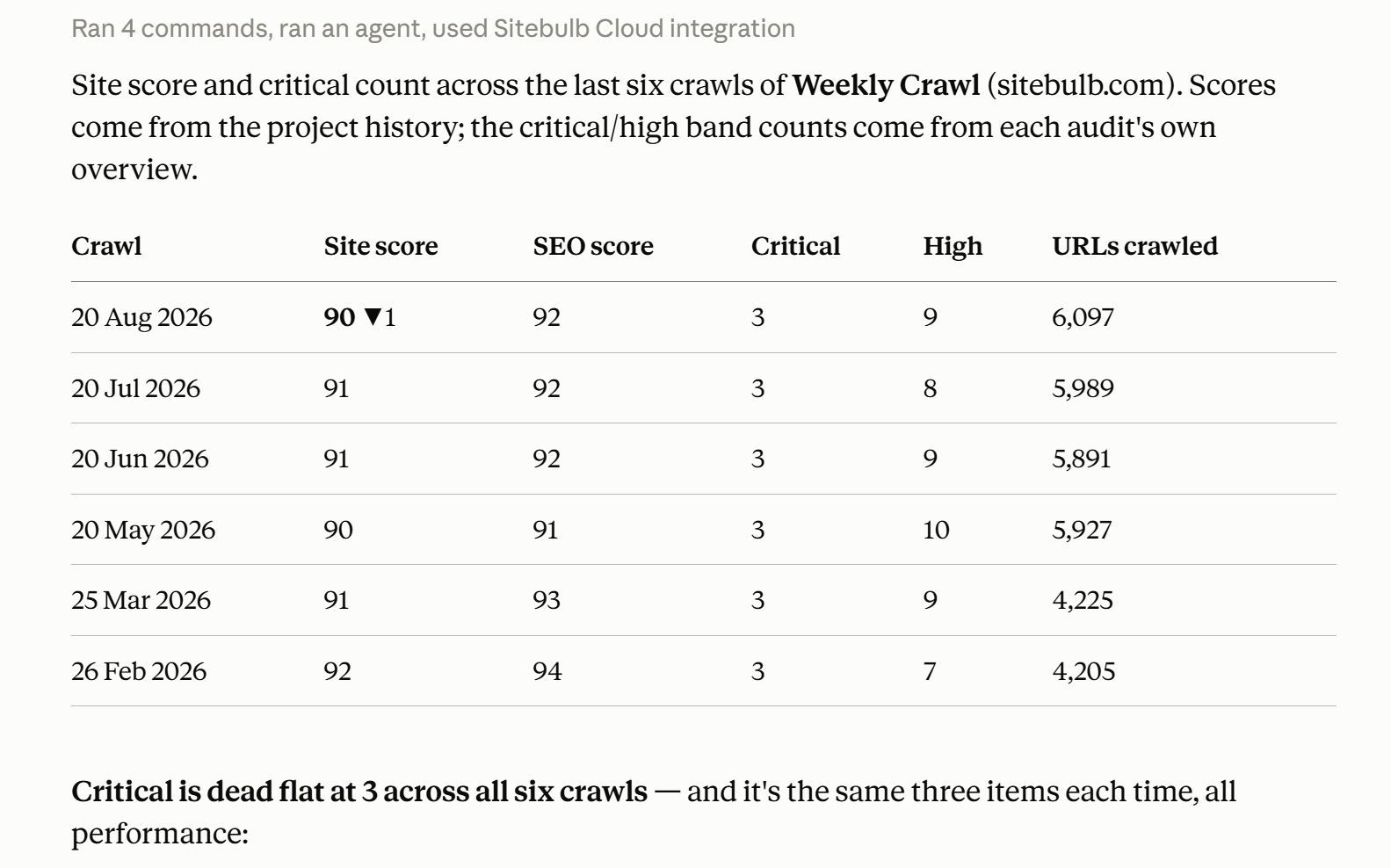
Show me the site score and critical issue count across the last several crawls.
One caveat while we're here: For any single issue, the MCP hands back a sample of up to 50 example URLs, not the full list, to keep answers fast and readable. When you need every affected row for a spreadsheet or a client hand-off, that's still a job for the export in the app.
The MCP gives you the shape and the headline number. The export gives you every last URL.
Not just a data dump: the pre-built Skills
Everything above is querying. Useful, fast, and a real upgrade on exporting and reformatting. But if that were all the MCP did, it'd be a nicer way to ask questions, and not much more.
So let’s talk about the Skills we’ve built to go with the MCP. No other crawler's MCP has shipped anything quite like them.
What is an AI Skill?
First, for anyone that doesn’t know:
A Skill is a packaged process for your AI assistant. It’s an entire SEO task and output—the questions to ask, the order to read the data, the deliverable to produce. This means you can run it in a sentence instead of a lengthy prompt you have to rebuild from scratch every time.
The MCP provides the data; the Skill provides the process. And because it's a set method rather than a fresh improvisation, you get the same shape of output, to the same standard, on every run.
What sets our Skills apart
Two things happen through the Skills we've built:
They interview before they answer.
No other crawler tool asks why you're looking before it responds. A single crawl will produce a different set of priorities depending on whether you’re an ecommerce site mid-migration vs a publisher in a traffic slump.
Yes, it depends.
Business context leads the decision, which means you don’t get back a generic readout, you get a response shaped by your actual situation.
They reframe, never fake.
The Sitebulb scores always stay honest. Context decides what leads, and the Skill will tell you when it's demoting something. Total transparency, resulting in higher trust.
So your AI will respond with something like: "The site score is 78. [X issue] affects every page, but it's best practice with no ranking effect, so it's not in your top priority. Based on the context you gave me, I’ve ordered [Y issue] at the top."
So no, every AI output isn’t just slop.
The 5 Sitebulb MCP Skills
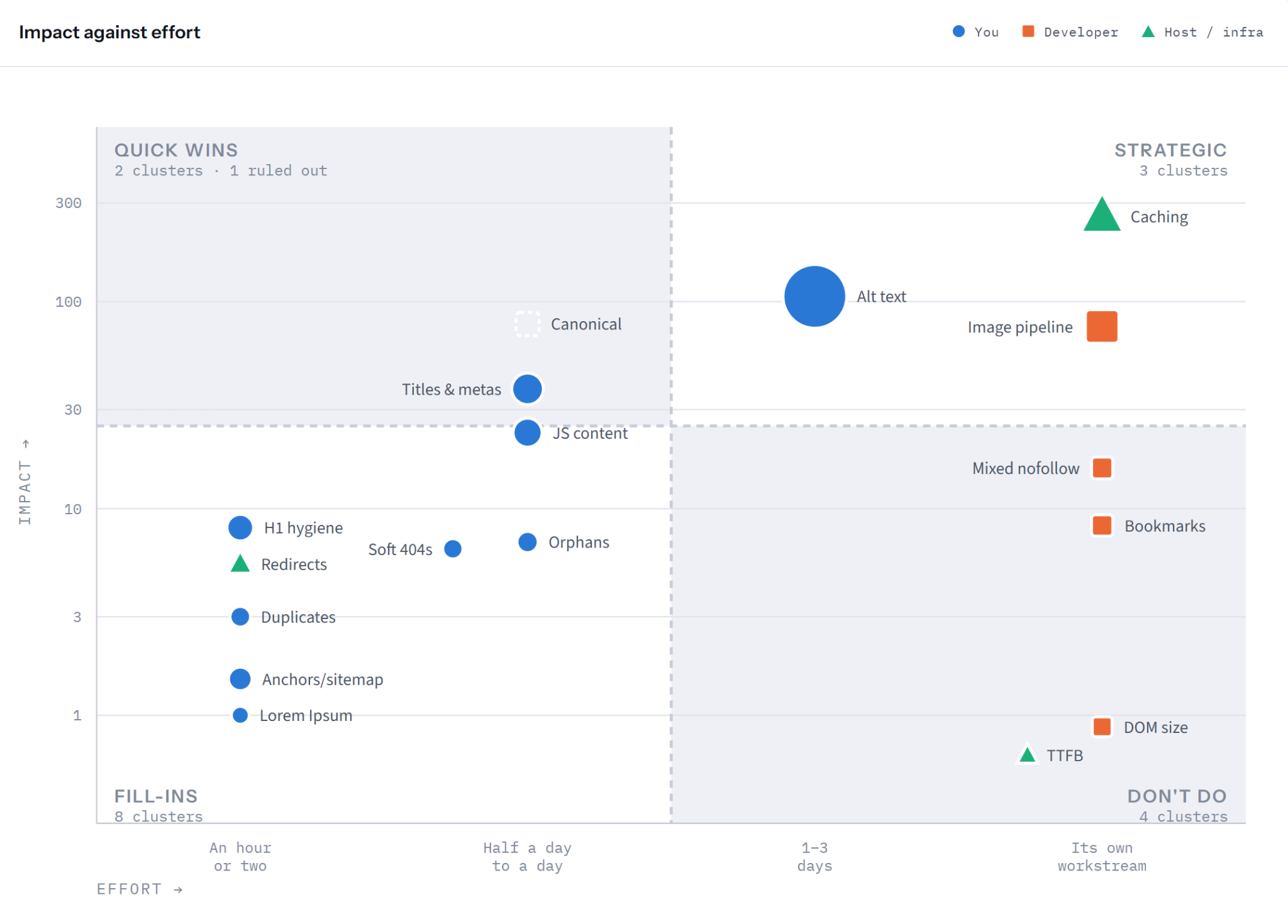
There are five of them at launch, and each one leans towards a particular kind of SEO. And you can deliver the data the AI retrieves for you as it is or transform it into something more visual, such as an impact vs effort quadrant chart or the other examples below.
what-to-fix-first
This is the one for your first five minutes with any crawl, and it was our number-one MCP waitlist request. It asks a couple of quick questions about the site and your situation, then hands back the three to five issue clusters actually worth your time, ranked by impact against effort, with the why and the evidence attached.
what-changed
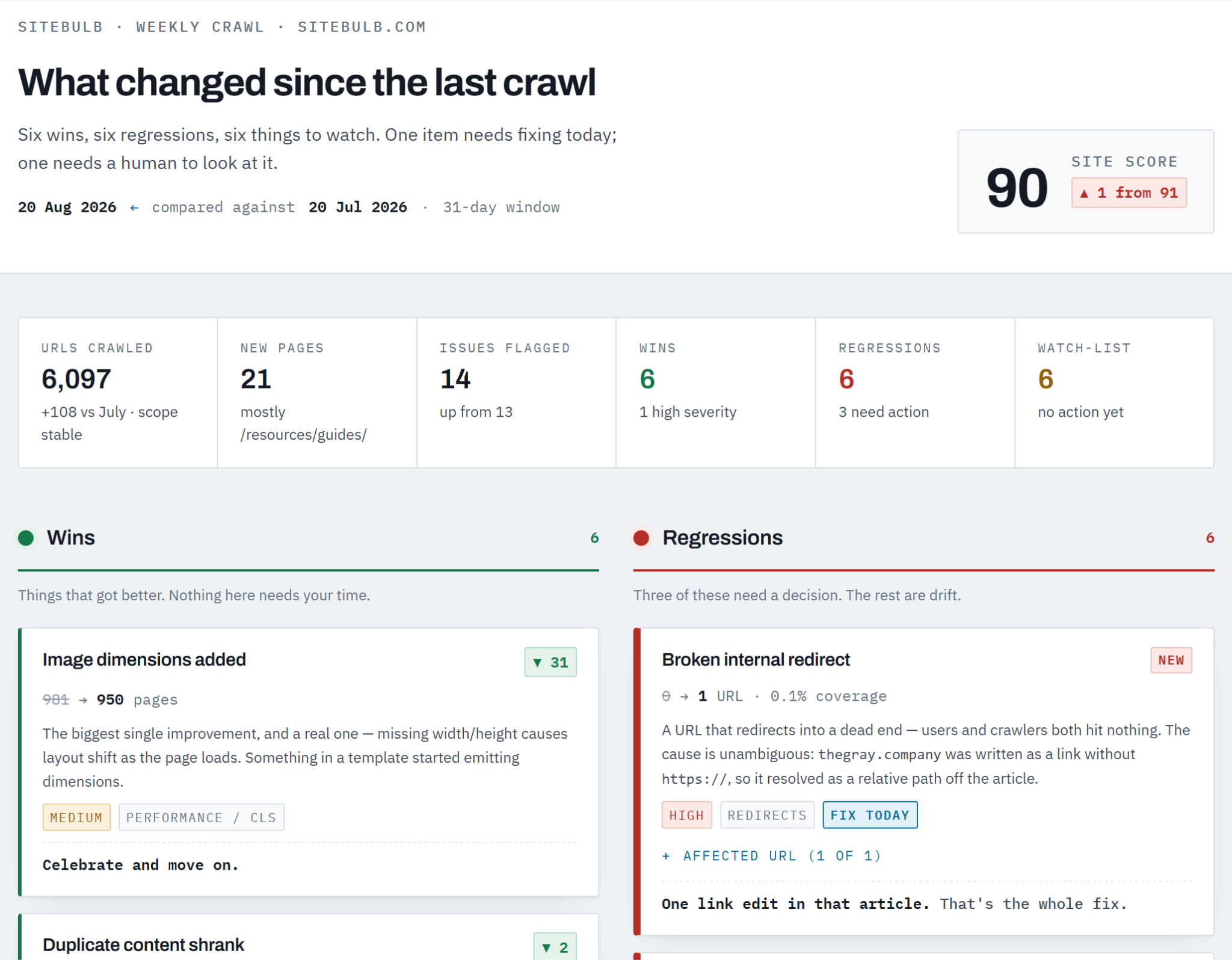
This is built for the agency account manager on a monthly retainer. It compares the two most recent crawls and tells you what moved; wins first, then regressions, then a watch-list, so the client sees progress before problems. There's a "client call in 20 minutes" mode for the days you walk in not having looked yet. (We've all had that day.)
technical-seo-audit
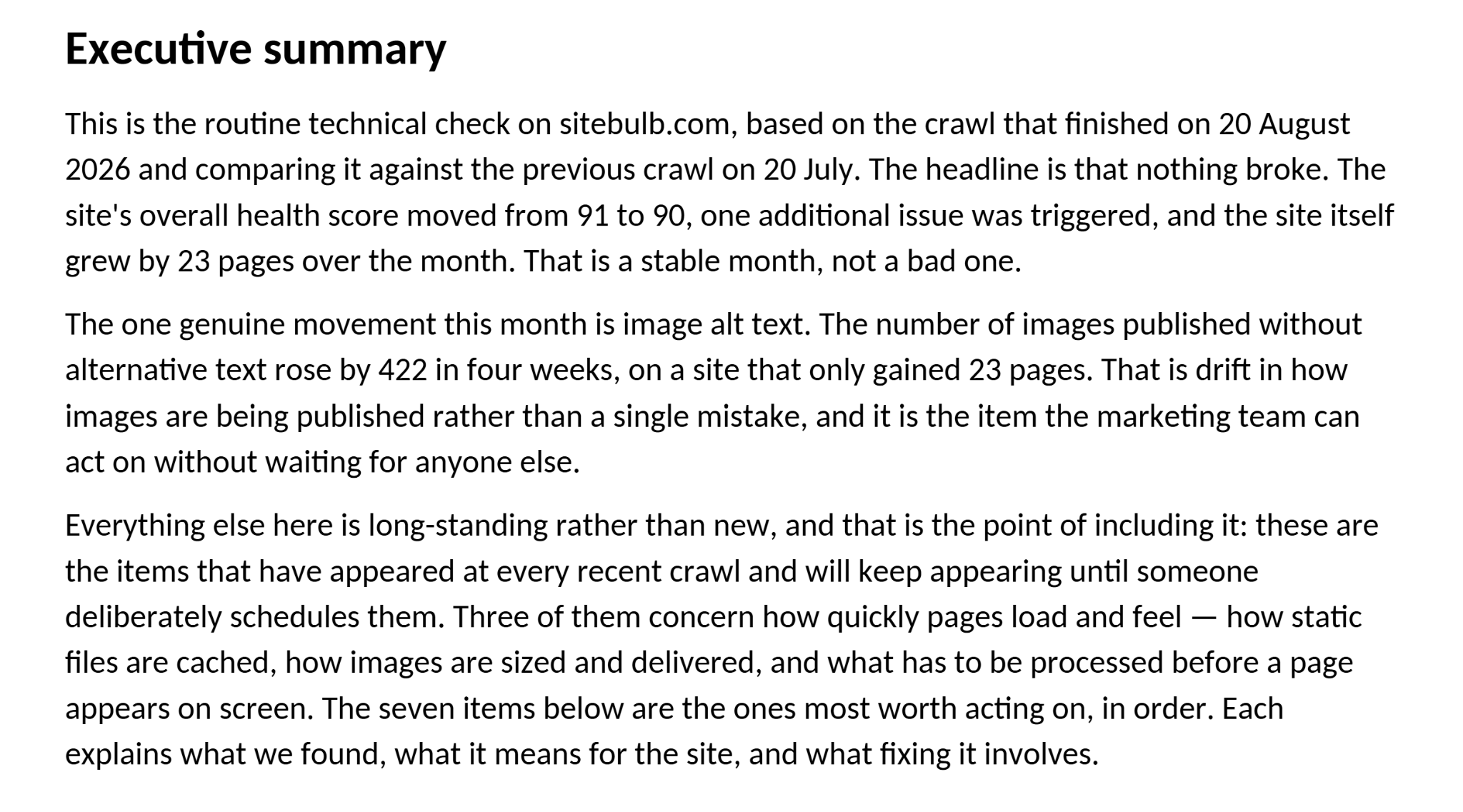
This Skill turns a crawl into the client-facing document itself: the five to ten issues that actually matter for that engagement, written for the person who'll read it. It arrives as a working draft with review comments pinned exactly where your judgement is needed. After all, your name goes on it, not Claude's.
release-check
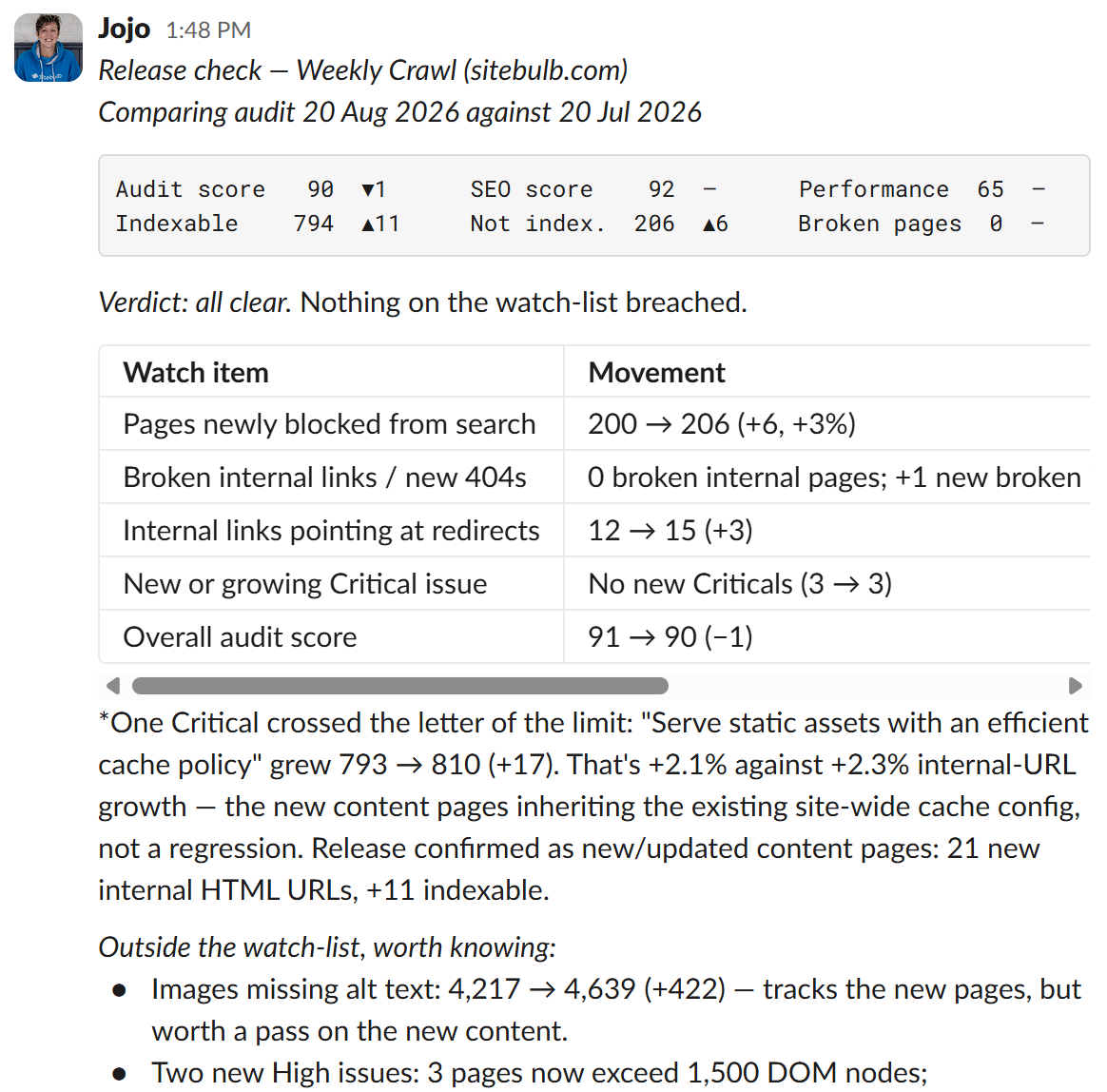
The smoke alarm for in-house teams shipping on a sprint cadence. Set your watch-list and thresholds once, tell it what you changed on purpose so deliberate changes don't cry wolf, and most Tuesdays it just gives you a two-line “all clear”. I've got mine set up in Claude Cowork so it pings me in Slack, after checking the weekly crawl.
dev-handoff
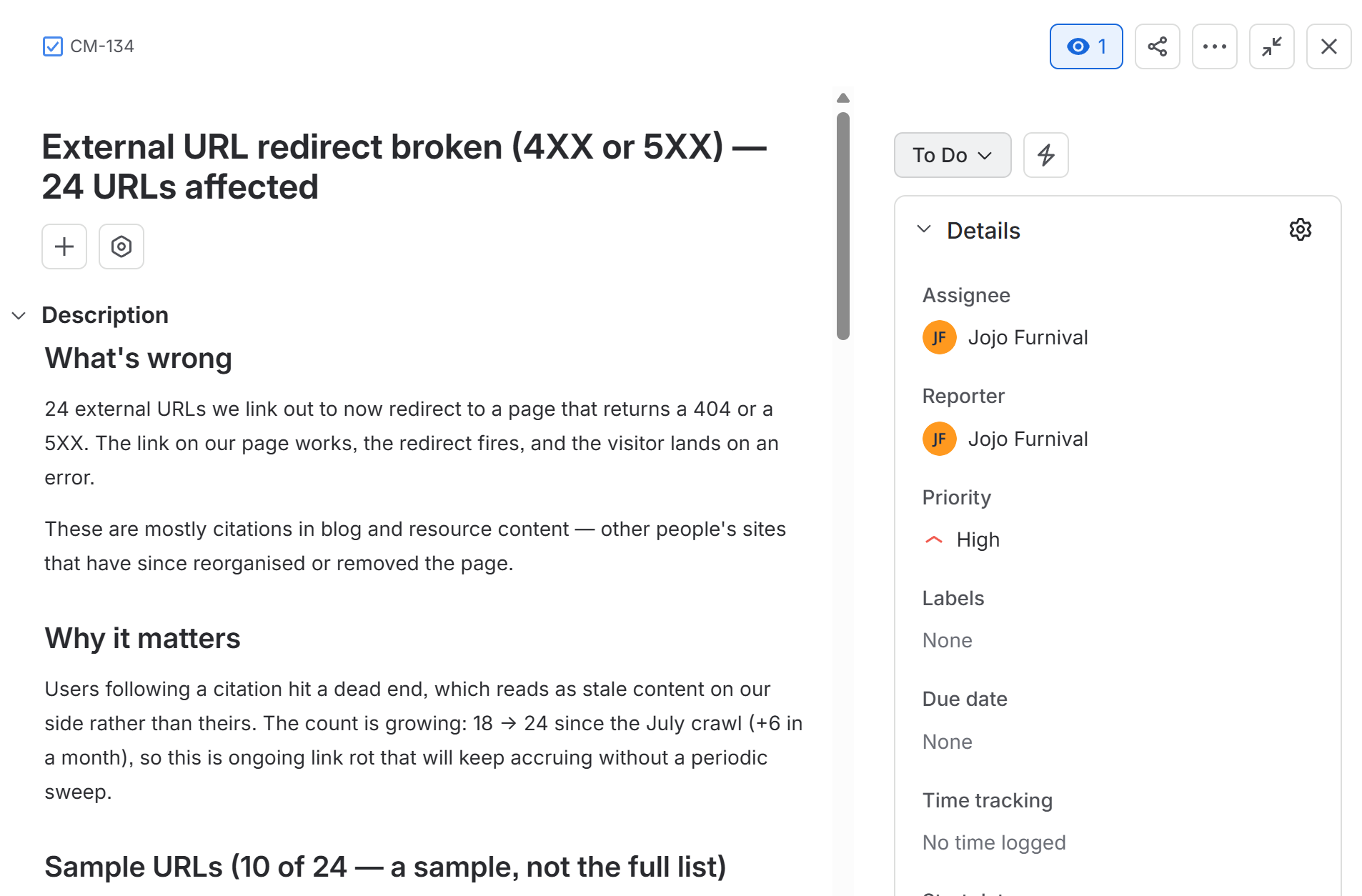
Closes the gap between finding an issue and getting it fixed. It writes proper dev-friendly tickets straight into Jira, Linear, Asana, Monday or ClickUp, each with what's wrong, why it matters, sample URLs, a suggested fix and an acceptance criterion that doubles as its own test. Every ticket is previewed in the chat before anything is created, because letting a tool write straight into your PM board is a trust decision, and so it should be.
To add these Skills to your AI Assistant’s Skills library, you install them as a single plugin. Although they are technically Skills, they are installed as a package via a Plugin, because it allows us to keep them secure and make improvements over time so your Skills improve in lockstep. In depth instructions on how to install the Skills are here.
The Skills follow the Agent Skills open standard, which means the same Skill runs in both Claude and ChatGPT with no separate version to maintain. And these five are a starting point, not the ceiling. We fully expect and encourage SEOs familiar with building Skills to create their own!
Automation and working with the rest of your stack
The Sitebulb MCP only ever pulls Sitebulb data. That's deliberate. But your assistant can talk to the other tools you've connected to it, and reason across all of them in one conversation.
So if you've got GA4 or Search Console connected, you can weight the findings by what's actually costing you traffic:
"Cross-reference the broken pages in the latest audit with their clicks, and prioritise by what's losing us the most."
If you've got a rank tracker connected, your broken page is both a technical hygiene issue AND a page that ranks third for a commercial term with forty referring domains at risk.
And with Jira or Slack connected, findings turn into tickets or channel updates without you having to leave the chat.
This is also where automation comes in, though with one real constraint: The MCP is read-only, so it can't start a crawl.
There are valid reasons for this that I won’t go into, but all you need to know is that the pattern remains the same for starting crawls:
Schedule the crawl in Sitebulb as you always have
Your AI assistant can then run the Skill the moment the crawl lands.
So, your overnight crawl finishes, Claude Cowork runs sitebulb-what-changed, and the monthly client update is drafted and posted to Slack before you've opened your emails the following morning.
Alternatively, you release an update on Monday, the crawl runs that night, and sitebulb-release-check gives you a Tuesday “all clear” you didn't have to look for.
Where you still very much need a human
This DOES NOT replace you. Anyone claiming their MCP turns SEO into a hands-off machine is selling you the confident-but-wrong LinkedIn noise from the top of this article.
Grounding an assistant in real audit data fixes the knowing problem. It doesn't make the model infallible. So the same habits you'd apply to any export still apply here: skim a client-bound summary against the source figures before you send it, and if an answer surprises you, check which audit it used before you act on it. A surprising claim is far more often a stale crawl or a loose prompt than a real discovery.
And the model has no idea about the context that only you know, right? For example, those thin pages might be thin on purpose, there’s a migration happening next week, or the client really only cares about one section of the site.
The Skills go a long way towards pulling that context out of you before they answer, but the final call is still yours.
And one final thing: the MCP doesn't retire the Sitebulb app or the humble export. SEOs have run audits from the app and worked from exports for years, and that doesn't suddenly stop.
The MCP is another tool in your toolbox. Reach for it when you want a fast answer, a summary, or a Skill to run a whole job. Reach for the app when you need to configure a crawl or click through every affected URL. Reach for the export when you need every last row somewhere else.
The bigger picture
For years, technical SEO has followed the same rhythm. Run the tool. Analyse the findings. Write the report. Most of the craft went into the middle bit, and most of the hours went into the last bit.
MCP changes that. You run the tool, then you ask the data questions and act on the answers; and with a Skill, the writing-up stops being a separate chore at all.
The MCP is the connection. What keeps it trustworthy is real, prioritised audit data underneath, instead of an AI hallucinating in a convincing voice. What makes it yours is your own Skill carrying your process, your thresholds, and your definition of a quick win.
That's the world we're building Sitebulb for; one where the boring, repetitive, afternoon-eating parts get handed off, and the part that actually needs a human SEO gets more of your attention, not less.
The Sitebulb MCP is available now on all Sitebulb plans, including the free trial, and it works with Claude, ChatGPT and any other MCP-compatible assistant. If you want your audits to start answering back, come and try it.

Sitebulb is a proud partner of Women in Tech SEO! This author is part of the WTS community. Discover all our Women in Tech SEO articles.

Jojo is Marketing Manager at Sitebulb. She has 15 years' experience in content and SEO, with 10 of those agency-side. Jojo works closely with the SEO community, collaborating on webinars, articles, and training content that helps to upskill SEOs.
When Jojo isn’t wrestling with content, you can find her trudging through fields with her King Charles Cavalier.


Related Articles
 The Brand-First Technical Audit: Why Your Entity Health Is a Technical SEO Problem

 How We Run SEO/AEO Audits Using Claude AI, MCPs, and Sitebulb

 Beyond Keywords: Designing Empathy-Based Ecommerce Architectures
 Sitebulb Desktop
Find, fix and communicate technical issues with easy visuals, in-depth insights, & prioritized recommendations across 300+ SEO issues.
- Ideal for SEO professionals, consultants & marketing agencies.
 Sitebulb Cloud
Get all the capability of Sitebulb Desktop, accessible via your web browser. Crawl at scale without project, crawl credit, or machine limits.
- Perfect for collaboration, remote teams & extreme scale.