

 Dragan Berak
This week, we're grateful to Dragan Berak of Rock The Rankings, who walks us through how his team runs SEO/AEO audits inside a single working environment—and why Sitebulb's crawl data is the layer that ties performance, visibility and technical signals together.
Most SEO audits miss the full picture. Not because the practitioner lacks skill, but because the data is fragmented across too many platforms. You're flipping between Google Search Console, GA4, Ahrefs, and your crawler, manually reconciling numbers, trying to hold a coherent picture of the site in your head while writing findings in a separate document. The context collapses. Important connections get lost. The final report reflects the last hour of analysis rather than the full synthesis.
That's the problem this workflow is designed to solve. At Rock The Rankings, we've built a repeatable SEO audit process that brings every data source into a single working environment (Claude Desktop), where all the analysis, synthesis, and report writing happens in one place. Sitebulb is the final and most important layer in that stack. This article walks through how the whole system works, why each piece matters, and how you can adapt it for your own audits.
Contents:
- The core idea: one working environment for all your data
- The role of each data source
- Why Sitebulb is the technical foundation
- How Claude Desktop and MCPs connect the data
- The two-skill architecture
- Step-by-step: how the audit actually runs
- What the final deliverable looks like
- How other SEOs can build a similar workflow
- What changes when Sitebulb releases its MCP server
- Final thoughts
- TL;DR key takeaways
The core idea: one working environment for all your data
The traditional audit workflow treats each data source as a separate silo. You export GSC data to a spreadsheet, pull Ahrefs numbers into a different tab, run a Sitebulb crawl and save the export somewhere, and then try to write a coherent audit from memory. The output is only as good as your ability to hold all of that in your head at once.
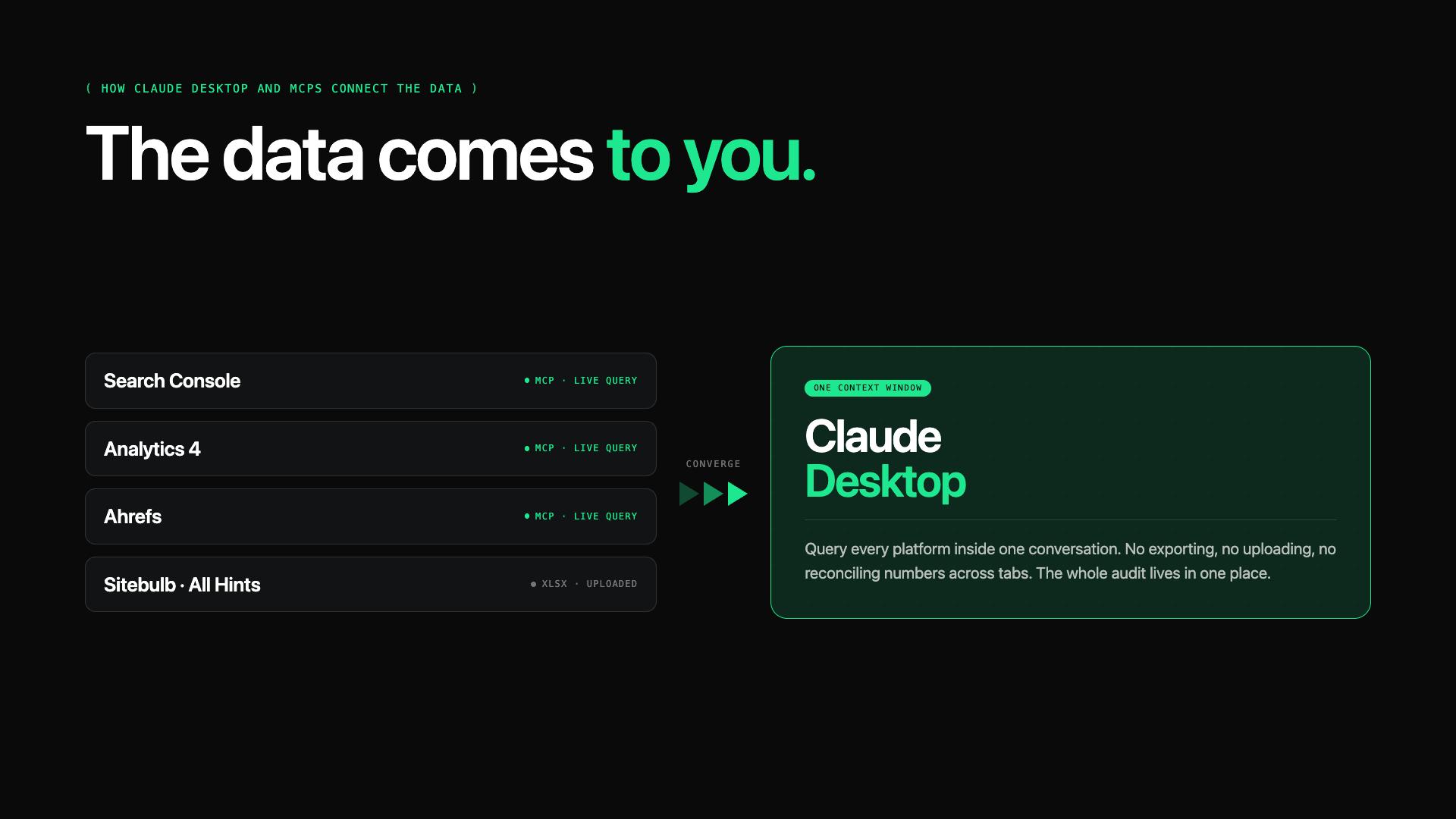
Our approach is different. Claude Desktop serves as the central working environment. We connect live MCP (Model Context Protocol) servers for Google Search Console, Google Analytics 4, and Ahrefs, which means we can query those platforms directly inside Claude rather than downloading and uploading separate exports. Then we bring in the Sitebulb crawl export, specifically the "All Hints" report, and the entire audit lives in one place.
This isn't about letting AI write the audit for you. It's about eliminating the friction between data collection, analysis, and writing. When all the data is in the same context window, Claude can draw connections that would take hours to find manually. A pattern in the Ahrefs keyword data maps to a technical issue in the Sitebulb export maps to an engagement problem in GA4. You see the whole picture at once, and the audit reflects it.
The role of each data source
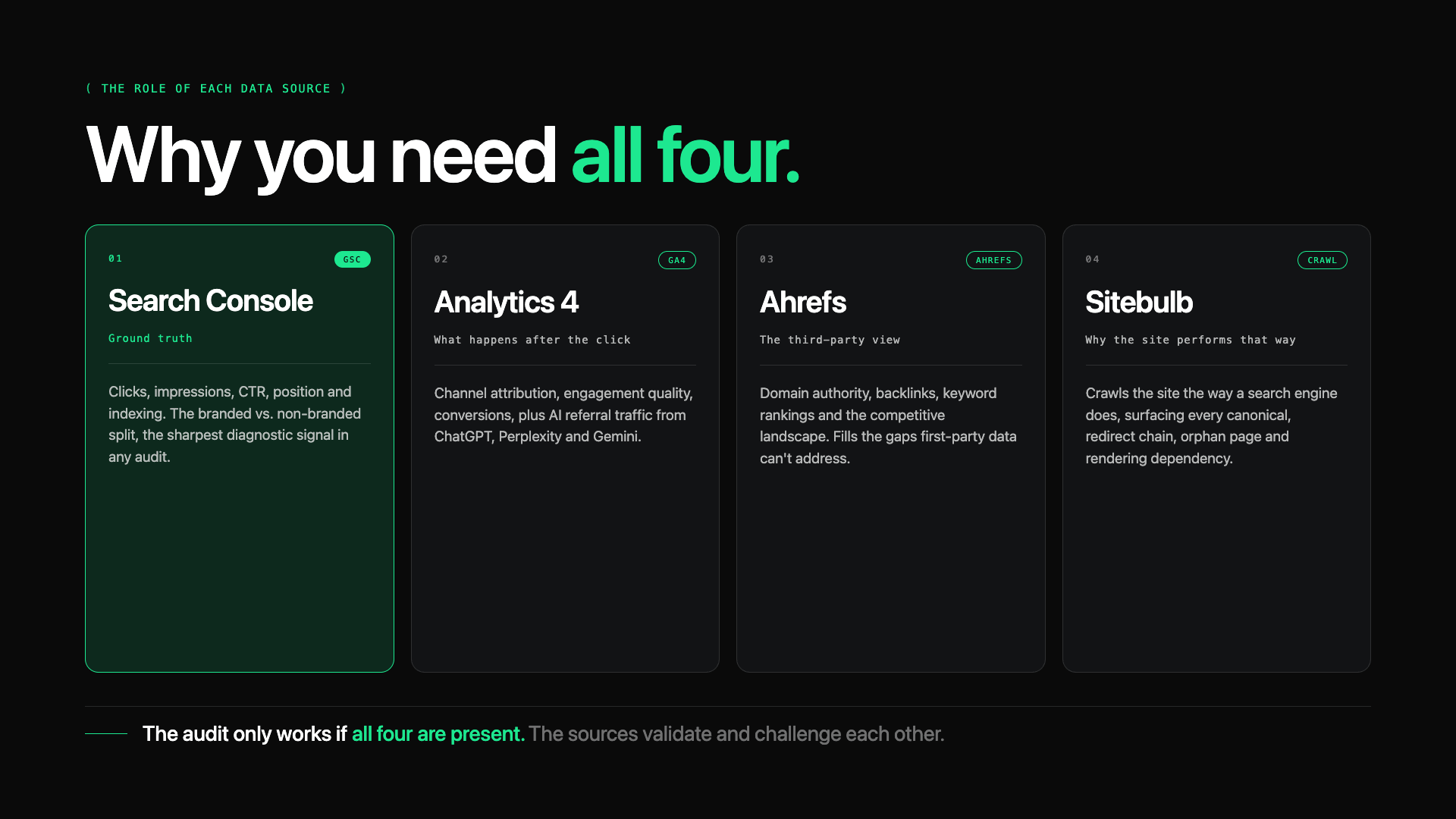
Before getting into the mechanics, it's worth being clear about what each data source contributes and why you need all four.
Google Search Console
Google Search Console provides the ground truth for organic search performance:
Clicks
Impressions
CTR
Average position
Indexing status
More importantly, it shows you the relationship between branded and non-branded traffic, which is one of the most useful diagnostic signals in any audit. A site where 80% of clicks come from brand queries is fundamentally different from one where non-branded organic traffic dominates.
GSC also surfaces indexing issues, sitemap warnings, and URL-level inspection data that no third-party tool can fully replicate.
GA4
Google Analytics 4 tells you what happens after the click.
Traffic from GSC might look healthy until you look at GA4 and see that the top organic landing pages have 85% bounce rates. It also gives you channel attribution (how much of total traffic is organic versus paid versus direct), conversion data, and increasingly, AI referral traffic from ChatGPT, Perplexity, and Gemini.
That last signal has become a meaningful early indicator of how well a site performs in AEO and GEO contexts.
Ahrefs
Ahrefs provides the third-party perspective:
Domain authority
Backlink profile
Keyword rankings and estimated traffic
Competitive landscape
Historical data for spotting deindexation or traffic drops.
It fills the gaps that first-party data can't address. GSC won't tell you that your top competitor has three times as many referring domains. Ahrefs will.
Sitebulb
Sitebulb does something the other three cannot. It crawls the site the way a search engine does and tells you what it finds at the technical level:
Every canonical tag
Every redirect chain
Every orphan page
Every JavaScript rendering dependency
The other three platforms help you understand performance, visibility, behaviour, and competitive context. Sitebulb helps you understand why the site performs the way it does from the ground up.
The audit only works if all four are present. GSC without a technical crawl is a performance report with no explanation. Ahrefs without GA4 is ranking data with no conversion context.
Sitebulb without any of the others is a list of technical issues without context. The data sources validate and challenge each other. That's what makes the synthesis meaningful.
Why Sitebulb is the technical foundation
Of the four data sources, Sitebulb is the one that most SEO workflows underuse. It's common to see audits that reference a crawl in passing, pull out a few headline numbers (pages crawled, 404s found), and move on. That barely scratches what Sitebulb can actually tell you.
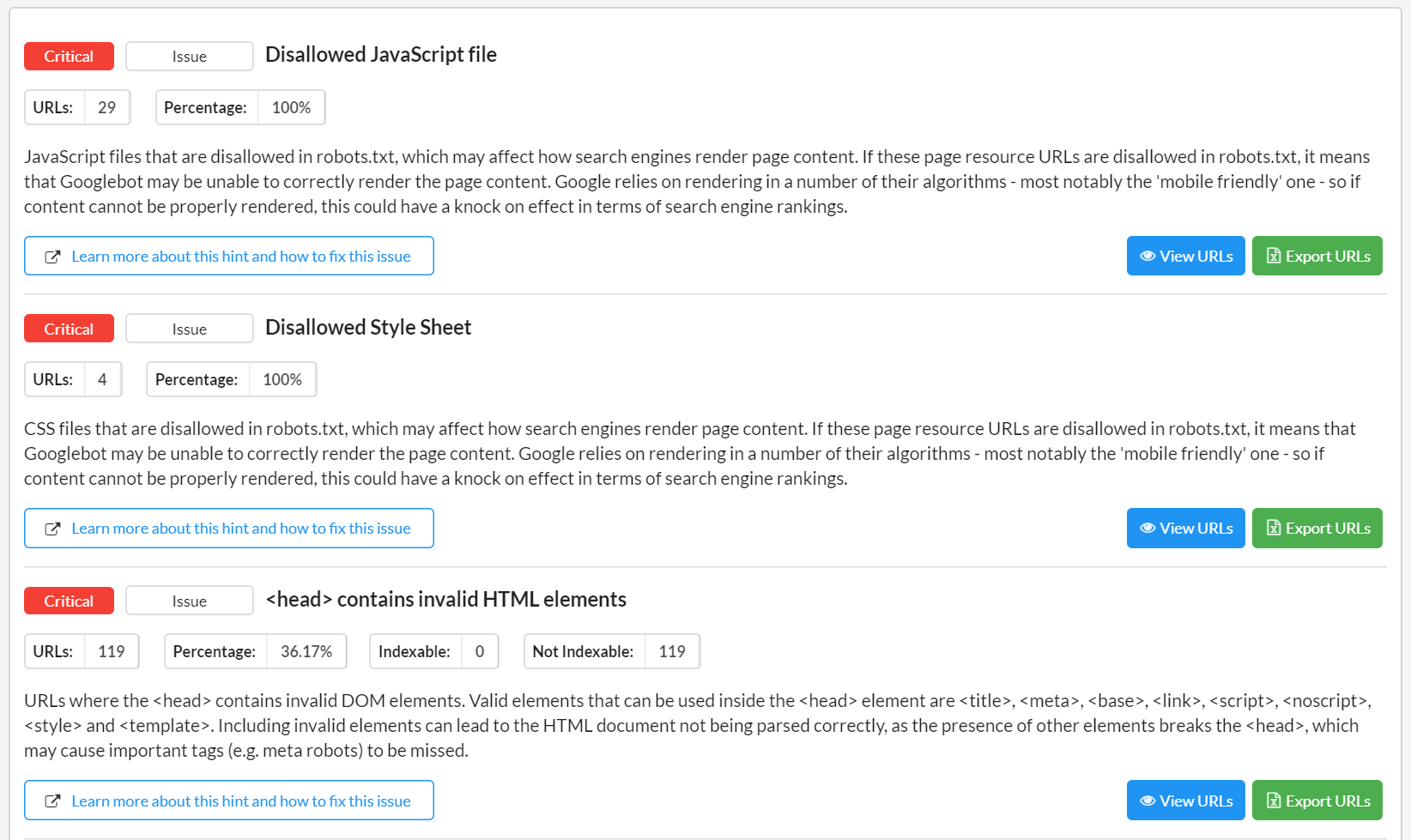
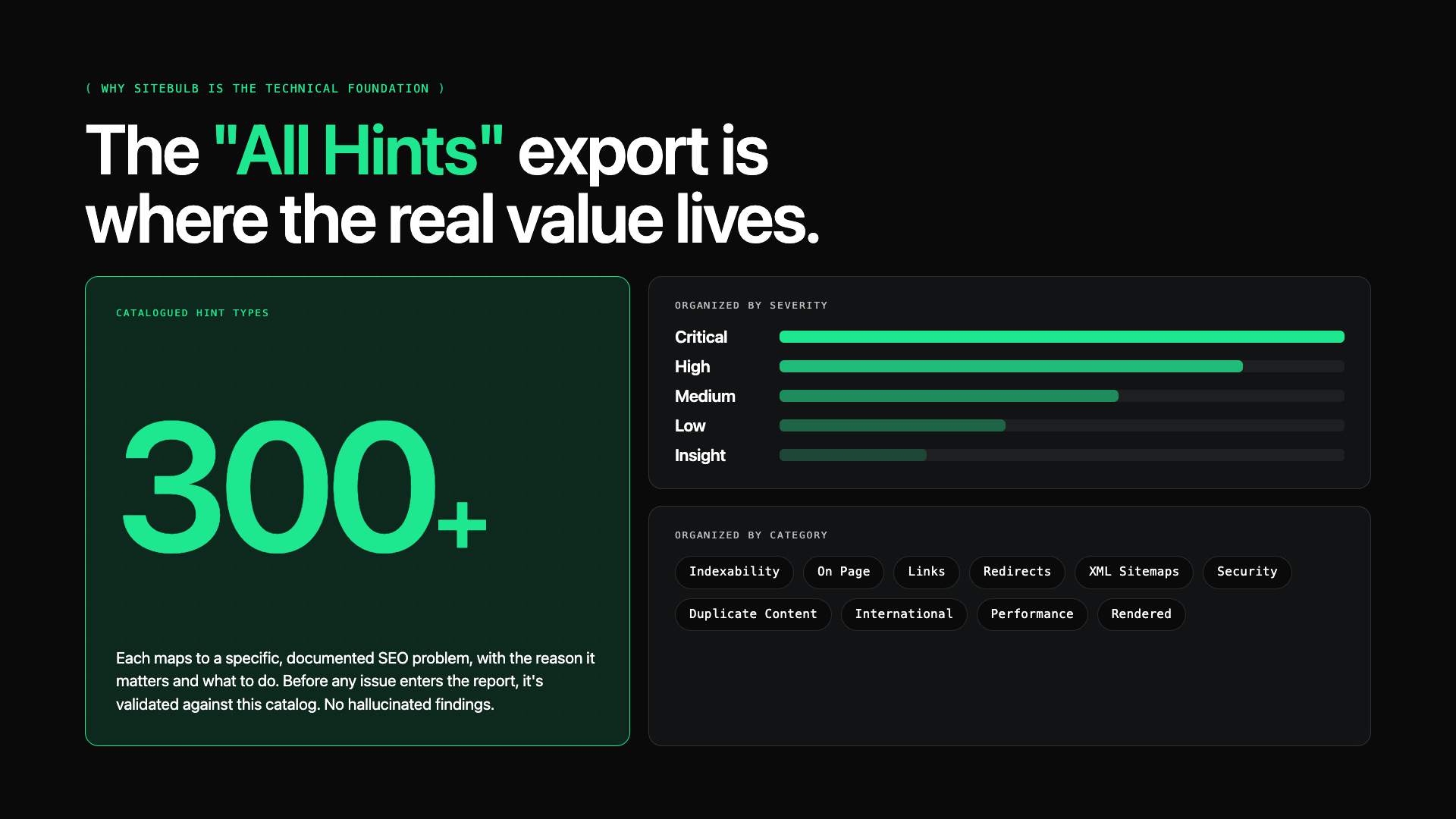
The "All Hints" export is where the real value lives. Sitebulb runs over 300 optimisation checks, organised by category (Indexability, On Page, Links, Redirects, XML Sitemaps, Security, Duplicate Content, International, Performance, Rendered, and others) and severity (Critical, High, Medium, Low, Insight).
Every hint maps to a specific, documented SEO problem with a clear explanation of why it matters and what to do about it.
When we bring the "All Hints" export into Claude alongside the other data sources, several things happen that wouldn't be possible working with the crawl data in isolation.
Technical issues get connected to performance data
A site with a significant Sitebulb flag for canonical tag mismatches between the rendered and source HTML might look fine in GSC on the surface. But when you cross-reference with Ahrefs traffic history and see a gradual decline in ranked pages, the canonical issue becomes the probable cause rather than a hypothesis. The audit can make that case with evidence instead of speculation.
Severity gets calibrated against business impact
Sitebulb's severity ratings are accurate from a technical standpoint, but they don't know that a particular Critical-severity issue only affects three low-traffic pages, while a Medium-severity issue affects the site's top 50 commercial pages. Having GSC click data and Ahrefs traffic data in the same context lets us reweight priorities based on actual business impact rather than technical severity alone.
Patterns across page types become visible
One of Sitebulb's most underrated capabilities is the ability to spot template-level problems. If a duplicate title tag issue appears on 200 pages, all following the same URL pattern, that's not 200 individual problems. It's one template fix. The "All Hints" export, parsed alongside the site's URL architecture from the Ahrefs data, makes these patterns obvious in a way that reviewing the crawl UI page-by-page never would.
Recommendations become specific and actionable
Generic audit findings ("improve your title tags") are easy to write and useless to act on. When the Sitebulb data tells you exactly which pages have missing or duplicate title tags, and the GSC data tells you which of those pages have high impressions but poor CTR, you can write recommendations that name specific pages, specific keyword opportunities, and specific expected outcomes. That's a different kind of audit.
How Claude Desktop and MCPs connect the data
Claude Desktop is the desktop application for Claude, and it supports Model Context Protocol (MCP) connections, a standardised way for Claude to communicate directly with external services.
In practice, this means we can connect GSC, GA4, and Ahrefs as live data sources that Claude can query inside a conversation, rather than working with static exports.
The setup for an audit looks like this:
The GSC MCP server connects to the relevant Search Console property and lets us pull performance data, indexing information, and sitemap status without leaving Claude.
The GA4 MCP server connects to the relevant Analytics property and surfaces channel breakdowns, landing page performance, conversion data, and AI referral traffic.
The Ahrefs MCP server gives us direct access to domain metrics, keyword rankings, backlink data, organic competitors, and Brand Radar AI visibility data.
The Sitebulb "All Hints" export is uploaded directly into the conversation as an XLSX file. (Sitebulb MCP server is coming soon.)
Once all four data sources are in the same context, the audit can run as a coherent, end-to-end process rather than a series of disconnected tasks. We've built a structured skill (essentially a detailed set of instructions that governs how Claude runs the audit) that ensures every step is followed in the right order, every finding is validated before it goes into the report, and the output consistently meets a high standard.
The two-skill architecture
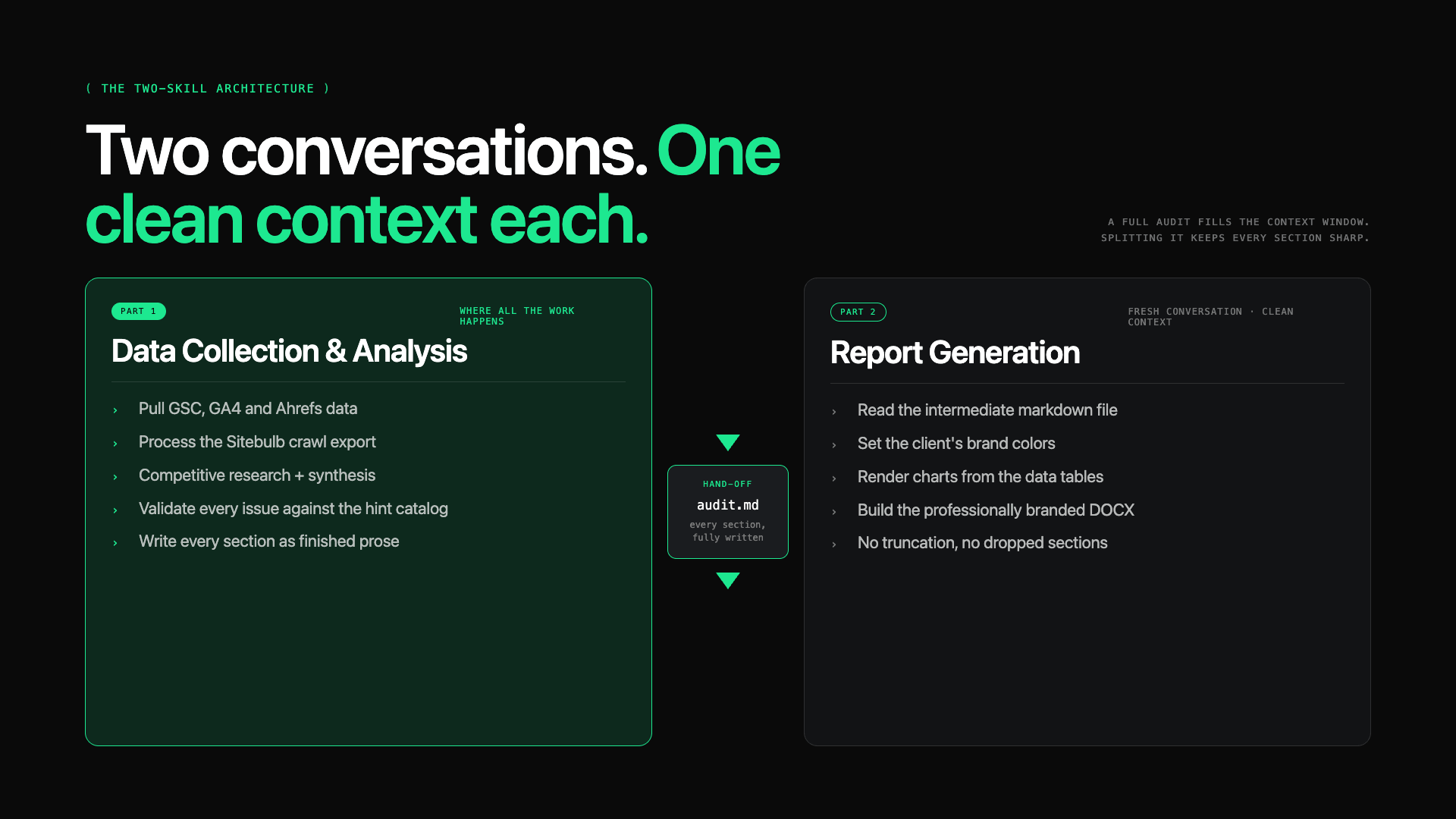
One of the most important decisions we made in building this workflow was splitting the audit into two separate conversations, each governed by its own Claude skill.
The reason is practical: running a full SEO audit generates an enormous amount of context. API responses from GSC, GA4, and Ahrefs, combined with the Sitebulb export and competitive research, consume a significant portion of Claude's available context window. If you try to do data collection, analysis, and document generation all in the same conversation, you run into truncation problems and quality degradation as the context fills up.
Part 1: Data collection and analysis
The skill walks Claude through a structured sequence: pulling GSC performance data, querying GA4 for traffic and engagement metrics, gathering Ahrefs domain and keyword data, processing the Sitebulb crawl export, and conducting competitive research. Then it synthesises all of that into a full analysis:
prioritised issues (High Priority and Medium Priority tiers)
quick wins
site architecture assessment
off-page profile evaluation
AEO and AI search visibility findings, and
the complete prose for every section of the audit report.
The output is an intermediate markdown file: a structured document containing every section of the report, fully written, ready for the next step.
The Part 1 skill includes a detailed reference catalogue of all Sitebulb hints, organised by category and severity. Before any technical or on-page issue goes into the report, it gets validated against that reference. This ensures the audit only contains real, recognised SEO problems, not hallucinated or exaggerated findings.
If an issue doesn't map to a Sitebulb hint or a documented Google best practice, it doesn't go in the report.
Part 2: Report generation
Part 2 starts a fresh conversation with a clean context window. It takes the intermediate markdown file from Part 1 and converts it into a professionally branded DOCX document, complete with the client's brand colours, custom typography, charts rendered from the data, and a clean, consistent layout.
Because Part 2's context is dedicated entirely to document construction, the output is reliably high quality, with no truncation, no formatting errors, and no sections dropped because the context ran out.
The intermediate file format uses section markers that Part 2 can parse reliably. Every section (executive foreword, traffic overview, site architecture assessment, quick wins, high priority issues, medium priority issues, implementation timeline, success metrics, priority matrix, and technical appendix) has a dedicated slot in the file that maps directly to a section in the final report.
Step-by-step: how the audit actually runs
Here's how a complete audit moves from first contact to final deliverable.
Before you start
You need four things:
the target URL
the client's GSC and GA4 property access (via the MCP connectors)
an Ahrefs API connection, and
a Sitebulb crawl of the site with the "All Hints" export downloaded as XLSX.
The Sitebulb crawl setup matters
For most SaaS or B2B sites, we run a full crawl with JavaScript rendering enabled. Sitebulb's ability to compare rendered HTML against source HTML is particularly valuable for catching canonical mismatches that a source-only crawler would miss entirely. A page might look canonicalised correctly in the raw source but point somewhere completely different after JavaScript executes.
The "All Hints" report is the export we use: it surfaces every identified issue across the entire site, organised by hint type with affected URL counts and severity ratings.
Part 1 runs as a structured sequence
Once the skill is active in Claude, the audit proceeds through several phases.
First, data collection: GSC performance data (clicks, impressions, position trends, branded vs. non-branded split, sitemap status), GA4 channel breakdowns and landing page performance, Ahrefs domain metrics and competitive analysis, and the Sitebulb export.
Then analysis: synthesising all the data, identifying the issues that actually matter for this specific site, and writing every section of the report.
The writing standards baked into the skill are strict. No generic AI-sounding language. No filler phrases. No bullet points within issue descriptions; everything is written as clear, flowing prose.
Every issue follows a three-part structure: what's the issue (opening with the specific symptom and a data point), why it's happening (root cause explanation), and what to do (concrete, specific action steps). Technical appendix entries contain implementation-ready code examples, schema markup, and configuration details that don't clutter the main report but are available when the client's dev team needs them.
Part 2 converts the output into the final document
Once the intermediate file is ready, a new conversation runs the Part 2 skill. It reads the intermediate file, extracts or sets the brand colours, generates charts from the data tables embedded in the file (channel breakdowns, organic visibility trends, competitor DR comparisons, branded vs. non-branded splits), and builds the full DOCX.
The result is a client-facing document that looks like it was designed rather than generated.
What the final deliverable looks like
The finished report follows a consistent structure that we've refined across many client engagements.
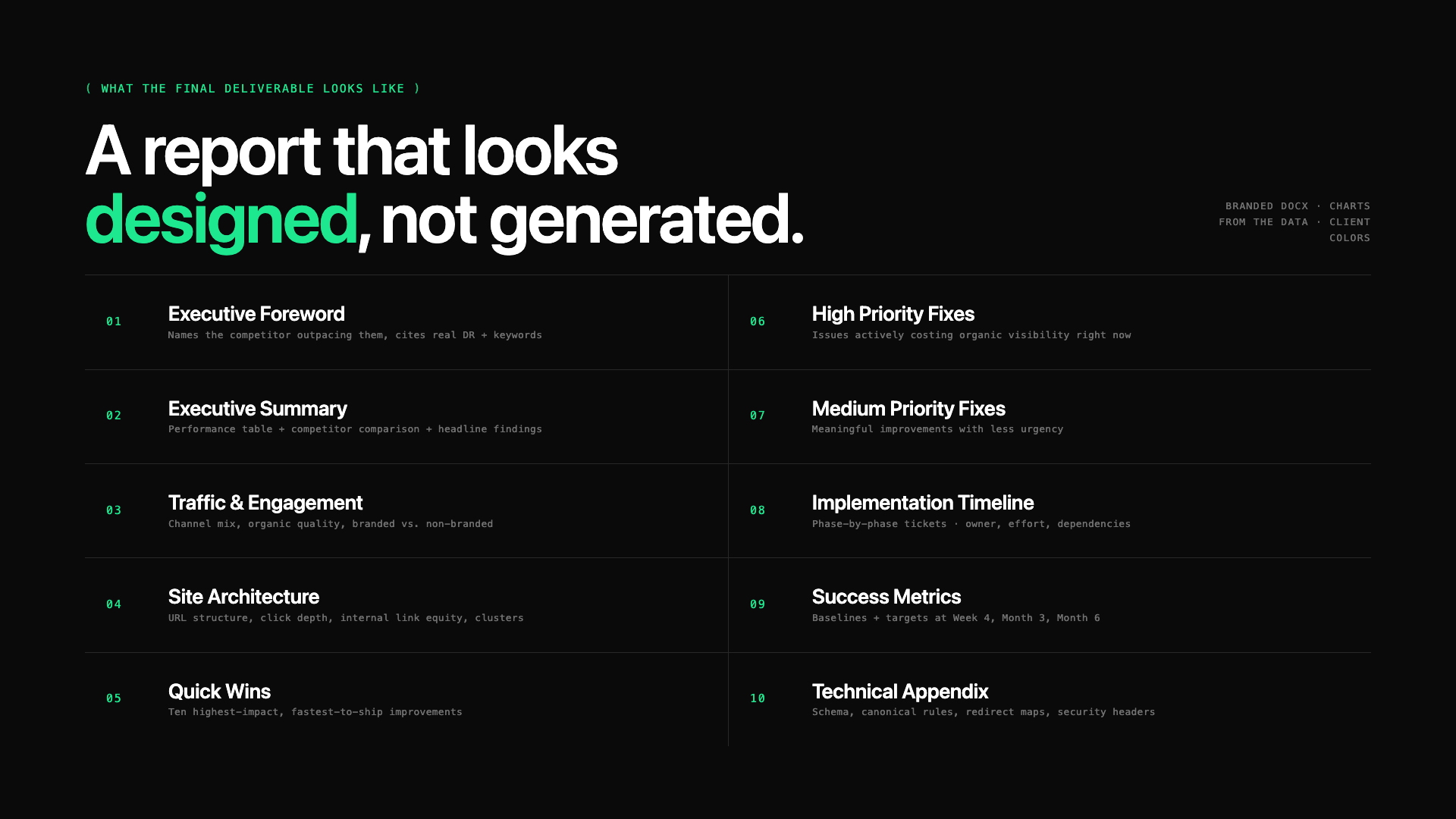
An Executive Foreword opens the document with two short paragraphs that show immediately that we understand the client's specific business, competitive position, and organic search situation. Not a generic intro, but something that names the competitor outperforming them, cites their actual DR and keyword count, and states clearly what the audit will help them fix.
An Executive Summary follows with a current performance table (clicks, impressions, CTR, position, DR, organic keywords, referring domains), a competitor comparison showing where the client stands relative to three or four key organic competitors, and a brief summary of the most important findings.
The Traffic and Engagement Overview covers the full picture from GA4 and GSC: channel breakdown, organic engagement quality, period-over-period trends, branded vs. non-branded split. Written as interpretive analysis, not a data recap, but an explanation of what the numbers mean for this specific business.
Site Architecture and Internal Linking follows, assessing URL structure and hierarchy, click depth, internal link equity distribution, topic cluster organisation, navigation, and subdomain decisions. If the architecture is sound, we say so clearly and explain why. If it has problems, we describe them with specific evidence and recommendations.
Quick Wins gives the client a table of the ten highest-impact, fastest-to-implement improvements from the audit, each specific enough to act on immediately and each tied to a primary Google ranking factor.
High Priority Fixes and Medium Priority Fixes are the core of the report. Each issue has the three-part structure described above. High Priority covers issues actively costing the site organic visibility or creating technical barriers to crawling and indexing. Medium Priority covers meaningful improvements with less urgency.
The Implementation Timeline translates everything into a phase-by-phase task list specific enough to create development tickets from. Each row names the exact task, which issue it references, who owns it (the client's dev team, their content team, or us), the estimated effort, any dependencies, and implementation notes.
A Success Metrics Dashboard establishes baseline values and targets at Week 4, Month 3, and Month 6, so progress can be tracked against the audit findings over time.
Finally, a Technical Appendix contains all the implementation detail that would clutter the main report: schema markup code customised to the site, canonical tag configuration rules, redirect maps, security header examples. Every issue with a technical component references its corresponding appendix entry.
To see what the final output looks like, meaning the actual report we conducted for our client, please see this document. It has been anonymised due to the NDA we signed, but I believe it includes enough information to give you the full picture.
How other SEOs can build a similar workflow
The workflow is replicable. Here's what you actually need to get started.
For the MCP connections, you'll need Claude Desktop installed, and then to set up MCP server configurations for your data sources. The GSC MCP server, GA4 MCP server, and Ahrefs MCP server all have public documentation. The setup is a JSON configuration file; once it's in place, those connections are live in every Claude Desktop conversation.
For Sitebulb, until their MCP is live, you can run your crawl with JavaScript rendering enabled and export the "All Hints" report as XLSX. This is the file that gets uploaded into the Part 1 conversation. The richer your crawl settings, the more useful the export, so make sure you're crawling with a realistic user agent and that your crawl depth covers the full site rather than just the top few levels.
For the skills, the simplest path is to take an existing SEO audit report you're proud of, share it with Claude (either as a Google Doc link or a DOCX upload), and ask Claude to create a custom skill for generating similar reports.
Claude will analyse the report's structure, identify the section patterns, extract the formatting conventions, and produce a skill that can generate reports following the same approach. The skill improves with each real-world audit it runs; the more specific you make the issue format, the writing rules, and the output structure, the more consistently the reports hit the standard you want.
For the two-conversation architecture, the key is that the intermediate file is complete and well-structured before you move to Part 2. The intermediate file should contain every section fully written, all tables populated with real data, and chart data formatted in a way that Part 2 can render.
If Part 1 produces a thin or incomplete intermediate file, Part 2 will produce a thin report. The quality of the final document is determined almost entirely in Part 1.
What changes when Sitebulb releases its MCP server
Sitebulb has an MCP server in development. Once it's available, the workflow will get meaningfully more streamlined.
Right now, the Sitebulb data enters the workflow through a manual step: run the crawl, export the "All Hints" file, upload it to Claude. That's not a significant burden, but it's a step. When the Sitebulb MCP server is available, Claude will potentially be able to access crawl data directly, querying specific hint categories, filtering by severity, and pulling URL-level data for specific pages, without any manual export step.
That change matters for a few reasons beyond convenience. Direct MCP access would allow Part 1 to query the crawl data more precisely, pulling only the highest-severity hints for the initial analysis and drilling into specific categories as needed, rather than working with a flat export of everything at once. It would also make it easier to cross-reference crawl findings with live data from the other MCP sources mid-analysis rather than after the fact.
More speculatively, it opens up the possibility of incremental audits: instead of running a full crawl and audit from scratch every quarter, you could query the Sitebulb MCP for changes since the last crawl and produce a progress report that tracks which issues from the original audit have been resolved and what new issues have appeared.
That's a different kind of deliverable and a more sustainable cadence for ongoing client relationships.
I'm looking forward to testing it when it becomes available. The current workflow with the "All Hints" export already works well, but direct MCP access would make the technical layer as seamless as the performance data is today.
Final thoughts
The reason this workflow produces better audits isn't that Claude is doing something a skilled SEO couldn't do manually. It's that it removes the friction that causes manual audits to cut corners.
When pulling data from GSC means switching to a browser, downloading a CSV, uploading it to a spreadsheet, and formatting it before you can read it, you do less of it. When writing issue descriptions means opening a separate document, copying numbers from three different tabs, and hoping you remember the context, the descriptions get shorter and less specific. The workflow exists to eliminate those micro-frictions so the analysis can be as thorough as the methodology demands.
Sitebulb is the layer that makes that thoroughness possible at the technical level. The performance data from GSC and GA4, the third-party context from Ahrefs: all of that tells you what's happening to a site's organic performance. Sitebulb tells you what's happening on the site itself. And once you have both in the same working environment, the connections between them become obvious in a way that neither source reveals alone.
That's what a complete SEO audit actually is: not a list of issues found by one tool, but a coherent picture assembled from every available signal. Getting there reliably, at a consistent standard, across every client engagement: that's what this workflow is built for.
TL;DR key takeaways
💡 Fragmented data, not lack of skill, is what makes most SEO audits fall short - bringing GSC, GA4, Ahrefs and Sitebulb into one Claude Desktop workspace lets you see the connections between them.
💡 Sitebulb's "All Hints" export is the technical foundation: it connects technical issues to performance data, calibrates severity against real business impact, and exposes template-level problems a page-by-page review would miss.
💡 Splitting the audit into two conversations - data collection and analysis, then report generation - keeps the context window clean and the final document high quality.
💡 The workflow is replicable: set up MCP connectors for your data sources, export the Sitebulb crawl with JavaScript rendering enabled, and build a custom skill from an audit report you're proud of.
💡 A Sitebulb MCP server is in development, which would remove the manual export step and open up precise, incremental audits. You can join the waitlist for the MCP here.

Dragan is an SEO, AI search, and growth strategist who helps SaaS companies, e-commerce brands, and digital platforms turn organic visibility into sustainable business growth. He works closely with Rock The Rankings, a growth-focused B2B SaaS SEO agency, and is the co-founder of SimpleTestimonial, a customer testimonial platform that helps businesses collect, manage, and showcase customer feedback. His work spans technical SEO, site architecture, programmatic content, Answer Engine Optimization (AEO), Generative Engine Optimization (GEO), and AI-powered growth systems.

Related Articles
 Technical SEO Audit Reports: How to Turn Them into Client Retention Tools

 Your SEO Audit Can Now Answer Back: Introducing Sitebulb MCP


 The Brand-First Technical Audit: Why Your Entity Health Is a Technical SEO Problem

 Sitebulb Desktop
Find, fix and communicate technical issues with easy visuals, in-depth insights, & prioritized recommendations across 300+ SEO issues.
- Ideal for SEO professionals, consultants & marketing agencies.
 Sitebulb Cloud
Get all the capability of Sitebulb Desktop, accessible via your web browser. Crawl at scale without project, crawl credit, or machine limits.
- Perfect for collaboration, remote teams & extreme scale.