

How To Automate Content Brief Creation For B2B With Claude
 Valeriia Verheles
Published September 22, 2026
This week, we're grateful to Valeriia Verheles who shares how she built custom Claude skills with MCP to automate B2B content briefs.
Content is an essential part of any SEO strategy, and AI is a great option to speed up routine tasks. Claude and Model Context Protocol (MCP) can be your best friends for automating daily workflows. You probably already know this. But what if I told you that relying on Claude’s ready-to-use automation skills may not bring you the expected results and could even harm your strategy?
I know that isn’t what you want to hear at the beginning of an article. But let me share my experience and explain why I believe this.
Sitebulb now has an MCP! So you can query your Sitebulb data and include it in automated tasks right from your AI assistant.
Contents:
Why the ready-to-use Claude skills might not work for you
When I got a request for the content strategy from my new client in a very specific B2B niche, I decided to put Claude and its skills to the test. I heard a lot of stories and read many case studies on LinkedIn about how people automate their routine and “replace an SEO agency with a Claude subscription”. So I was determined to join that category of people who are a step ahead with AI, and partly automate my working process.
I got an MCP from SE Ranking and bought a Claude subscription to start my acquaintance with its existing skills. By using MCP, Claude gets direct access to SE Ranking’s database, so you receive actual SEO data when generating your brief or analyzing how strong your competitors are.
This is an example of Claude using one of SE Ranking’s readymade skills:
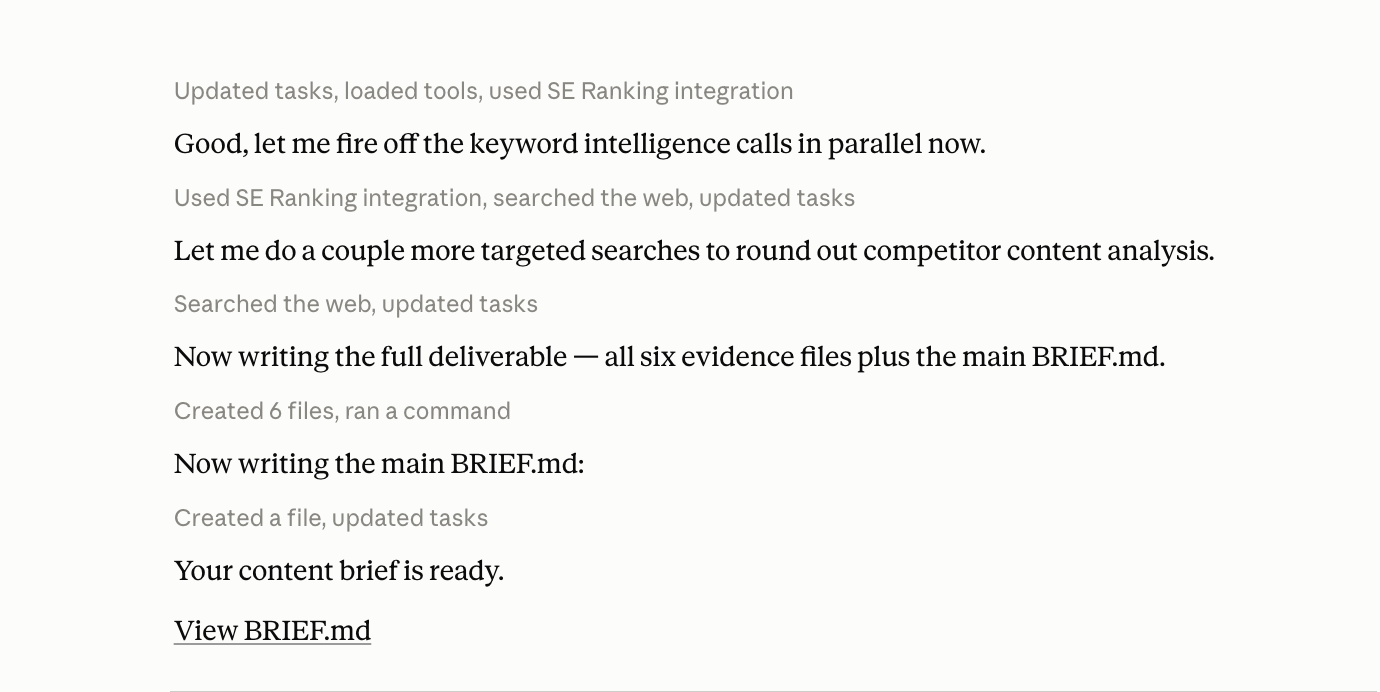
As someone who was skeptical from the beginning, I was truly surprised by its capabilities and final deliverables.
However, there is a huge “but” when it comes to these ready-to-use skills:
they rely on a GENERAL SET OF RULES.
Most skills are designed around broad requirements. While their rules are technically correct, they aren’t tailored to your specific project, niche, business model, strategy, or the exact type of content you want to rank.
Yes, you can receive a content brief, but it will be generic. If you have a project in a very specific niche, as my client was, or if your content strategy is focused on long-tail queries, a generic brief won’t work for you. It will be ineffective and won’t bring any results.
Editor’s Note: Sitebulb's ready-to-use AI skills are designed to interview you when you use them, to give your AI assistant that all-important business context. Learn more about Sitebulb’s AI Skills.
That was the exact moment when I realized that AI automation wasn’t as simple as the LinkedIn posts claimed. So, I decided to build my very first custom automation with AI.
What do you need to know before automating?
You will go through a lot of edits. And that's normal. No matter how perfectly you describe all the fields for the brief, during the process you will understand that some points interfere with you, some of them are missing, and you will constantly want to improve, remove, or add something. That's absolutely normal.
So don't plan to do everything perfectly from the first time - most likely it won't work. To minimize the number of edits, I would advise you to decide what information in the content brief can be constant and what is dynamic. I came to this only empirically, and I think it would save me a lot of time if I did it at the beginning.
Editor’s Note: Just starting out with building your own AI Skills? Check out this tutorial with Tory Gray.
Сonstant information in the brief is something that can be described well once and laid as a foundation. Just tell AI this is the base and ask it not to reassemble something new every time. This will significantly save you time and nerves, because:
your capacity limits will not expire so quickly
all content briefs will maintain the same structure and sequence
Here is my example of static data for a commercial content brief:
Tone of voice and copywriting rules (including EEAT and trust signals the page needs)
Readability and formatting (where we described the criteria for content and its structure)
Meta tag generation templates (make sure that you described all types of templates for each type of content piece)
Keyword density and placement (including primary and secondary keywords)
Visual asset requirements (including requirements for alt tags, format, size, names etc)
Dynamic blocks are the information that the AI needs to research by itself, create based on the data provided, or define according to the research. Definitely, the number of fields can vary, but here is my example of dynamic data for a commercial content brief to inspire your own:
1. General SEO Specifications
Topic
Target Audience Segment
Target URL Slug (if we rewrite)
Target Word Count
Primary Keyword
Secondary & Long-Tail Keywords (if needed)
Core Entities
2. Target Audience, Positioning & Intent
ICP & Personas
What they already know
Core Pain Points to Address
Value Proposition
How to highlight our product
Core Message
Search / User Intent
After establishing this, you're ready to approach the most interesting part - creating your own skill.
How to create a skill for a B2B content brief with Claude and MCP
Prompting
To create a skill, download the desktop version of Claude. Open a chat in the Cowork section and ask for help building a new skill. Your prompt should sound something like this:
Help me create a new Cowork plugin. I want to have the [write what your skill should do] using [name of tool from which you buy MCP] MCP
Don’t worry about forgetting something; Claude will interview you about your future skill. For example:
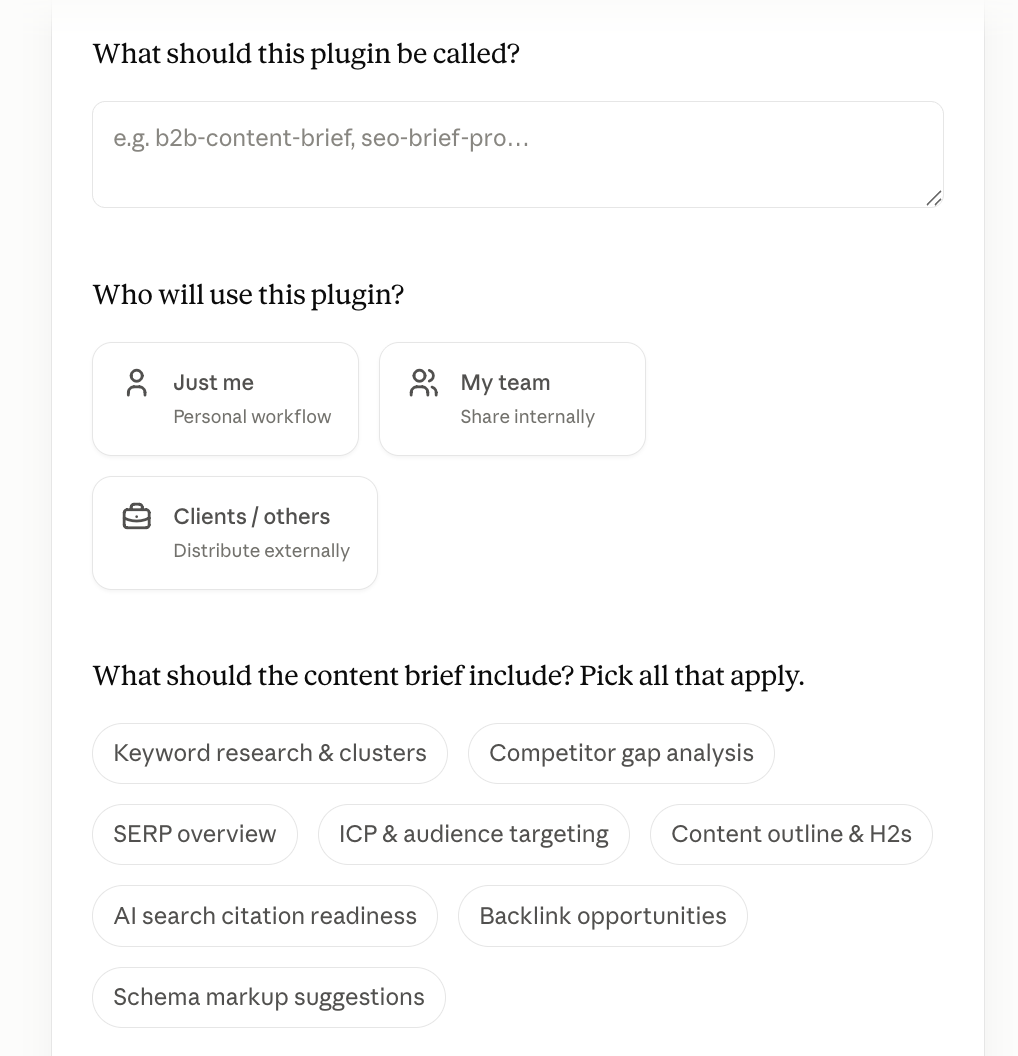
Give a context and set up the structure of the brief
After this, you need to set up the structure of the brief. If you consider creating a skill specifically for one project, it is better to add your main strategic documents and give the context from the beginning. That could be:
goals and what you want to achieve
target audience
semantic core
analysis of current content or at least a list of pages
If this is meant to be a universal skill for all your b2b projects, just set a rule requiring the AI to ask you for context before creating a brief.
Since you already understand the dynamic and static content, describe to Claude all static content requirements and upload the existing content brief template as an example. Once the template is uploaded, ask AI to use it as a base for all your future commercial b2b content briefs.
Note: I recommend creating separate skills for commercial content briefs and informational blog posts.
Data-gathering steps for B2B content brief creation
Then we need to define the main workflow of SERP analysis and data collection for each topic. Mostly it depends on what points you choose at the Prompting stage, but, of course, you can customize it entirely to your needs.
Just describe your typical steps, which you do manually when creating a content brief; no need to figure out something overspecial - start with the basics.
Here's how I set it up.
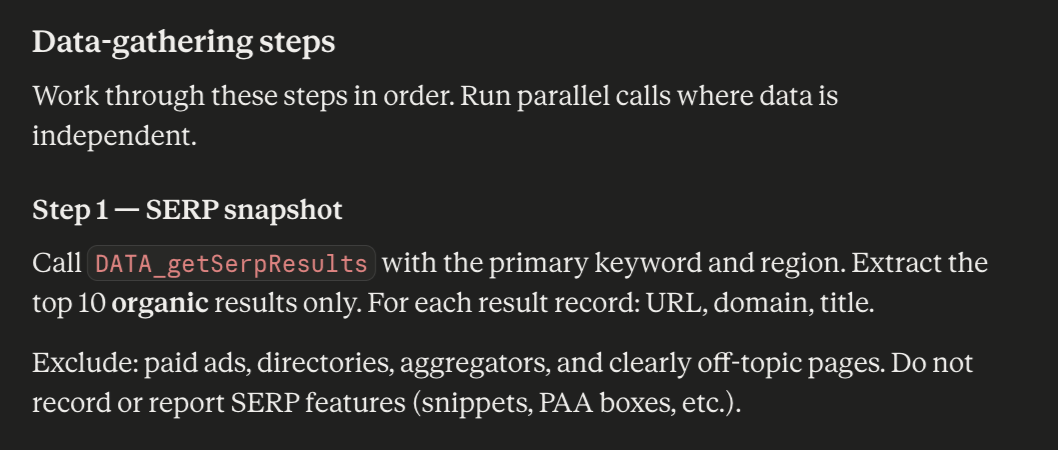
Step 1. SERP analysis
While describing the process, be as precise as possible. If you have a specific target country - name it; don't just write, "analyze the competitors";write:
Analyze the top 10 SERP results in the USA], filter out irrelevant search intent (forums, B2C sites, aggregators, social networks), and keep only commercial pages of our direct B2B organic competitors
This is how it looks inside the skill:
Step 2. Length of the content
Based on the competitor’s data, ask AI to count the average number of words and put it inside the content brief.
Step 3. Keyword enrichment
You can provide full semantics for the content brief by yourself and skip this step. But if you don’t have it and need help, ask Claude to use SeRanking MCP (or some other SEO tool) to expand the semantics with similar and related keywords; that will allow you to get secondary keywords and core entities.
Remember - be as precise as possible; don’t ask to give you all similar keywords - that will be tons of data. Give a specific query up to your topic:
Using [name of tool from which you buy MCP] MCP, find 10 keywords similar to [“your seed kw”] in the US, volume 100–50, KD under 10. Show keyword, volume, CPC, difficulty, intent.
Note: all keywords must be manually checked, especially if it’s a very specific b2b niche.
Step 4. Content gap and strategic wedge
Based on competitor analysis, identify:
what angle or subtopic none of the top competitors are covering well or not covering at all
how the client's product/service connects to that gap
how they are positioning themselves inside the content and among the market
Having this data will help you to identify the gap and define the direction for your own content, making it really valuable and useful for your customers.
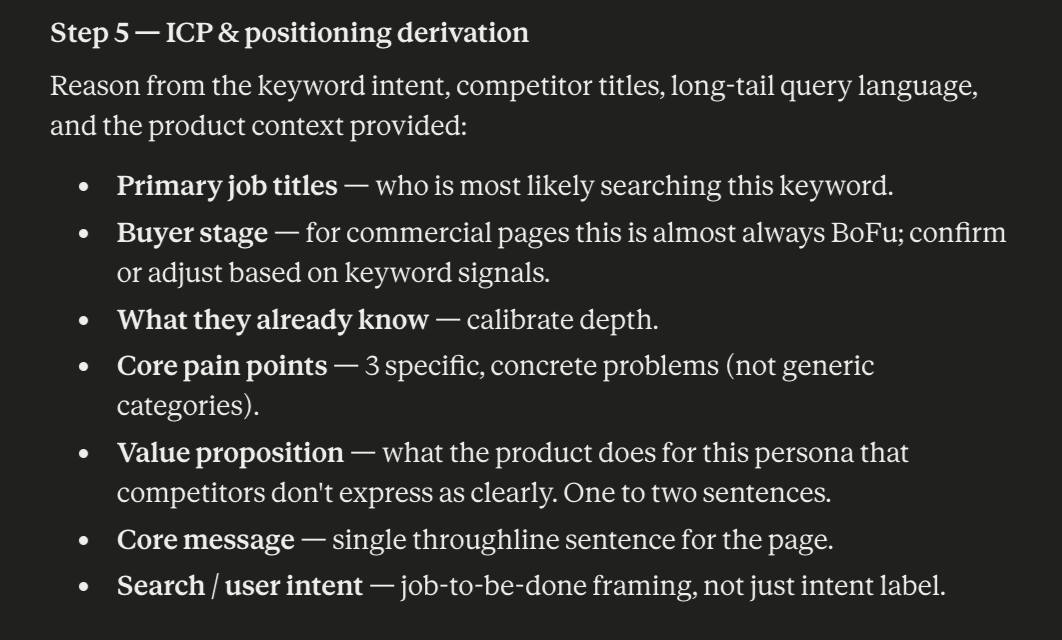
Step 5. ICP and positioning
As for me, this step is one of the most important. People don't need information they already know; they need insights others aren't providing. We don’t just have to write the text; we need to understand who will be googling those queries, what their pain points are, how we can help them, and stand out from our competitors at the same time.
This is exactly where you can add value and hook your audience. So, here is my example of what exactly I added to my briefs for commercial b2b landing pages:
Step 6. Page structure
The last of the data-gathering steps is preparing a structure and visual assets for the page. The main thing to emphasize is no need to write beautifully; write clearly. You just need to describe how you want the page structure to look.
When I created the skill, I just briefly described where elements should go and in what order; here is how my query sounded:
Block 1: Hero H1 + Visual Concept, Sub-headline + Primary CTA: Request a Demo
Block 2: Immediate Social Proof & Capabilities Match Validate credibility + propose a visual
Block 3. Show the Core Capabilities and How It Works
Block 4. Name our strong sides and benefits, propose a visual + add a short relevant CTA
Block 5. Technical Specifications
Block 6. Final Conversion Section with a primary CTA Button
Set up r ules for Claude
The final stage in creation is general rules for working with Claude. Like any AI, it can also hallucinate and make up non-existent facts, so be sure to give it some basic rules:
Do not invent keywords and their search volume yourself
Do not create your own hypotheses, but rely only on facts and justify them
Do not start work on the brief until specific data is provided
No keyword volume or KD columns anywhere in the brief
No SERP features listed
No FAQ section (this template is for commercial pages)
ICP section contains only job titles, buyer stage, pain points, and value proposition — no industry vertical, no company size
Strategic Wedge is specific to this brief, not generic
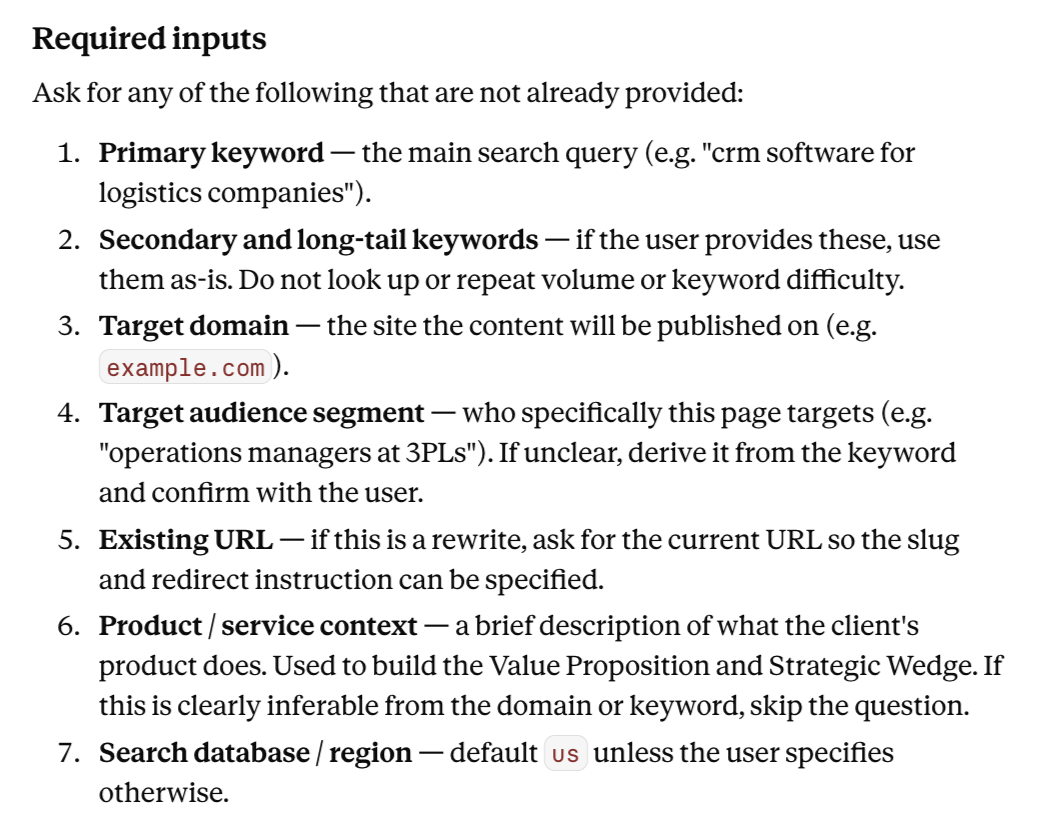
In addition, set up the basic fields to get started - what you have to provide to Claude so it can start working on the content brief. In my case, we do not proceed until I give at least the primary keyword, target domain, and audience segment.
This is how it looks inside the skill:
My congratulations; that was the hardest part. We are almost there!
How does it actually work in real life?
Once all parameters are set, all steps are described, the template is uploaded, and the rules for AI are detailed, you move to the final stage - testing. This is the last stage, but the most important and interesting.
Based on what you want the skill to do, AI chooses the main queries for launching the work. You can set up your own query, or AI will let you know how to trigger it by itself. It could be something like this:
content brief for [topic]
create a content brief
generate SEO brief for [topic]
brief me on [topic]
b2b content brief
write a brief for [keyword]
Note: from my experience, you don’t need to enter exactly the suggested triggers; the skill will launch even if you enter its name.
To start the test, write the name of your skill and the request. If you haven’t specified anything, Claude will start interviewing you with questions about the missing data (without which it cannot start working). For example:
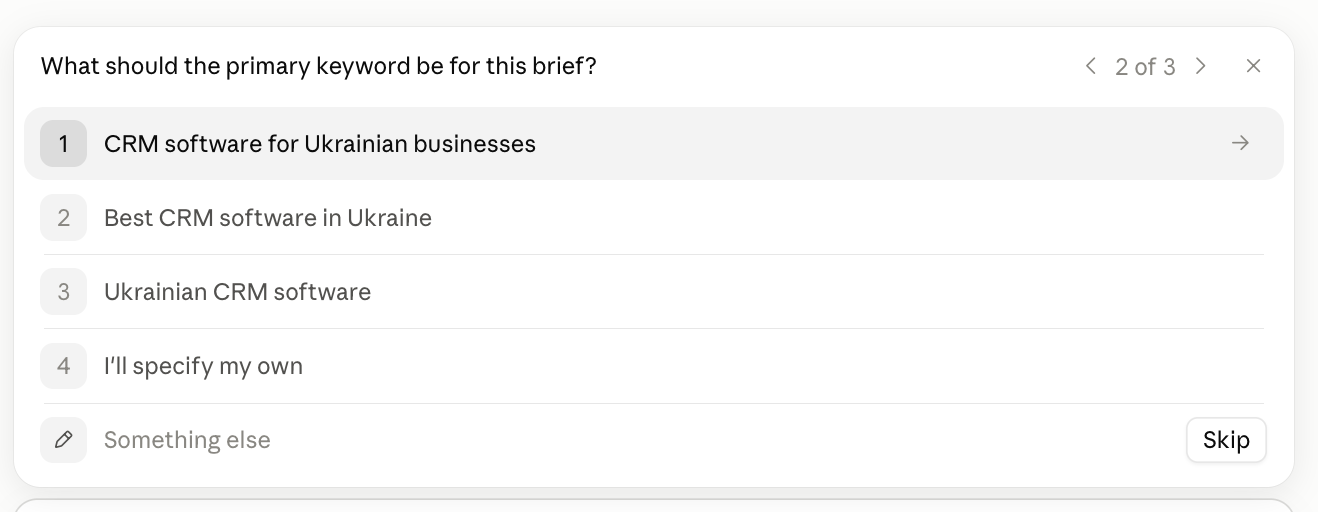
When the main data is gathered, the skill summarizes it and starts the workflow:
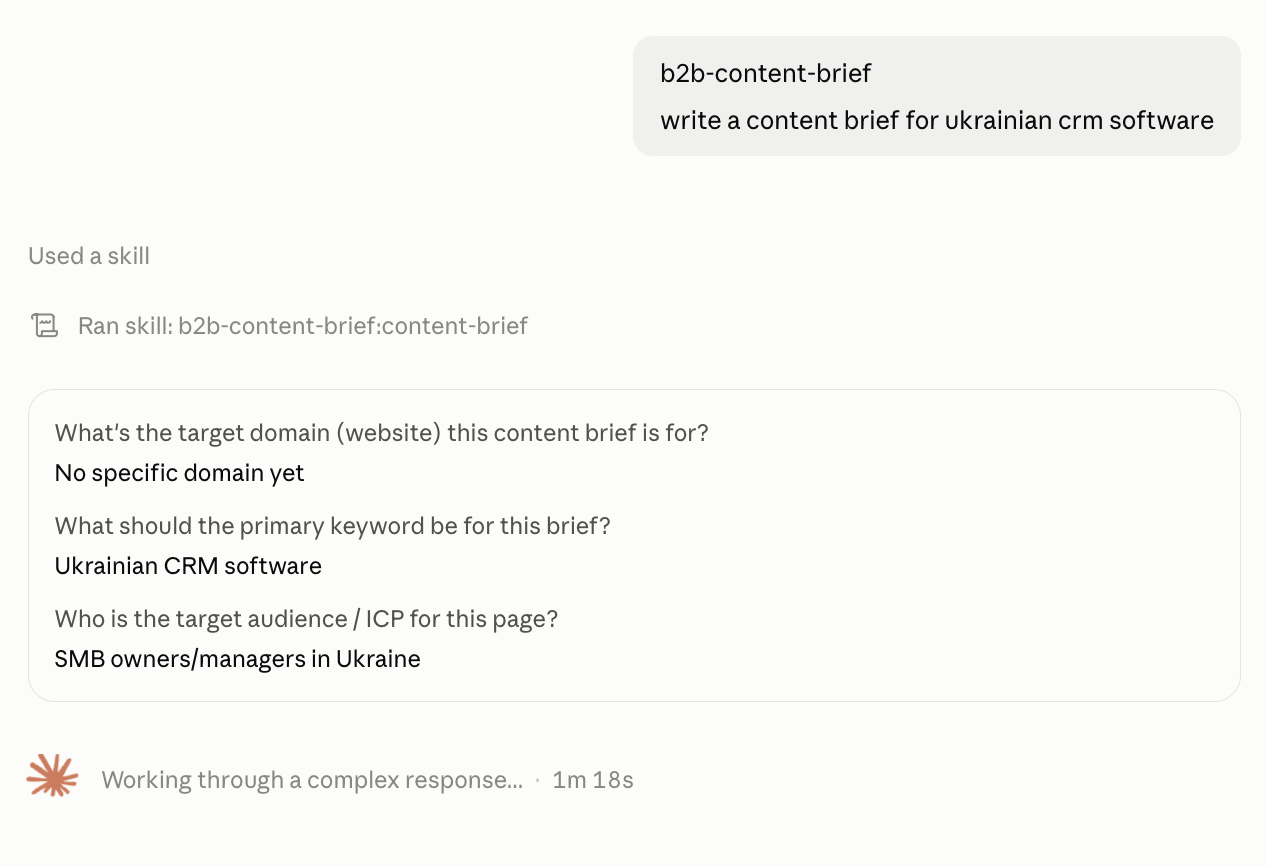
Since we have MCP from the tool, it will check if we have a connection to it. After establishing the connection, the entire analysis process begins according to our workflow, which we described above.
If during testing you understand that you want something to remove or add in the current skill, open the window where you created it and write what you want to change. Make sure that Claude understood everything correctly and run a new test.
One of the most annoying things during my tests was that Claude always does the same flow for existing landings and for the new pages. So I put additional rules for analyzing the existing pages, with a focus on current positions, backlinks, slug, content, meta tags, and page structure.
This is how it looks in action:
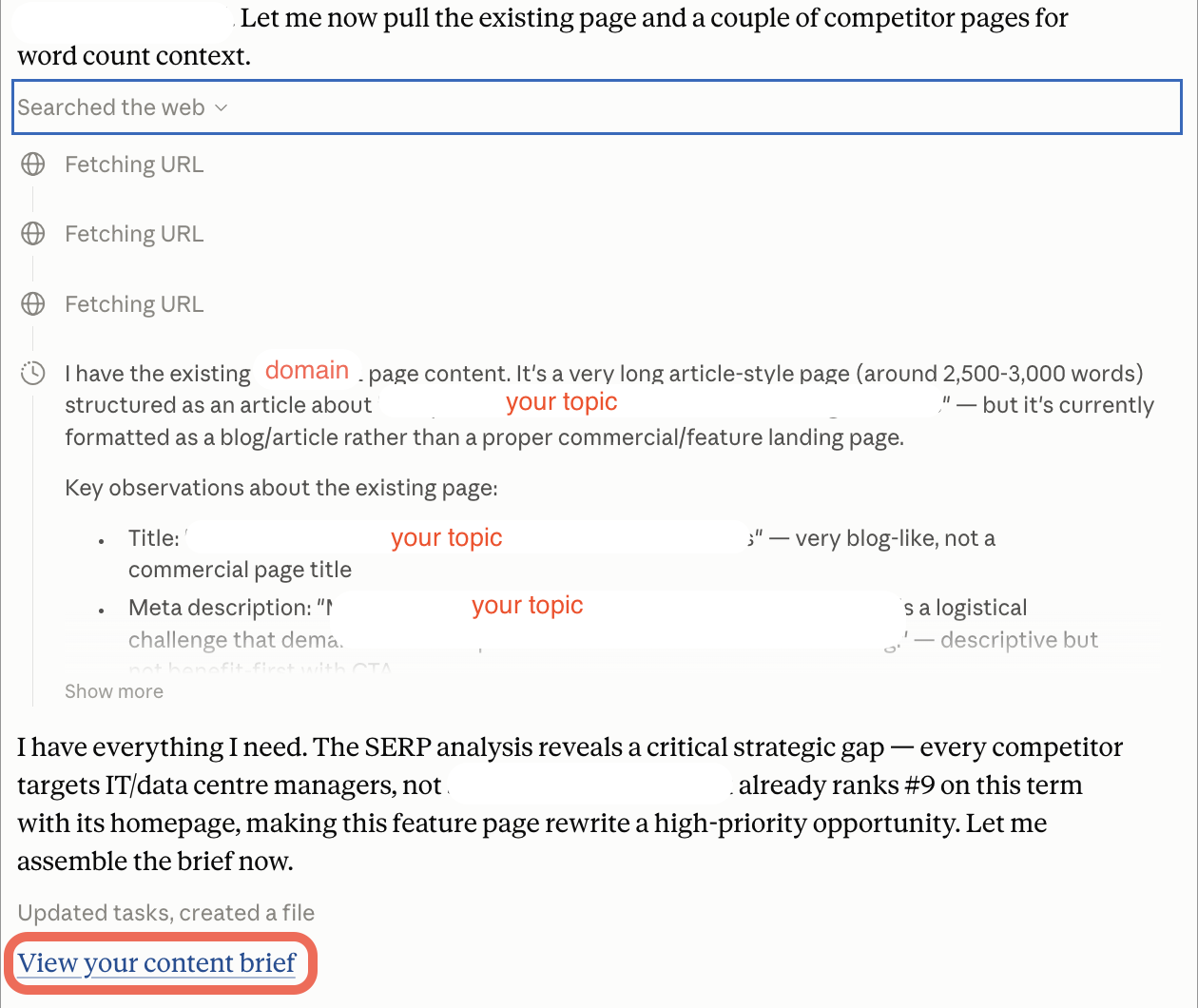
Starting from this point, Claude always asks me whether there is a new page or an existing one and gives me recommendations, including whether we need to configure a redirect or we can leave the current slug. In the final content brief, it will look like this:
Target URL | https://example.com/I-electrica-I-work-packages/ |
URL Slug | example.com-electrical-work-packages/ — keep as-is; no redirect needed |
Redirect Instruction | N/A — URL unchanged |
Content Type | Product feature landing page (Commercial intent) |
Search Intent | Commercial / Transactional — searchers are shipyard project managers or IT evaluators researching execution-management software for vessel electrical outfitting |
Recommended Word Count | 1,400–1,800 words |
The more tests you conduct, the more details you will take into account during the process. So, test as much as possible - the more unusual cases you will have, the better experience and skill you receive as a result.
And yes, now I can congratulate you - you created your own skill for automation B2B content briefing process!
Is it worth developing your own skill for a specific project?
The short answer is “Yes”.
Sounds like a huge amount of work? It is! But once everything is properly configured for your project, you can save a lot of time.
Before automation, I could spend 3-4 hours researching SERP and creating a content brief. Now it takes 15 minutes, plus 10 minutes to check the final document. My only limitation is Claude's capacity limits.
The main idea to keep in mind: don’t write content just for the sake of content and don’t automate the work process with skills if they are not tailored to your project; that doesn’t work.
To achieve meaningful organic growth, you have to invest time in the foundation, provide the right inputs, think strategically, and verify the AI's logic. Once you configure this system to align with your business goals, you’ll unlock a priceless assistant that scales your SEO efforts in the right direction and boosts your productivity.

Sitebulb is a proud partner of Women in Tech SEO! This author is part of the WTS community. Discover all our Women in Tech SEO articles.

Valeriia is an SEO Strategist with 10+ years of experience turning organic search into a profitable and self-sustaining growth channel. Focusing on product-led projects for B2B and B2C brands, she builds SEO strategies and teams from scratch, finds points of growth where no one else is looking, and architects SEO ecosystems that dominate both traditional search and Generative SERPs.

Related Articles
 Mapping a Site's Topical Focus with Sitebulb & Embeddings

 Webinar: The SEO Stack Has a New Layer, and It's Called MCP

 Building AI Skills for SEO: Where to Keep a Human in the Loop
 Sitebulb Desktop
Find, fix and communicate technical issues with easy visuals, in-depth insights, & prioritized recommendations across 300+ SEO issues.
- Ideal for SEO professionals, consultants & marketing agencies.
 Sitebulb Cloud
Get all the capability of Sitebulb Desktop, accessible via your web browser. Crawl at scale without project, crawl credit, or machine limits.
- Perfect for collaboration, remote teams & extreme scale.