

Building AI Skills for SEO: Where to Keep a Human in the Loop
 Jojo Furnival
Published September 8, 2026
When Tory Gray wrapped up her presentation and we moved into Q&A at the end of our recent AI Skills webinar, I closed the poll I'd been running since the intro. What we learned from that poll was that roughly half the audience had already built an AI Skill. The other half hadn't.
I wasn’t surprised by the split. Yes, the tutorial was designed for those that had never created a Skill before, but knowing the SEO community as the curious, experimental bunch that they are, I suspected that most of our audience had probably already given it a go.
Watching the session back, though, Tory spent much of the forty minutes not on the building but on what happens after you build one, and specifically on how far you intend to stand back from a Skill once it's running.
So here’s a recap of that tutorial: how to build an AI Skill, who’s responsible for it, important important security considerations, and whether AI is even the right tool for the job. Most of the insights are from Tory, who is incidentally one of the trainers on our free JavaScript SEO course, but I also waded in during the Q&A as someone who has built lots of Skills in both Claude and ChatGPT.
Contents:
Is AI even the right tool for this job?
Before anything else, Tory pulled the handbrake on the whole premise.
"If you're trying to check redirects, for example, are they 301s? Are they routing to the correct destinations? An LLM is not your tool." She hears this a lot, apparently: people describing redirect auditing as an AI job, when what they want is a crawler (hello Sitebulb).
Her point is that this isn't what the LLM does directly, so you can get a confident-looking answer from a process that never actually checked anything. If you want to verify redirects across a site, that's technical SEO auditing work, and there's already a tool for it. You don’t need to reinvent the wheel.
Her framing for this comes from Britney Muller: why use a blowtorch to light a birthday candle? It’s overkill. If you want a reminder to take a tablet, you don't need an AI process to send you a reminder. You just need a phone alarm.
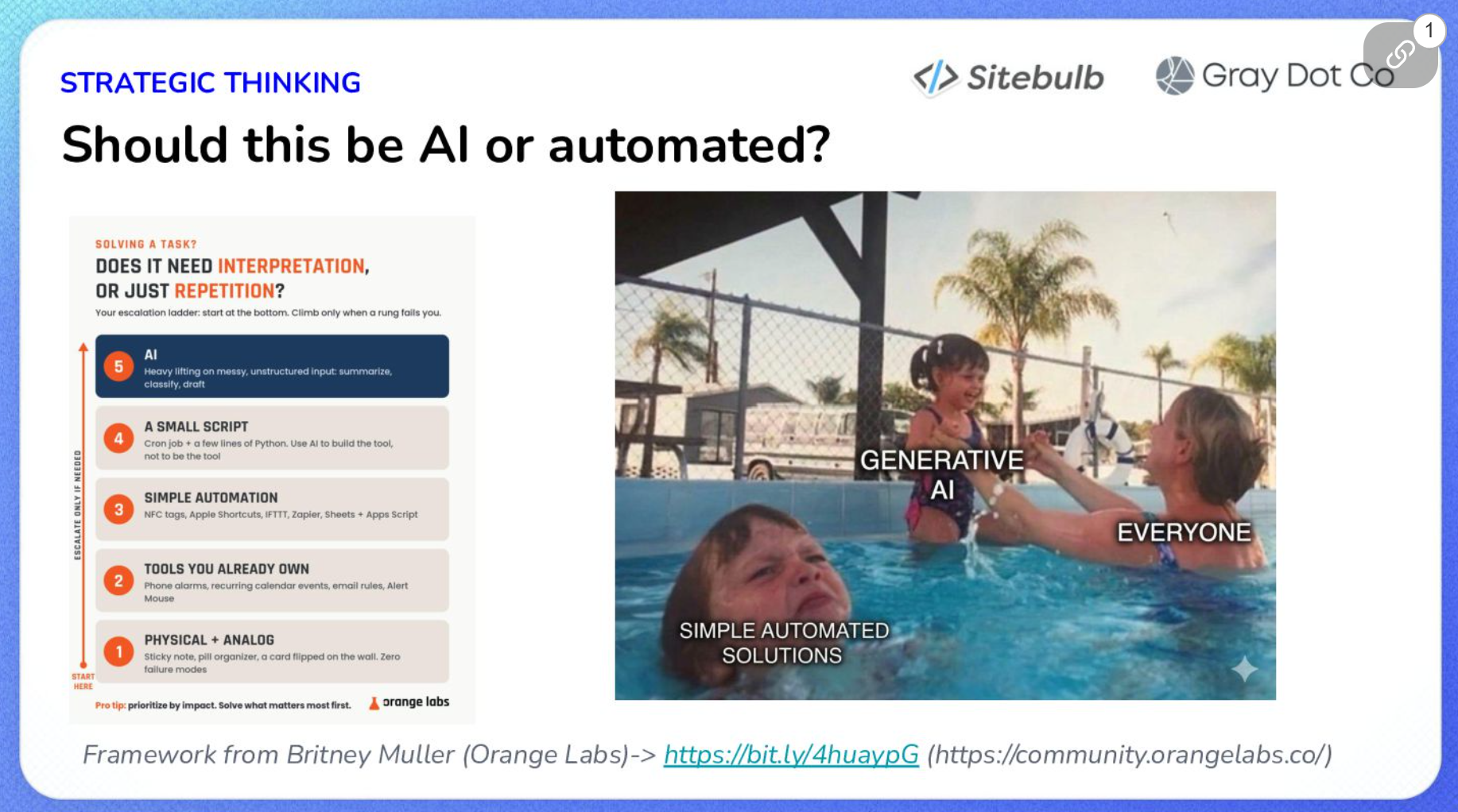
Where you might consider an AI assist is in making sense of messy, unstructured data, for example, synthesising client data in bulk, or producing an audit output.
Britney's own framework pictured above presents a few possible options:
Prompt it in a one-off conversation, with no process built around it
Use AI to build a tool that does the job properly
Use AI with a skill connected to an MCP, so it's working from real data
Don't use AI for this at all
Try to resist the temptation to get AI to do every little thing. A repetitive task that requires you to wrangle lots of data? Now that’s got AI Skill written all over it.
What actually goes in a Skill
Tory's build is four steps:
Write it
Save it
Test it
Refine it
I’d add 2 extra steps to that as well:
Keep testing it
Keep refining it
It’s an iterative process.
Tory suggests giving AI the following information when you ask it to create a Skill:
Purpose: What this Skill is for.
Audience: Who receives what it produces (even if it’s just you).
What you'll supply every time the Skill runs: The inputs it can rely on.
What it should do when you don't supply them, or when what you give it contradicts itself. Stop and ask, or carry on?
Whether it's allowed to skip steps, and at what points you want it to check in with you before continuing (the human review gates).
The steps themselves, in order.
The output format. Long-form text, a formatted document, a PDF, a spreadsheet, a branded client deliverable, whatever.
And don’t forget examples. Tory's advice is to provide example deliverables that already meet your spec, and to be generous about it if you've run the process enough times to have them. The model gets something concrete to compare its output against, rather than an abstract description of good.
What happens when an input is missing, and whether the skill may skip steps, are both really asking the same thing: when this thing hits something ambiguous, does it stop and ask you, or does it guess and keep going? That's crucial to include, because the AI’s default is always to continue producing an output—regardless of how it gets there.
Trigger, call, or invoke the Skill by asking Claude or ChatGPT to run it. The name doesn't need to be exact, it should work it out, and you can check by watching its workings. But to be 100% sure, you can also add it to your conversation using the + button.
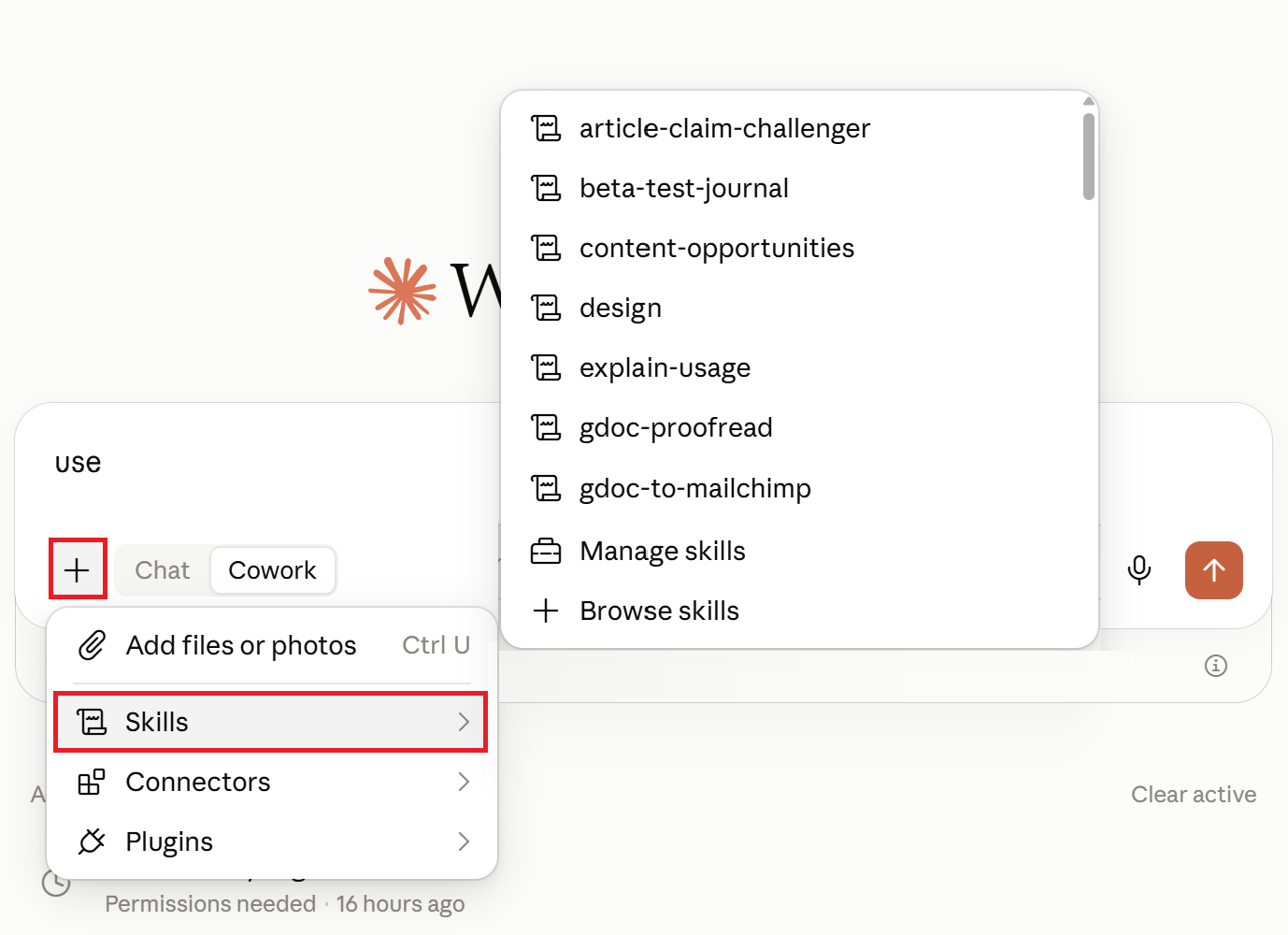
You can also connect one Skill to another by writing it into the Skill steps; one Skill finishes and hands off to the next.
Three things worth stealing from how she builds them (I heartily endorse the first two):
Collaborate with AI to write it. Tory says she's never written a Skill from scratch. She works with the AI to draft it, then reviews and tightens. Ditto.
Ask the tool what it needs. Her three prompts: what do you need in order to do this, what steps am I missing, and where are my strategic blind spots. You don't have to accept the answers but it might expose some weaknesses.
Get a second human on it. She and a colleague build Skills together, pair-programming style, and rate the joint output above what either produces alone, because they notice different things.
Decide how how much automation you’re comfortable with
Tory's own default is a human in the loop, put plainly: "that's generally what I prefer to do. Because I'm picky as heck."
The industry conversation tends to treat human-in-the-loop as a safety caveat and full automation as the destination. Tory treats it as a design decision you make per Skill, based on how much you care about the output.
She put the risk like this:
That’s the key bit: nobody bothered to check. If you're reading the output every time your Skill runs, a wrong answer costs you the same correction it would have cost in a one-off chat. The cost multiplies if the checking stops.
Which brings us to the story Tory referenced, the one that was heavily circulated on Reddit: A company was running a report built on analytics data, and made decisions on it for several months. Then someone checked, and found the AI hadn't bothered to fetch the data at all. The numbers had been invented the whole time. The process looked like it was working. Forget this at your peril!
One way to minimise some of the risk is to build a second Skill whose only job is to check the first one's work. Are these metrics actually accurate? Is the analysis based on real retrieved data rather than something hallucinated? She's explicit that this doesn't replace manual QA, it reduces the error rate on the runs nobody reads.

“Just remember it's AI. Mistakes happen. Hallucinations happen. Think of it like a junior SEO or an intern.”
The obvious objection is that a QA Skill is one more thing capable of hallucinating, and it is. Tory doesn't claim otherwise. But you're adding a second pair of “eyes” and that beats no eyes, plus you still read the work yourself sometimes.
What your connectors can actually reach
There is no official MCP for Google Search Console, which surprised a chunk of the audience. There are a few different community versions, plus third-party options like SEO Gets (which I use). So anyone pulling GSC data into an LLM through one of those community builds is potentially trusting work by some random on the internet.
Tory's questions for any connector, before you install it:
Who made it? Not just the name, but whether you trust them to know what they're doing and to understand the risks they're taking on your behalf.
What does it connect to? This one tells you what the thing is actually touching.
What could go wrong, and how fast could you fix it?
On the first question, her position is that official connectors from named companies (e.g. Sitebulb or SEO Gets) carry less risk than anonymous ones, because those companies are incentivised to keep them safe: their reputation is on the line, versus "Joe Schmo on the internet". This is Tory's argument, not Sitebulb’s obviously bias viewpoint, and honestly it’s just good sense.
Now, an obvious question but one that Tory reckons people are most casual about:
“Do you have permission to share this data on behalf of this client? I don't at Gray Dot Co. Not for all of my clients. For some, I do and for some, I don't.”
The reasons why you may not have permission are all recognisable:
Clients whose IT rules mean nobody outside the company gets property access at all. They export reports and email them over, because they're privacy-minded and locked down.
Clients whose IT team has approved a specific AI tool and not others. Her example: a client in the Microsoft ecosystem where Copilot is approved and Claude isn't. That's a restriction on the tool, not on the data.
Clients who simply don't want their proprietary data in any AI system, and have said so.
Her practical warning follows from that: don't add a GSC connector across your whole client roster if some of those clients haven't agreed to it.
On blast radius, she rates the Google Drive connector as considerably higher risk than a crawl-data one, because Drive holds proprietary client material and the exposure isn't only about someone reading it. Files get deleted. Files get overwritten. If you've been in this industry more than five minutes you've heard a story about an update that wiped a database, and the question worth asking in advance is what you'd actually do if that happened to a client folder.
For what it's worth, Tory used the Sitebulb MCP as her example at the low-risk end of the scale: if your site is publicly crawlable, porting that crawl data into your AI tool is high reward and fairly low exposure, because it isn't necessarily private information.
Two things I’ll add though, since it's our own connector:
That "if" is key: crawl data from an authenticated crawl or a staging environment isn't public, and neither are URLs carrying customer identifiers.
And the Sitebulb MCP is read-only, so it can't delete or overwrite anything, which massively limits what could go wrong.
Who owns this Skill in six months?
Tory's scenario is mundane and completely plausible: What happens if the person who built the Skill goes on maternity leave, or takes a great new job. Now who owns it? Who's responsible when it breaks? Who even knows how it was supposed to work?
"Literally just declaring an owner of that Skill goes a long way in ensuring that things are streamlined," she says.
Four mechanisms she recommends:
A named owner. Not a team, a person.
A change log the Skill maintains about itself. You can write this into the Skill's steps: as it evolves, annotate what changed, when and why. Your AI tool will do the record-keeping if you tell it to.
An export stored outside the AI. Skills get overwritten and erased by accident. A plain text copy somewhere the model can't reach means you can restore it.
QA on a regular cadence, which is where a QA Skill starts paying for itself.
In a larger agency, she'd split the responsibilities rather than stacking them on one person: someone accountable for QA-ing the delivered output, someone maintaining the Skill itself, and someone testing it against new model releases.
That last one came up because of something we've hit internally at Sitebulb:

“If you create a Skill with one model, and then it gets used by a different model at another time, it doesn't necessarily behave exactly as you're expecting.”
Tory added that models are better and worse at different things, so a model change might mean adding instructions to stop behaviour that breaks your specs rather than rewriting the Skill completely. Either way, a new model release is a reminder to re-test.
Start with something small and annoying
Ok, now let’s shake off some of that caution and think about what Skill you can build right now.
Tory’s answer to this is to "fix the things that bug you", for example, brand guidelines or tone of voice for social posting. Default AI output, she reckons, reads as "very masculine. Very kind of tech-broy." She isn't a tech bro, so she doesn't want to sound like one. A Skill that encodes ‘do this, don't do that, always do this’ (including, in her case, an Oxford comma every time) is one less thing to fix by hand.
My own version of small and annoying is this: we do a company show and tell every Friday, and because every night when I go to sleep my entire memory basically resets, I have no idea by Friday what I got done that week. So I built a Skill that runs on Friday mornings and tells me. It took no time at all. It's low stakes by design, which is exactly why I'm happy to let it run unattended because I ultimately decide what I want to share when it’s time for the meeting; and that's the judgement this whole article is about.
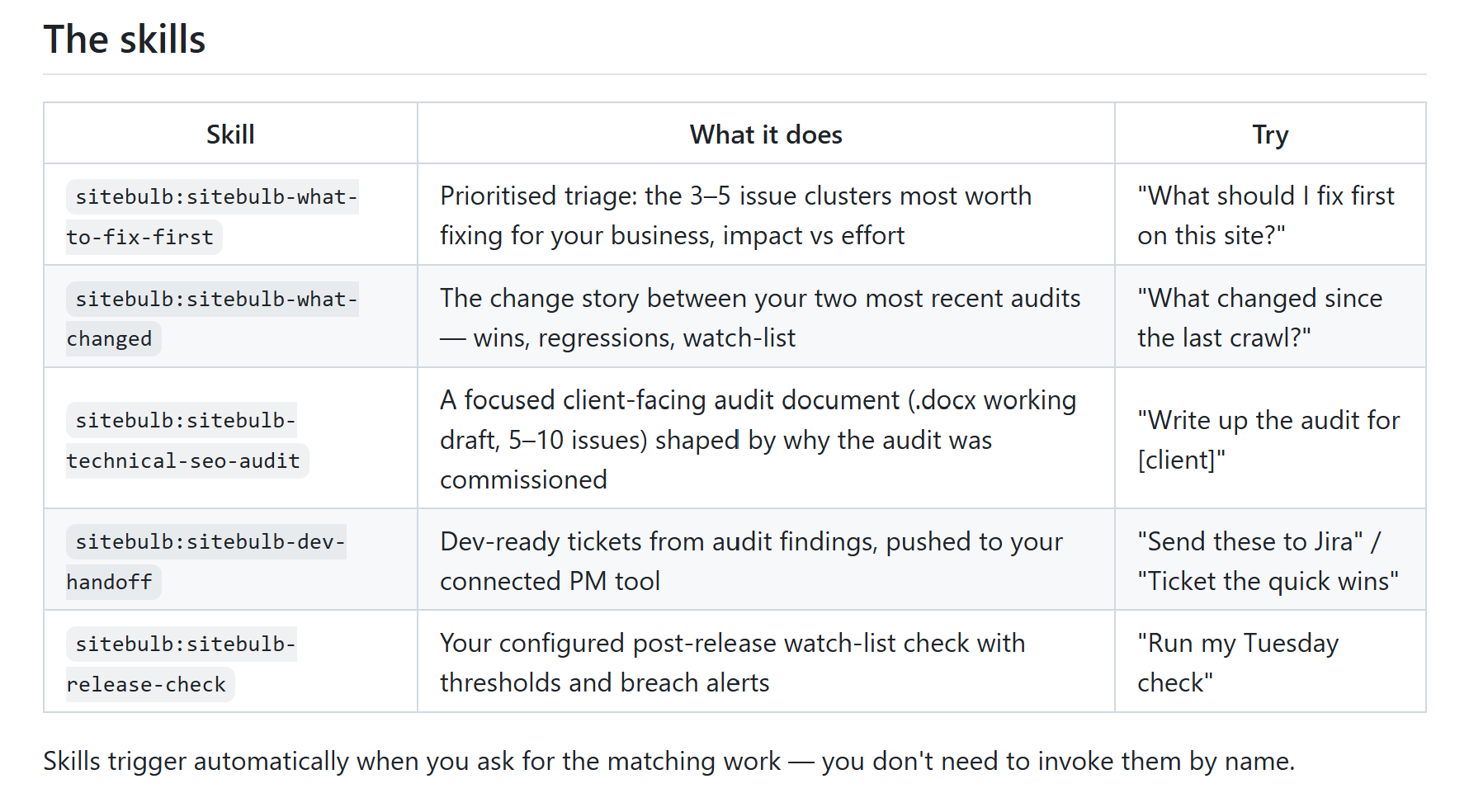
If you'd rather read a working example than build one, Tory pointed people at Sitebulb's published Skills on GitHub; check out the "what to fix first" Skill as a starting point. Her advice was to read through them and work out why each element is there, then think about how you'd tailor it to your own clients.
None of the caution outlined in this article is a reason not to start. It’s a reason to start small, proceed safely, and know which of your Skills you're checking and which you’re leaving alone. Tory's closing advice was the right note to end on:
“Breathe and go try some stuff and try and go a little bit more slowly than everyone's pushing you to do.”
TL;DR key takeaways
💡 Check the job isn't one a crawler already does better before you build anything. Redirect checking is not an LLM task, and every unnecessary Skill is something you'll have to maintain, QA and hand over later.
💡 The cost of an AI mistake scales with how far you are from the output. Decide per Skill how closely you intend to read it, and write the review gate into the skill rather than relying on habit.
💡 A Skill running unattended needs a QA mechanism. Tory's version is a second Skill that verifies the first one's metrics are real and its data was actually retrieved.
💡 There is no official MCP for Google Search Console, so every GSC connector is a community or third-party build. Check who maintains it, what else it can reach, and whether that codebase could change hands.
💡 Having a connector isn't the same as having permission. Client IT rules, approved-tool lists and data policies all sit upstream of what you're allowed to share.
💡 Give every Skill a named owner, a self-maintained change log and a backup stored outside the AI, then re-test it whenever the model changes.
Want the full session, including the five worked SEO Skill examples Tory walked through? Watch the webinar recording or come along to the next one, a panel discussion on the power of MCP in your tool stack.

Sitebulb is a proud partner of Women in Tech SEO! This author is part of the WTS community. Discover all our Women in Tech SEO articles.

Jojo is Marketing Manager at Sitebulb. She has 15 years' experience in content and SEO, with 10 of those agency-side. Jojo works closely with the SEO community, collaborating on webinars, articles, and training content that helps to upskill SEOs.
When Jojo isn’t wrestling with content, you can find her trudging through fields with her King Charles Cavalier.


Related Articles
 How To Automate Content Brief Creation For B2B With Claude

 Webinar: The SEO Stack Has a New Layer, and It's Called MCP

 How to Use AI to Build an SEO Progress Scorecard in Minutes

 Sitebulb Desktop
Find, fix and communicate technical issues with easy visuals, in-depth insights, & prioritized recommendations across 300+ SEO issues.
- Ideal for SEO professionals, consultants & marketing agencies.
 Sitebulb Cloud
Get all the capability of Sitebulb Desktop, accessible via your web browser. Crawl at scale without project, crawl credit, or machine limits.
- Perfect for collaboration, remote teams & extreme scale.