




 Wayne Barker
If you’re reading this on Sitebulb’s blog, odds are you understand the value of a good SEO audit.
Not an export-some-spreadsheet and send it to the developers kind of an audit. Audits that apply critical thinking. That take each project and not only spot the mistakes, but look at the bigger picture. Audits that then go on to get those recommendations implemented. If you're not bought into all this yet, maybe have a look at this SEO audits 101 guide first.
Many guides cover why you need to pay attention to site structure, internal linking, copy, site speed, and all that jazz. But what if you had knowledge upfront about the kind of SEO issues and quirks you might find on the site, based on the Content Management System (CMS) or platform it’s built on - before you press the big ol’ Crawl button?
That would be handy, right?
Knowledge of the platform a site’s built on and the technology used can make a world of difference when auditing.
Table of contents:
Why is a website's CMS platform important for SEO?
As some smart SEO once said:
“All platforms and CMSs are not created equal in the eyes of an SEO.”
Or something like that.
Some CMSs are better suited to certain types of websites than others, and some platforms are far more customisable than others.
Most platforms will also come with their own issues and constraints. These are all things that SEOs need to be aware of and take into consideration when doing audits.
As SEOs we don't always get input at the early stages of a redesign/migration/platform change, which is a bit of a pain in the arse - and another post entirely. So when a CMS is already in place (which is usually the case), we need to understand what we’re working with.
What are the most popular CMS platforms?
The data here moves faster than most people expect, so it's worth checking in with W3Techs fairly regularly if you want current numbers.
As of March 2026, here's where things stand.
WordPress is still the dominant CMS on the market by a massive distance, powering around 42.6% of all websites. Within the CMS-specific market (i.e. only counting sites actually running a CMS), that figure jumps to around 60%.
The interesting bit is the direction of travel. WordPress peaked at a 65.2% CMS share in 2022 and has been declining since. That's the first sustained drop it's seen in two decades. It's not a collapse by any means, but it's a genuine shift, and it's worth understanding what's driving it.
The short answer is Shopify, Wix, and Squarespace.
Shopify has grown from around 1.5% of all websites in 2020 to 5.1% now, cementing itself as the clear number two. Wix has followed a similar trajectory, sitting at 4.2%. Both are eating into the chunk of the web that WordPress used to own almost by default. The reason isn't technical superiority — it's simplicity. These platforms handle hosting, security, and updates without the user needing to touch any of it. For a lot of small businesses and online stores, that trade-off (less flexibility, more convenience) is an obvious win.
On the other end of the spectrum, Joomla and Drupal continue their long decline. Joomla has dropped to around 1.3% of all websites; Drupal is sitting at 0.7%. They haven't disappeared, and Drupal in particular still punches above its weight in enterprise. But the mainstream audience they once competed for has largely moved on.
CMS | % of all websites (W3Techs, March 2026) |
WordPress | 42.6% |
Shopify | 5.1% |
Wix | 4.2% |
Squarespace | 2.4% |
Joomla | 1.3% |
Drupal | 0.7% |
What does this mean for you? Practically, it means that if you're doing any volume of audits, Shopify expertise is no longer optional. It's now the second most common platform you're going to encounter, well ahead of where it was five years ago.
So let's crack on.
If you're doing an audit for a pitch, you're going to want to know what technology a potential client is using. You don't want to be pitching low if you know the technology is a pain in the arse to work with.
So.
How can you find out what CMS a website uses?
This is pretty simple, most crawlers and SEO tools (such as Sitebulb or Semrush) will tell you what CMS a site is using.
But often you’ll just want to do a quick check, so there are a couple of standalone tools that I like to use. They're also pretty handy if you're on the phone with a potential client, as you can grab the data fast.
BuiltWith
It feels like Builtwith has been around forever, and for a long time it was my go-to tool.
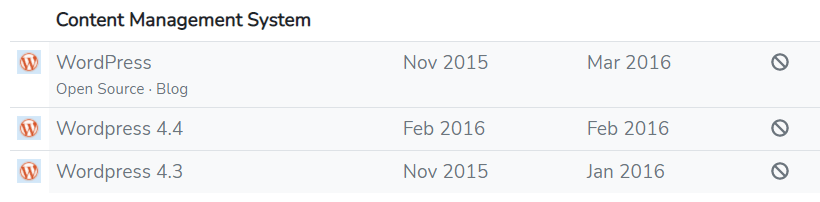
To find out what CMS a site is using you need to head over to the homepage and bang in the domain.

Click lookup, and hey presto.
Wappalyzer
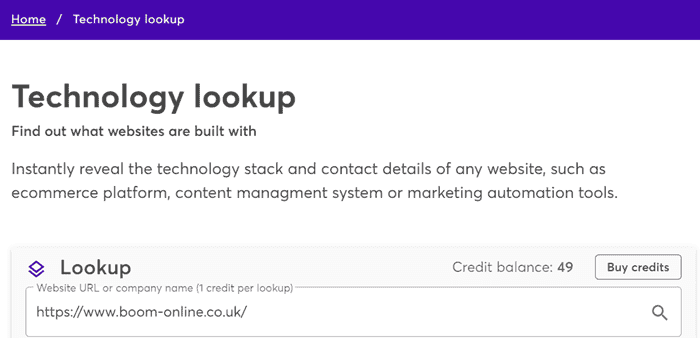
Wappalyzer is an awesome tool - to be honest, I like it better.
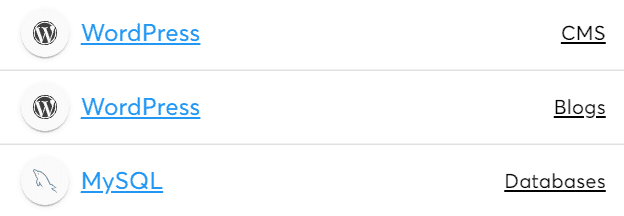
Head over to the home page and drop the URL of the site that you want to check, and off you go.
Bosh.
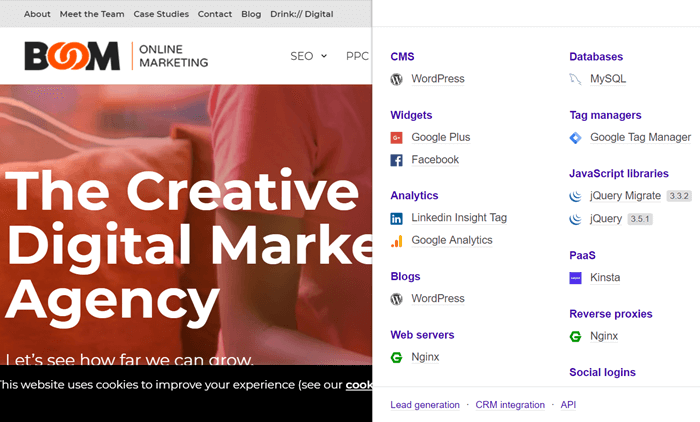
Wappalyzer also has a chrome extension that's much more user-friendly than the BuiltWith one.
Manual link structure analysis
What if you've run out of credits on one of the above tools and don't have the budget to pay for some? Are there other ways you find out what CMS a site is using?
There sure is. Pretty much every CMS has a unique link structure that can help you identify what a site uses.
Here's a couple of simple checks that you can manually perform by looking at the page source code.
WordPress
Dig around for this kind of structure:
website_name/р=8435
Joomla
You are looking to unearth something like this:
website_name/content/view/1/896/
Admin login URLs
Most popular CMSs have a specific admin URL that helps you identify what a site is using.
All you need to do is add the following after the name of the site.
WordPress
/wp-admin/
Or
/login/
Or
/wp-login.php
Joomla
/administrator/
OpenCart
/admin
Drupal
/user/
This doesn’t work every time, however. More security-conscious sites may have disabled these to add a site-specific one.
For example, on the Boom site, you can try and add one of the variations:

But that’ll just lead you to the 404 page.
There are a bunch of other ways that you can locate CMS information, including (but not limited to):
In the robots.txt
In the source code itself
In the footer of the site
Now you know how to find out what CMS a site is using, you can dig a bit further. Knowing a site is apparently running on WordPress - or whatever - is great, especially since not all CMSs play nicely with all technologies.
What about the wider tech stack?
Beyond the CMS, it’s crucial that you know what other technologies are being used. The earlier you identify this, the more pain it can save you further down the line.
For example, a site I recently worked on has WordPress running and uses Nuxt.js, Vue.js and Hammer.js (JavaScript frameworks) . What should have been simple technical fixes to apply became a massive, time-consuming project. The fixes just weren’t worth the rewards. A new site with new technology is on the cards instead.
So let's dig in.
How to find out what technology a website is using?
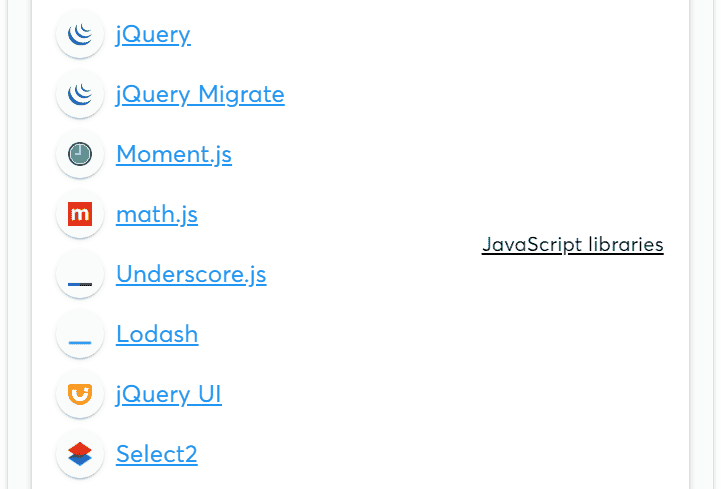
Wappalyzer
Yeah, we mentioned Wappalyzer earlier, but it's worth mentioning again, seeing as it's so damn good.
Simply follow the same instructions as before to uncover other technologies being used.
Sitebulb
It would be amiss for me not to mention Sitebulb here. Not because I’m writing on their site, but because I use it pretty much every single day and have for years (cheque in the post, please fellas).
When you run an audit, Sitebulb will flag all the technologies it comes across.
Sitebulb might not be the ideal tool when you’re doing things on the fly, but it's excellent for an in-depth dive as part of a more extensive audit.
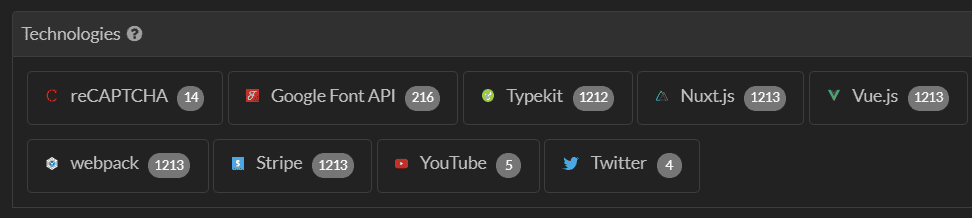
Handily you can also click on the number to the right of each technology and see what pages it’s being used on.
This allows you to make recommendations based on specific templates or sections of a site - saving time and money in the long run.
Sistrix
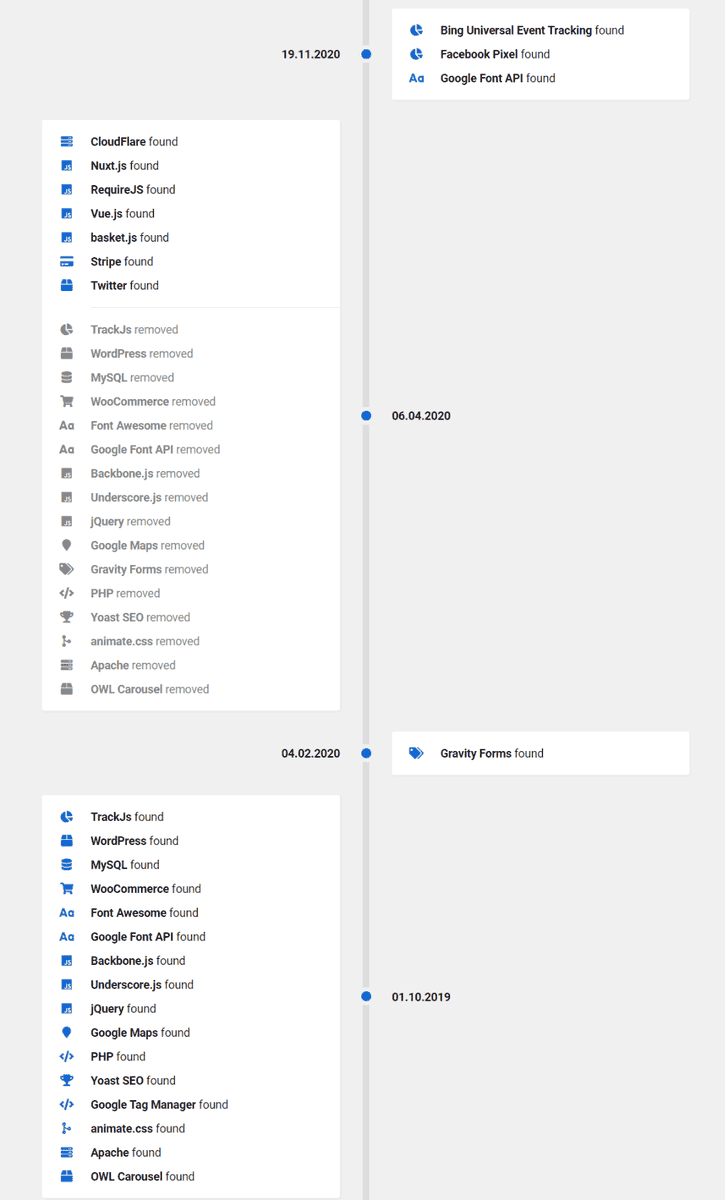
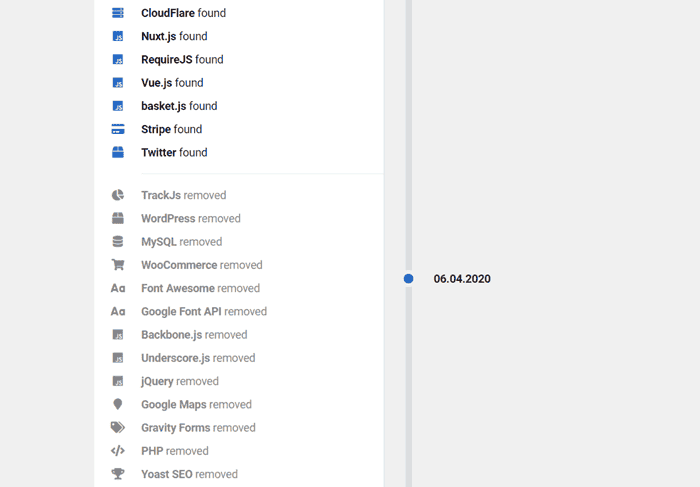
Like many other tool suites, Sistrix has a technologies section that helps you uncover what's being used on a site. But they have a killer feature that I've not seen in other tools: technology history feature.
You can look back through a site's history to see what technology was added and removed, and when. As you might imagine, this allows you to diagnose issues that you previously could not.
Let's say that a site experiences a significant drop in traffic around the time of one of Google's many algorithm updates.
But you've been digging deep, and everything seems in order. There's no manual penalty. There are no issues with the content. A developer hasn’t accidentally deleted all title tags for the second time (yes, that has happened to me).
If you spoke to your client and asked them about a new site or migration, they might have some information, but they are unlikely to be able to tell you what technology they used in their old site.
Hello Sistrix.
How should a website’s technology influence your SEO audit?
So you're armed with all the information about the platform and technology used. Great. But what are you gonna do with it?
Crawling JavaScript websites
If you’re working with a site that uses JavaScript frameworks, such as Angular, React and Meteor, standard HTML crawling isn’t going to cut it. To audit JavaScript websites like this, you’ll need to use a JavaScript crawler to process the code on the page and actually render the content.
To get a better understanding of why this is important, and how to do it, have a look at this guide on how to crawl JavaScript websites.
Headless CMS and what it means for your audit
While we're on the subject of JavaScript, it's worth addressing headless CMS setups specifically, because they're increasingly common and they compress several of the above issues into one.
A headless CMS - think Contentful, Sanity, or Shopify's headless offering - separates the backend (where content lives) from the frontend (how it's displayed). Developers build the frontend independently, usually with a JavaScript framework like Next.js or React. The content is delivered via API.
From an auditing perspective, the key questions are around rendering and metadata control.
On rendering: how is the frontend actually serving content to Googlebot? Client-side rendering (CSR) means the page is assembled in the browser using JavaScript, which creates the same crawlability headaches as any JS-heavy site.
Server-side rendering (SSR) or static site generation (SSG) builds the page before it reaches the browser, which is much cleaner for crawlers. Most modern headless builds use SSR or a hybrid approach, but always verify - don't assume.
Sitebulb's JavaScript crawling can show you the difference between what Googlebot sees in the initial response vs what renders after JavaScript executes.
On metadata: traditional CMSs like WordPress handle title tags, meta descriptions, and canonical tags through plugins or built-in fields. In a headless setup, none of that exists by default. It has to be built into the frontend, and done properly. When auditing a headless site, check that every page type (product pages, blog posts, category pages) has its own properly populated metadata, not just the homepage.
A few other things that commonly go wrong on headless builds: sitemaps that aren't dynamically generated and fall out of sync with published content, canonical tags missing entirely on pages that are accessible via multiple URL paths, and robots.txt files that are either over-permissive or blocking entire sections by accident.
It's also worth asking the client upfront. A surprising number of people don't know their site is headless, or don't know what that means. If Wappalyzer shows Next.js or Nuxt.js on the frontend alongside a separate CMS in the backend, that's your cue to dig in.
Know your platforms
I’m not saying that you should know all the quirks of each CMS straight off the bat - that would be ridiculous. Your knowledge is built over time.
When you start to crawl and audit different CMSs, keep a document of the little quirks you find. If you work within a team of SEOs, having that document shared between everyone means you can learn from each other.
No SEO is their own island. We all learn from each other, whether as an internal team or part of the wider community. We’re a generous bunch, you know?
What’s going to hold you back?
No CMS will be completely free of SEO issues - it's just not possible, and each has its little quirks.
This article isn't a “how to do SEO on Squarespace” type article, but I thought I would just jot down some of the issues that pop up most commonly when SEO Twitter is having a good old moan.
Here are some of the bigger historical issues that we’ve seen with some of the more popular CMSs. If they've been fixed, somebody give me a shout.
Historic issues with WordPress:
Devs gone crazy with a million plugins slowing the site down
Third-party themes with massive CSS theme files
Historic issues with Shopify:
A robots.txt that you can’t edit — Fixed. Shopify introduced editable robots.txt via a robots.txt.liquid template in June 2021. You can now allow/disallow URLs, add crawl-delay rules, block specific crawlers, and add custom sitemap URLs. One caveat: it's classed as an unsupported customisation, so Shopify support won't help if you break it. Worth being careful, and worth knowing the default file is actually pretty well-configured for most stores already.
Tag pages that cant be edited
Learn more about Shopify SEO auditing in this guide.
Historic issues with Squarespace:
Distinct lack of plugins
Old templates that just don't cut the mustard
Historic issues with Wix:
Limited heading tags
Adding odd strings to URLs
No canonical tags in bulk — Fixed. Wix now sets self-referencing canonical tags automatically across every page. You can override them individually in the Advanced SEO tab, or manage them at scale by page type via SEO Settings. It's not quite the same freedom you'd have in WordPress with a plugin, but the "no canonical control" complaint isn't accurate anymore.
While the uptake on SEO for many CMSs has been slow, it's worth noting that they are ALL (well, almost all) now making significant strides to become more SEO friendly.
Wix has had an SEO advisory board for a few years now, bringing in practitioners from across the industry to help shape the platform's direction. The membership has shifted over time (as these things do) - but what's worth knowing is that they've got serious people involved.
Crystal Carter - Head of SEO Communications at Wix, regular speaker at BrightonSEO and Google Search Central, the kind of person other SEOs actually listen to - has been central to their SEO output for years. If you're not following her, you probably should be.
Making the case for tech stack changes
Once you're ready to present your findings, you might want to take a little step back.
Many SEOs bemoan the fact that none of their recommendations get actioned. And as we are human, it's all too easy to think that's the fault of the guys we are presenting the ideas to - whether that’s clients, stakeholders or developers.
An audit isn't worth anything if you don't get the recommendations implemented. It's not only the SEOs job to produce the audit; it’s their job to get things actioned.
And that's another skill set entirely. Let's take a look at how you can take your recommendations and get them applied.
Communicating with clients
The biggest issue you're going to encounter when talking to the higher-ups about getting audit recommendations actioned is that they're not likely to care about the details.
You're going to have to pitch in a language they understand.
Here’s a couple of tips.
If the technology used is holding the site back, compare it to competitors’
Clients and stakeholders never like to be seen to be lagging behind their competitors. If your audit shows that the technologies used are holding you back, you need to pinpoint competitors that are using tech that’s helping their sites get ahead.
As well as showing (and briefly) talking about the technology used, you can then take some SEMrush or Ahrefs data and make the case that changing technology can and does change your ability to rank.
For example, here's a client that I worked with years ago. Despite our efforts to get the clients’ developers NOT to use infinite scroll, they overruled us.
Can you guess when the new technology was launched?
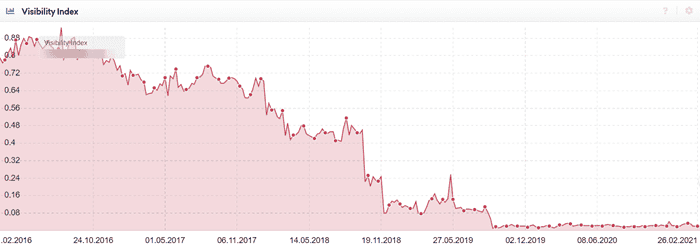
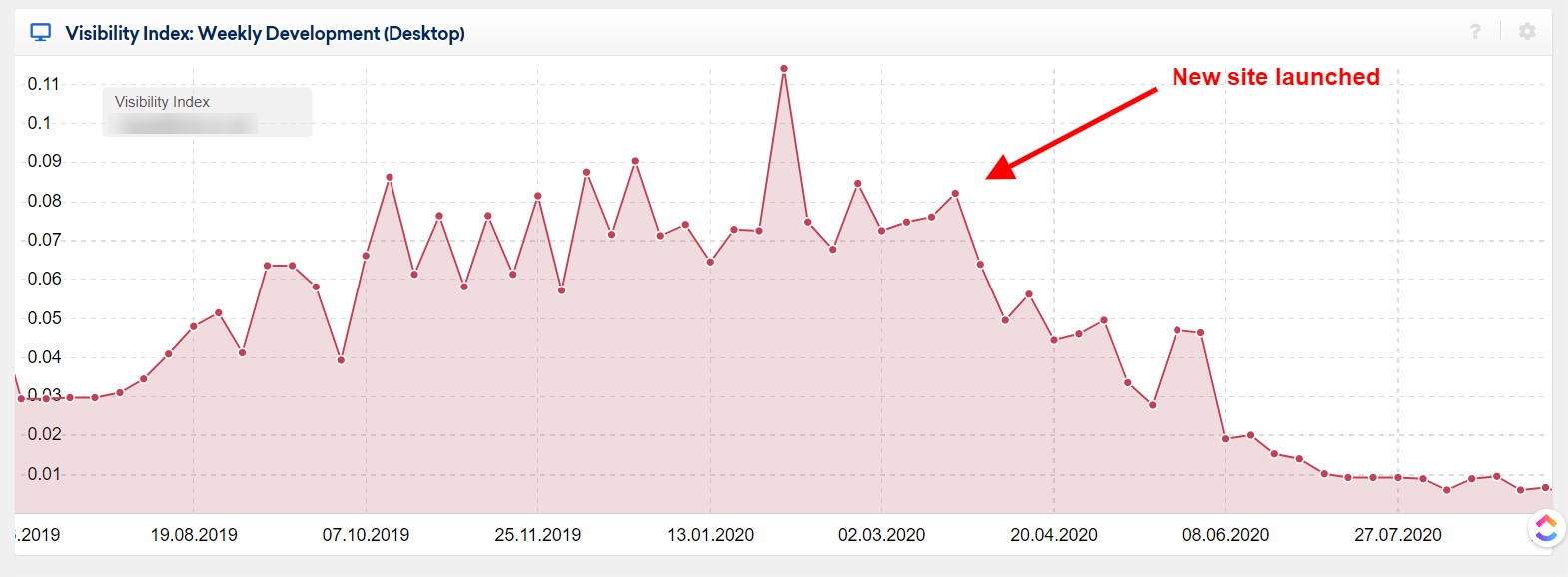
Here's another example of when a client (before our time) built a new site and swapped the technology that it was built on.
And here's what happened - yeah yeah, correlation is not causation and all that jazz, but…
Communicate business benefits
The technology that's used can and does affect the performance, productivity and profitability of employees. If you discover during the audit process that employees have to go through convoluted methods to get content uploaded, use it to your advantage.
Clients never want to be spending more money than necessary. Use this to your advantage too.
Some quick maths that shows how much time staff spend using dated or cumbersome technology, and how much time can be saved by building afresh, is often a winner.
Simply taking the time that is spent and how it could be saved and then showing how many ££££’s could be saved by the client per month and per year is a surefire way to get their attention.
Speak their language - not yours.
Communicating with developers
Communicating with developers is another thing entirely - especially if it is the same developers that built the site.
It's their baby. They spent months on it.
Look, it does this cool parallax scrolling stuff - it's amazing.
Going in like a bull in a china shop isn't going to help you one bit. You're going to get pushed back. You're going to create a tension that it can be hard to fix in the future.
So how do you get devs onboard?
Don't worry, I’ve got you covered.
Don't just chuck it on their lap - offer guidance (but not necessarily a solution).
Devs like to solve problems; devs like to get stuck into the nitty-gritty, and stamping your authority down is likely to cause tension.
SEO isn't their job; development is. But you can communicate with them in the same way you would with a client.
Present the data that shows why a fix is essential. Not all devs are SEO savvy - and there's nothing wrong with that. Not all SEOs are development savvy, either.
Don’t then tell them how they should do their job. Work with them, listen to their opinions, and find a solution that works for both sides.
Respect their time and workloads
This isn't so dev-specific but it is important. You need to understand and respect their workload. Some technical SEO issues are not quick fixes, and sometimes, when the tech involved is complicated, it might take a while to get your recommendations addressed.
Let them scope the work correctly and come back to you with time estimates or cost estimates.
I’m not saying you're going to agree with them 100%, but you've opened a mutual dialogue. A dialogue that is much more healthy.
Respect is vital in getting your recommendations addressed - and creates a long term relationship that's better for all involved.
Get buy-in from the client or stakeholder first
At the end of the day (no matter whether you're working with in-house or external devs), they will be working towards broader business goals. These goals were likely set out long before this SEO peep popped along and gave them a list of tasks to do.
When they are working towards company goals, it's crucial to get the client’s buy-in first.
When you've demonstrated to the client why they need to get your recommendations actioned, it's easier to get buy-in from the development team.
Learn how they work
Not all teams work the same way - and more often than not, a development team will work differently from an SEO team.
Learn their language. Learn their processes
When you're familiar with sprints and scrums, it can allow you to communicate more easily with the dev team.
When you've brushed up on what the heck epics and user stories are, you’ll get more respect.
At the end of the day, your client and you - as the SEO - need to get your recommendations implemented to understand how the dev team will be working and what approach they will take.
Trust me, it works better in the long run.
Wrapping Up
Thanks for sticking around to the end faithful reader. Probably just the one of you, given the length of that.
Hopefully, I’ve successfully highlighted why having a deep understanding of the platforms and CMSs that sites are built on can inform your decisions before starting an audit. Hopefully I’ve also set in motion a deeper investigation of what different technologies are used on sites and how you can use it to your advantage when digging into technical SEO issues.
Happy crawling and helping to make the web a better place.

Unrepentant long-time SEO, consultant at Boom Online Marketing, and guest writer for Sitebulb.
Similarly sweary as Patrick, but does a much better job of hiding it (usually).


Related Articles
 Beyond the Basics: How to Turn Crawl Data Into Strategic Actionable SEO Insights

 How to Develop an SEO Strategy: What Does the Data Say?


 Auditing Core Web Vitals with Chrome DevTools MCP

 Sitebulb Desktop
Find, fix and communicate technical issues with easy visuals, in-depth insights, & prioritized recommendations across 300+ SEO issues.
- Ideal for SEO professionals, consultants & marketing agencies.
 Sitebulb Cloud
Get all the capability of Sitebulb Desktop, accessible via your web browser. Crawl at scale without project, crawl credit, or machine limits.
- Perfect for collaboration, remote teams & extreme scale.