




Rescuing a Migration: A Guide for SEOs Brought in Too Late
 Kelly-Anne Crean
Published March 31, 2026
We welcome back Kelly-Anne Crean, who shares valuable insights on a scenario that’s all too common for agency SEOs: when you’re brought in late and have to rescue a migration…
There is a particular type of phone call that most experienced SEOs recognise instantly: The website has already launched. Traffic is down. Rankings have dropped. Someone is worried enough to finally bring SEO into the conversation.
Being introduced to a migration after go-live is more common than it should be. Despite years of guidance and numerous articles on the subject (including my last article for Sitebulb ‘why SEO should be brought on from day 1’), migrations still happen without redirects, without crawl checks, and without anyone validating whether search engines can actually access the new site post-launch.
By the time SEO is involved, the symptoms are usually clear. Organic traffic has fallen sharply. Pages are dropping out of the index. Brand terms are no longer ranking. Internally, pressure is building quickly.
This guide is about what to do next. This isn't a full migration planning guide, nor is it about redesign best practices or pre-launch SEO processes.
This article focuses on how to take control of a migration you did not plan, how to assess the damage pragmatically, how to identify the high-value pages and signals that must be protected, and how to prioritise recovery when time, trust and development resources are all limited. It's not a theoretical migration checklist, and it's not about perfection. It's about stabilisation, recovery and making sensible decisions under pressure.

Website Migrations
Join our live 3-part training series on Website Migrations: The Ideal Scenario, Emergency Protocol, and Disaster Recovery
Contents:
Post-launch triage: assessing the damage
When you are brought into a migration late, the most important thing isn't to act quickly, but to act in the right order. The sequence below reflects the approach I take when inheriting a migration after launch. It prioritises clarity over completeness, and stabilisation over optimisation.
When you arrive late to a migration, the first priority is understanding what has actually gone wrong and how severe the impact is.
Start with a short, focused triage to answer two questions:
What's broken?
What's actively suppressing performance right now?
Key checks should include:
Redirect integrity
Confirm whether legacy URLs resolve correctly. Look for missing redirects, redirect chains, mass redirects to irrelevant pages and URLs returning 404 responses. These issues directly interrupt signal transfer and should be treated as high risk.
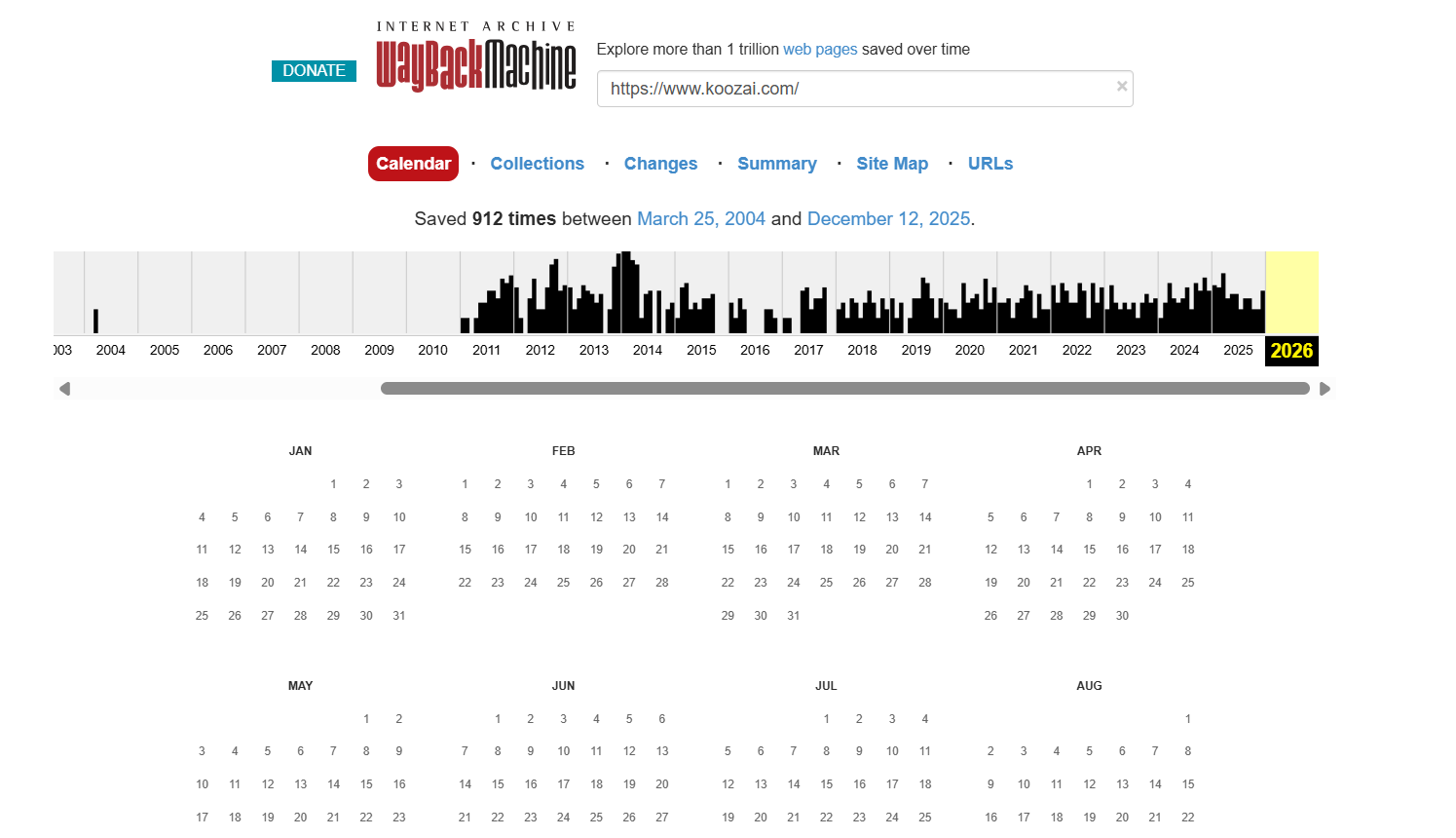
If the old site is no longer live, tools like Wayback Machine can be invaluable. Archived versions of the site, combined with data from Google Search Console, third-party visibility tools and backlink reports, can help reconstruct lost URL structures and prioritise what needs to be recovered.
Canonical signals
Review canonical tags across key templates. Post-migration sites often introduce self-referential canonicals that point to incorrect URLs, legacy domains, or non-indexable versions of pages. These errors can quietly undermine recovery even when redirects exist.
Indexation changes
Compare indexed URLs before and after launch. Sudden drops in valid indexed pages, spikes in excluded URLs, or large volumes of crawled but not indexed pages often indicate crawl access problems or conflicting signals.
Google’s documentation on crawling and indexing makes it clear that robots.txt rules, noindex tags, and canonical signals should be reviewed immediately post-launch, particularly if a staging environment was used.
Sitemap accuracy and discovery
Review XML sitemaps to ensure they accurately reflect the live site. They should only include indexable URLs, use the correct canonical versions, and exclude pages that are blocked, redirected or no longer exist. During recovery, sitemaps play an important role in helping search engines rediscover priority URLs and reassess the site efficiently.
Once these core checks are complete, the next step is to separate issues that block crawling or indexing from those that are undesirable but not immediately harmful. This distinction will shape every prioritisation decision that follows.
Identifying what should never have been lost
One of the most common reasons migrations fail isn't technical complexity, but omission. Critical pages are simply missed.
When SEO is brought in after launch, it's common to discover that high-performing legacy URLs were never mapped, redirected or even considered during the migration. These are often pages that ranked well for valuable queries, attracted significant organic traffic, or accumulated strong external links over time.
The first step in recovery is forensic rather than technical. Before fixing anything, you need to identify which pages historically carried the most value and confirm whether they still exist in a meaningful form.
Start with first-party data where possible. Historical landing page performance in Google Analytics and query-level data in Google Search Console can reveal which URLs previously drove organic traffic and visibility. Where access to historic data is limited, third-party visibility tools can help reconstruct which pages ranked and how their performance changed over time.
Link data is equally important. Pages with strong backlink profiles often carry disproportionate authority, and losing them can have a massive impact on rankings. Identifying legacy URLs that attracted links allows you to prioritise redirect accuracy and relevance where it matters most.
Only once this set of high-value legacy pages has been established does it make sense to validate redirect behaviour, destination relevance and canonical alignment. Without this prioritisation, recovery efforts risk focusing on completeness rather than impact.
Prioritising fixes when everything feels urgent
After a failed migration, everything can feel critical. In reality, not everything has the same impact on recovery.
When prioritising fixes, start with issues that actively suppress crawling, indexing, or link equity transfer. Redirect failures, blocked resources and canonical conflicts should always come before secondary optimisation tasks such as refining metadata or internal linking.
Editor’s Note: Sitebulb prioritises issues according to severity and labels them accordingly, as you can see in the clip below:
This sequencing aligns with established migration guidance from experienced SEOs. Aleyda Solis, in her guidance on SEO for web migrations, stresses the importance of validating redirect behaviour and crawl accessibility for high-value pages before addressing lower-impact optimisation tasks, particularly when a migration has already gone live, and performance is under pressure.
This approach is also reinforced by Google’s own documentation. Google explains that permanent server-side redirects, such as 301s, are the strongest signal for communicating URL changes and helping search engines correctly process and index new locations during a site move.
Focus first on issues that actively suppress performance:
Crawl blocking directives, such as robots.txt disallows or noindex tags
Missing or incorrect 301 redirects
Canonical conflicts that prevent consolidation
Server or rendering issues that limit crawlability
These are the problems that stop search engines (and AI systems) from understanding or trusting the new site.
Quick wins often exist. Removing an accidental Disallow rule, correcting an unintended sitewide noindex setting, or fixing a single redirect pattern can unlock recovery faster than weeks of lower-priority cleanup work.
Longer-term fixes, such as internal linking improvements or content work, should be addressed after critical access and consolidation issues are sorted.
Working within real-world constraints
Late-stage migration recovery rarely happens in ideal conditions. Trust may already be damaged, timelines are compressed, and development teams are often focused on delivery rather than remediation.
In the first few weeks post-launch, what you communicate matters as much as what you fix. At this stage, avoid committing to timelines for full recovery or promising ranking improvements. Instead, focus communication on what's being validated, what has been ruled out, and which signals indicate stabilisation rather than growth.
Clear communication becomes as important as technical execution
Be explicit about what has happened, what can be fixed, and what will take time. Avoid framing recovery as a guarantee. Instead, outline risks, dependencies and expected stages of stabilisation.
Securing development resource often requires reframing SEO issues as business risks rather than best practice recommendations. Lost organic traffic usually translates directly into lost revenue, leads or visibility. Make that connection explicit.
Reset expectations early. In some cases, even well-executed recovery work will involve a short-term dip before improvement. Setting this context up front helps avoid panic-driven decision-making later.
Building a realistic recovery roadmap
A recovery roadmap should balance urgency with realism.
Define clear phases: Immediate stabilisation. Signal consolidation. Gradual improvement.
During recovery, monitor technical indicators as closely as rankings:
Crawl stats and index coverage
Valid indexed URLs over time
Resolution of redirect errors
Reduction in excluded or duplicated pages
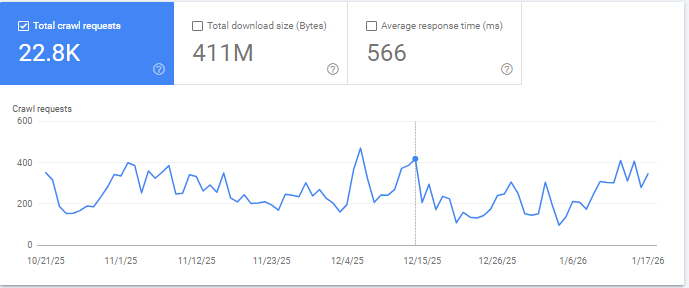
Progress isn't always visible in rankings straight away. Demonstrating improvements in crawl behaviour, indexation consistency and signal alignment helps show that recovery is underway, even when performance lags.
Regular, structured communication matters. Weekly updates that focus on what has changed, what's improving and what remains outstanding build confidence and reduce reactive decision making.
Common mistakes that slow migration recovery
Several patterns consistently delay recovery:
Trying to fix everything at once without prioritisation
Treating symptoms rather than identifying root causes
Making undocumented changes that cannot be reviewed or reversed
Overhauling content and structure while technical issues remain unresolved
Recovery is rarely linear. Documenting decisions, trade-offs and assumptions creates clarity when results fluctuate or questions come up.
A practical checklist for SEOs brought in after launch
Before taking action, confirm the following:
Search engines can crawl the site without restriction
Legacy URLs resolve correctly to relevant destinations
Canonical signals align with preferred URLs
XML sitemaps reflect the current site state
Indexation trends are understood and monitored
High-value legacy URLs have been identified (historical traffic, rankings, and backlinks)
Redirects prioritise these high-value pages accurately
Stakeholders understand recovery phases and associated risks
This checklist will not fix a migration on its own, but it provides a structured starting point when time is limited and confidence needs to be rebuilt.
Conclusion
Being brought into a migration after launch is never ideal, but it's recoverable.
Panic-driven fixes rarely help. Structure, prioritisation and clear communication matter more than speed alone. By focusing on access, consolidation and realistic expectations, SEOs can stabilise performance and guide sites back towards growth, even when they arrive later than planned.
SEO should be involved from the start of any migration, rather than being brought in as a corrective measure. When it is, the risk is significantly reduced. When it's not, recovery is possible, but it depends on clear diagnosis, prioritisation and disciplined execution under pressure.
To upskill yourself about migrations, don’t miss our upcoming 3-part webinar series.

Sitebulb is a proud partner of Women in Tech SEO! This author is part of the WTS community. Discover all our Women in Tech SEO articles.

Kelly-Anne is the Head of Operations at Koozai, with over 16 years of marketing and SEO expertise. She is dedicated to mentoring women in tech SEO, providing guidance and support to help them develop essential skills and achieve their career aspirations.

Related Articles
 Agency Technical SEO in 2026: AMA with Tory Gray & Patrick Hathaway

 JavaScript SEO AMA with Sam Torres: 13 Questions & Answers

 These WordPress Website Mistakes Could Hurt Your Brand’s Credibility

 Sitebulb Desktop
Find, fix and communicate technical issues with easy visuals, in-depth insights, & prioritized recommendations across 300+ SEO issues.
- Ideal for SEO professionals, consultants & marketing agencies.
 Sitebulb Cloud
Get all the capability of Sitebulb Desktop, accessible via your web browser. Crawl at scale without project, crawl credit, or machine limits.
- Perfect for collaboration, remote teams & extreme scale.