

 Jojo Furnival
The accessibility tree has been sitting in your Chrome dev tools since about 2021. Built so screen readers could describe a page to people who can't see it, most SEOs have never opened it.
Then Google published its guidance on building agent-friendly websites, and now that lesser-spotted tree has become something every SEO has to care about. Because it's one of the main ways AI agents work out what's on your page and what they can do with it.
We pulled this apart in a recent Sitebulb webinar with two people who've been living in the documentation. Tory Gray, founder and CEO of Gray Dot Co, has been building agentic auditing into her firm's audit and rendering workflow. Jessyca Frederick, director of digital product at Wine Enthusiast, works it from both sides: as a consultant and as the in-house product owner who has to get it all shipped. Both have spent the last few weeks fielding the same question, asked overnight by clients and colleagues: "are we agent ready?"
This article is the practical takeaways of that discussion. What agents look at, the rendering pickle that can break your whole approach, and the shortlist of things worth fixing now. None of it requires you to bet on a new international standard that might not exist in six months.
Let’s get into it.
Contents:
- Agents are a new kind of bot, not AI search
- What the accessibility tree is, and why agents lean on it
- The rendering nightmare that gives you false confidence
- Why ARIA stuffing is as smart as keyword stuffing *sigh
- Define what you want agents to do before you audit anything
- What to fix now, and what to leave alone
- TL;DR key takeaways
Agents are a new kind of bot, not AI search
A lot of the confusion around Google's guidance comes from a general misunderstanding about this.
An AI agent is not Googlebot, and it's not an AI-search bot. It behaves like a user. It clicks things, navigates, adds to cart, and completes actions. It’s a totally different creature from the crawlers we've spent twenty years optimising for, and from the bots feeding AI Overviews or Gemini. The capabilities are different and the requirements are different.
Don’t lump every "AI bot" into one bucket.
There's a reason the guidance itself feels contradictory, by the way. Google is not a monolith. The Search team, the Gemini team and the Chrome team want different things and back different standards, so that’s why the advice coming out of Mountain View points in different directions depending on who wrote it.
It’s three teams with three different goals. See, Google is just like us: a business made up of different teams of people!
So before you touch a single tool, get clear on which bot you're optimising for. Everything below is about agents specifically. "Agent ready" and "AI visibility" describe two different jobs, and treating them as the same thing is the fastest way to spend a quarter's worth of technical SEO effort in the wrong place.
What the accessibility tree is, and why agents lean on it
Quick definition:
The accessibility tree is a stripped-down version of the DOM. Where the DOM carries all your markup, the tree keeps only some elements, e.g. headings, page copy, links, buttons.
Tory's analogy was an overhead projector outline, the kind your teacher used to scrawl on and beam at the wall. It's the summary. The critical information you're conveying to a user, with the rest of the code left out.
Now, the reason it matters:
Screen readers were designed for users with no (or poor) vision. The tree was designed to convey a page to someone who can't see it, point at it, or tap it on their phone. This is helpful to agents because screenshots are their only way of "seeing" a page. So the accessibility tree is a super-helpful structure agents reach for.
This is also where the wall between SEO and accessibility starts to come down. Jessyca's argument is that this is SEO’s responsibility whether we like it or not, because nobody else in the organisation is looking under the hood the way we do. If you're crawling the site and inspecting tags already, you're the person who ends up owning this.
Go and look right now. Yes, right now (well, in a minute).
Open dev tools, find the accessibility tree, and check a real page. Here’s the instructions for doing so.
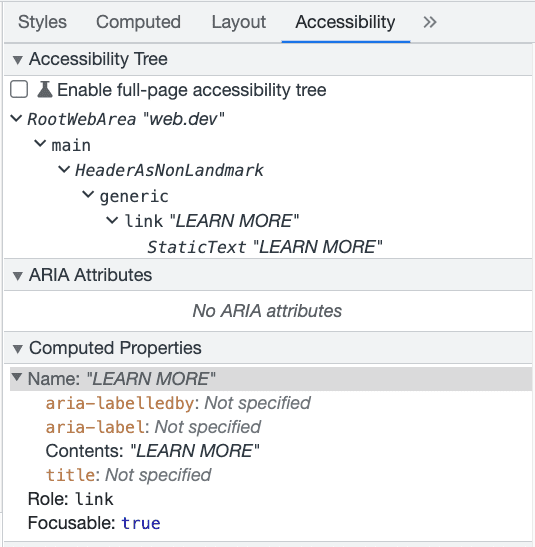
What you're checking for:
Are your important buttons, links, text and headings actually in the tree?
Is CSS hiding a heading you thought was there? If so, it won't show up.
Is ARIA pushing things in or out of the tree in ways you didn't intend?
This is literally the most concrete thing you can do today. Open the tree, compare it to what you assume the page is telling a visitor, and note the gaps.
By the way, Sitebulb already runs a large set of accessibility checks, so if you want to do this across a site rather than page by page, the groundwork exists. But even one manual look will tell you something.
The rendering nightmare that gives you false confidence
Ah, rendering. How we love thee.
The accessibility tree you see in Chrome is rendered. That is not the same as what's in the response HTML.
Jessyca encountered this on a live product listing page. The company she works for, Wine Enthusiast, uses Algolia to pull in listings client-side, so the products load via JavaScript after the initial HTML arrives. When she opened the accessibility tree, the listings were there, but when she checked the payload, they weren't.

“I see them in the accessibility tree, and I know they're not in the payload. And I'm like, wait a minute.”
The tree showed her content that only exists after rendering. Google renders JavaScript (though not necessarily immediately or perfectly), so for Google, sure that content may be fine. But if an agent doesn't render, that content isn't there for it at all.
You can already feel where this is going if you've done any JavaScript SEO work (or our free training course). Client-side rendering decisions are back on the table, and the question "is this in the response or only after render?" applies all over again.
Why ARIA stuffing is as smart as keyword stuffing *sigh
You can see this one coming a mile off, because we've done it before.
The moment SEOs learn the accessibility tree matters, some of us will start stuffing it. ARIA labels on everything, keywords where they don't belong... The worry is that this repeats the exact mistake we made with alt text: optimising for bots in a way that actively degrades the experience for the people the feature was built for.

“Let's all try to not be terrible spammers of the internet and actually implement it correctly and not cause harm to real users who could drive real revenue for our businesses.”
If “don’t be a dick” isn’t a good enough reason for you not to do it, here’s the technical reason it backfires. Buttons already have implied ARIA roles. They're an established element with a defined meaning. Bolting extra labels onto them doesn't help an agent and it actively confuses a screen reader.
Tory described an exchange where a ChatGPT executive suggested adding ARIA labels to buttons for the agentic use case, and someone from the accessibility side pushed back hard, for precisely this reason. You'd be spamming tags into a place that already works fine the way it is.
Jessyca's reminder works too: WordPress, when you upload an image, asks whether it's purely decorative, and tells you not to add alt text if it's just there to be pretty. Apply that same question to the tree: is this element necessary? If yes, and only if yes, label it clearly.
And if your actual goal is to stop agents doing things you don't want, ARIA is the wrong tool entirely. Tory warned not to reach for ARIA to control behaviour. Control bot access at the IP level, allow only the bots you've vetted, and decide deliberately what each one gets. Jessyca's team uses an "is bot" header from their bot-mitigation service and has the page respond to it, so they can simply not render certain things for an agent when they know it's an agent. That's the right tool for the job. ARIA is for meaning, not for access control.
Define what you want agents to do before you audit anything
An agent audit is meaningless until you've decided what you actually want agents to do, and what you want to stop them doing. Tory's first question to every client is:
"What do you want agents to be able to do?" Until that's answered, there's no spec to audit against, so there's nothing to check.
Tory points ChatGPT Atlas (one of several agentic browsers she's downloaded lately – currently not available for Windows) at a page and asks it to brainstorm what actions an agent could take there. It comes back with dozens, often around 75 per page, and the list looks different for a homepage, a collection or listing page, and a product detail page.
It's quick. She calls it almost a pre-deliverable rather than a deliverable in its own right, because it's the input to the real conversation, not the output.
That conversation isn't only with developers, by the way. Once you have a list of what agents can do, you take it to legal, to security, to the cloud team, whoever. The list surfaces risk as fast as it surfaces opportunity. Tory ran the exercise on Wells Fargo as an example, picking a big bank at random, and one of the actions it offered was helping a user recall their account email or password. 🤯
She's also seen a real client where a single agent attempted around 2,000 actions in a ten-minute window, whether through malice or just a user setting an agent loose and it going nuts. Either way, it's something you need to consider.
There's an upside though and it's a UX one. Jessyca talks about bots as users (because they are) and auditing what an agent can do on a page often reveals that the page is asking users to do too much. Her line was that we don't want a page with 4,000 purposes. We want two or three, so the action you actually intend gets taken.
So that lines up nicely with everything we already preach about matching a page to a single search intent. Win.
What to fix now, and what to leave alone
You have a finite dev budget, so here's what to focus on.
Do the global, well-understood things first. These sit squarely inside technical SEO and use tooling you already own:
Sort your robots.txt and decide which bots you allow.
Check your XML sitemaps are present and referenced correctly.
Get deliberate about bot access, whether through robots.txt (which bots can choose to honour or ignore) or IP-level control.
Then go page-specific. If you want agents to be able to buy something, go to the product detail page and check your CLS. If the add-to-cart button shifts as the page settles, an agent may not find it. Tory's example was exactly that: a moving button is a button an agent can miss. So performance work you'd do anyway has a new bonus.
Because remember, agents don't hang around!
So optimise time to first byte, return your payload quickly, and keep it from bloating. This matters even more on ecommerce sites, where the payload tends to be heaviest and the actions you care about (purchase, add to basket) live deepest in the page.
When it comes to the murky layer of competing standards, don’t worry too much about it yet. llms.txt, skills.md, OKD and OKF, NLWeb, WebMCP. These are proposals, several of them competing, and the ground is still moving.
On llms.txt specifically, Jessyca pointed to a study suggesting fewer than 6% of crawls even look for the file (though other studies suggest the percentage is higher than that); her view is that Google baking it into the Chrome audit is a hedge in case adoption takes off, not an endorsement that it works.
Her framing was VHS versus Betamax: you can't safely bet which standard wins yet. The sane move is to find what the standards have in common and cover that, rather than implementing all of them and chasing a perfect score that doesn't mean anything.
TL;DR key takeaways
💡 Agents aren't AI search or Googlebot. They act on pages like users, so they need different things from your site, and "agent ready" is a different thing to "AI visibility".
💡 The accessibility tree is a surface agents read. Open it in Chrome dev tools and check your key buttons, links, headings and copy are actually in there.
💡 The tree you see in Chrome is rendered. Client-side content can show up in it and still be missing from the response, so it may work for Google and fail for agents that don't render.
💡 Don't stuff ARIA for agents. Buttons already have implied labels, and gaming the tree harms assistive-tech users. Control agent behaviour at the IP level, not with ARIA.
💡 Decide what you want agents to do, and not do, before you audit. A quick browser-agent brainstorm surfaces the opportunities and the security risks in one go.
💡 Ship the known wins now (robots.txt, sitemaps, CLS, time to first byte). Leave the unsettled standards (llms.txt, NLWeb, WebMCP, OKD/OKF) until adoption is clearer.
Want the full conversation, including the Q&A on paywalls and the "is it agent ready" tooling debate? Here’s the full webinar recording and transcript.

Sitebulb is a proud partner of Women in Tech SEO! This author is part of the WTS community. Discover all our Women in Tech SEO articles.

Jojo is Marketing Manager at Sitebulb. She has 15 years' experience in content and SEO, with 10 of those agency-side. Jojo works closely with the SEO community, collaborating on webinars, articles, and training content that helps to upskill SEOs.
When Jojo isn’t wrestling with content, you can find her trudging through fields with her King Charles Cavalier.


Related Articles
 Technical SEO Audit Reports: How to Turn Them into Client Retention Tools

 Enterprise SEO Audit: From Crawl to Prioritised Action Plan

 Which Rendering Approach is Best for SEO on E-commerce Sites?

 Sitebulb Desktop
Find, fix and communicate technical issues with easy visuals, in-depth insights, & prioritized recommendations across 300+ SEO issues.
- Ideal for SEO professionals, consultants & marketing agencies.
 Sitebulb Cloud
Get all the capability of Sitebulb Desktop, accessible via your web browser. Crawl at scale without project, crawl credit, or machine limits.
- Perfect for collaboration, remote teams & extreme scale.