

Sh*t, The Migration Is in 2 Days/Weeks: Mark Williams-Cook's Emergency Protocol
 Jojo Furnival
Published April 20, 2026
Ever been told something a bit like this?
“The new website is going live in two weeks. Everyone's very excited about the rebrand. Could you just make sure it’s SEO friendly?”
Ugh. *sigh
2 weeks is NOT an ideal website migration planning timeframe. I repeat: 2 weeks is NOT ideal.
Whether it’s 2 weeks or 2 days (yes, some poor bastards have to deal with that timeframe), t his falls into the Emergency Migration Protocol scenario, and it’s this exact scenario that was covered in Part 2 of Sitebulb's three-part website migrations series with Mark Williams-Cook.
Marketing Director at Candour, founder of AlsoAsked, and the person behind the Core Updates newsletter, Mark has been in this situation more than once. Including, as it happens, at the end of last year on a very large client. His framework for handling it is what this article is based on.
Two weeks is what we’re saying here, but as Mark notes, it depends on the migration. Basically, unless you have enough time to do everything you'd want to do in a proper migration plan, it's too short notice, full stop.
Contents:
- Why you were brought in late and why the reason matters
- The first thing to do: reframe success
- What you need to do in the first 24 hours
- The three risks hiding in plain sight
- Communicating risk in a language stakeholders understand
- Pushing back on blockers
- Prevention is cheaper than cure
- TL;DR key takeaways
Why you were brought in late and why the reason matters
Before you do anything else, it's worth working out why you're in this situation. Understanding the root cause, says Mark, changes your approach.
There are three scenarios.
1. The impending catastrophe
Someone in the organisation can see that things are about to go badly wrong, but they don't have enough sway to stop it. So they've brought you in, partly for your expertise, and partly, to offload the grenade before it explodes.
Mark's observation on this is characteristically direct: "Sometimes this is coded speak for, yeah, I can see an impending catastrophe and I really need someone else to take responsibility for this." That's manageable, as long as you go in with your eyes open.
Your primary job here is stakeholder management: convincing people of the danger and getting them to listen.
2. Genuine ignorance
In this scenario, n obody in the organisation particularly understands the SEO risk. They're not being oblivious on purpose, they literally don't know what they don't know.
A rebrand is exciting! A new website is exciting. The SEO implications are either less exciting and easier to overlook, or just not on their radar at all.
Your job here is education rather than persuasion. Similar methods, slightly different tone.
3. Enterprise paralysis
Ah enterprise. How we love thee.
In this scenario, e veryone knows they’re going to hit the iceberg, but the ship’s just too damn big to turn around and half the staff have already made off in the life rafts.
The decision was effectively made years ago at a level that no longer exists. Mark's description of this is pretty bleak: "if you wanted to influence this decision, it would need to have been like 400 BC when the decision was made."
In this scenario, as a consultant or agency, you're most likely going to end up picking up the pieces. Knowing that upfront means you don't waste energy trying to influence the uninfluenceable. You document, you advise, you bill.
These root causes also generate a cluster of downstream problems that can feel like real constraints but aren't. Design sign-off is done. Dev sprints are locked. Launch date is set. There's a TV campaign timed to coincide with the new site. These feel immovable, but are they though? More on that later.
The first thing to do: reframe success
The most dangerous assumption in any emergency migration is this: we've hired an SEO, so that's all sorted now.
It isn't sorted. And letting that assumption go unchallenged is how you end up taking the blame for outcomes you couldn't have prevented.
Sure, with a proper planning window, migration work can go beyond damage mitigation; you can actually improve things on the new site! In an emergency/two week timeframe, the goal is getting through it with the least cuts and scrapes, without breaking anything on the way.
Say that out loud. Say it early. Say it to everyone who needs to hear it, including the people who hired you.
This sometimes means saying no, quite a lot of times in a row. That's uncomfortable. Most people want to get through the day without having to have an awkward conversation, and in larger organisations this problem compounds. Information travels upward through multiple layers of management, each one softening the bad news a little. So by the time the picture reaches C-level, what's happening on the ground and what senior management understands can be very different.
Congratulations, that gap – or yawning abyss – is now yours to bridge.
The questions only get more awkward the longer you leave them.
What you need to do in the first 24 hours
Mark is emphatic about this: how well you do in the first 24 hours will determine the success of the migration project.
This period is about fact-finding and data collection. Some of it should be running before you've even finished your first conversation.
1. Document everything
You're going to be absorbing a lot of information quickly, and not all of it will be accurate. People make mistakes. People sometimes don't fully understand their own company's constraints, plans, or technologies. And you’re always getting information through the lens of how someone else perceives the situation, or wants it to be perceived.
Having a documented trail of everything you've been told matters.
Mark uses Fathom for this (so do we at Sitebulb, as it happens). It records calls, generates transcripts and AI summaries, and lets you search across multiple calls to verify specific details. The Ask Fathom feature means you can query your call history directly: "when was the go-live date set?" Any similar tool will work, the principle is what matters: if someone told you something that turns out to be wrong, you want to be able to demonstrate what you were told, when and by whom.
2. Start the crawls immediately
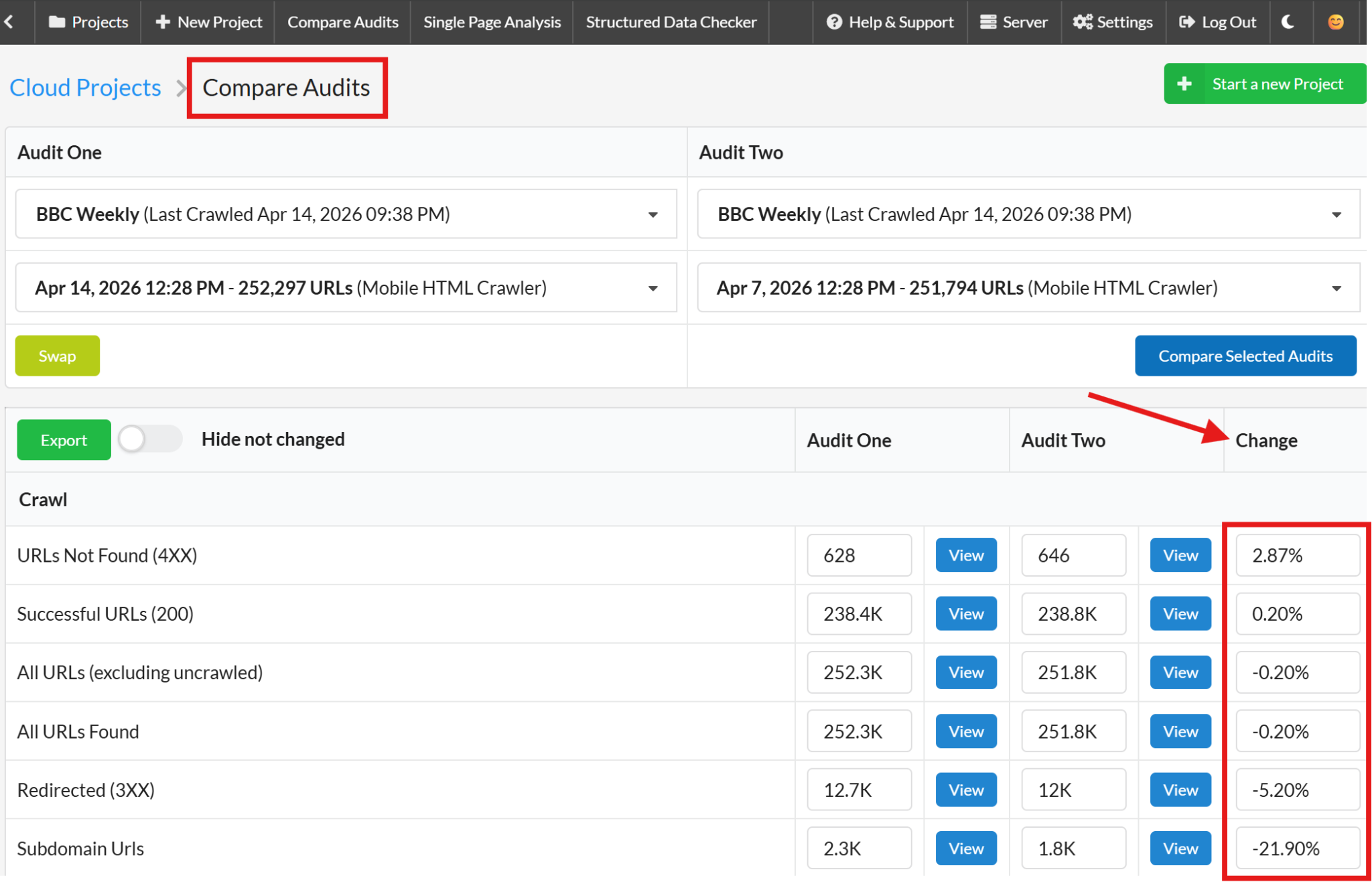
Don't wait for the conversations to finish. Get Sitebulb running on the old site and the staging site (if you have access) as soon as possible. In Sitebulb, a single project saves multiple crawls, so you can compare differences over time as things change.
Set up change monitoring. Mark has dealt with teams who swore the staging site was final, “nothing is changing, this is what’s going live” and then change monitoring picked up a significant update two days later that nobody mentioned.
Change monitoring is an essential backup for when communication breaks down.
3. Take benchmarks
Grab a rankings snapshot from your rank tracker or Search Console. This is about giving yourself the context to interpret what happens post-migration correctly.
For example: If the site's traffic has been declining for the past six months, that decline will continue regardless of what you do. If you don't take a baseline before the migration, you can end up eight weeks later looking at an 18% traffic drop and attributing it to the migration, when it was actually happening for other reasons entirely.
Benchmarks let you separate the migration's impact from everything else.
4. Check broken backlinks and all Search Console filters
Two quick wins that often get missed in the rush:
On broken backlinks:
Ahrefs has a broken backlinks report showing links pointing to pages that no longer exist on the site. These still carry ranking value, and you can often find a site has thousands of them pointing to pages that were removed at some point. Getting those into the redirect map and pointing them at relevant pages can give you a useful recovery boost during the post-migration period.
On Search Console:
Go beyond the standard web traffic view; check Discover, News, and image search specifically. Mark flags image search as something that gets missed constantly, particularly on ecommerce sites. There can be significant traffic coming from Google image search and landing on product pages. If you don't know that traffic exists before you start, you can't protect it during migration.
The three risks hiding in plain sight
Here's something worth knowing before you dive into the technical audit: the obvious stuff is probably covered.
When you're brought in at the last minute, it's usually because someone thought "the devs will handle the migration." And devs generally do handle the basics; there's usually some version of a plan in place for the fundamentals.
What's going to hurt the site are the things they don't know they don't know. There are 3 usual suspects.
1. JavaScript rendering
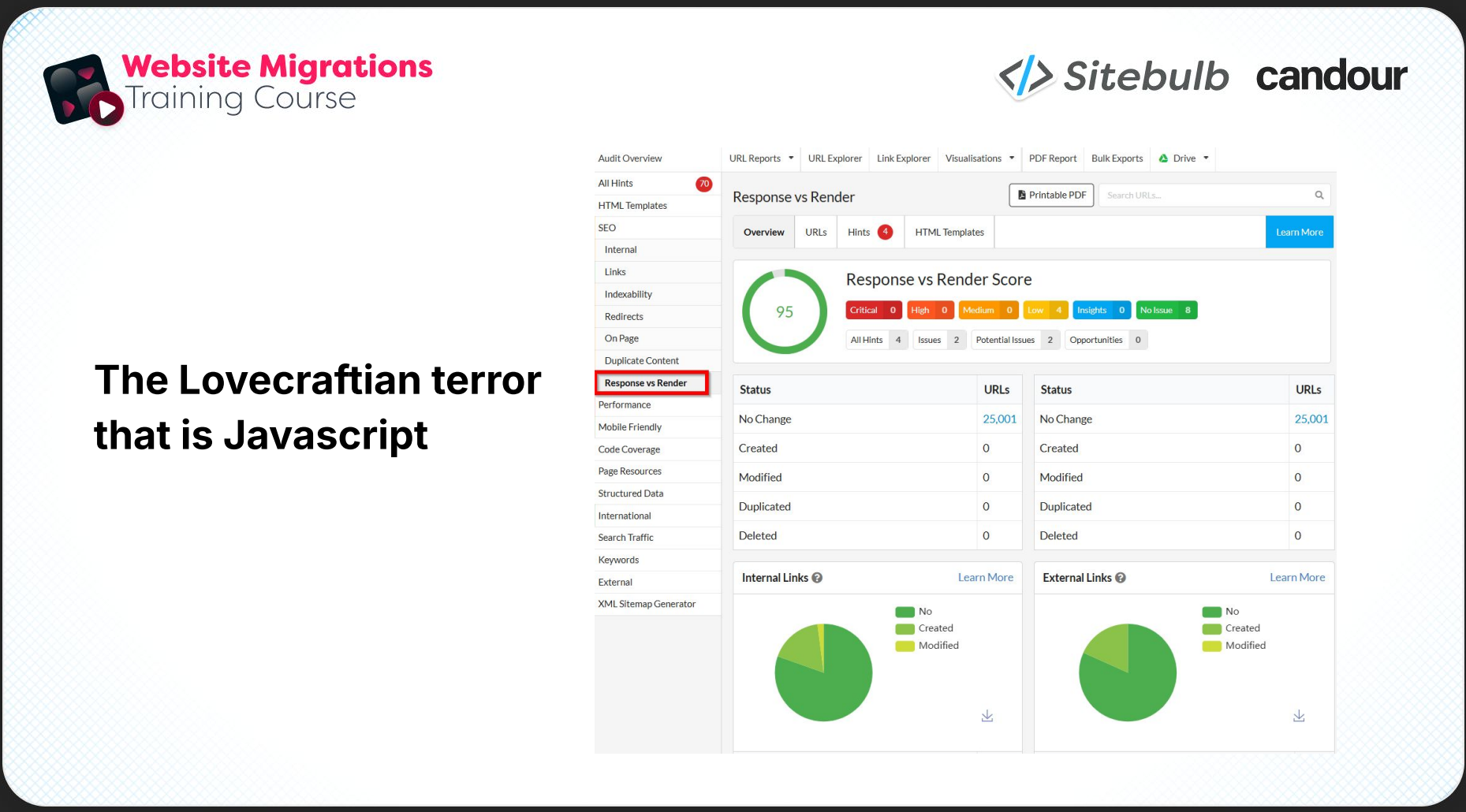
Mark calls this "the Lovecraftian terror that is JavaScript," which is slightly dramatic. But only slightly.
What this usually looks like:
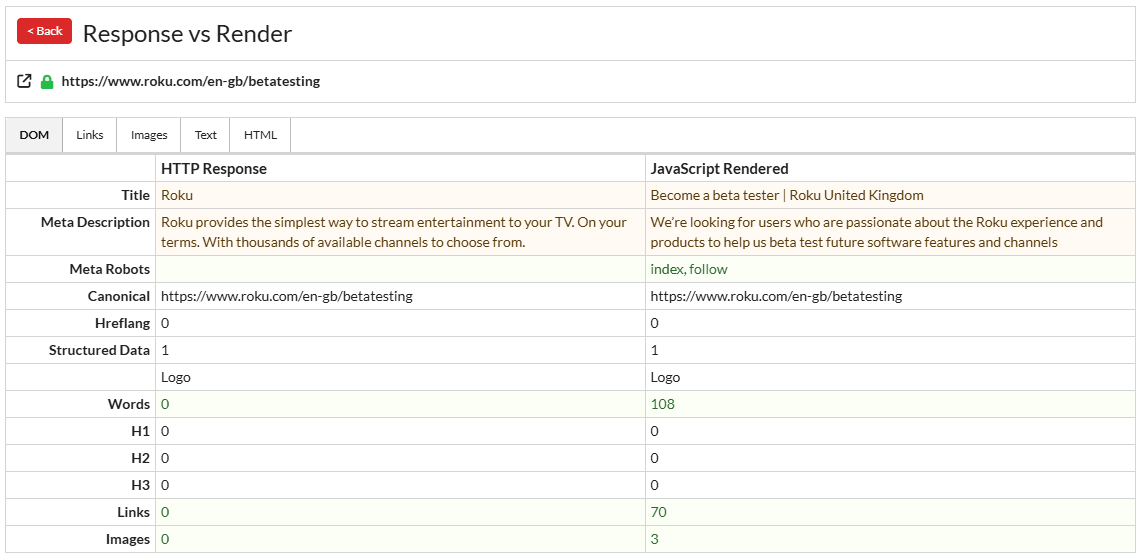
The new site is a beautiful, modern, heavily client-side rendered JavaScript build. Nobody has thought about what this means for crawlability. Pages are essentially blank before JavaScript kicks in and pulls the content. Google can technically process JavaScript, but on large sites it’s not ideal.
We cover the potential negative SEO impact of JavaScript fairly extensively elsewhere, so I won’t go into it here. You can check out this whole hub of information for that.
The first thing Mark checks on any staging site is Sitebulb's Response vs. Render view. It gives you an immediate result on how much the rendered page differs from the raw HTML response; in other words, how much work JavaScript is doing on the front end. If the gap is large, that's a conversation that needs to happen before launch.
2. Information architecture changes
This one catches people out because it doesn't look like an SEO issue on the surface. It looks like a UX decision.
The classic example is, a site has a 100-link mega menu. The new design has four links in the main menu, because someone decided that was cleaner and simpler for users. This is a completely reasonable UX goal. It's also, potentially, an SEO catastrophe, depending on which pages just got deprioritised.
Removing a page from the main nav means removing links to that page. Fewer prominent internal links means users find it harder to reach, and search engines infer it's less important. Revenue-driving commercial pages can lose ranking power quickly this way, and nobody connects the drop to the navigation redesign.
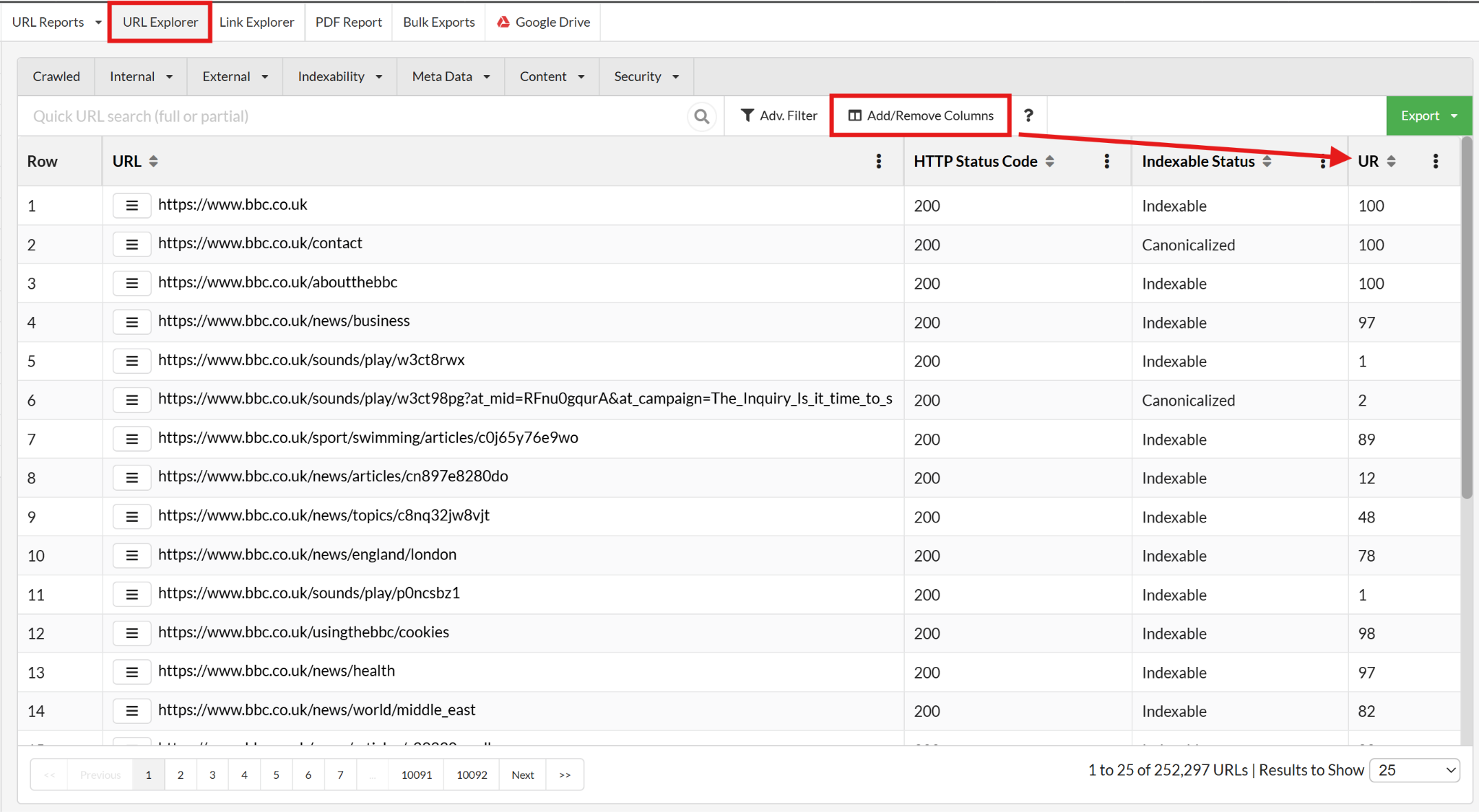
Sitebulb has a URL Rank metric in its URL Explorer view, which is essentially internal PageRank based on internal links and how well linked each page is in both quality and quantity.
What Mark does is compare URL Rank between the current site and the staging site for every page he'd classify as a VIP (important, revenue-generating pages). If the staging site score is lower than the current site score for those pages, that's a problem but easy to fix once you’ve spotted it.
3. Removing pages that are backlink pipelines
"We decided to remove these pages as they weren't driving revenue." This one comes up a lot.
The cause-and-effect chain that people miss when people do this is that informational pages (guides, tools, calculators) tend to attract backlinks. Those informational pages then link to the commercial money pages. The backlinks flowing into the informational pages pass authority through to the money pages.
That's what makes the money pages rank.
Remove the informational pages, lose the backlink pipeline, and the commercial pages become less competitive. Which makes everyone “very sad,” to use Mark's technical terminology.
There's also a compounding risk that if a high-quality external site is linking to a URL that breaks, they may remove the link entirely. Or, worse, actively replace it with a link to a competitor. Yeah, that old chestnut.
These three things – JavaScript rendering, IA changes, and removed backlink pipelines – are what Mark calls the land mines lying about when someone says "oh, we've got all the redirects mapped, it's fine."
Communicating risk in a language stakeholders understand
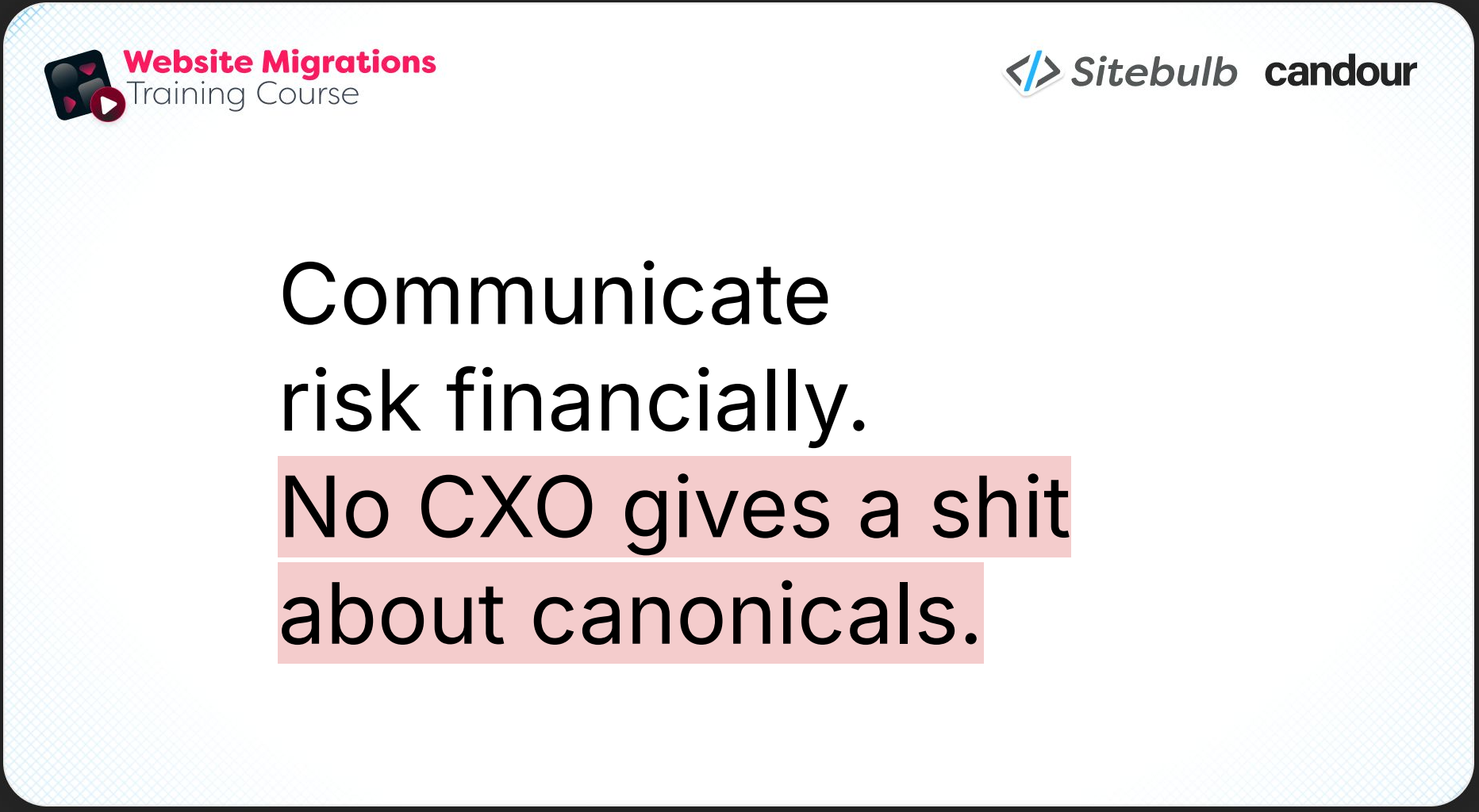
No C-level person cares about canonical tags.
That’s why the business risk conversation needs to happen in financial terms. Exactly how you frame it will depend on the analytical maturity of the company you're dealing with.
The quick and dirty method is to use CPC costs as a proxy for traffic value. Work out how much traffic is at risk and use Ahrefs or Semrush data to estimate what it would cost to buy that traffic through paid search. It's rough, but it gives you a number with a currency symbol in front of it, which is what you need.
For more analytically mature clients, the more rigorous approach is to derive a value per organic visitor that includes things like AI platform visibility alongside direct conversion value. The fabulous Bengü Sarıca Dinçer wrote an article for Search Engine Journal that covers how to build that kind of outcome-level measurement, and is worth reading alongside this.
Once you have a per-visitor value – however you've figured it out – Mark uses it to calculate ‘expected value at risk’ to put a number on individual migration decisions.
Expected value at risk formula
EV = $ benefit of doing a thing x % chance of it happening – cost of doing the thing
The example Mark walked us through in the webinar…
A page is being removed. Keeping it is projected to retain 10,000 visitors per month. Organic visitors have been calculated to be worth 45¢ each, giving a projected annual value of $54,000. There's a similar page on the new site, but it's unlikely to rank; call it a 90% chance the traffic loss occurs. Expected value at risk: $48,600.
Cost to keep the page: $6,000 in dev time, plus a $10,000 media campaign that needs rescheduling = $16,000 total.
$48,600 minus $16,000… keeping the page is worth around $32,000 net. Easy decision if it's framed that way.
The numbers don't always come out in favour of acting. Sometimes the cost of a fix outweighs the projected risk, and that's useful information too.
The other thing Mark is consistent about: position yourself as an adviser, not a decision maker. Don't say "you must do this." Say "my recommendation is X, here's what it's worth, and here's the risk if you don't. Your call." Document that conversation. Once you've handed people the financial responsibility for a decision, they tend to engage with it very differently.
Pushing back on blockers
Often, what we think of as blockers don’t actually need to be…
For example, someone puts a date in a project plan and over time it becomes treated as immovable, not because it actually is, but because people just accepted it.
Mark's approach is somewhat akin to a child questioning an adult: keep asking why until you reach a genuine constraint, or find that there isn't one! The example he gives:
"We have to go live on April 29th."
Do we?
"Yes."
Why?
"That's the date all the teams are aligned to."
Can't we just change it?
"Management has an expectation for those dates now."
Would management accept $500,000 to move the date back four weeks?
At some point in this chain, either you hit a real reason or the blocker dissolves. In Mark’s experience, a lot of them dissolve. The point isn't to prove the delay is worth $500,000. The point is to keep pulling at the thread until you reach something solid.
There's also anchoring, which is an effective negotiation tactic even when people know you're using it. Ask for something large first, e.g. "can we just push the launch back six months?" When it’s refused, you can ask for a single extra week of dev time, which seems perfectly reasonable in comparison.
I actually used a version of this tactic on my parents when I got my first tattoo.
The frame Mark uses for all of this is finding the true edges of the map, i.e. the real parameters you're actually allowed to work within. In his experience, those edges are almost always further out than they initially appear.
Prevention is cheaper than cure
"We can fix it after launch" is a sentence you must always push back on, because there will never be a guarantee things will return to normal once you do.
Not everything carries the same post-migration fix difficulty though.
What can and can't wait
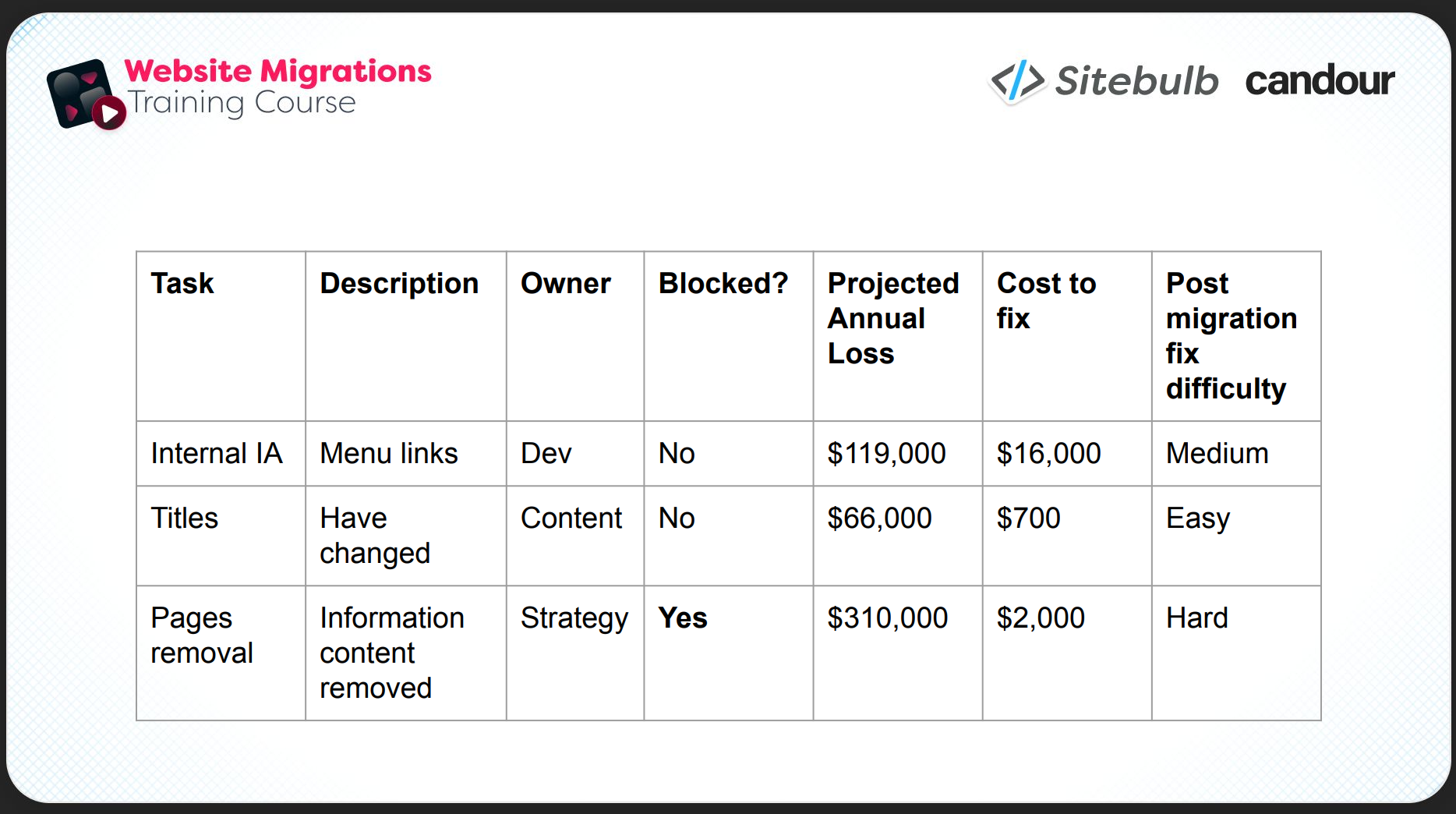
Page titles are relatively safe to address after launch. Google responds fairly quickly to title changes and permanent damage is unlikely. Removing content entirely is a different matter. The pages are gone, the backlinks may be lost, competitors may have already picked up the broken link opportunities.
A useful way to communicate prioritisation to stakeholders is a simple matrix like the one below:
Always have a plan B
Before any migration goes live, agree the rollback criteria. What's the traffic loss threshold that triggers a serious conversation about reversal? Having that number agreed in advance means you're not making panicked decisions mid-crisis with everyone looking at you for an answer.
For phased migrations, there's an additional tactic: start with the lowest-risk sections and see how Google reacts before moving to higher-risk areas. Mark did this recently. He started with the site's smallest countries, saw signs that things were behaving as expected, then moved progressively to bigger and more complex sections.
TL;DR key takeaways
💡 When you're brought in late, your goal is damage limitation, not a perfect migration. Say this clearly to stakeholders before you do anything else.
💡 The first 24 hours determines the success of the project. Start crawling, take benchmarks, document every conversation, and check all Search Console traffic filters before the first meeting is even finished.
💡 The redirects are probably covered. What will actually hurt the site are the things nobody thought to mention: JavaScript rendering, information architecture changes, and informational pages being removed that are quietly powering the rankings of everything else.
💡 Communicate risk in financial terms. The expected value framework – (benefit × probability) minus cost – gives you a replicable way to put a number on individual decisions and hand the responsibility to the people who should be making them.
💡 Most blockers aren't real. Keep asking “why” until you reach an actual constraint, or discover there isn't one.
💡 Prevention is much cheaper than cure, and recovery is not guaranteed. Challenge "we'll fix it after launch" every single time you hear it.
This article is based on Part 2 of Sitebulb's three-part website migrations series. Part 1 covers migration planning with Tom Spencer-Livingston (what to do when you have the luxury of time). Part 3 covers disaster recovery with Brendan Bennett (what to do when the migration has already gone wrong).

Sitebulb is a proud partner of Women in Tech SEO! This author is part of the WTS community. Discover all our Women in Tech SEO articles.

Jojo is Marketing Manager at Sitebulb. She has 15 years' experience in content and SEO, with 10 of those agency-side. Jojo works closely with the SEO community, collaborating on webinars, articles, and training content that helps to upskill SEOs.
When Jojo isn’t wrestling with content, you can find her trudging through fields with her King Charles Cavalier.


Related Articles
 Technical SEO Audit Reports: How to Turn Them into Client Retention Tools

 Enterprise SEO Audit: From Crawl to Prioritised Action Plan

 Which Rendering Approach is Best for SEO on E-commerce Sites?

 Sitebulb Desktop
Find, fix and communicate technical issues with easy visuals, in-depth insights, & prioritized recommendations across 300+ SEO issues.
- Ideal for SEO professionals, consultants & marketing agencies.
 Sitebulb Cloud
Get all the capability of Sitebulb Desktop, accessible via your web browser. Crawl at scale without project, crawl credit, or machine limits.
- Perfect for collaboration, remote teams & extreme scale.