

When Website Migrations Go Wrong: A Practical Guide to Disaster Recovery
 Jojo Furnival
Published April 29, 2026
Traffic is down, Search Console graphs are doing the dead dance, and client’s on the phone…
It’s a migration nightmare!
And now it's your job to figure out what went wrong and what to do about it.
Brendan Bennett, Principal SEO Consultant at Candour, has been in SEO long enough to have dealt with plenty of migrations going sideways. In the final session of Sitebulb's three-part website migration series, he walks us through his full disaster recovery framework, which I’m going to recap in this article.
We’ll cover:
- How to work out if you actually have a disaster
- How to check your data isn't lying to you
- What to look at first, and
- His parity-obsessive approach that gets to the root of most longer-term problems.
Let’s go…
Contents:
First, take a breath: do you actually have a disaster?
Before you go into full panic mode, assess whether or not it really is a disaster.
Some traffic loss after a migration is inevitable. Some instability is normal. So it’s a case of determining whether the drop you’re looking at is acceptable or not. And your acceptable level of traffic loss is something you should have defined before the migration.
Your pre-migration calculations of projected traffic loss and estimated revenue impact are a benchmark dataset to compare week by week. This is what makes post-migration monitoring meaningful. Without it, every dip looks like a disaster.
Before you decide you're in disaster recovery mode, Brendan suggests four questions:
Have you hit any danger thresholds for revenue or leads?
Have you given it enough time for Google to have internalised the migration?
Are you moving in the right direction, even incrementally?
Is the data actually sound?
We’ll come back to that last one in a minute.

Traffic vs business metrics
Let’s also remember that traffic may not be the right thing to panic about. What matters more is whether the bottom line is holding.
If revenue, transactions, and leads are relatively stable despite a traffic drop, why panic if conversions are fine? It might be a reason to sit tight and have a cuppa.
If you're actually losing money, that's different. That's when having an exit plan matters.
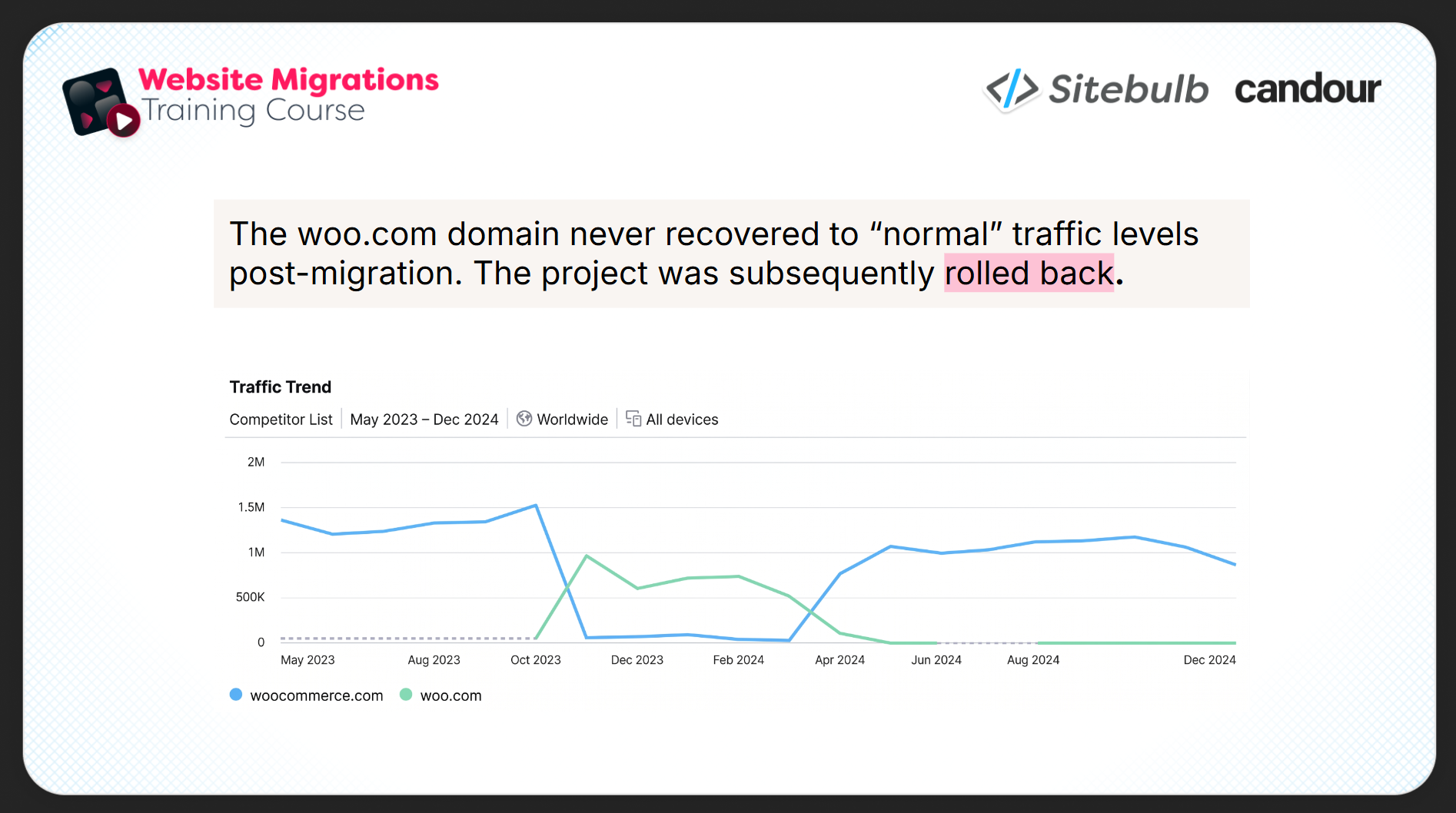
The WooCommerce domain migration is Brendan's case study here. Remember that?
We have to assume that at some point they reached a pre-defined threshold where waiting for recovery simply wasn't viable, and made the call to roll back to the old domain entirely. Not necessarily a failure, but a planned off-ramp that someone had the sense to define in advance.
Time expectations
Google's own documentation says it takes around 180 days after submitting a change of address for it to fully stop treating the old domain as a serious entity. Anecdotally, Brendan has seen migrations where recovery takes over a year, and where long-tail impacts don't show up until well after the main traffic line has stabilised.
There is no golden rule, it legit “depends”. The right benchmark is whatever thresholds you agreed with your team in advance.
Your data might be lying to you
A migration is one of the most common moments for analytics configurations to change, so the data you're using to judge recovery might not be measuring the same thing as the data you had pre-migration.
Double-check these before you start freaking out:
GA4 configuration changes, like cookie consent settings and event tracking changes, can produce apparent drops that aren't actual drops in traffic. Make sure you're comparing two like-for-like setups.
Search Console property mismatches are surprisingly common. If you were previously on a URL-prefix property and you're now on a domain-inclusive one, you're looking at different scopes entirely. Brendan recommends setting up multiple properties (HTTP, HTTPS, www., trailing slashes, key subfolders) so you've got maximum diagnostic coverage, and you can compare apples with apples.
Seasonality is the one that creeps in. If your migration happened in November and you're comparing it to the last few months, you might be looking at a seasonal trough. Compare relevant time periods.
And be aware that, for a while after a migration, Google often serves old and new URLs in parallel. If you're seeing clicks attributed to old URLs you thought were redirected, that may just be Google not having finished processing the change.
The fundamentals pulse check
OK so if you've established that you probably do have a real problem, and your data is sound. Before anything else, there are basic things to check. Brendan calls these the pulse check—things that should have been caught at launch but sometimes weren't.
The focus is entirely on crawling and indexing here because, well, if Google can't reach your pages, nothing else matters.
Noindex tags
It sounds way too basic to say out loud. And yet here we are:
Check for Sitewide noindex tags left on from staging.
Dev pushes the new site live, the staging noindex doesn't get removed, and every single page on the site is asking Google not to index it.
Check your homepage source manually, or run a URL list crawl in Sitebulb; the URL Explorer report shows indexability status at a glance across all crawled URLs.
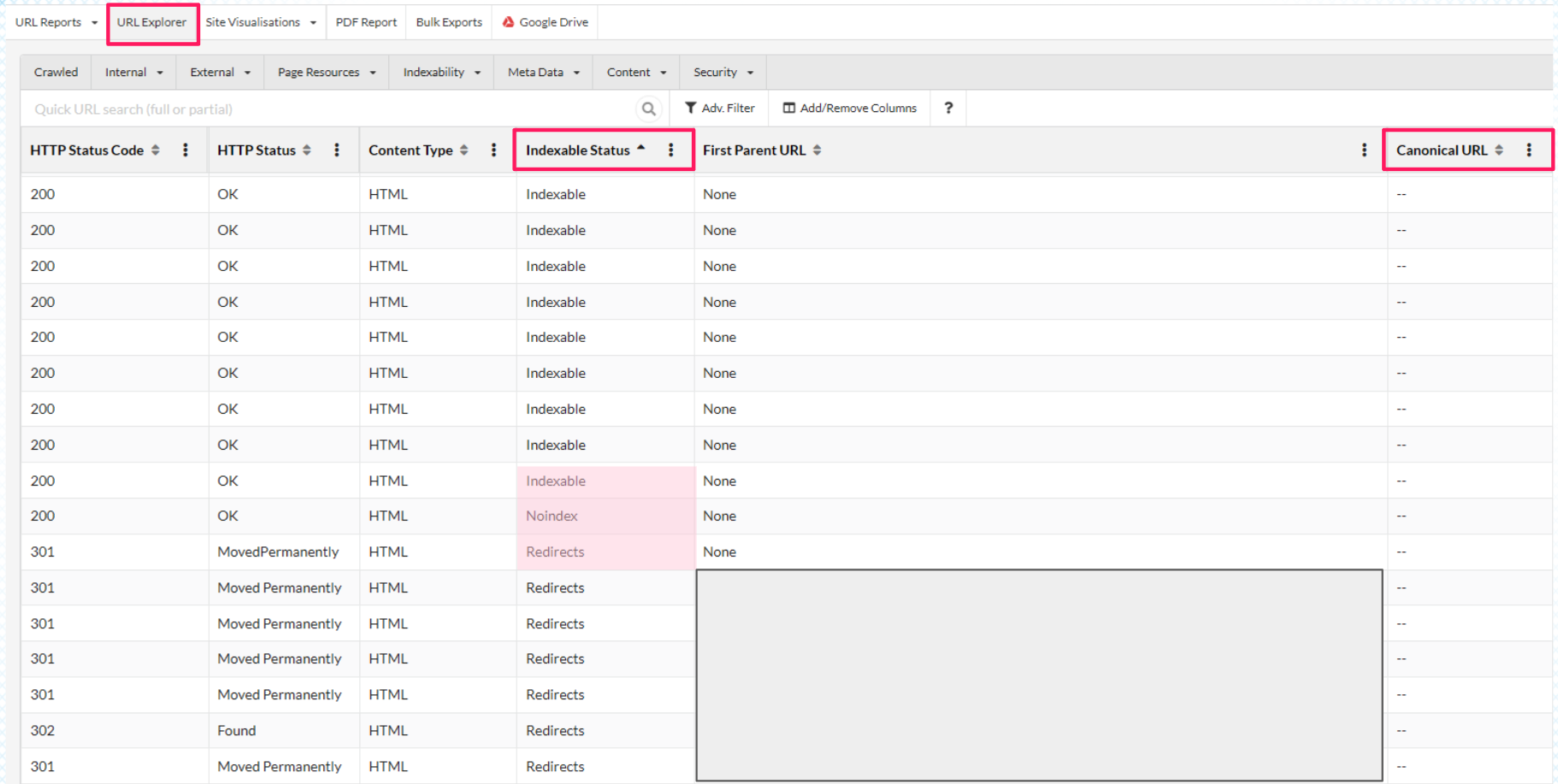
While you're there, check canonicals. It's possible to have set up canonicals that either tell Google to skip pages it should be indexing, or point to URLs that no longer exist.
Robots.txt
Check your robots.txt for blockers on crawling your redirects.
There's a specific trap Brendan flags as something he's seen multiple times: redirect chains where an intermediate URL is blocked by robots.txt.
You've set up a redirect from URL A to URL B. But the chain actually goes A → C → B, and URL C is disallowed. Google Search Console won't surface this clearly; it may just look like the redirect isn't working.
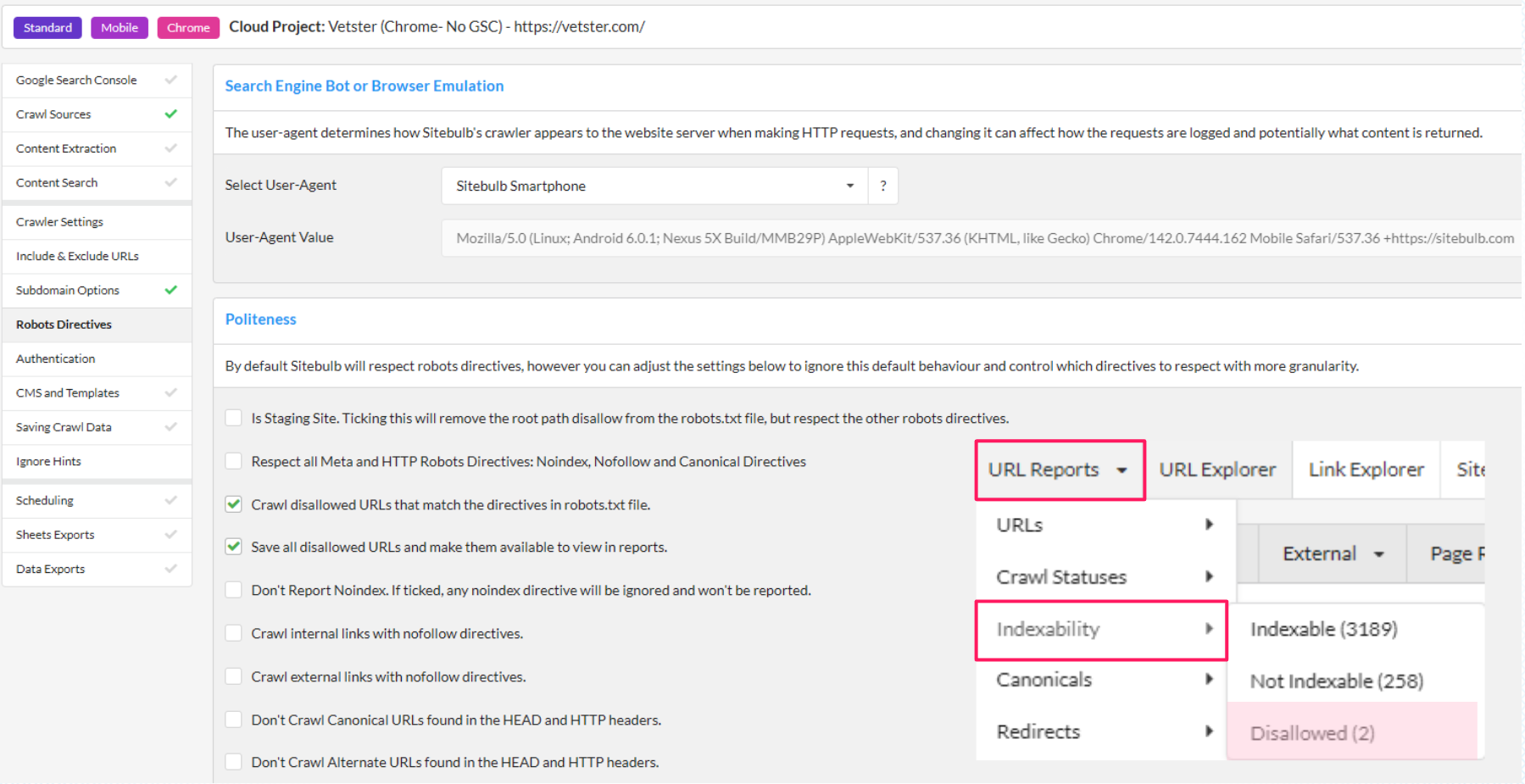
In Sitebulb, you can configure your crawl to save and crawl disallowed URLs, and the report will flag disallowed status against each individual URL.
Redirect verification
Crawl just your redirect list using Sitebulb; you’re not auditing the whole site, just the URLs that were supposed to be redirected. It’s easy then to verify that each one is working, going to the right destination, and not creating loops or chains.
Brendan recommends the GSC indexing report alongside this. In the early days after a migration, you'll often find URLs that Google is trying to reach that weren't in the original redirect mapping. These are pages that got missed. Use it to find gaps and get fixes briefed to developers quickly.
You could also try getting the actual .htaccess file from your developers and reading it. Are there chains? Loops? URLs redirected to pages that aren't actually equivalent?
CDN and server access
If it's not noindex or robots.txt, the next layer is server and CDN configuration. A CDN like Cloudflare may have had its configuration changed during the migration in ways that affect Googlebot's access.
The GSC Crawl Stats report, which Brendan flags as being hidden in the settings menu and, in his words, "very undersung," is one of the most useful diagnostic tools available here. It shows how different Googlebot types are interacting with your site, and its response report lets you drill into specific URLs by response type: 4xx errors, redirects, pages not being reached.
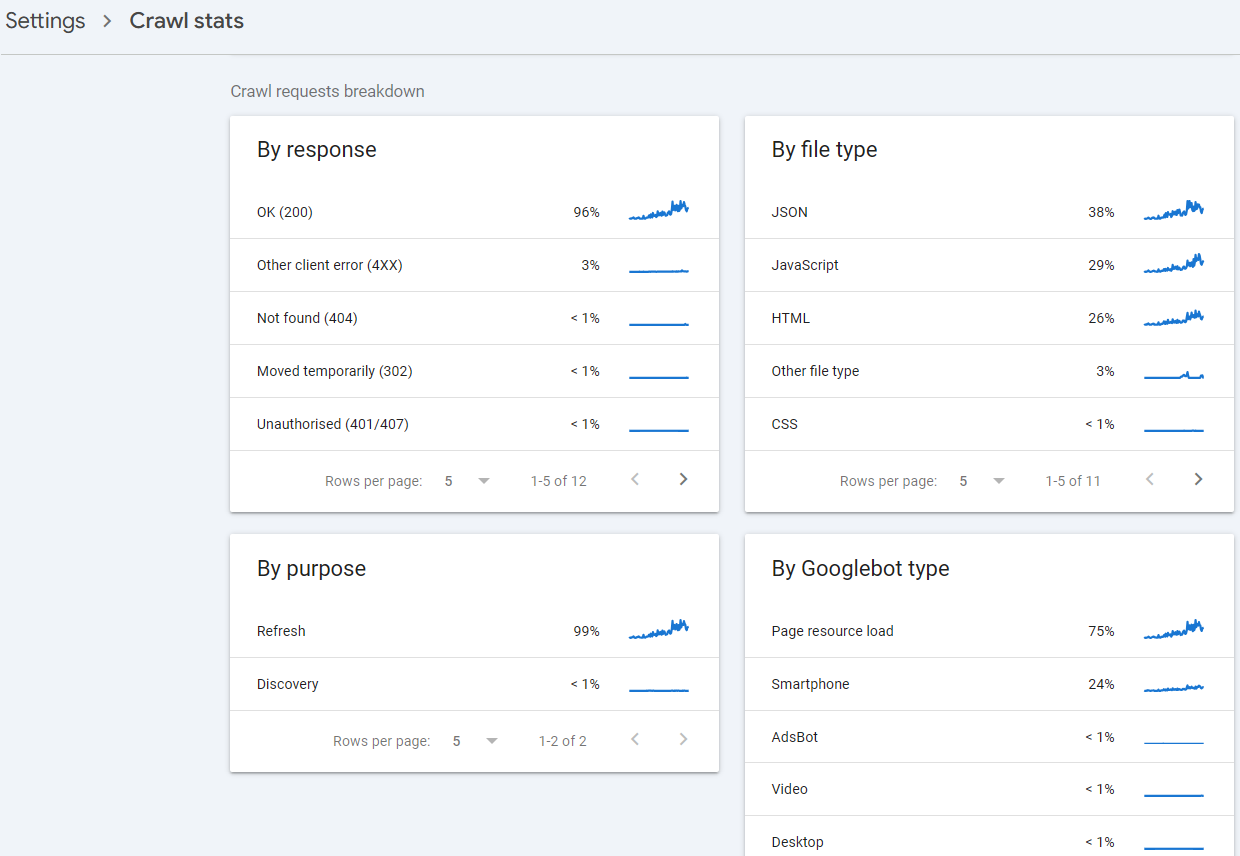
If you need to go deeper (e.g. checking IP ranges, verifying Googlebot is actually hitting the site at all), that's a conversation with whoever manages your server or CDN.
The parity audit
This is Brendan's core diagnostic framework for migrations that are underperforming beyond the initial launch window, when the fundamentals look fine, but rankings and traffic aren't recovering the way you expected.
The basic premise is that something changed between the old site and the new one that's affecting performance. Your job is to find it.
The problem is finding the "something that changed" is a bit of a needle-in-a-haystack situation.
A migration can change URL structures, internal link architecture, content, titles, headings, navigation, CMS, rendering approach, and more. And sometimes all at once. So you need a systematic way to compare the two.
This requires access to historical data. If someone did their job properly before the migration, you should be able to get hold of at least some of these:
A pre-migration crawl (ideally from within a week or two of launch)
The redirect map and the logic behind it
Search Console and GA data from the old property
A staging environment or backup of the old site
The more of these you have, the more precisely you can diagnose.
Link structure and internal authority
Brendan says he’s “obsessed with parity”—a useful obsession to have during migration investigations. Link structure is where he looks first.
Internal links are the architecture of a site. They tell Google what pages are important and how they relate to each other. So if a migration has changed that architecture in ways that weren't planned or noticed, pages that were previously well-linked internally can vanish in terms of crawlability and authority.
Sitebulb's URL Rank score measures internal page strength based on the number and quality of internal links a page receives. Comparing these values between a pre-migration crawl and your current one shows you pages where internal authority has dropped significantly.
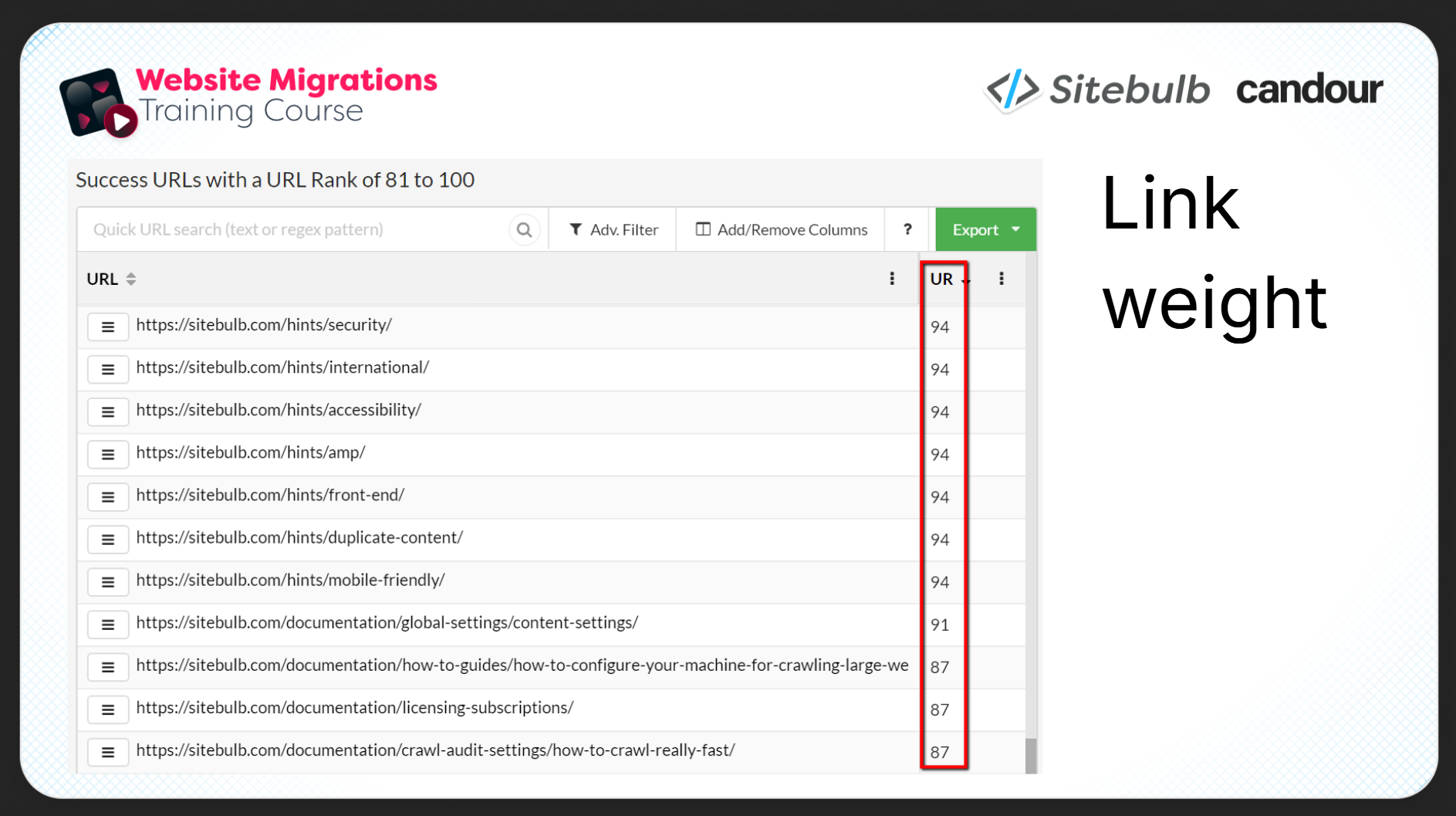
The same comparison works for raw inlink counts, word counts, title matching, heading matching. Build a spreadsheet mapping old URLs to new equivalents, pull in metrics from both crawls, look for the biggest discrepancies.
Content pruning is an underappreciated version of this problem. Pages deleted or consolidated during the migration might not have been generating direct clicks, but they may have been contributing internal link equity and anchor text to pages that were. (Mark Williams-Cook discusses this in part 2 of the series.)
Navigation and structural changes, and when to just LOOK
Sometimes, the fastest way to spot the difference is just to look. Revolutionary, I know.
Brendan recalls a client site he joined a few months after a migration, with graphs pointing stubbornly downward long after they should have started recovering. The numbers showed internal link drops, but where? The actual discovery came from simply comparing the old homepage to the new one using his eyeballs.
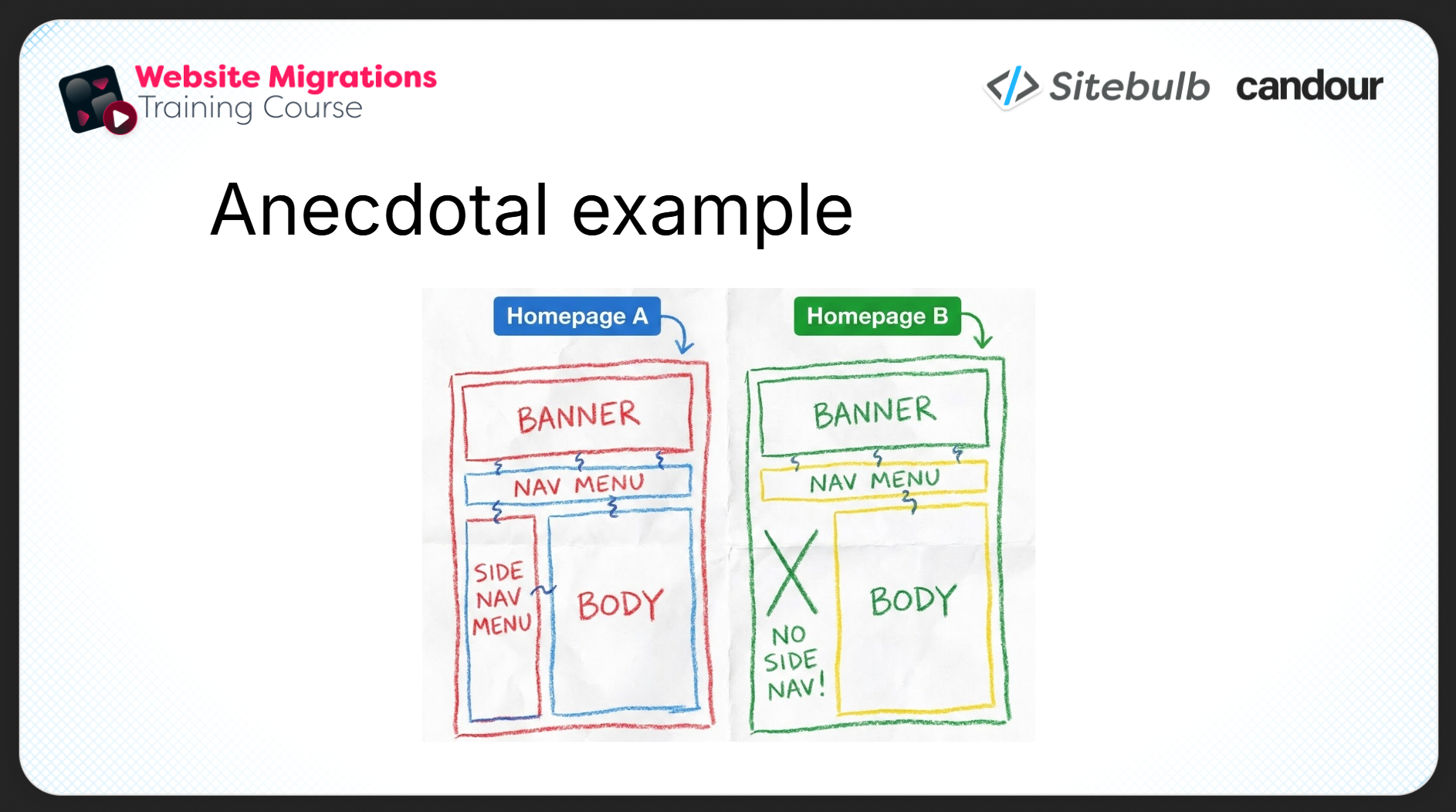
The site had removed a major navigation menu, the one that linked to all the deep brand-specific product pages. Customers had been using those pages to find and buy specific brands. The change was aesthetically motivated; the new design was cleaner but nobody had checked what those pages were contributing to the business.
There was no SEO in the room when the design got signed off.
Getting the navigation restored was what moved the dial. No amount of redirect auditing would have caught it, because technically everything was working fine.
By the way, Sitebulb links directly to Wayback Machine from any crawled URL, which makes this kind of comparison relatively quick. If your site gets crawled regularly by the Internet Archive, you should have snapshots from around the migration date.
JavaScript and rendering changes
If your migration involved a replatforming or a move to a JavaScript-heavy architecture, you’ll need to do a very specific check: is there any content that was previously in static HTML and is now sitting behind JavaScript execution?
Sitebulb's response vs render comparison shows you the difference between what a page serves in the HTTP response and what's present after JavaScript executes. If content, links, or headings that existed in the old HTML are now rendered via JS, the report flags them.
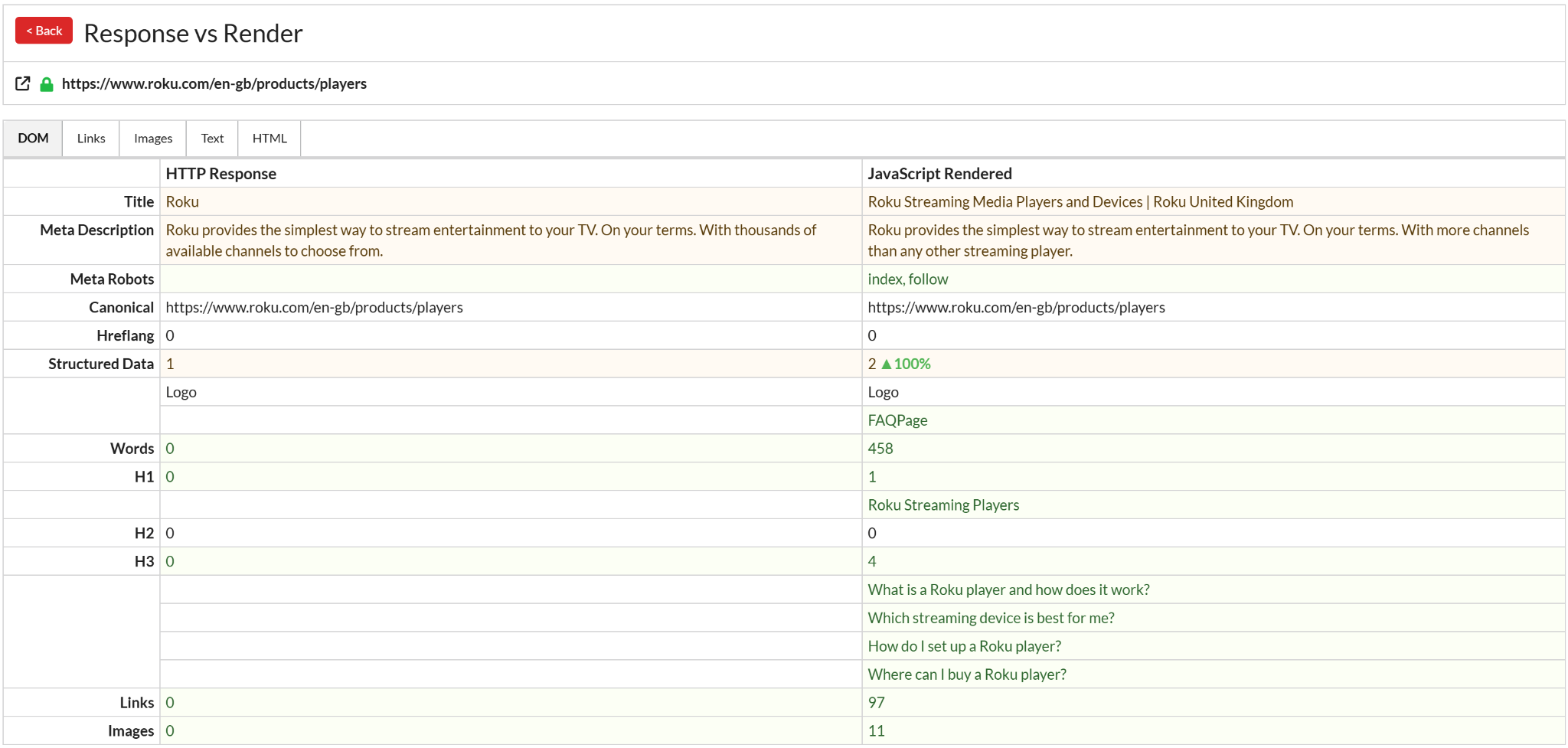
This matters most when the content being hidden is related to the queries you're losing rankings on. Check underperforming pages first. For a deeper dive on JavaScript's effect on crawling and indexing, check out the Sitebulb JavaScript SEO resource hub.
Scope governs expectations
One thing worth establishing early in any recovery investigation: what was actually changed? Because the scope of the migration determines both what you're investigating and what recovery you can realistically expect.
A domain-name-only migration with a clean redirect map and minimal content changes is a different beast entirely to a full replatforming that altered the CMS, the site design, the navigation, and hundreds of URLs simultaneously. The latter might take over a year to stabilise, and some of the performance change might not be recoverable.
Brendan also notes that if the site was already in free fall before the migration, the new domain inheriting all the same content isn't going to perform better. Migration doesn't reset a site's performance trajectory.
Migration scope factors that have significant implications
ccTLD vs. TLD changes: Moving from a generic domain to a country-specific one can cause major geographic traffic fluctuations as Google recalibrates how it perceives the domain's targeting.
Rebrands: Major brand name changes take Google longer to process than most people expect. Brendan notes what seems to be a pattern of Google taking increasingly long to absorb significant entity changes. Monitor brand query volume for both old and new brand names closely after a rebrand.
Protocol changes: Even something as seemingly minor as a change from HTTP to www. can occasionally produce unexpected impacts.
Targeted recovery interventions
Once you've identified what went wrong, interventions should be surgical, targeting specific URLs and queries rather than broad changes across the site. A few tactical points from Brendan's quick-fire tips section:
Link building as part of recovery. Some link equity is inevitably diluted through redirects. Using the migration as a deliberate trigger for link building and brand amplification helps compensate. Make sure your new domain is being consistently linked to and cited across all external web presence. Hello PR!
Request indexing, but sparingly. If you're confident a URL is in good shape and should be indexed, submitting a request through GSC is reasonable. Using an indexing API at scale is an option if you're really concerned, but Brendan's advice is not to overdo it.
Semantic clustering for merger migrations. If the migration combined multiple sites, double-check that there aren’t any pages that are too semantically similar, causing cannibalisation and confusion for Google.
Blended data in Data Studio. Connecting old and new Search Console properties in Data Studio gives you a 16-month view of pre- and post-migration performance at URL or page-group level. Good for identifying specific query or page categories that haven't recovered and need targeted attention.
Don't make changes just for Google. Every intervention should be defensible to other stakeholders. If a fix compromises UX or undoes something a content or design team deliberately chose, you need to make that case with data, not just push it through unilaterally.
Knowing when to bail
Brendan closes with something migration guides don't usually say out loud: sometimes the right answer is to reverse course.
If you've hit the thresholds you defined, revenue and traffic haven't recovered over a reasonable timeframe, and the investigation has revealed problems too deeply embedded in the new site to fix quickly, rolling back to the old domain may be the correct decision. The WooCommerce example exists in the industry consciousness precisely because they made that call at the right time rather than continuing to bleed.
The ideal state, obviously, is never to need any of this. If you as the SEO were involved from the beginning, post-migration investigation is far faster and more targeted. Disaster recovery in that instance is essentially: find the documentation, find the deviation, fix the deviation.
TL;DR key takeaways
💡 Define disaster before you diagnose it: pre-agreed thresholds, realistic time expectations (Google takes ~180 days to process a change of address), and business metrics rather than traffic metrics determine whether you're in a genuine crisis.
💡 Validate your data before you act on it: GA4 config changes, mismatched Search Console properties, seasonality, and Google serving old and new URLs in parallel can all produce apparent drops that aren't real.
💡 Check the fundamentals first: sitewide noindex left on from staging, robots.txt blocking redirect chain intermediaries, and CDN configuration issues are all common, often missed at launch, and relatively quick to fix. GSC Crawl Stats (buried in settings, chronically underused) is your best diagnostic tool here.
💡 Use parity as your core diagnostic framework: systematically compare old vs new across internal link structure (URL Rank / Link Score), content, titles, headings, and navigation. Look for the biggest discrepancies.
💡 Use your eyes as well as your tools: the most revealing diagnostic in Brendan's career was a visual comparison of the old vs new homepage. Wayback Machine plus Sitebulb's direct Wayback link makes historical page comparison quick to pull up.
💡 Have an exit plan: define in advance the threshold at which you stop trying to recover a migration and reverse course. The WooCommerce rollback is a decision made well, not a failure.
This article is based on Part 3 of Sitebulb and Candour's website migration series. Part 1 covers migration planning with Tom Spencer-Livingston: How to Plan a Website Migration That Doesn't Tank Your Traffic. Part 2 covers emergency protocols with Mark Williams-Cook: Sh*t, The Migration Is in 2 Days/Weeks.

Sitebulb is a proud partner of Women in Tech SEO! This author is part of the WTS community. Discover all our Women in Tech SEO articles.

Jojo is Marketing Manager at Sitebulb. She has 15 years' experience in content and SEO, with 10 of those agency-side. Jojo works closely with the SEO community, collaborating on webinars, articles, and training content that helps to upskill SEOs.
When Jojo isn’t wrestling with content, you can find her trudging through fields with her King Charles Cavalier.


Related Articles
 Enterprise SEO Audit: From Crawl to Prioritised Action Plan

 Which Rendering Approach is Best for SEO on E-commerce Sites?

 The M&A Migration Framework: Merging Websites Without Killing Business Value

 Sitebulb Desktop
Find, fix and communicate technical issues with easy visuals, in-depth insights, & prioritized recommendations across 300+ SEO issues.
- Ideal for SEO professionals, consultants & marketing agencies.
 Sitebulb Cloud
Get all the capability of Sitebulb Desktop, accessible via your web browser. Crawl at scale without project, crawl credit, or machine limits.
- Perfect for collaboration, remote teams & extreme scale.