

How to Plan a Website Migration That Doesn't Tank Your Traffic
 Jojo Furnival
Published April 16, 2026
There's a version of a website migration that goes smoothly. Traffic dips briefly, recovers within a few weeks, and everyone moves on with their life. There's also the other version. Months of declining rankings, panicked stakeholder calls, and an SEO frantically trying to figure out what went wrong and why.
The difference between those two outcomes almost always comes down to planning. Specifically, how much of it happened, and whether the SEO was actually involved in it from the start.
Tom Spencer-Livingston, SEO Innovation Lead at Candour, has been working on migrations for five years. He's seen the good, the bad, and the really ugly. And his conclusion is that the worst migrations are almost always the ones where something went wrong during planning.
So we got him to share Candour’s migration planning process in the first session of Sitebulb's three-part migration webinar series. Tom walked us through exactly what good migration planning looks like when you’ve been brought in early and time is on your side. Here’s the recap.
Contents:
- Types of website migrations
- Giving migration risk financial meaning
- What to know before you build the migration plan
- Priority vs sensitivity: Knowing which pages need the most care
- What a good migration plan actually contains
- The staggered approach
- Keeping the plan on track
- When there's no time to plan
- TL;DR key takeaways
Types of website migrations
Before you can assess risk, you need to understand what kind of migration you're actually dealing with. "Migration" gets used as a catch-all term, but the word covers a wide range of scenarios with very different risk profiles.
Tom identifies five common types:
Domain change
Moving a site from one domain to another, without changing much else. Relatively low risk. Search Console's Change of Address tool lets you signal to Google that a domain migration is intentional, which is useful for domain-to-domain moves where both properties are verified.
Merging sites
Combining an old site into a new one, or consolidating multiple sites together. Risk creeps up here because you're likely dealing with overlapping content that needs careful planning to avoid cannibalistion issues.
Replatforming
Common in ecommerce – moving from WordPress to Shopify, for example – but it also covers situations where the design or functionality of a site changes significantly without the URLs necessarily changing. Performance considerations become particularly important here.
As Tom notes, if you're moving between CMSs, the new platform may have restrictions on what you can do with certain design elements, and those constraints need to go into your risk register early.
International migration
Pushing a single domain out into multiple localised versions, potentially in different languages, with their own hreflang requirements and technical considerations. This is the one that tends to make people visibly nervous in meetings.
Rebrand
Changing the site's name, domain, and/or product offering. Anecdotally, Tom has found that rebrands cause Google to take a long time to reconcile what the old brand was with what the new brand is, making it one of the highest-risk migration types.
More on why rebrands require a different approach later.
In practice, most migrations combine elements of more than one type. A replatform that also involves a domain change and some international expansion is a different beast to any of those things in isolation. Every migration needs to be assessed on its own terms.
The one thing that's consistent across all of them: there is always some level of risk, and everyone involved needs to understand that. Tom is firm on this point. It doesn't matter if it's a simple domain change with nothing else going on. Something can still go wrong, and pretending otherwise doesn't help anyone.
Giving migration risk financial meaning
SEOs know migrations are risky. But translating that risk into terms stakeholders care about enough to get you involved from day 1 of planning? You’ve got to talk about money—specifically projected revenue loss.
It's marketing 101: speak the language that gets your audience's attention.
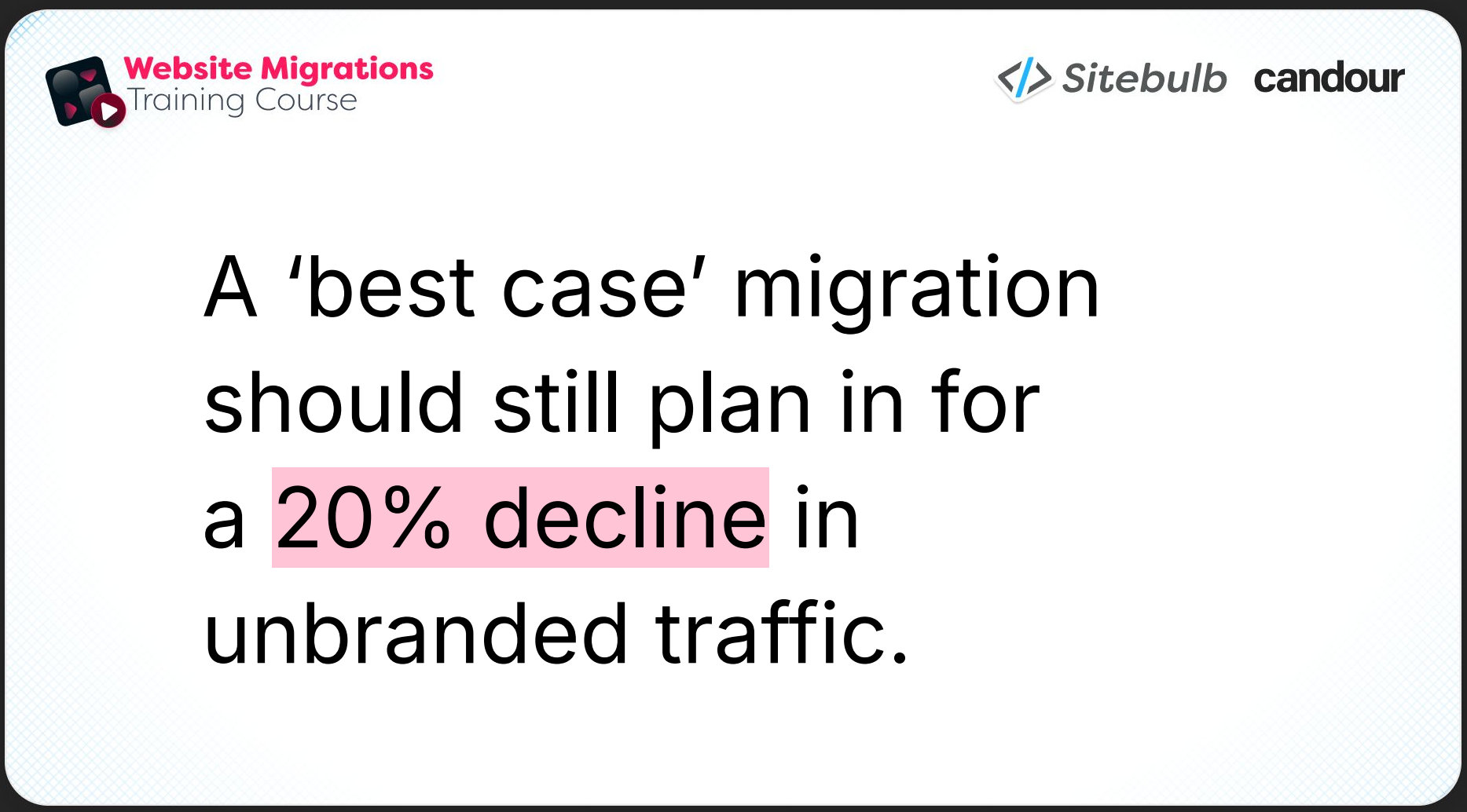
The baseline assumption he works from is a 20% decline in unbranded traffic as a best-case short-term scenario. Unbranded traffic is the focus here because branded traffic is relatively resilient: Google is very unlikely to start serving a competitor's site for someone searching your brand name. Unbranded traffic, particularly for competitive terms, is what's genuinely exposed during a migration.
A well-executed migration may show initial signs of stabilisation within two to four weeks, but full recovery of unbranded rankings typically takes several months — and for larger or more competitive sites, six months or more is not unusual.
Here's the formula:
Step 1: Isolate your unbranded traffic
In Search Console, apply a branded filter and remove those queries. What's left is your unbranded click volume. (There's a relatively new feature in Search Console that can do this automatically, but the manual filter method works fine.)
Step 2: Calculate unbranded conversions
Multiply your unbranded clicks by your site's conversion rate.
Step 3: Calculate at-risk revenue
Multiply your unbranded conversions by the average conversion value, whether that's a purchase, a lead, or a contact form submission. This is the total unbranded revenue that's potentially at risk during the migration.
Step 4: Apply the 20% reduction
Multiply your unbranded conversions by 0.8 (a 20% reduction), then derive the revenue from that figure. Subtract it from your original at-risk revenue figure. The difference is your projected best-case short-term loss.
Tom walks through a worked example in the webinar, which you can see below.
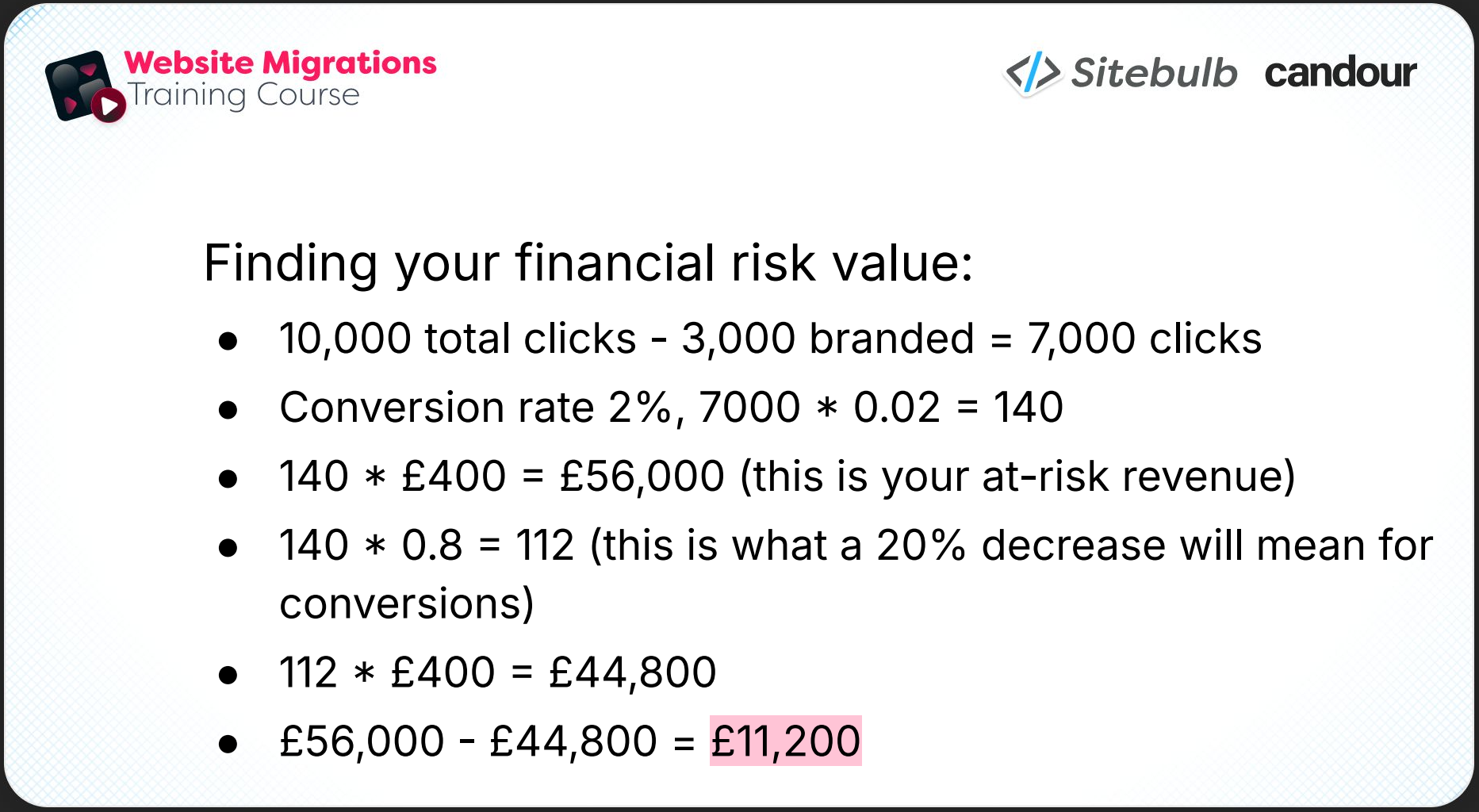
A site with 10,000 clicks per month, 3,000 of which are branded, leaves 7,000 unbranded clicks at risk. At a 2% conversion rate and an average conversion value of £400, the at-risk revenue is £56,000. Apply the 20% reduction: 140 conversions drops to 112, and the revenue difference is £11,200 in projected best-case short-term losses.

“Someone will look at this figure and be like, okay, maybe we need to plan this properly with the help of an SEO.”
That's on a fairly modest site. Scale it up for a larger site with higher unbranded traffic, more competitive terms, and a higher average conversion value, and the figures can get uncomfortable quickly.
The other useful thing about this approach is scenario modelling. So, don't just run the 20% best case scenario. Model 30% and 40% declines as well. You then have a best-case to worst-case range, which is a much more honest representation of what's at stake.
As Tom puts it: the less involved you are as the SEO, the further toward the worst-case end of that range you're likely to end up.
What to know before you build the migration plan
The financial risk calculation is only as good as the data going into it. And beyond the calculation, building a sensible migration plan requires genuinely understanding the site you're working on.
Tom flags this particularly for SEOs who are being brought in specifically for a migration, rather than working with the site on an ongoing basis. In that case, there's a real due-diligence phase before you can do anything else:
Traffic distribution
Which sections of the site are performing? What are the top product pages? How is the informational content doing? You need a clear picture of where value is concentrated.
Keywords and rankings
What are the most valuable terms, and what proportion of them are branded vs unbranded? This feeds directly into the risk calculation and tells you which parts of the ranking profile are most exposed.
The competitive landscape
For your most important unbranded terms, how competitive is the space? If you drop a few positions during the migration, how long might recovery actually take? In a very competitive niche with well-funded competitors, two to four weeks is optimistic.
Traffic subchannels
Standard organic search is the obvious one, but the site may also be getting meaningful traffic from image search, Google Discover, or AI-driven traffic. Each of these behaves differently in a migration and needs to be accounted for.
Backlink profile
Which pages have links? Are those links recent and high-quality, or old and static? Pages with strong link equity are higher sensitivity from a migration perspective, and you'll want to know which ones they are before you start moving things around.
Internal linking structure
Which pages link to which? What's the anchor text? Where does internal authority flow? If important pages lose their internal links during the migration, they can quietly become a lot less prominent without anyone noticing until rankings drop.
Page targeting
Titles, headings, keyword mapping. If these change across the migration without intention, you can end up with pages that are no longer targeting the queries for which they were ranking.
Site structure
Navigation, taxonomy, conversion funnels, content hub architecture. These are easy to inadvertently damage in a migration, particularly a replatform, and they're worth documenting clearly before anything changes.
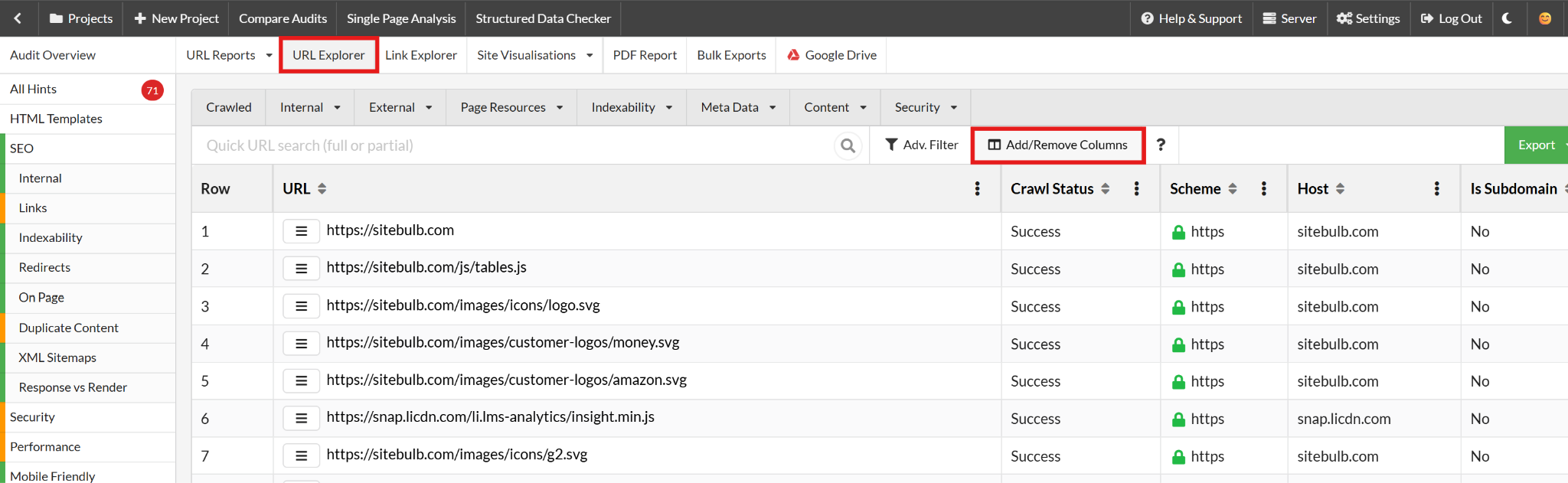
In Sitebulb, the URL Explorer is particularly useful for building this picture. You can pull titles, headings, and link data together in a custom report, and bring in Search Console data (clicks, impressions) on a page-by-page basis through the integration.
Priority vs sensitivity: Knowing which pages need the most care
Once you have the data, you need a framework for deciding which pages deserve the most attention during the migration. Tom makes a distinction here between priority and sensitivity, which need to be assessed independently.
Priority is about importance: how much does this page matter to the business? Is it a key commercial page? A high-traffic informational piece? A major conversion driver?
Sensitivity is about risk: how exposed is this page if something goes wrong? A page with a lot of unbranded traffic and a strong backlink profile is highly sensitive. Changes to its URL, its content, or its internal links could have a meaningful and hard-to-reverse impact on rankings.
The reason this distinction matters is that priority and sensitivity don't always move together. A page can be high priority and low sensitivity (your most important page happens to rank primarily on branded terms and has clean backlinks). Or it can be high priority and high sensitivity (an important commercial page, ranking for competitive unbranded terms, with a significant backlink profile).
That second combination is what you want to be flagging clearly in your pre-migration planning and treating with particular care.
In practice, this looks like a content-audit-style categorisation of your pages – using crawl data from Sitebulb or whatever tool you're using – that assigns a priority and sensitivity score to each page. This then feeds directly into your redirect map prioritisation and your decisions about what gets checked most carefully during technical auditing.
“Some of your pages will be of really critical importance but may not be very sensitive at all, which is kind of a good place to be. But if you've got a lot of pages that are very, very important and also very highly sensitive, that's something you're going to want to be flagging at this stage.”
What a good migration plan actually contains
With the risk picture established and the page-level analysis done, you can start building the actual migration plan. Tom is clear that there's no universal template; every migration is different and needs to be treated individually. But there are consistent elements that appear in good plans across all migration types.
Clear ownership
Every task in the plan needs an assigned owner.
The SEO is typically responsible for technical auditing and content review. Developers handle wireframes and (depending on the setup) tracking implementation. There may be a UX agency involved, or a third-party platform team.
What you want to avoid is the situation Tom describes: getting halfway through a migration and discovering that a piece of work hasn't been done because the person responsible didn't know they were supposed to do it. Doh.
Milestones and activities
The plan should define the broad phases of the migration and the deliverables within each.
Milestones might be:
Wireframes and designs complete
Staging site available
Technical snagging resolved
Go live
Activities within each phase will include things like redirect mapping, auditing, content briefing, and tracking setup.
Flagged risks and pitfalls
Some risks are human: someone going on holiday at a critical moment, a resource being unavailable. Some are technical: a new CMS platform that has restrictions on page structure that the old one didn't.
As Tom puts it, the point of flagging these isn't just to avoid being surprised when they happen; it's to give you the opportunity to build solutions for them proactively.
A meeting cadence
How often does everyone involved need to be in the same room (or on the same call)? For a fast-moving migration with a short runway, frequent touchpoints help people hand over work and surface questions before they become blockers. For a longer, more staggered migration, fortnightly check-ins might be enough. The right answer depends on the pace of the project.
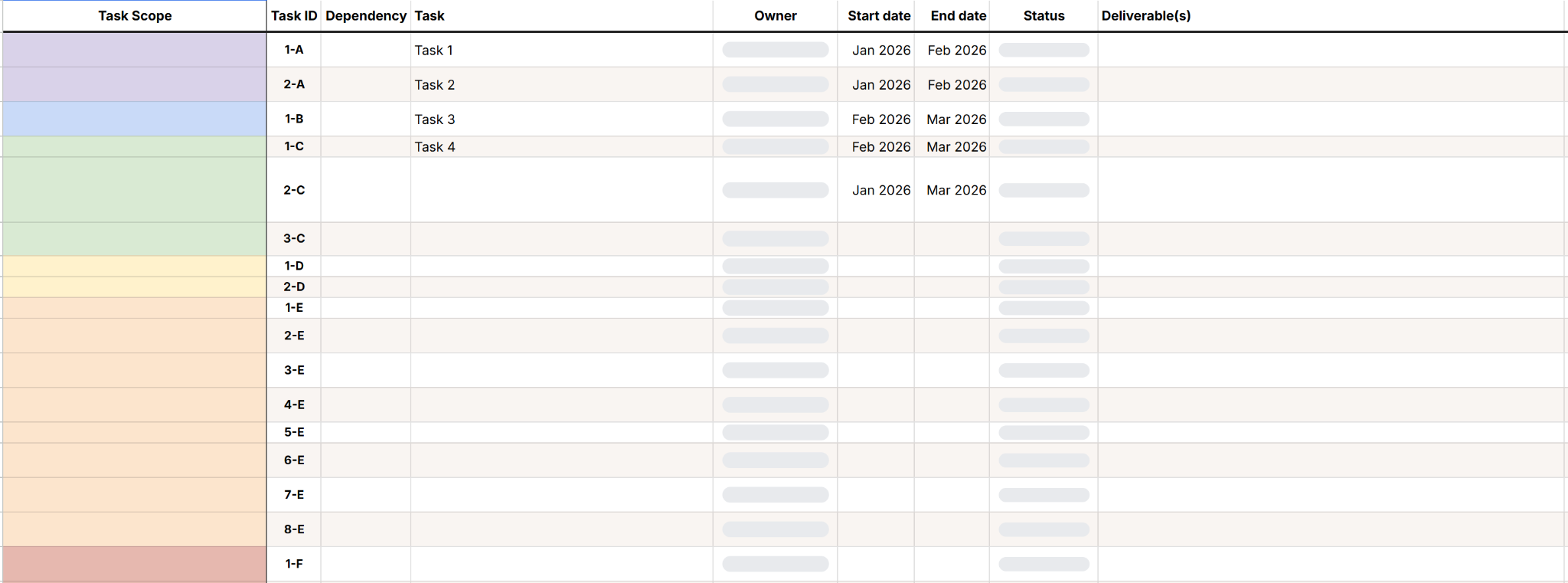
You can copy Candour’s migration planning template that combines a task list (with owner, start/end dates, status, deliverable, and dependency columns) with a Gantt chart that populates automatically as you fill in the dates.
Benchmarking
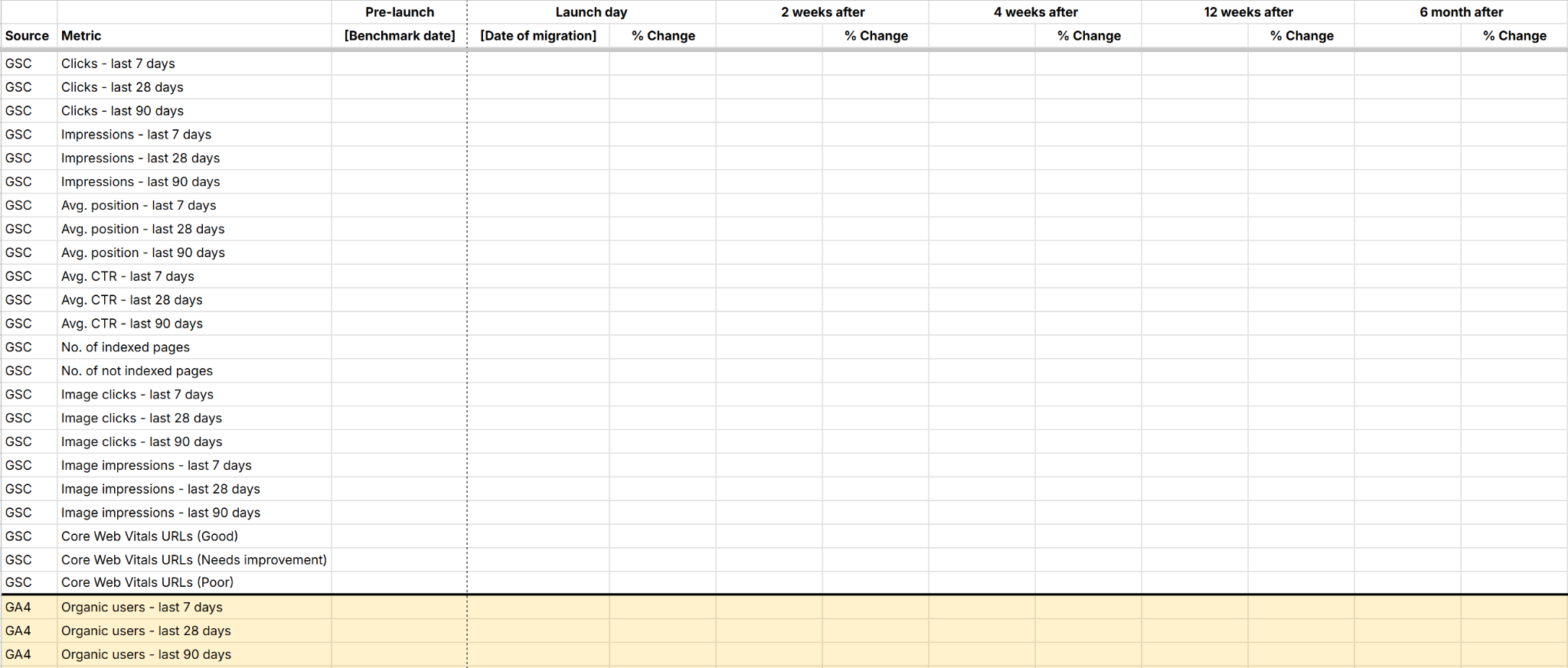
Before anything changes, capture your baseline metrics: Search Console data (clicks, impressions, average position), analytics sessions, ranking data from your rank tracker, and Core Web Vitals. You need something to measure against post-migration to determine whether things are recovering on track or whether something needs to be investigated. Sitebulb can help with the Core Web Vitals piece.
You can also use Candour’s benchmarking template:
The staggered approach
Something to consider is t he staggered migration: rather than making all changes at once, break the migration into phases with time built in between.
Why? Because the more changes that happen at once, the harder it is for Google to understand the relationship between the old site and the new one.
If you change the domain and the page structure and the content and the URL format all in one go, Google is trying to re-associate a huge number of signals simultaneously. If you change one thing, let it settle, then change the next thing, Google has a much clearer view of what's happening.
Tom talked about a client who wanted to do all of the following in a single migration:
A domain change
A significant redesign of commercial pages
An international migration
The incorporation of informational content from another site
Candour suggested they break it down: migrate the domain and change nothing else, wait a month. Then redesign the commercial pages, wait another month. Then bring in the informational content.
Each phase got its own two-to-four-week recovery window, and by the time the next phase began, the previous one had settled.
This approach doesn't work for every situation. If you're working with a client on a retainer, you have the relationship and the time to manage a staggered process. But if you've been parachuted in with a tight deadline (which is what we’re covering in the next webinar), it's a harder sell.
The exception is rebrands. In Tom's experience, phasing a rebrand tends to backfire. If you change some pages to reflect the new brand while others still reflect the old one, Google ends up with conflicting signals and struggles to reconcile them. The result is often a longer, messier recovery than if you'd made the switch cleanly all at once.
This is part of what makes rebrands the highest-risk migration type.
Keeping the plan on track
Having a good plan is one thing. Making sure it's actually followed is another. Tom covers a few areas that consistently go wrong in the implementation phase, even when the planning has been solid.
Technical snagging
You should be auditing three versions of the site: the old site, the staging site, and the post-launch site. The staging audit is particularly important; you need to know what you're actually going live with before it goes live.
Migrations are also a genuinely good opportunity to resolve long-standing technical debt. When everyone is already focused on the site and developers are already engaged and in the right headspace, tasks that would normally be deprioritised forever can actually get done. Tom specifically mentions JavaScript SEO issues as an example, which are usually difficult for SEOs to push through but more possible when there's already developer resource committed to the project.
Redirect maps
The redirect map is not a set-and-forget task and its scope needs to be comprehensive, including PDFs and images.
More importantly, once the redirects are implemented, re-crawl them. Use Sitebulb to verify that every redirect is resolving correctly.
Parity checks
Ensure these three things haven't been accidentally lost across the migration:
Link parity: Your most important commercial pages had internal links pointing to them. Do they still? Internal link equity is easy to disrupt during a redesign, and the impact on rankings can be slow and hard to diagnose.
URL minimisation: Where there's no structural reason to change a URL, don't change it. Every URL change is a redirect, and every redirect is an opportunity for something to go wrong.
Targeting preservation: If pages have been deleted, consolidated, or restructured, check that somewhere on the new site is still targeting the queries those pages were ranking for.
Staging access
This one comes up repeatedly as something that gets missed. Someone who needed to be reviewing the staging site didn't have access to it, so they weren't reviewing it, so issues that should have been caught before launch weren't.
Make sure everyone who needs access to the staging site has it, and that the staging site has the content you actually need to review. If the migration involves significant content changes, a staging site with lorem ipsum text isn't useful for content review purposes.
Ongoing benchmarking
After launch, check in on those pre-migration benchmarks regularly. Some traffic drop is expected and normal. What you're watching for is what happens after the initial dip: is it recovering? Going sideways? Still declining four or five weeks post-launch?
To state the obvious, a recovery that stalls or reverses is a signal that something needs to be investigated.
When there's no time to plan
Everything above assumes the best-case scenario: you've been brought in early, there's a realistic timeline, and the migration can be planned properly. In practice, that's not always where you find yourself.
What to do in that situation is the subject of part two of this series, where Mark Williams-Cook covers emergency migration protocols. If you're reading this because your migration is already in motion, you should probably join us for that session.
TL;DR key takeaways
💡 Some traffic loss in a migration is inevitable. Your job as the SEO is to minimise unnecessary risk, not to promise a seamless transition that isn't possible.
💡 Translate migration risk into projected revenue loss before the conversation with stakeholders happens.
💡 Different migration types carry different risk levels, and most real migrations combine more than one type. Assess each one on its own terms.
💡 Priority and sensitivity are different things. A page can be critical to the business but not particularly risky to move OR it can be both critical and highly sensitive. Know which pages fall into that second category before you start.
💡 A staggered approach reduces risk for most migrations by giving Google smaller, more digestible changes to process. The exception is rebrands, which tend to work better as a clean break.
💡 The redirect map isn't done when you hand it over. Re-crawl after implementation and verify every single redirect is resolving correctly.

Sitebulb is a proud partner of Women in Tech SEO! This author is part of the WTS community. Discover all our Women in Tech SEO articles.

Jojo is Marketing Manager at Sitebulb. She has 15 years' experience in content and SEO, with 10 of those agency-side. Jojo works closely with the SEO community, collaborating on webinars, articles, and training content that helps to upskill SEOs.
When Jojo isn’t wrestling with content, you can find her trudging through fields with her King Charles Cavalier.


Related Articles
 Enterprise SEO Audit: From Crawl to Prioritised Action Plan

 Which Rendering Approach is Best for SEO on E-commerce Sites?

 The M&A Migration Framework: Merging Websites Without Killing Business Value

 Sitebulb Desktop
Find, fix and communicate technical issues with easy visuals, in-depth insights, & prioritized recommendations across 300+ SEO issues.
- Ideal for SEO professionals, consultants & marketing agencies.
 Sitebulb Cloud
Get all the capability of Sitebulb Desktop, accessible via your web browser. Crawl at scale without project, crawl credit, or machine limits.
- Perfect for collaboration, remote teams & extreme scale.