

Breadcrumbs in SEO: What Google's Mobile Change Actually Means
 Karyna Barbaziuk
Published March 31, 2026
This week, we’re grateful to Karyna Barbaziuk who eliminates any confusion around Google removing breadcrumbs from mobile search results and explains their SEO value in 2026.
In January 2025, Google announced that breadcrumbs were being removed from mobile search results. A lot of SEOs started wondering if their breadcrumb work had become pointless.
Here's what Google actually said: "Starting today, we're rolling out a change to no longer show breadcrumbs on mobile search results in all languages and regions where Google Search is available (they continue to appear on desktop search results)".
This shouldn’t confuse you. Breadcrumbs still matter. A lot.
Desktop search still displays them. The schema markup still works. Your site structure still benefits. And honestly, if you were only using breadcrumbs for that mobile display in search results, you were missing the whole point anyway.
Unfortunately, most SEOs add breadcrumbs because "Google says so" without understanding what they actually do. This becomes another checkbox on the technical SEO audit, and nobody thinks much about it again. But breadcrumbs are doing important work for your site structure, internal linking, and crawlability that has nothing to do with how they look in search results.
Let’s talk about what's really happening when breadcrumbs work properly, and when they actually make things worse.
Contents:
What breadcrumbs actually are
Breadcrumbs are navigation elements that show users where they are on your website. Think of them as a trail of links leading back to your homepage, like in the Hansel and Gretel story.
You'll usually find them near the top of a page, just below the main navigation or above the page title. They look something like this:
Home > Category > Subcategory > Current Page
Each level is clickable (or should be), so users can go back to any previous page without using their browser's back button or starting over from your homepage.
The structure is simple:
A starting point (usually your homepage)
Different levels separated by a symbol (>, /, or →)
The current page (sometimes not linked, sometimes styled differently)
Breadcrumbs types
Not all breadcrumbs work the same way. There are four main types, and picking the wrong one for your site can create confusion instead of helping.
1. Hierarchy-based breadcrumbs
These are location-based breadcrumbs that follow your actual site structure. They're the most common type and usually the best choice for content sites.
Example: Home > Start an LLC > California LLC
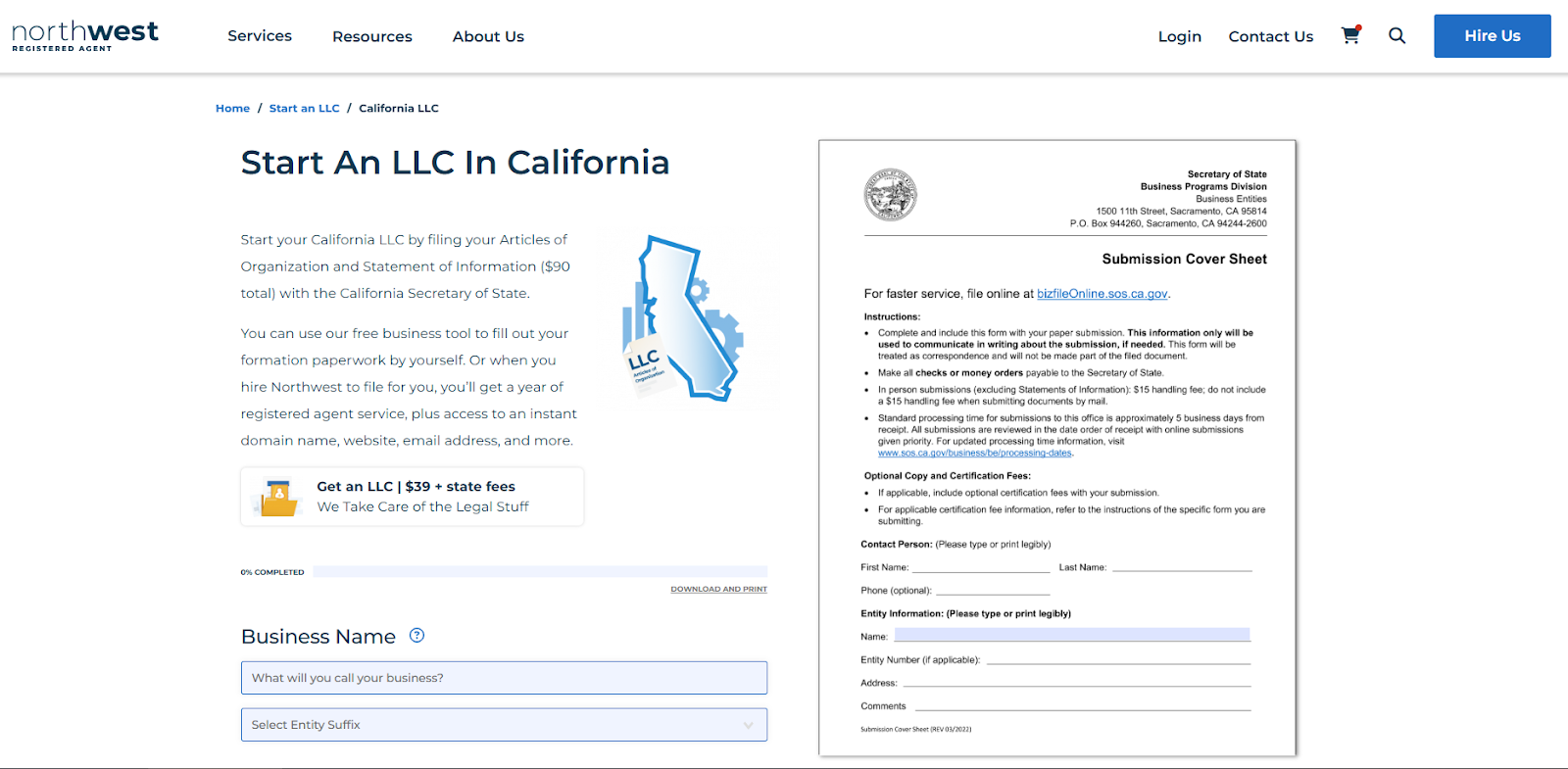
Each level shows a real section of your site. Users can see exactly where they are and go up to broader categories. This type works well when your site has a clear, nested structure where content naturally fits into parent categories.
The important part: your breadcrumb hierarchy needs to match your URL structure and actual site organization. If your breadcrumb shows Home > Start an LLC > California LLC but your URL is /random-state-123, you're confusing both users and crawlers about your real site structure.
2. Attribute-based breadcrumbs
These show the path users took through filter options. You'll see these on ecommerce sites where people filter products.
Example: Home > Women's Fashion, Shoes & Accessories > Women's Clothing > Activewear & Workout > Sweatshirts & Hoodies
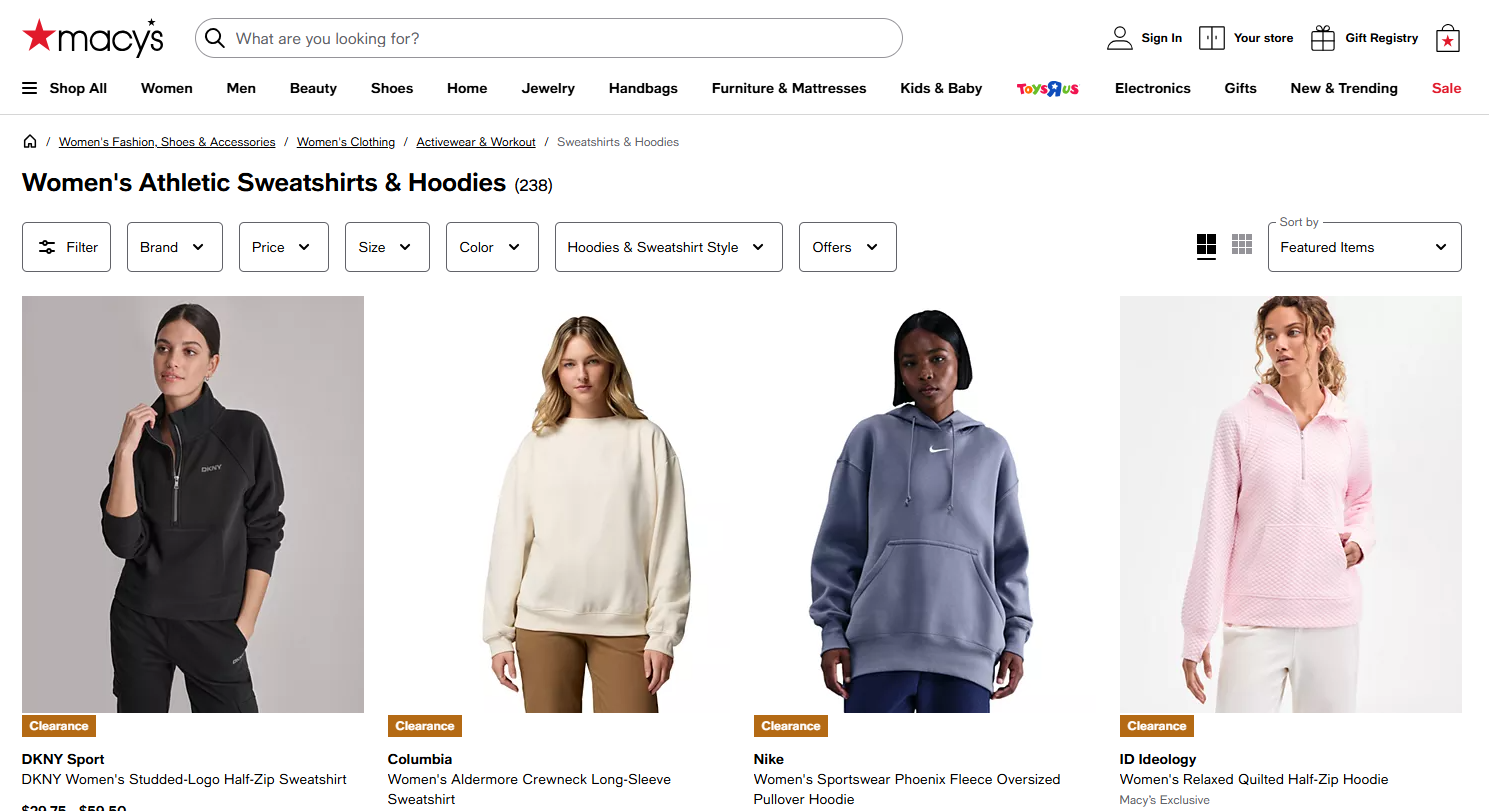
Each part shows a choice the user made while filtering products.
This type works great for showing shopping behavior and making it easy to change your filters. But here's the catch: if the same product can be reached through multiple filter combinations, you need to choose one primary breadcrumb path. Otherwise, you'll create problems with duplicate content.
3. Forward or look-ahead breadcrumbs
These show progress through a series of steps. You'll find them in checkout processes and multi-page forms.
Example: Step 1: Account Setup > Step 2: Payment Info > Step 3: Confirmation
Think of Amazon's checkout or any multi-step form where users need to see where they are and how many steps are left.
These aren't traditional SEO breadcrumbs because they don't show your site hierarchy. They're mainly UX tools that help reduce form abandonment. But less abandonment means better engagement signals, which helps SEO indirectly.
4. History-based or path-based breadcrumbs
These track the actual pages users visited to get to their current location.
Example: If you read three different articles, the breadcrumbs might show: Home > Article 1 > Article 2 > Current Page
My advice: skip these. They're the least useful for SEO because they don't give consistent signals to search engines. Different users reach the same page through different paths, so you're showing different breadcrumb structures for the same content. Plus, you can't mark them up with BreadcrumbList schema because they're too random.
Which type makes sense for your site?
Use hierarchy-based breadcrumbs if:
Your site has a clear nested structure (categories, subcategories)
You're running a blog, news site, or content library
Your URLs follow a logical hierarchy
Use attribute-based breadcrumbs if:
You're running an ecommerce site with lots of filtering options
Users need to see which filters they've applied
You've set up canonical paths for products in multiple categories
Use forward breadcrumbs if:
You have multi-step processes (checkout, registration, forms)
Tracking progress helps users complete the process
Use these together with, not instead of, hierarchy breadcrumbs
Skip breadcrumbs entirely if:
Your site is small with a flat structure (under 10 pages)
You don't have nested categories
Breadcrumbs would just repeat your main navigation
How breadcrumbs actually influence SEO
Let's look at what breadcrumbs are actually doing for your SEO beyond appearing in search results.
The internal linking structure benefits
Breadcrumbs create internal links automatically. Every time you add a new page, it gets connected to its parent categories through the breadcrumb trail.
Here's why this matters: Imagine an e-commerce site with 15,000 products. Each product page automatically links to its subcategory, category, department, and homepage through breadcrumbs. That's 15,000 contextual links going to category pages without any manual internal linking work.
This link value gets distributed naturally. Your category pages get stronger because they're receiving consistent internal links from every product in them. Those stronger category pages help the individual product pages rank better. It's a cycle that scales with your content.
Compare this to manual internal linking. You'd need to decide which pages to link to, update old content to link to new content, and maintain this as your site grows. Breadcrumbs handle this automatically for large sites in a way manual linking can't match.
There's another benefit: Orphaned pages become almost impossible. Any page with breadcrumbs has a guaranteed path back to your homepage. Crawlers can always find their way through your site.
Crawl efficiency and site understanding
Search engine crawlers are always deciding which pages matter most and how they relate to each other. Breadcrumbs work like a roadmap, showing crawlers the logical structure of your site.
When Google sees consistent breadcrumb patterns like Home > Marketing > B2B Content Marketing > Strategy, it builds stronger connections between your site and those topic areas. This is how entity-based indexing works; Google doesn't look at pages alone but analyzes how content relates within your whole site.
The relationship between breadcrumb consistency and crawl priority is simple: sites that are easier to understand get crawled more efficiently. If Google can quickly understand your site structure through consistent breadcrumbs, it wastes less time figuring out how pages relate. That means more of your crawl budget goes toward discovering new content instead of mapping your structure.
Breadcrumbs and user experience + role in web accessibility (WCAG)
Breadcrumbs keep people on your site longer by making navigation easy. If someone's looking for running shoes on Adidas's website and lands on a specific product, breadcrumbs make it simple to go back to the "running shoes" category and look at other options. This is better than going back to Google and potentially landing on a competitor's site.
Engagement rate matters to Google. The NavBoost patent shows that Google uses engagement signals for ranking. When users click through your site instead of leaving quickly, it sends positive signals.
But there's another angle: Accessibility. Breadcrumbs help users with disabilities navigate your website more easily. They give clear context about where someone is within your site, which is valuable for people with cognitive disabilities. Screen readers can read breadcrumb trails, helping visually impaired users understand their location and navigate efficiently.
This aligns with WCAG (Web Content Accessibility Guidelines) success criterion 2.4.8, which says that more than one way should be available to find content on a site. Breadcrumbs are one of those ways, alongside your main navigation and search function.
Technical implementation that works
Let's talk about how to set up breadcrumbs so they actually deliver SEO value.
BreadcrumbList schema markup essentials
Google needs structured data to understand your breadcrumbs. The BreadcrumbList schema tells search engines exactly what each level represents.
Here's what a properly marked up breadcrumb looks like in JSON-LD:
{
  "@context": "https://schema.org",
  "@type": "BreadcrumbList",
  "itemListElement": [{
    "@type": "ListItem",
    "position": 1,
    "name": "Home",
    "item": "https://example.com/"
  },
  {
    "@type": "ListItem",
    "position": 2,
    "name": "SEO Tools",
    "item": "https://example.com/seo-tools"
  },
  {
    "@type": "ListItem",
    "position": 3,
    "name": "Technical SEO"
  }]
}
Let’s discover what each property does:
@context: points to the Schema.org vocabulary so search engines know where to find definitions
@type: says this is a BreadcrumbList
itemListElement: an array containing each breadcrumb level
position: the order in the breadcrumb trail, starting at 1
name: the visible text users see
item: the URL for that breadcrumb level (optional for the current page)
A few important rules:
Use full URLs with the protocol: https://website.com/category not /category
Your JSON-LD must match the visible breadcrumbs on the page exactly
The final breadcrumb (current page) doesn't need an "item" property
Position values must be sequential numbers starting at 1
If your schema doesn't match your visible breadcrumbs, Google may flag this as structured data manipulation. This can result in a manual penalty, not a rankings drop, but you'll lose eligibility for rich results entirely.
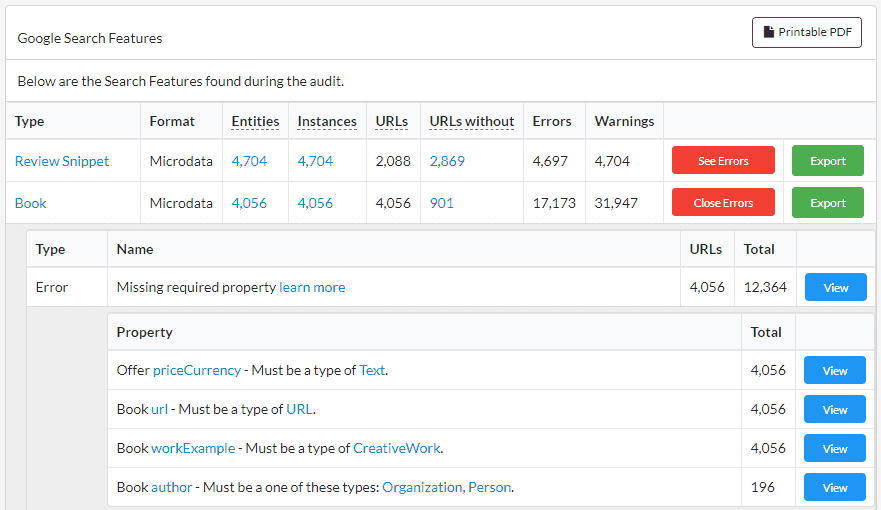
Editor’s Note: You can audit and validate your structured data against Google and schema’s guidelines using Sitebulb:
Common technical mistakes to avoid
I see these errors all the time in audits. Each one stops Google from properly understanding your breadcrumbs.
Missing schema markup entirely: Your breadcrumbs might look perfect to users, but without BreadcrumbList schema, Google can't reliably extract them for search features. The visible breadcrumbs and the schema work together; you need both.
Using relative URLs instead of absolute URLs: Schema requires full URLs. Don't use /category/product. Use https://website.com/category/product. Relative URLs will trigger validation errors.
JavaScript-only rendering: If breadcrumbs only appear after JavaScript runs, you're invisible to many crawlers. Google can render JavaScript, but it's slower and less reliable than server-side HTML. For important navigation like breadcrumbs, render them server-side or use pre-rendering.
Schema doesn't match visible breadcrumbs: This is a big problem. If users see Home > Products > Shoes but your schema shows Home > Shop > Footwear Google sees this as manipulation. Keep them identical.
Missing position values or required properties: Every ListItem needs a position. Every level needs a name. These aren't optional, they're required for valid BreadcrumbList markup. Missing them means Google ignores your schema entirely.
Linking to non-canonical URLs: Your breadcrumb links must point to canonical URLs. If you're linking to category?ref=nav&sort=popular instead of just category, you're telling crawlers these parameter-heavy URLs are the preferred versions. This splits up authority and creates crawl problems.
Testing and validation
Don't just add breadcrumbs and hope they work. Validate them before you launch and monitor them regularly.
Use Google's Rich Results Test first. Paste your URL or your schema code directly. It'll show you if Google can successfully parse your BreadcrumbList markup and identify any errors.
Next, run it through the Schema.org validator. This checks that your JSON-LD follows Schema.org rules and catches errors the Rich Results Test might miss.
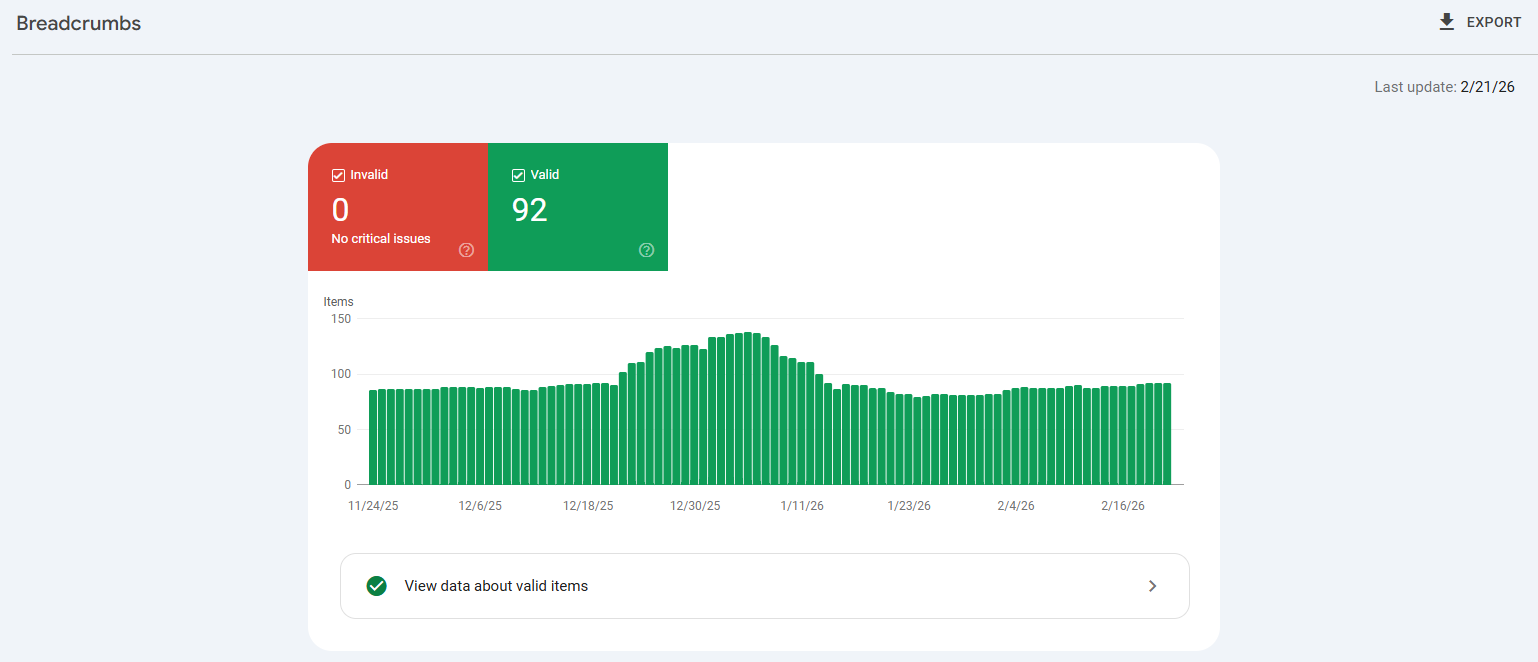
Once it's live, monitor breadcrumbs in Google Search Console. Go to Enhancements > Breadcrumbs to see:
Valid items (pages with correct breadcrumb schema)
Warnings (non-critical issues you should fix)
Errors (critical problems preventing Google from parsing your markup)
For larger sites, use Sitebulb across your entire site. It'll find missing markup, inconsistent hierarchies, and duplicate paths at scale.
Breadcrumbs optimization tips
Once your breadcrumbs are technically set up, these optimization tips make them more effective.
Including keywords where natural: If your category is "Running Shoes" not just "Shoes" use the full term in your breadcrumb. But don't force keywords where they don't fit. Home > Athletic Footwear > Running Shoes is better than Home > Shoes > Running Shoes.
Keeping breadcrumb text concise and clear: Users need to understand each level quickly. "Electronics" is better than "Electronic Devices and Accessories". Be specific enough to be useful but short enough to scan quickly.
Appropriate sizing: Breadcrumbs should be visible but not compete with your main navigation. A slightly smaller font is fine, too small becomes hard to click on mobile. Put them where users expect to find them, usually at the top of the page just above the H1 title.
Ensuring breadcrumbs are actual clickable links: I've seen sites add breadcrumbs that aren't actually linked. That's pointless. Every level except maybe the current page should be clickable.
Mobile responsiveness considerations: Even though Google removed breadcrumbs from mobile search results, they still help mobile users navigate your site. On smaller screens, consider horizontal scrolling or collapsible parent categories. Show the full path when possible, but make it work nicely when space is limited. Your BreadcrumbList schema should include the complete hierarchy even if your mobile design truncates the visible trail.
Wrap-up
Google's decision to remove breadcrumbs from mobile search results may be confusing, but it shouldn't be. Breadcrumbs were never just about looking good in search results, they're about site structure, internal linking, and crawlability. If you were only using breadcrumbs for search result display, you missed the point.
Desktop search still shows them. The schema still works. Your crawlers still use them to understand your site. Your users still rely on them for navigation. And sites with proper structure benefit regardless of visual changes in Google's interface.
So the question to ask yourself is not just Do breadcrumbs help SEO? The right question is Does my site have the proper structure where breadcrumbs make sense?
Breadcrumbs aren't magic, but they're one of those technical elements that quietly make your website work better. Get them right, and your site becomes easier to crawl, easier to navigate, and easier to understand, for both Google and your actual users.

Sitebulb is a proud partner of Women in Tech SEO! This author is part of the WTS community. Discover all our Women in Tech SEO articles.

Karyna is an SEO Strategist with over 10 years of hands-on experience working across different industries and markets. With a strong background in technical SEO and a deep understanding of how search engines actually work, she knows how to build strategies that don’t just follow best practices, but stay ahead of constant industry changes.

Related Articles
 Enterprise SEO Audit: From Crawl to Prioritised Action Plan

 Which Rendering Approach is Best for SEO on E-commerce Sites?

 The M&A Migration Framework: Merging Websites Without Killing Business Value

 Sitebulb Desktop
Find, fix and communicate technical issues with easy visuals, in-depth insights, & prioritized recommendations across 300+ SEO issues.
- Ideal for SEO professionals, consultants & marketing agencies.
 Sitebulb Cloud
Get all the capability of Sitebulb Desktop, accessible via your web browser. Crawl at scale without project, crawl credit, or machine limits.
- Perfect for collaboration, remote teams & extreme scale.