




Beyond the Basics: How to Turn Crawl Data Into Strategic Actionable SEO Insights
 Cassandra May
Published January 27, 2026
This week, we’re grateful to Cassandra May who shares some valuable insights on auditing and what turns tactical SEO into strategic SEO.
You've run the audit. The progress bar hits 100%, and you're staring at a dashboard filled with red lines, warnings, and "Action Required" notifications.
For many SEOs, the immediate instinct is to go into "janitor mode." There’s an immediate urge to export your list of broken links, patch up redirect chains, and ensure H1s are present.
But what separates tactical SEOs from strategic ones is how they interpret what they see.
Strategic SEOs can prioritize technical issues and then layer business context on top: traffic, conversions, revenue, and broader commercial priorities.
Once you start thinking this way, your crawl stops being a giant error list and becomes something much more valuable: a pattern-recognition engine. It reveals how your content ecosystem works, where users encounter friction, and where your templates or architecture might be holding the business back.
In this article, we’ll explore how to look beyond individual warnings and use crawl data to drive real business outcomes across three pillars: content strategy, UX prioritization, and resource allocation.
Contents:
How expert SEOs move from single data points to strategic patterns
The difference between a junior SEO and a strategist is how they view the data. A junior SEO sees a broken page; a strategist sees a broken process.
To make this leap, you need to broaden your view. You cannot diagnose a website's health solely by looking at its structure in isolation.
What is the complete data ecosystem required for diagnostic insight?
To get the full picture, you need to overlay three specific datasets:
Crawl data: This is your site structure (what exists)
Log files: This is Google's actual behavior (what the bot is doing)
Analytics: This is user behavior (what people are doing)
Modern audit tools can help streamline this process. For example, Sitebulb offers native integration with Google Analytics and Search Console, allowing you to enrich your crawl data with traffic and performance metrics directly within the platform.
This means you can filter your URL Lists by organic traffic, conversions, or impressions without exporting to spreadsheets making it faster to identify high-value pages that need attention.
When you combine these datasets, you stop asking "what" and start asking "why."
For example, finding a single 404 error is a "what." But when an entire directory of product pages returns 404s, you've uncovered a "why", usually a systemic issue in your CMS or a misconfigured migration rule.
As Dom Woodman points out in this article, aggregate patterns often reveal that 1,000 errors are really just one error repeated 1,000 times:

“We want to give people the root causes to fix, not the symptoms. Your job is to take those numbers of 100s and 1000s [from crawls], find the patterns and turn them into a couple root problems.”
How should we prioritize crawl fixes by business value, not just severity?
In terms of technical severity, Sitebulb gives SEOs a head start with its prioritized Hint system. But technical severity is only one part of the story.
In real-world SEO, business impact always outweighs technical severity.
A technically severe issue on a low-value page is rarely urgent, but a technically "minor" issue on a high-value page can be harmful.
You should always map your crawl data against analytics and revenue data. A 404 on a blog post from 2013 that drives zero traffic is low priority. But a 404 on a top-5 product page responsible for 20% of your revenue is a drop-everything emergency.
When you present your findings to stakeholders, filter your crawl data by traffic, conversions, and commercial importance, so you fix the money-makers first.
This is also how you earn developer resources. As Helen Pollitt explains, tying technical debt to financial impact changes the conversation:

“Start by calculating the risk to the business if this work isn't carried out… If we don't carry out this work then our product pages will be no-indexed… we risk $Y of revenue each year.”
This framing helps ensure your highest-value crawl issues rise to the top of the development queue.
In practice: In Sitebulb, you can customize URL Lists to include GA metrics alongside technical issues. Sort by "Sessions" or "Transactions" descending, then filter by specific Hints (e.g., "Missing canonical tag"). This immediately surfaces high-traffic pages with technical problems, your true priorities.
Why is segmentation by template and cluster essential for strategic action?
If you try to fix a 100,000-page website URL by URL, you will fail. The only scalable way forward is to segment your data.
Modern SEO tools allow you to break down crawl issues by:
Page template (e.g., product pages, category pages, blog posts)
Content cluster
Business unit
Language
CMS instance
How to do this efficiently: In Sitebulb, you can customize URL Lists by adding/removing columns to see exactly the data you need, then apply advanced filters to segment your crawl.
For example, filter by URL patterns (e.g., /products/ vs. /blog/), combine multiple conditions using AND/OR logic, and nest filters to create highly specific segments. You can even export these filtered segments directly to Google Sheets for further analysis or stakeholder presentation.
Segmentation transforms chaos into patterns. It shows you where problems truly live, not just how many of them exist.
As Jessica Bowman explains in her article on evaluating technical SEO data, pattern recognition is the key to scalable fixes:

“When looking for action items in technical SEO data, you need to be able to segment the data… to identify locations, patterns, trends and fluctuations that create large volumes of errors.”
This is especially crucial for enterprise environments where a single template or widget can generate sitewide issues across thousands of URLs.
Consider this scenario:
Scenario: You see "Low Word Count" warnings.
Without segmentation: You panic because 500 pages appear thin.
With segmentation: You quickly discover that 100% of those pages belong to the "Tag Archive" template.
Strategic action: Instead of rewriting content, you simply NoIndex the Tag Archive template, preserving crawl budget while avoiding unnecessary editorial work.
Segmentation gives you clarity. It allows you to diagnose root causes faster, fix the right problems at scale, and avoid wasting resources on symptoms.
How can crawl data directly inform and drive content strategy?
Crawl data is often pigeonholed as "technical SEO," but it is one of the best tools for content strategy. By using the Edit/Boost/Prune framework, you can manage your inventory effectively.
How do we identify and "boost" high-value, orphaned content?
One of the biggest missed opportunities in SEO is high-quality content that is buried in the site architecture. Identifying orphaned pages can help ensure these assets are found and ranked by search engines.
Look for this specific pattern in your data:
Pages with high organic traffic/conversions but a Crawl Depth of 5+ (or zero internal in-links).
This data tells you that you have a valuable asset that users love, but Google struggles to find. It is essentially an "orphan" despite its performance.
In practice: Using Sitebulb's Crawl Depth data, filter your URL List to show pages at depth 5+ and overlay this with your analytics data. You can also use Sitebulb's interactive Crawl Maps, force-directed visual diagrams that show your site architecture to quickly identify valuable pages that are buried deep in your structure or completely isolated.
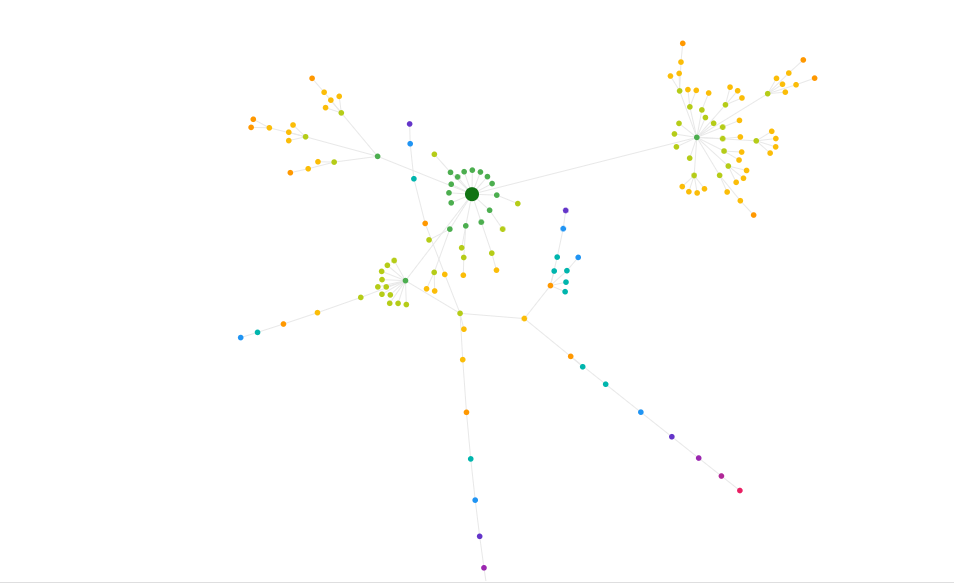
These visualizations make it immediately obvious where high-value content is stranded, often revealing patterns you'd miss in spreadsheets alone.
Tool Tip: Sitebulb's Crawl Maps use color-coded nodes (green for homepage/depth 0, progressively lighter for deeper levels) to visualize your site structure. Hover over any node to see its URL, crawl depth, and internal links—making it easy to spot orphaned high-performers at a glance.
Strategic Insight: These pages need to be brought into the main Information Architecture (IA). Research from Hubspot shows that linking high-value content within topic clusters can significantly improve SEO performance and topical authority.
Action: Create a new hub page or topic cluster and link prominently to these assets. You will significantly boost the authority of these high-value pages by reducing their click depth.
Is your crawl budget being wasted, and how do we "prune" inefficient pages?
Crawl budget isn't something every site needs to worry about, but crawl efficiency is.
Analyze your log files against your crawl data. Look for:
Pages with a High Recrawl Rate but Low/Zero organic traffic.
Common culprits include old faceted navigation parameters, paginated archives, or print-version URLs.
Strategic Insight: Google is spending resources crawling pages that generate no ROI. Google's John Mueller has stated that improving crawl efficiency helps search engines discover new, important content faster.
Action: This is your signal to prune. You can combine thin pages, implement canonical tags, or use noindex directives to force Google to focus its attention entirely on your high-ROI assets.
Editor’s Note: Check out these case studies showing the power of canonical tags!
How do we scale quality audits by grouping low-quality signals?
Content quality issues are rarely manual errors; they are usually systemic.
Look for large segments of pages triggering multiple "Low Quality" warnings simultaneously:
Duplicate H1 tags
Short word counts
Missing meta descriptions
If 5,000 product pages all have duplicate H1s, the writer didn't make a mistake, the template did. You have identified a scalability issue in the CMS.
Sitebulb makes this pattern recognition easier through its Hints system: when you see a Hint affecting hundreds or thousands of URLs, click "View URLs" to examine the URL patterns. If you notice they all share a common URL structure (e.g., /products/* or /category/*), you've identified a template issue.
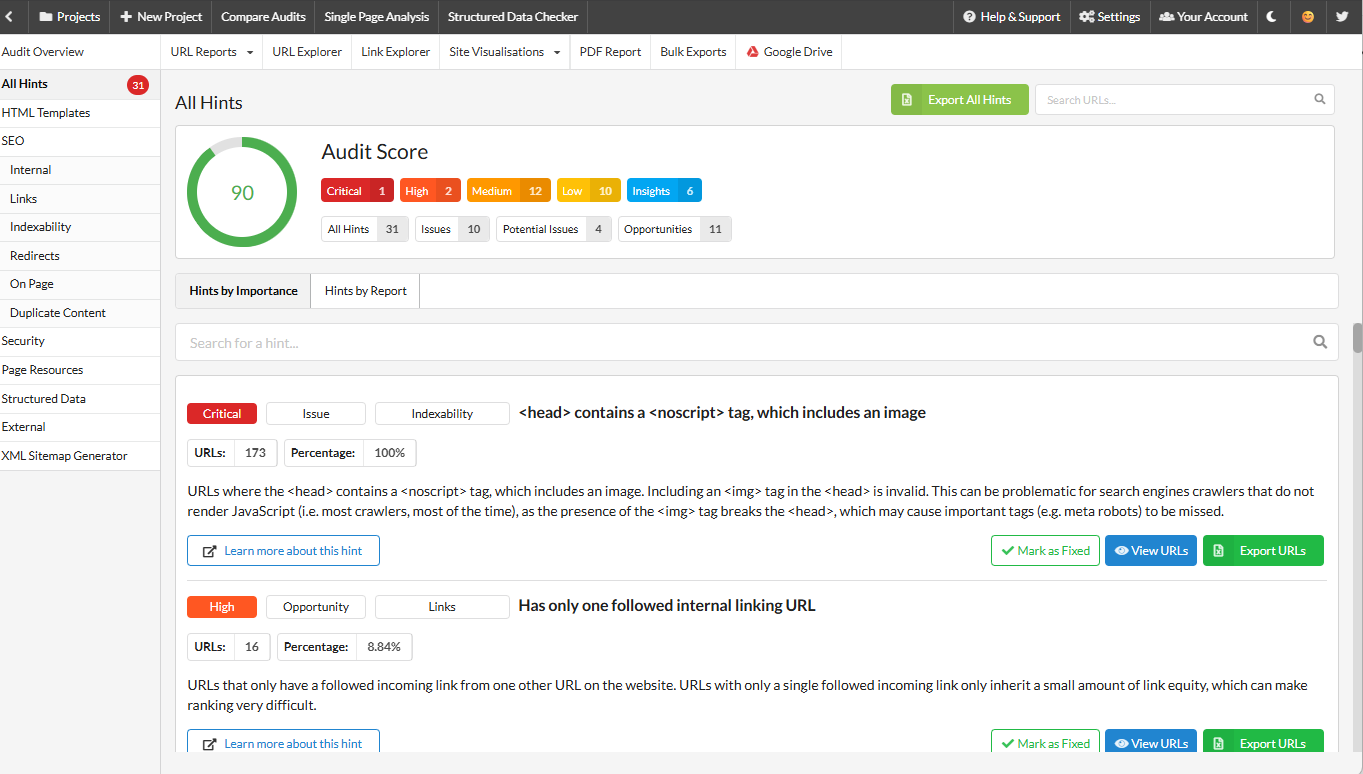
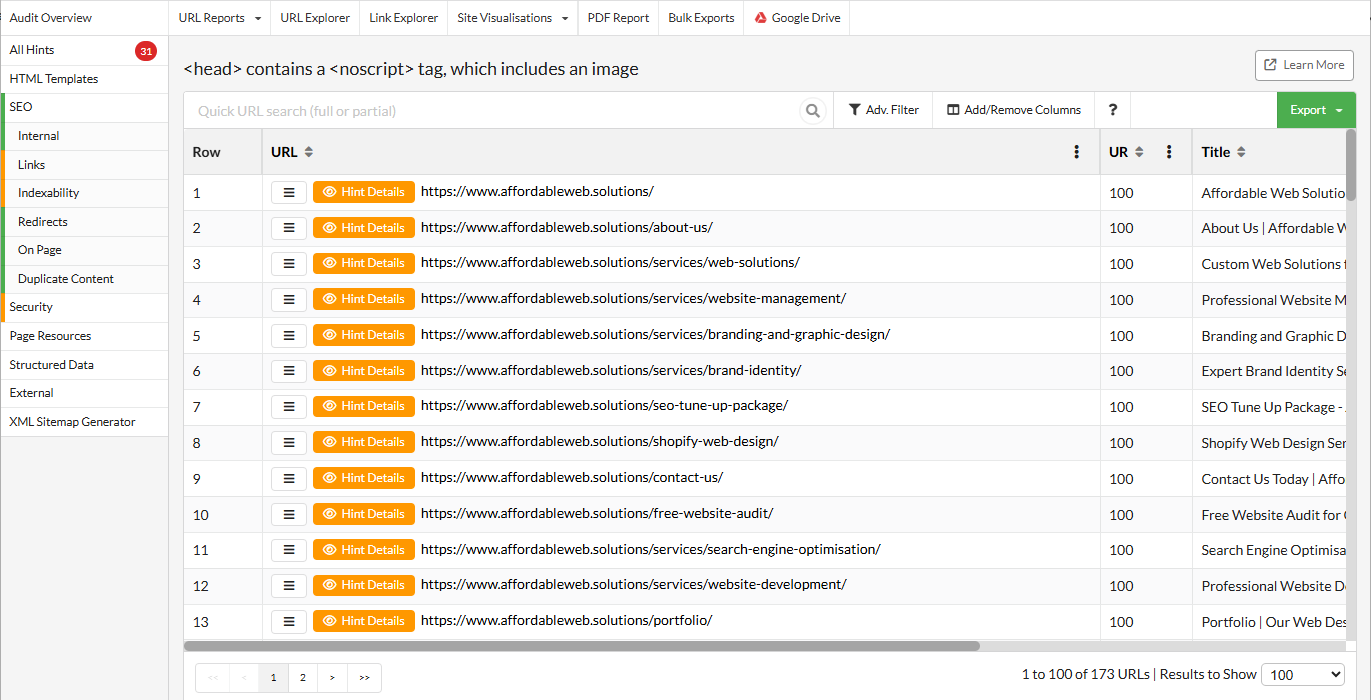
Sitebulb's URL Lists allow you to sort, filter, and group these URLs to confirm the pattern before you create your developer ticket.
Strategic Insight: Template-level problems require template-level solutions.
Action: Do not rewrite them manually. Update the page template to dynamically generate unique H1s based on product attributes (e.g., product name, category, brand). This fixes thousands of errors with one ticket.
How do we use crawl data to enhance user experience (UX) and site trust?
What annoys the crawler often annoys the user. Friction points identified in a crawl are excellent proxies for UX issues.
Is our internal linking confusing Google and hurting topical authority?
Internal linking is the nervous system of your website. It tells Google how pages relate to one another.
Analyze the Anchor Text distribution pointing to your key pages. If you see that the most common anchor text pointing to your "Enterprise Software" page is "click here" or "read more," you have a problem.
Strategic Insight: You are diluting your own topical authority. Google uses anchor text to understand context, as confirmed in their Search Central documentation on crawlable links.
Action: Institute an editorial mandate to update link text. It should be descriptive and entity-rich (e.g., "enterprise project management software" instead of "click here"). This improves accessibility for users (screen readers) and semantic understanding for bots.
Editor’s Note: Descriptive anchors also help LLM crawl bots. Find out more optimization methods for AI Search in our free training series.
What core technical component is causing slowdown across our entire site?
Don't just look at a list of slow URLs. Segment pages with Long Response Times or Large Page Weights by their underlying template.
Often, you will find that every slow page shares a common denominator: a specific third-party script, an uncompressed hero image slider, or a heavy chat widget.
Performance at scale: Sitebulb collects Core Web Vitals data (LCP, CLS, INP) across your entire site, not just sample pages. It also provides Lighthouse-style opportunities and diagnostics Hints for every URL crawled, pinpointing specific resources causing slowdowns, oversized images, render-blocking JavaScript, unused CSS.
By filtering these performance Hints by URL pattern, you can identify that, for instance, 90% of your slow product pages all load the same heavy carousel script.
Strategic Insight: This allows you to solve the problem at the source. Research from Google shows that improving Core Web Vitals can significantly impact user engagement and conversions.
Action: Instead of asking developers to "speed up these 50 URLs," you ask them to "replace the JavaScript library used in the product page template header." This single resource allocation decision speeds up the entire site.
Are we maintaining site trust by eliminating all security and mixed-content issues?
Security is a trust signal. Modern browsers are aggressive about warning users when a connection isn't fully secure.
Scan your crawl data for Mixed Content warnings (HTTP resources loading on an HTTPS page).
Strategic Insight: Even if the page loads, the "Not Secure" warning in the browser bar kills conversion rates and user trust. Furthermore, it forces the crawler to process extra redirects. Google has confirmed HTTPS as a ranking signal since 2014.
Action: Enforce consistent secure protocols (HTTPS) across all resource loading (images, scripts, CSS). This is a quick win for both trust and technical hygiene.
How do we translate technical findings into stakeholder-ready strategy?
The best audit in the world is useless if you can't get buy-in. Stakeholders don't speak "canonical tags"; they speak risk, revenue, and growth.
This is where presentation matters as much as analysis.
Communicating findings effectively: Sitebulb's Hints are written in client-friendly language. T he first sentence explains what the issue is, the second explains why it matters, making them ideal for copy-pasting into stakeholder reports.
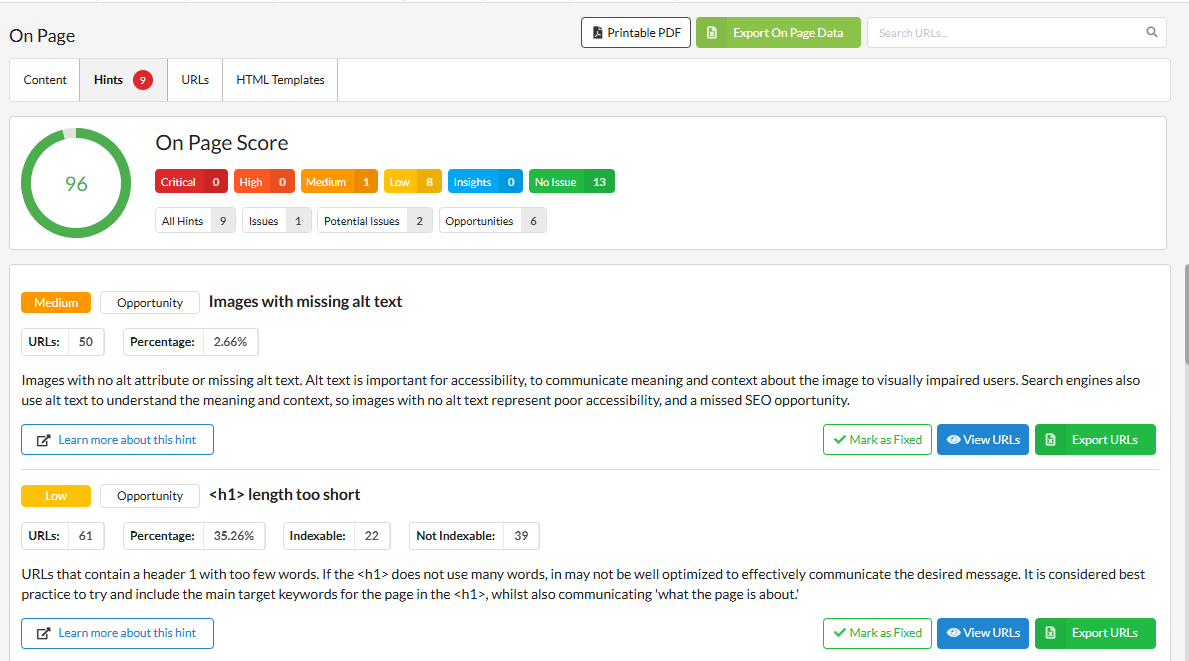
The platform also generates customized PDF reports with visual data representations (Crawl Maps, performance charts, issue summaries) that non-technical stakeholders can understand. When you present a visual Crawl Map showing how your high-value content is buried at depth 6, it's far more compelling than a spreadsheet of URLs.
What language should we use to communicate risk and opportunity to management?
Stop reporting the error count. Start reporting the impact.
Instead of saying... | Say this... |
|---|---|
"We found 500 redirect chains." | "We have identified latency issues affecting 15% of our top products. Fixing this will improve load times by 20%, potentially lifting conversion rates by 0.5-1%, which translates to approximately $50,000 in additional annual revenue." |
"We have low text-to-HTML ratio." | "Our content is too thin to compete with the top 3 ranking competitors, who average 2,500 words per article compared to our 800. We need to invest in editorial updates to match competitor depth and improve our ability to rank for high-value keywords." |
"There are 404s in the sitemap." | "We are sending Google into dead ends, wasting the crawl budget we invest server resources in. This delays the discovery of new, revenue-generating content by an average of 12 days." |
Which key strategic metrics should our dashboard track?
When creating a dashboard for stakeholders, present insights as trends, not static numbers.
Focus on metrics that show health and progress:
Crawl Ratio: The percentage of High-Value Pages crawled vs. Low-Value Pages. (You want this high.)
Indexability Rate of New Content: How fast does a new article get indexed? Track time-to-index for new pages.
Technical Debt Score: A custom metric tracking the long-term cost of ignoring persistent issues (e.g., the number of temporary redirects that have existed for >6 months).
Average Crawl Depth of Revenue-Generating Pages: Lower is better. Track this monthly to ensure your IA improvements are working.
Conclusion
Running a crawl is easy, but interpreting what the data says about your business is the real skill. Stop treating your audit tool like a spell-checker and start using it as a business intelligence platform. When you focus on patterns instead of individual errors, you can refine content strategy, streamline UX, and communicate SEO in terms stakeholders actually care about.
The SEOs who can turn log files into development roadmaps or editorial priorities are the ones who earn long-term buy-in and drive real growth. On your next audit, don’t ask “what’s broken?” Instead ask “what pattern does this reveal about how our business operates online?” That shift is what turns tactical SEO into strategic SEO.

Cassandra May, founder of Affordable Web Solutions, has 25+ years of IT experience and a passion for helping businesses succeed online. She specializes in website design, development, hosting, and SEO, providing clear, jargon-free guidance and tailored solutions that drive results for businesses across Australia.

Related Articles
 How to Develop an SEO Strategy: What Does the Data Say?


 Auditing Core Web Vitals with Chrome DevTools MCP

 AI-Driven SEO: How to Audit Your Visibility & Stop Stressing About ChatGPT

 Sitebulb Desktop
Find, fix and communicate technical issues with easy visuals, in-depth insights, & prioritized recommendations across 300+ SEO issues.
- Ideal for SEO professionals, consultants & marketing agencies.
 Sitebulb Cloud
Get all the capability of Sitebulb Desktop, accessible via your web browser. Crawl at scale without project, crawl credit, or machine limits.
- Perfect for collaboration, remote teams & extreme scale.