

AI Search, RAG, Agents and Crawl Bots: A Plain-English Guide to What They Mean
 Jojo Furnival
Published June 30, 2026
The week Google published its guidance on building agent-friendly websites, Tory Gray's inbox blew up. "Almost overnight, almost all of my clients said, okay, are we agent ready? Go audit my website," she told us. But what does being "agent ready" actually mean?
AI has crept into so many different aspects of search now that we've ended up with a pile of terms that get used as if they're interchangeable, and they really aren't. AI search. RAG. Agentic search. Traditional search bots. LLM crawl bots. Agents. People reach for whichever one is nearest and assume everyone means the same thing.
This piece exists because our own webinar audience asked for it. We ran a session on optimising for AI agents with two people who've been in the trenches with this stuff: Tory Gray, Founder and CEO of Gray Dot Company (currently building agentic auditing into her firm's technical SEO workflow), and Jessyca Frederick, Director of Digital Product at Wine Enthusiast and a freelance SEO consultant. In the closing Q&A, an attendee asked whether there was a good resource explaining the different types of AI search and their use cases. There wasn't; so we made it.
By the end of this article, you'll have a mental model that lets you take any new term, tool, or bit of Google guidance and orient it in terms of which actor it’s talking about and which process it relates to.
Contents:
- AI bots vs agents: bots read, agents act
- The cast of bots: search engine crawlers vs LLM crawl bots vs agents
- LLM crawl bots up close: training, search, and on-demand user fetch
- The search-mode vocabulary: AI search, RAG, agentic search (and the acronym soup)
- How agents actually see a page: screenshots, raw HTML, and the accessibility tree
- What this means for what you actually do (and what to ignore for now)
- TL;DR key takeaways
AI bots vs agents: bots read, agents act
The mistake nearly everyone makes is lumping all the AI-flavoured bots into a single bucket and treating them as one thing to optimise for. They are not one thing.
Traditional search bots and the older breed of AI bots are not users. They crawl your site to build an index or to gather content, and then they leave. They don't click, they don't fill in forms, they don't try to buy anything.
Agents do a different job, even if some of the underlying machinery overlaps. They are users; agents operate a browser the way a person does, interpreting a goal, making a plan, and taking actions on the page on someone's behalf. Google's own framing, in its agent UX guidance, describes agents as “autonomous systems” that can “interpret input, plan, and execute actions” for a user.

This is why "agent ready" and "AI visible" are two separate issues, and Tory is blunt about keeping them apart:
The practical consequence is immediate. If a client, a stakeholder, or an exec says "make us agent ready" and you can't pin down which actor they mean, you cannot scope the work. You'll write robots.txt rules for a crawler when the real question was about an agent completing a checkout, or you'll obsess over an agent workflow when the actual gap is that your content never makes it into AI answers in the first place.
Different actors, different capabilities, different optimisations.
So before any audit, the first job is to name the actor. Everything else in this guide is really just a more detailed version of that single act of sorting.
The cast of bots: search engine crawlers vs LLM crawl bots vs agents
Once you accept that these are different creatures, it helps to line them up side by side:
Traditional search engine bots
LLM/AI crawl bots
Agents
Traditional search engine bots
Traditional search engine bots are the ones you already know. Googlebot crawls to build a searchable index, it renders JavaScript through Google's web rendering service, and it prioritises what to crawl using crawl demand (popularity, freshness) and your server's capacity.
Click depth from the homepage isn't a documented input to that budget, but in terms of link equity, it's a strong importance signal, so deep pages tend to get crawled less. Years of JavaScript SEO practice rests on the fact that Google can usually render and read your client-side content, eventually.
LLM or AI crawl bots
LLM crawl bots behave more like scrapers. As Gray Dot's breakdown of AI crawling puts it, “they grab specific text and data when they need it”, and, for now at least, most of them do not render JavaScript at all.
There are caveats worth knowing: Gemini can lean on content Google has already rendered and indexed, and ClaudeBot reportedly renders JavaScript in some cases. But the working assumption for most AI bots is no rendering.
Worth noting too, as Gray Dot is careful to say, these are bots from AI companies. The chatbot you type into doesn't crawl your site itself; it sends a bot to do it.
Agents
Agents are the third category, the ones that act like users.
Because they drive a real browser, rendering isn't the obstacle it is for the crawl bots above: they see the page much as you do. They piece it together from a mix of the screenshot, the raw HTML and the accessibility tree, though exactly how that works (and why it matters for your markup) is worth its own section, so we'll come back to it later.
You've probably met the early ones already: ChatGPT's Atlas browser, OpenAI's Operator, Google's Project Mariner, Anthropic's Computer Use. They're new and still rough around the edges, but they're the reason "agent ready" is suddenly on everyone's roadmap, and they behave nothing like the two bot types above.
Search Actor | Specific example | What it does | Renders JS? | Behaves like a user? |
|---|---|---|---|---|
Traditional search engine crawler | Googlebot | Crawls pages to build a searchable index | Yes (delayed) | No |
LLM/AI crawler | ChatGPT-User | Scrapes text and data to feed AI systems | Most don’t | No |
AI agent | ChatGPT Atlas | Interpret input, plan, and execute actions on a website | Yes (drives a real browser) | Yes |
Google renders JavaScript, so surely the AI crawlers will all catch up soon. Maybe they will, maybe they won’t. But you have to optimise for what the bots do now right? Not what they might do next year; and right now most of them don't render.
A note on scale
The numbers here come from a few different places, pulled together in Kinsta's bot traffic round-up, so it's worth being clear about who actually measured what.
The headline figure, that AI bot traffic has roughly tripled (up around 300%) in a year, comes from Akamai's 2025 Digital Fraud and Abuse Report, which Kinsta cites. Kinsta's own analysis of more than 10 billion requests across its hosting infrastructure is where the eye-watering behaviour stats come from, like bots hammering add-to-cart URLs and getting stuck in query-string loops, but the traffic-growth number is Akamai's, not Kinsta's own data.
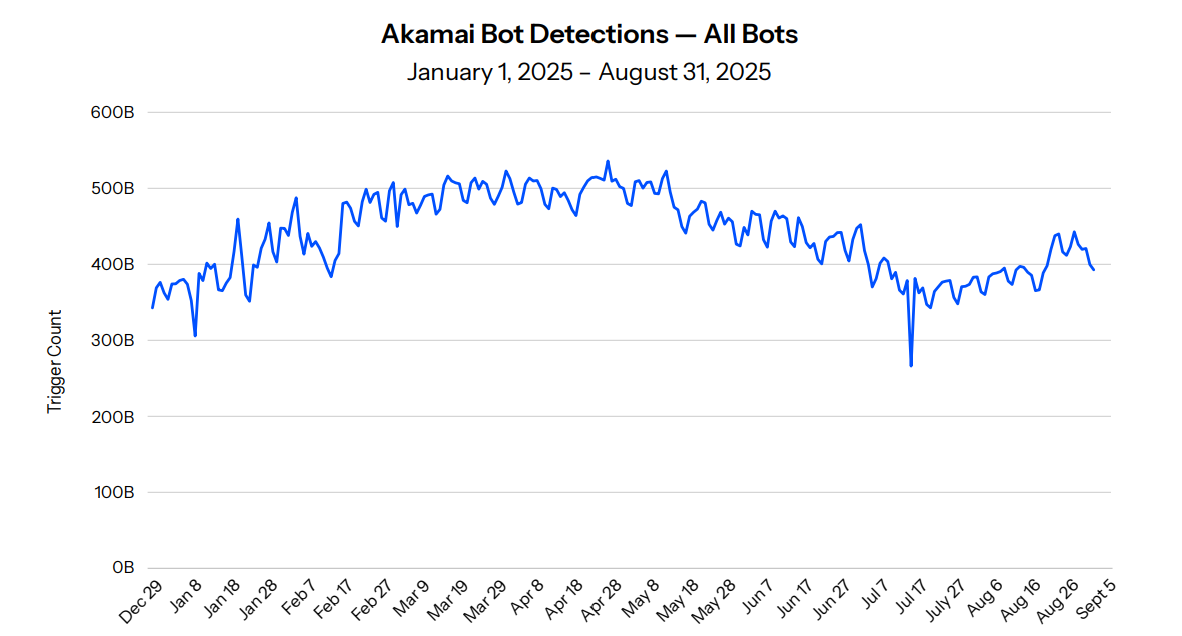
For how much of your traffic is now automated, Kinsta points to TollBit's State of the Bots (Q4 2025): on TollBit's network, about one in every 31 web visits now comes from an AI bot, up from something closer to one in 200 at the start of 2025. (That's a publisher-heavy network, which sees more AI-bot interest than the web at large, so I'd read it as a direction of travel, not a universal average.)
And for the share of raw requests, Kinsta cites Cloudflare's Radar 2025 Year in Review. Bots whose job is to feed AI systems (GPTBot, ClaudeBot, PerplexityBot and the like, plus the AI-specific crawlers the big platforms run) averaged around 4.2% of HTML requests across the year. That's an annual average; it swung from a low of about 2.4% in early April to a high of 6.4% in late June, so it bounces around rather than climbing in a straight line. Cloudflare counts those as AI crawlers but files Googlebot separately, as a traditional search crawler.
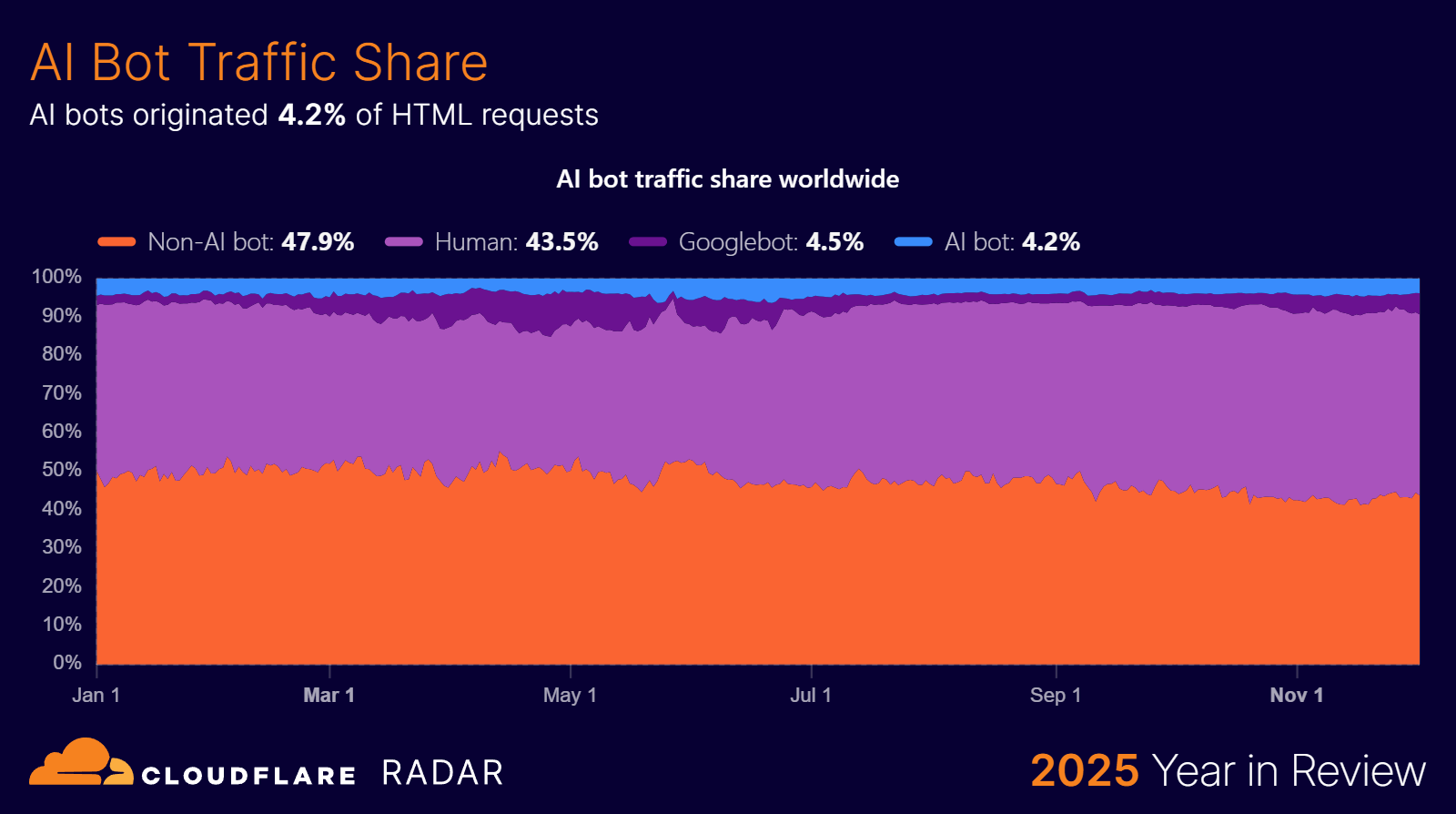
Fold the search crawlers back into the mix and the combined bot share reaches about 8.5%, with Googlebot alone making up roughly 4.5% of that, more than every non-Google AI bot put together. In other words, the 4.2% is AI-purpose crawlers across providers, and the jump to 8.5% is what you get when you add the old-fashioned search engine crawlers on top.
LLM crawl bots up close: training, search, and on-demand user fetch
Here's where the second layer of confusion lives, because "LLM crawl bot" isn't one thing either. A single AI company runs several, each with its own job and its own user agent.
Take ChatGPT as an example:
There's GPTBot, which crawls to gather material for future model training.
There's OAI-SearchBot, which indexes sources to support search features.
And there's ChatGPT-User, which fetches a page on demand when a real person asks something and the model goes to look.
The neatest way to categorise them is by the job they do:
Training bots tell the model your content exists.
Search bots find fresh URLs to feed into answers.
User bots fetch on behalf of a live person mid-query, which makes them the closest thing to an actual impression inside an AI interface.
So it’s possible for your site to be crawled heavily and still be absent from AI answers.
How much of all that crawling is training versus answering is genuinely disputed. Cloudflare's data (via Kinsta) puts training at around 80% of AI crawling, which sends no referral traffic back at all, while JetOctopus's log data flips it, putting training and search crawls at just 30 to 35% and user-driven fetches at the rest. Different networks and different definitions, but the point is: heavy crawling is not the same as showing up in answers.
This is the layer where reading your log files and writing robots.txt rules actually happens, and you can't do either sensibly until you know which user agent is which. OpenAI's own crawler documentation is the canonical reference for its bots, and for the wider field there's a thorough catalogue of AI user agents and IP ranges that goes well beyond one vendor.
One teeny tiny wrinkle: the sources don't fully agree on the taxonomy. Gray Dot names three ChatGPT bots, JetOctopus groups all AI bots into training, search and user types, and the user-agent catalogue above splits them into five functional categories. Basically, the three-job model is the spine, while the others are further refinements to it. Best not to treat any single list as gospel.
The search-mode vocabulary: AI search, RAG, agentic search (and the acronym soup)
So much for who is fetching. Now the words for what they do with what they fetch, because this is its own can of worms.
AI search
AI search is the broad one. An LLM or answer engine like Perplexity builds its reply from content it pulls in at the moment you ask, either fetched live from the web or retrieved from an index, rather than from what it picked up during training.
Example: You ask, "What's the best laptop for video editing under £1,500, and does it have enough ports for my kit?" Instead of answering from whatever it absorbed in training (which might be a year out of date), the engine pulls in current pages and answers from those. This describes the category of AI search. Exactly how it does the pulling-in is what RAG and agentic search describe.
RAG
RAG, short for retrieval-augmented generation, is more specific. The model retrieves relevant external documents before it generates its answer, so the response is grounded in real source material rather than the model's memory, which cuts down on hallucination.
Example: Faced with your laptop question, the engine grabs a handful of current review and spec pages, then writes its recommendation from those. One retrieval, then the answer, so it can cite real specs instead of guessing. AI Search is essentially RAG with a live index.
Agentic search
Agentic search is the next step up.
Instead of one retrieval before answering, the agent runs a loop: it reasons, decides it needs more, retrieves again, reasons further, and keeps going. It breaks a messy question into sub-queries and gathers evidence across several turns before it commits to an answer.
Example: It spots that your laptop question is really two questions. It searches for the best editing laptops first, reads the contenders, then notices it still hasn't confirmed the ports, so it runs a second search just for that spec, checks it, and only then answers both parts. If something doesn't add up, it goes round again.
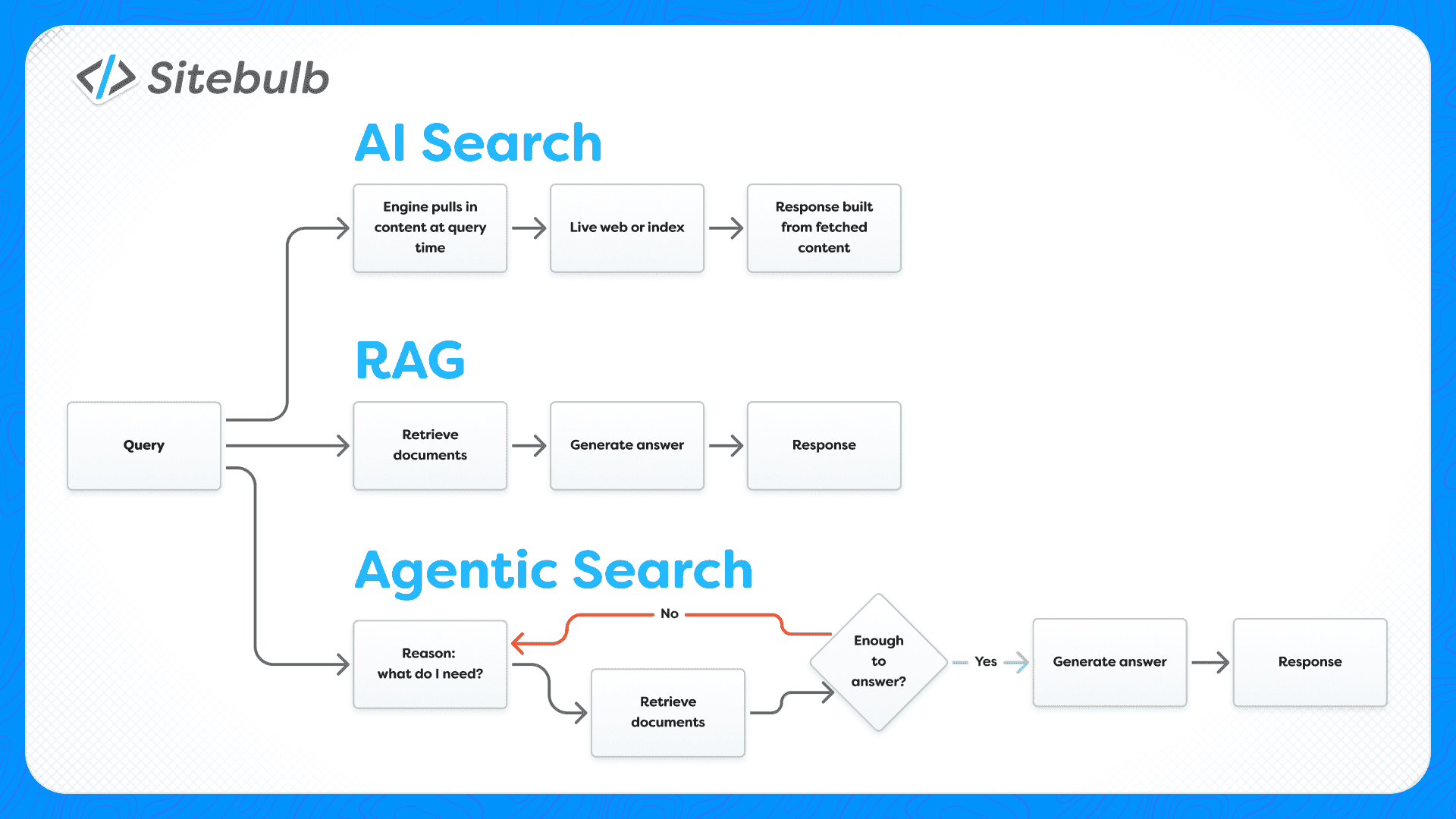
And here's the tricky overlap: The word “agentic” describes a process (multi-step retrieval-and-reasoning) and it also gets stuck onto the actors from the start of this guide (agents that act on web pages).
An agentic search process and a website-operating agent are related ideas, but they are not the same thing, and using "agentic" to mean both in the same breath is a big part of why these conversations go in circles.
It gets worse, because the optimisation acronym soup still hasn’t settled either.
You'll see GEO (generative engine optimisation), LLMO (large language model optimisation), AIO (AI optimisation), and AEO, which depending on who's writing stands for either “answer engine optimisation” or, as in Everett Sizemore's recent posts, "agentic engine optimisation", a framework he attributes to Google's Addy Osmani.
Even the names for this work are still being argued over. *Sigh
How agents actually see a page: screenshots, raw HTML, and the accessibility tree
An agent reads a page three ways, and modern ones combine all three.
It can take a screenshot and run a vision model over it. It can read the raw HTML and the DOM. And it can read the accessibility tree, which is the browser's stripped-down summary of the page, built from the DOM with all the purely decorative nodes pruned out, leaving the roles and names of the things that matter. Chrome's own write-up of the accessibility tree describes it exactly this way, and you can open it yourself in DevTools.
The hidden variable across all three is cost, measured in tokens. The accessibility tree is dramatically cheaper to read than the full DOM, which is why many agent frameworks now lean on it (though plenty still combine it with screenshots and the raw DOM rather than relying on any one of them alone).
Screenshots are the pricey fallback:
There's a trap hiding in the accessibility tree, and Jessyca walked straight into it on her own commerce site. But you can read all about that in my recap here.
What this means for what you actually do (and what to ignore for now)
Pull all of that together and the to-do list is shorter and calmer than the LinkedIn bros would have you believe.
First, be clear on which actors are important to you right now. Is it citations in LLM answers, or is it agents taking actions on your site? This will largely depend on what type of business the website serves. What you decide gives you a clear path in terms of optimisations.
Remember that good technical hygiene underpins everything you (or your execs) may want bots and agents to be able to do on your site. This point is emphasised by Zach Chahalis repeatedly in our Technical SEO for AI (The Search Matrix) training course.
On the standards that are now coming out left, right and centre, hold your nerve. robots.txt is the closest thing to real control you've got, because the major named platforms (OpenAI, Anthropic, Google) say they honour it. Just treat it as a request, not a boundary though: it's unenforceable, and bots ignore it all the time. Cloudflare has documented Perplexity using undeclared user agents and rotating IPs to crawl sites that had explicitly disallowed it, and that's a named platform, never mind the smaller or sloppier bots that don't even pretend.
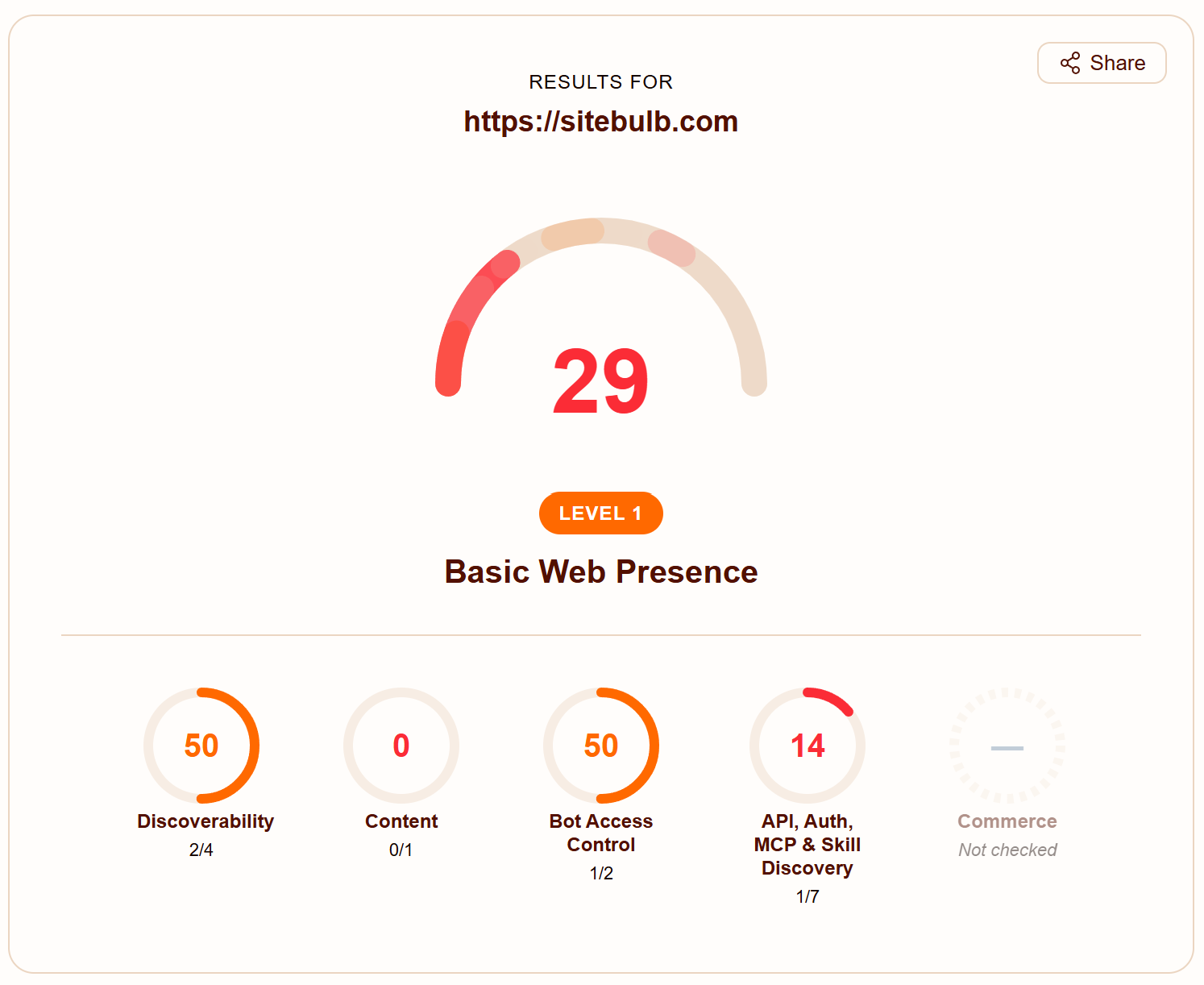
The rest of the alphabet (WebMCP, Web Bot Auth, Content Signals, Agent Skills, A2A, and the agentic-commerce specs) are worth watching rather than chasing. Cloudflare's Is Your Site Agent-Ready scanner is a decent map simply because it shows how many competing standards already exist.
While we're disambiguating, one term that keeps getting filed in the wrong drawer: OKF. Tory mentioned Google's Open Knowledge Format "only came out on Friday," and it's easy to assume it's another crawl or visibility standard. It isn't. Google Cloud's introduction to OKF describes a knowledge-sharing spec, markdown files with a little YAML frontmatter, for feeding curated context to agentic systems, based on the "LLM wiki" idea. Useful, but it belongs nowhere near your robots.txt decisions.
So what should actually move up the queue? Surprise surprise, it’s the boring, durable stuff: server-rendered HTML so your content survives without JavaScript, fast time to first byte, clean semantic HTML, descriptive internal links, and content that isn't buried behind click-to-expand.
None of it is new, all of it helps users and Google as much as agents, and it pays off no matter which standards win. The fancy layer can wait. The fundamentals can't, and they never could.
TL;DR key takeaways
💡 "Agent ready" and "AI visible" are not the same thing. Bots read your content, agents act on it like users, and optimising for one does almost nothing for the other.
💡 One AI company runs several bots with separate user agents: training, search-indexing, and on-demand user fetch. Sources disagree on how much crawling is training versus answering, but the lesson holds either way: heavy crawling doesn't equal visibility.
💡 RAG retrieves documents once before answering; agentic search runs a multi-step retrieve-and-reason loop. "Agentic" describes both a process and the page-acting agents, which is half the confusion.
💡 Most LLM bots don't render JavaScript, and the accessibility tree you see in Chrome is rendered, so client-side content can be visible to you and Google but invisible to other agents.
💡 Don't hide key content behind tabs or accordions, and don't spam ARIA. Google's own "read more" guidance, and Addy Osmani (as cited by Everett Sizemore), both point the same way: agents want everything at once, while ARIA stuffing harms real assistive-tech users.
💡 robots.txt is your best lever for controlling bot access, but it's a request, not a fence, and some platforms (Perplexity included) have been caught ignoring it. llms.txt and the newer standards are contested, and OKF isn't even a crawl standard, so do the evergreen technical work and watch the rest.

Sitebulb is a proud partner of Women in Tech SEO! This author is part of the WTS community. Discover all our Women in Tech SEO articles.

Jojo is Marketing Manager at Sitebulb. She has 15 years' experience in content and SEO, with 10 of those agency-side. Jojo works closely with the SEO community, collaborating on webinars, articles, and training content that helps to upskill SEOs.
When Jojo isn’t wrestling with content, you can find her trudging through fields with her King Charles Cavalier.


Related Articles
 Enterprise SEO Audit: From Crawl to Prioritised Action Plan

 Which Rendering Approach is Best for SEO on E-commerce Sites?

 The M&A Migration Framework: Merging Websites Without Killing Business Value

 Sitebulb Desktop
Find, fix and communicate technical issues with easy visuals, in-depth insights, & prioritized recommendations across 300+ SEO issues.
- Ideal for SEO professionals, consultants & marketing agencies.
 Sitebulb Cloud
Get all the capability of Sitebulb Desktop, accessible via your web browser. Crawl at scale without project, crawl credit, or machine limits.
- Perfect for collaboration, remote teams & extreme scale.