



JavaScript SEO Fundamentals: Guide to Web Rendering Techniques
 Matt Hollingshead
Published December 1, 2025
Matt Hollingshead shares an educational, comparative, and strategic guide to web rendering methods, acting as translator for SEOs who want to understand how rendering frameworks impact indexing.
Most SEO issues don't start with title tags or backlinks. They start with whether search engines can actually see your content.
That visibility depends on how your site is built and delivered.
The rendering method your development team chooses determines how efficiently bots can crawl your site, how quickly your pages load, and ultimately, how well you rank.
This guide translates the technical jargon of rendering patterns into actionable SEO insights, so you can have informed conversations with your development team and avoid costly mistakes.
💡 Editorial Note:
This article is part of our Rendering in SEO mini-series, where SEO experts explore how search engines and AI systems understand your website.
In this article by Matt, you’ll learn how different rendering frameworks (CSR, SSR, SSG, and beyond) impact crawlability and performance. Then, in Carlos Sanchez’s Advanced SEO Guide to Debugging Rendering Issues, you’ll discover hands-on techniques to test, troubleshoot, and optimize how Google and LLMs actually process your pages.
Contents:

New AI module available!
Free, on-demand JavaScript SEO training in partnership with Women in Tech SEO & GrayDot Co.
What is web rendering?
Web rendering is the process of turning code into the visual page you see in your browser.
When someone visits your website or web application, their browser receives files (HTML, CSS, JavaScript) and transforms them into a readable, interactive page. This transformation is rendering.
Here's the basic flow:
Your server sends code → Something processes that code → A finished page appears on screen
The "something" in that middle step is where it gets interesting for SEO. That processing can happen in different places: on your server before the page is sent, in the user's browser after it arrives, or through a combination of both.
Why does this matter for SEO?
Search engine bots go through the same process when they crawl your site. They request your pages, receive code, and need to render it to see your content.
If your content is server-rendered, web crawlers see everything immediately in the initial HTML response.
However, if your content relies on client-side JavaScript, you're introducing delays and points of failure into the indexing process.
Your rendering method determines whether bots get instant access to your content or have to work for it.
How Google crawls and renders pages
Although there are many different search engines and AI search tools, Google still has the largest market share by a landslide.
So, here's what you need to know about Googlebot and rendering.
Google attempts to render every indexable HTML page it crawls using headless Chromium, a version of Chrome that runs without a visual interface.
The process looks like this:
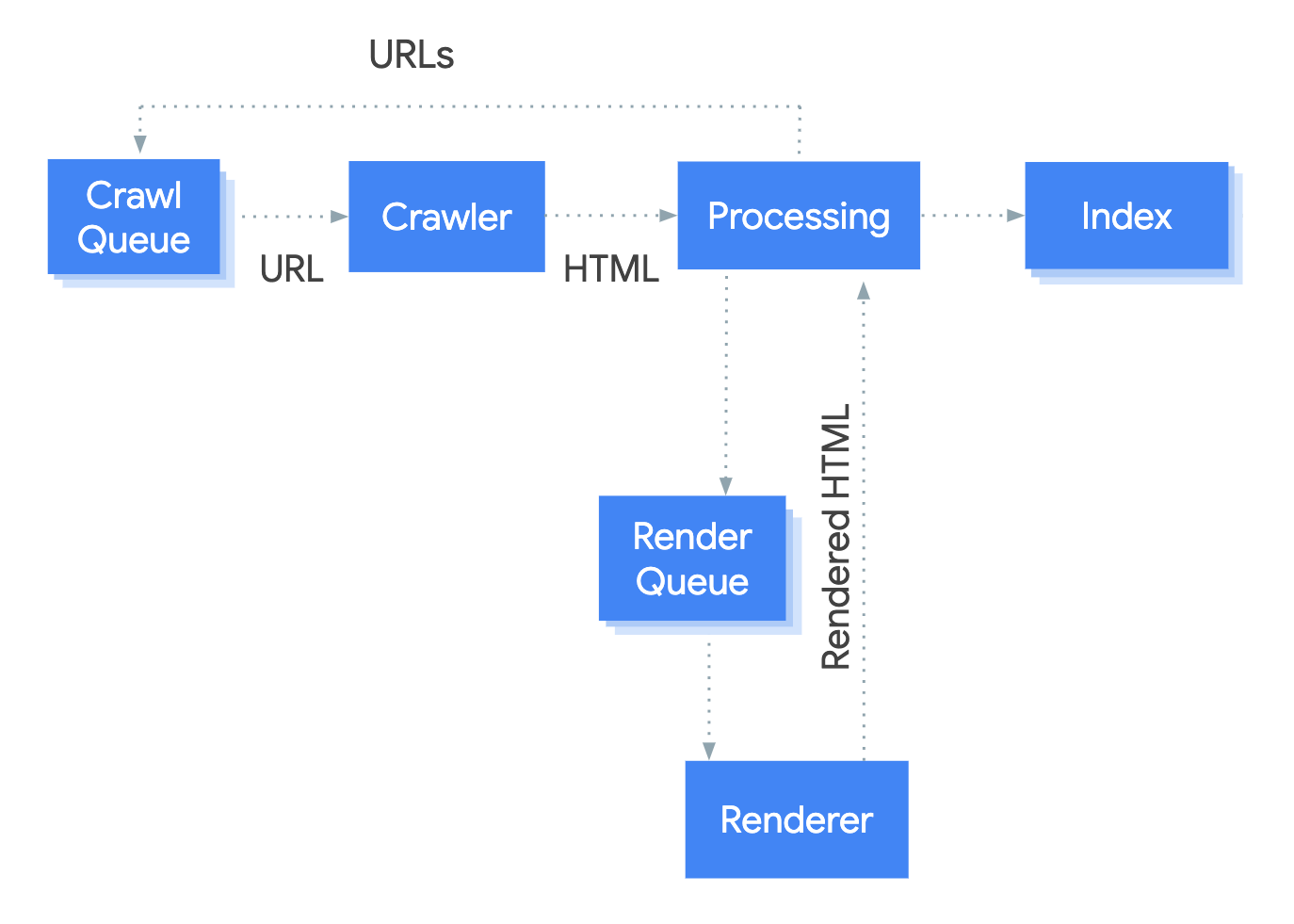
Source: Google Search Central
This means Google can execute JavaScript and see dynamically loaded content.
However, keep in mind that Googlebot doesn't interact like users do. It won't click buttons, scroll, etc. If content only appears after interaction, Google won't see it.
Also, technical configurations can prevent crawlers from accessing content that real users normally see. For example, if JavaScript files are blocked in robots.txt, Googlebot won't execute them, but browsers will.
Why initial HTML matters for LLM visibility
AI chatbots are changing how people find information. ChatGPT alone processes 2.5 billion messages daily, and tools like Perplexity and Claude continue to grow.
Many AI chatbots use crawlers that don't run JavaScript yet. They read the initial HTML response and move on.
If your content requires JavaScript to render, those AI chatbots won't see it.
To get your content cited in AI-generated answers, it needs to be in the initial HTML response. Server-side rendering and static generation deliver this. Client-side rendering doesn't.
Client-side rendering (CSR)
With client-side rendering, the server sends minimal HTML to the browser (client). JavaScript handles building the actual page content.
How it works
The browser receives basic HTML, downloads the required JavaScript, executes it, and only then displays the content to the user.
Here's the CSR process from request to rendered page:
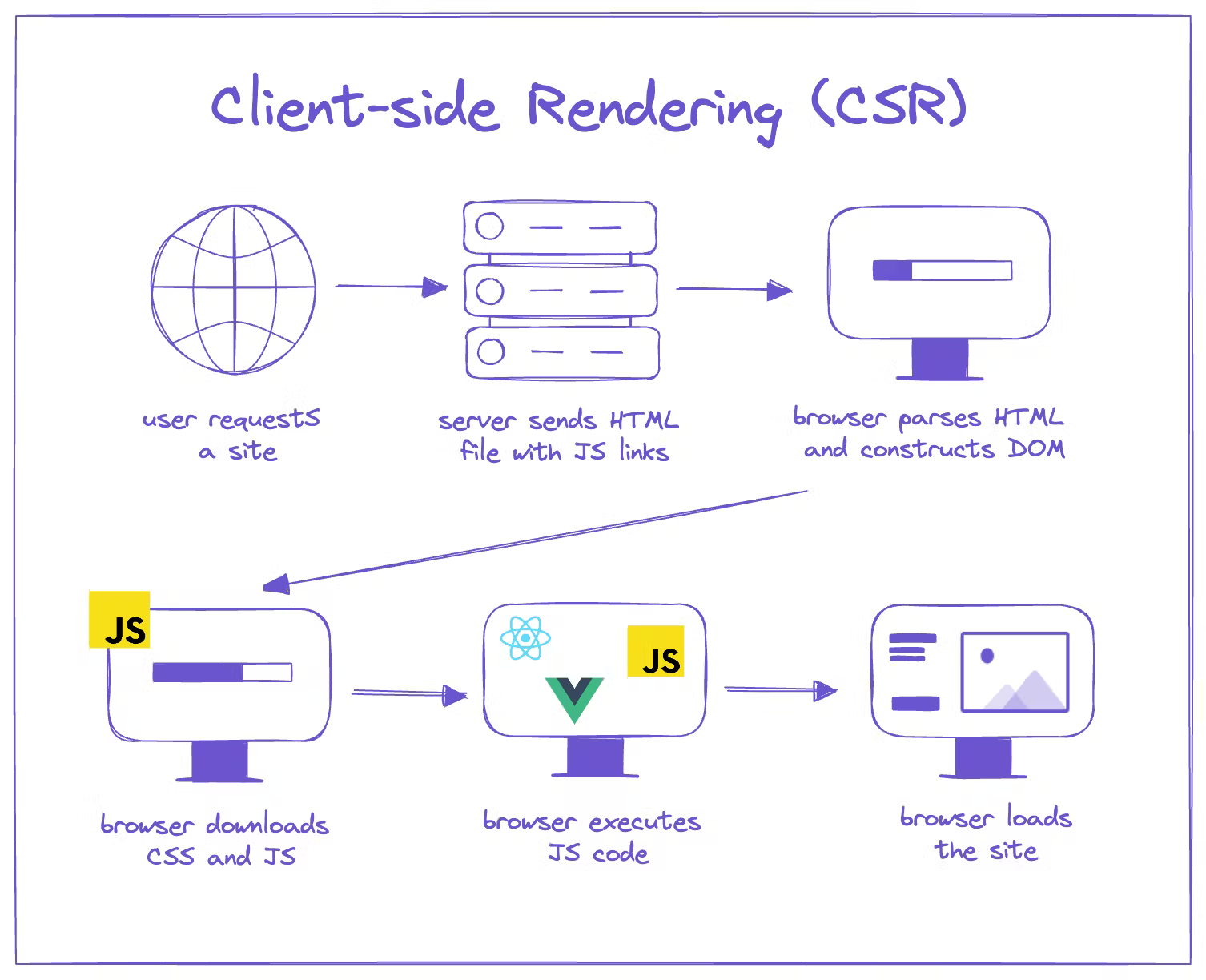
Source: Prismic
Common frameworks
React
Vue
Angular
SEO implications
CSR creates the most friction for search engines.
If JavaScript fails to load or execute properly, search engine bots may not see the content. Many AI chatbots, which don’t execute JavaScript at all, won’t see your content either.
Pros
Simple server infrastructure - You only need to serve static files, which requires minimal server configuration and maintenance
Fast subsequent page navigation - Once JavaScript is loaded, navigating between pages is quick without full page reloads
Rich interactivity - Complex user interactions, animations, and state management work seamlessly
Cons
Initial page load can be slower - Client must download and execute JavaScript before seeing any content
Poor SEO for public content - Search engines must wait for JavaScript execution, creating indexing delays and potential failures
Relies on user's device performance - Older devices or slow connections result in significantly worse user experience
When CSR makes sense
CSR works well for web applications where content sits behind authentication and doesn't need search visibility.
Good use cases for CSR:
Authenticated apps
Dashboards
Internal tools
These applications prioritize interactivity and personalized data over search visibility. Users access them directly through login, not through search engines.
For public-facing content that needs to rank, CSR is the worst choice for SEO. Use a server-rendered approach instead.
Server-side rendering (SSR)
In server-side rendering, the server generates the full HTML page with each request. It then sends the complete page to the browser.
How it works
The server processes the request, fetches any necessary data, then builds and delivers the complete page. The browser displays the content immediately.
After the page loads, JavaScript "hydrates" the page, attaching event listeners and making interactive elements like buttons and widgets functional.
Here's the SSR process from request to fully interactive page:
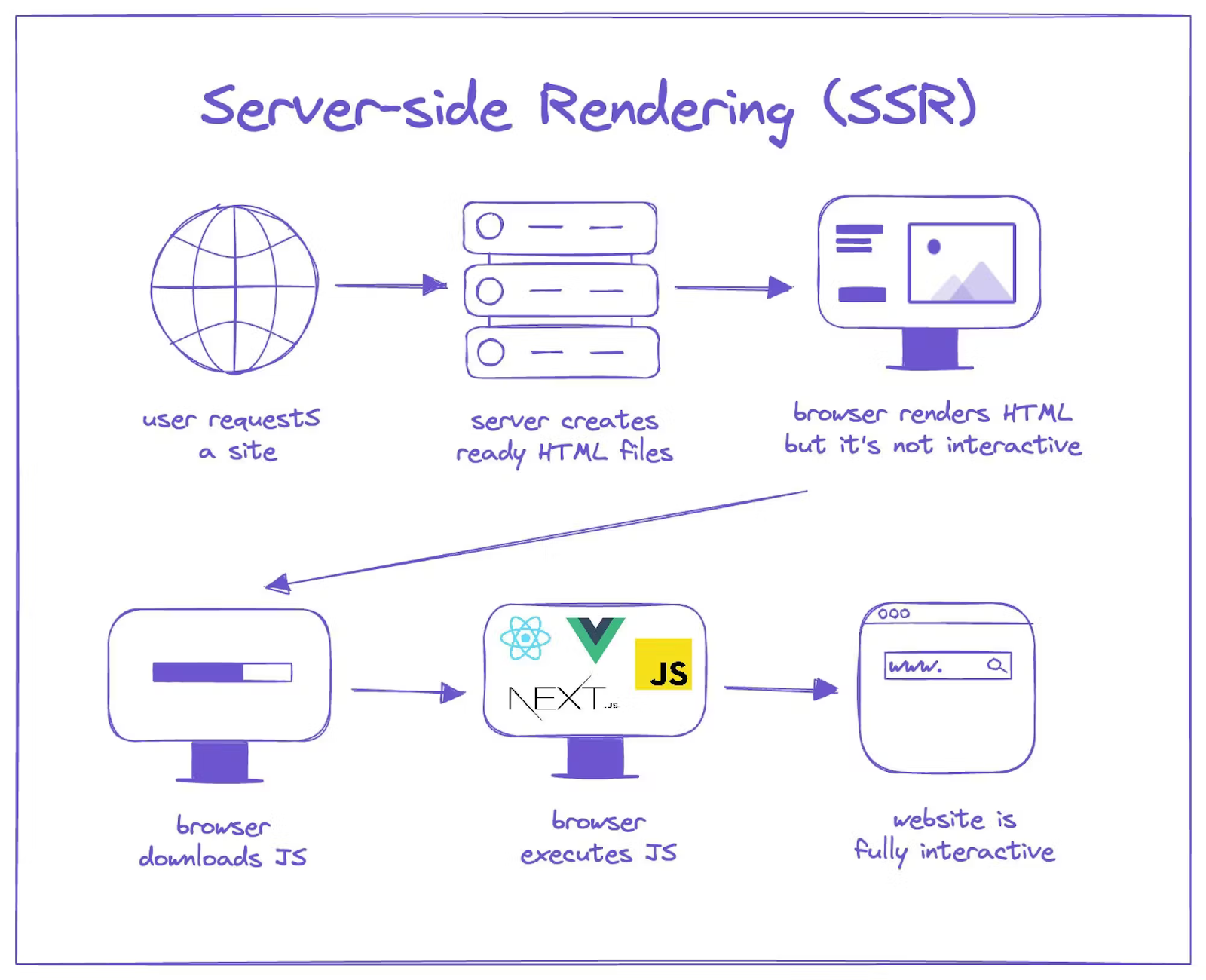
Source: Prismic
Common frameworks
Next.js
Nuxt.js
SvelteKit
Remix
SEO implications
SSR is excellent for SEO. Search engines and AI chatbots receive fully rendered HTML immediately, making the content easily crawlable.
Pros
Easier for crawlers to access - Main content is included in the initial HTML without relying on client-side JavaScript
Fast initial page load - Users see content quickly because HTML is already rendered
Good for dynamic content - Adapts output on each request, making it easy to handle frequently changing data
Cons
Requires more server resources - Every request needs server processing, database queries, and HTML generation
Higher server costs at scale - More traffic means more server capacity needed
More complex infrastructure than static sites - Requires server maintenance, monitoring, and potential scaling solutions
When SSR makes sense
SSR works best for public-facing content that changes frequently or requires real-time data.
Good use cases for SSR:
News sites
Ecommerce product pages
Pages with real-time content
These sites need content indexed by search engines but can't prerender everything because the content is dynamic, user-specific, or changes too frequently for static generation.
If your content needs to be indexed and changes based on who's viewing it or updates throughout the day, SSR delivers both SEO benefits and dynamic capabilities.
Static site generation (SSG)
With static site generation, all pages are generated at build time. The build process creates static HTML files that are served directly to visitors.
How it works
When you deploy an SSG site, the build phase generates complete HTML files for every page. These files are stored on a server or content delivery network (CDN) and delivered right away when requested.
Here's the process for static site generation. As you can see, site generation is decoupled from serving requests.
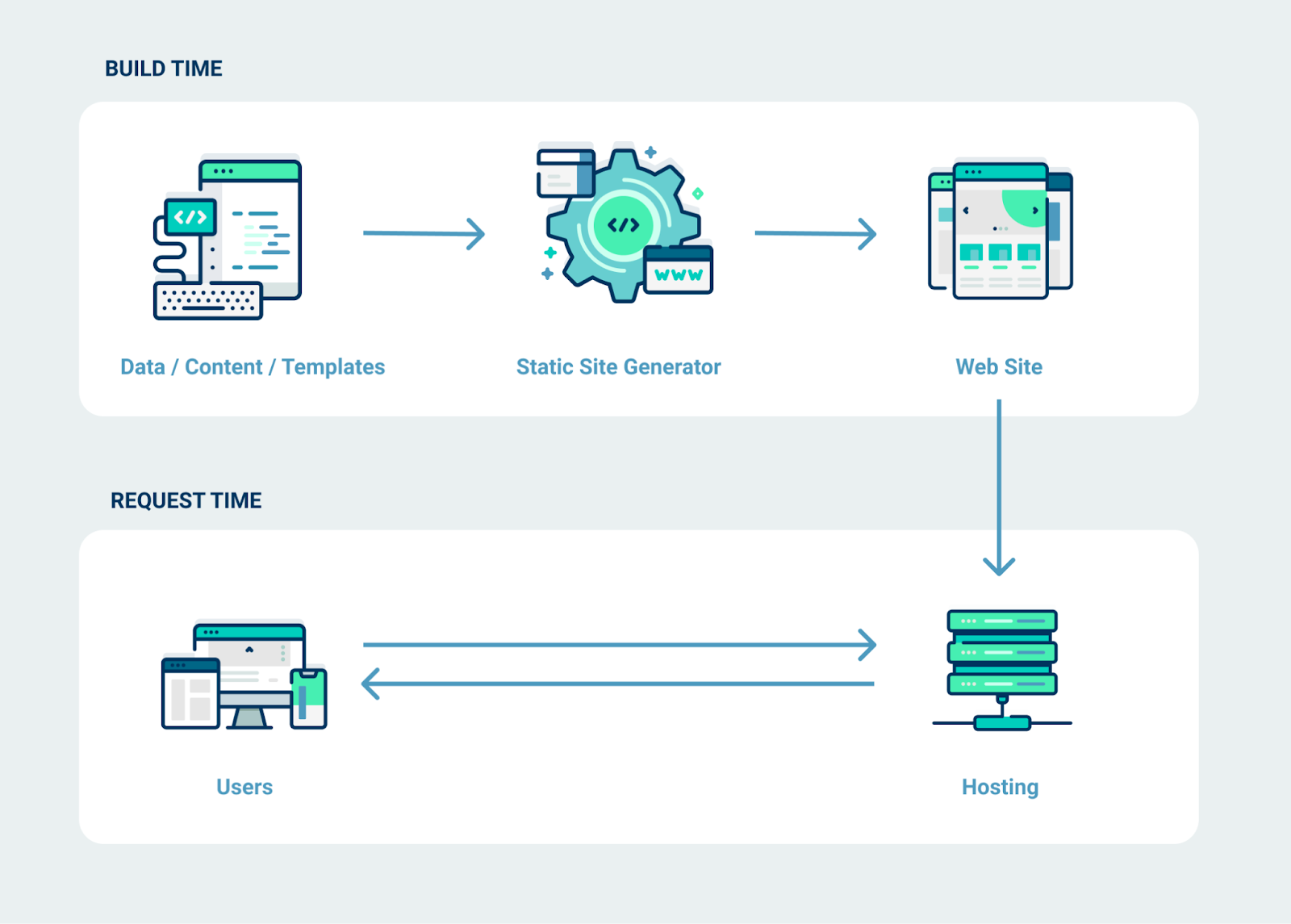
Source: Netlify
Common frameworks
Next.js
Gatsby
Hugo
Eleventy
Jekyll
SEO implications
SSG is ideal for SEO. Pages are prerendered as static HTML at build time, so web crawlers can immediately access complete content without server-side processing or client-side JavaScript execution.
Pros
Maximum SEO benefits - Search engines get complete, static HTML immediately with no wait time
Lowest server costs - Can host entirely on CDNs with minimal infrastructure
High security - No server-side code execution means fewer attack vectors
Cons
Content updates require a rebuild - Changes require triggering a new build and deployment
Longer build times for big websites - Build time increases with the number of pages
Not suitable for dynamic content - Not ideal for sites requiring dynamic content or lots of interactivity
When SSG makes sense
SSG is ideal for websites with mostly static, non-personalized content that doesn’t change often.
Good use cases for SSG:
Marketing sites
Blogs
Documentation
Landing pages
These sites deliver the same content to all users and don’t require real-time updates, making prerendering a reliable, high-performance, and cost-efficient option with minimal infrastructure overhead.
Incremental static regeneration (ISR)
With incremental static regeneration, pages are initially built as static HTML. They can then be regenerated without rebuilding your entire site.
How it works
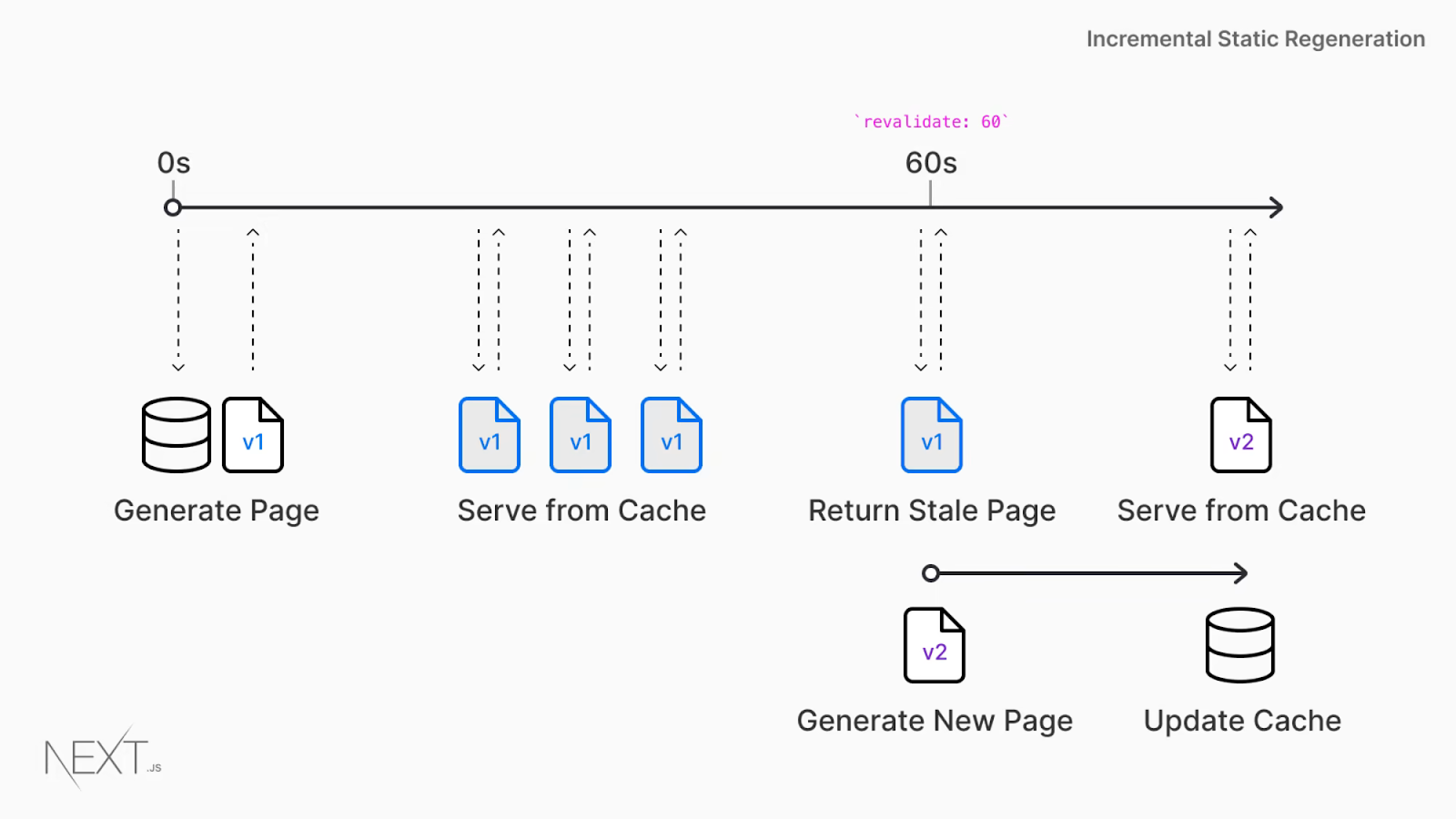
You can set a revalidation period for each page to regenerate automatically (e.g., 5 minutes, 1 hour).
When that time expires and someone requests the page, ISR serves the cached (old) version while updating the page in the background. The next visitor will see the updated version.
Alternatively, you can use on-demand revalidation to update specific pages when content changes, such as when you publish or update content.
Let’s take a look at how ISR works:
Source: Next.js
Common frameworks
Next.js introduced ISR, though other frameworks now offer comparable features.
SEO implications
ISR delivers strong SEO benefits similar to SSG. Clients receive prerendered HTML, ensuring quick content visibility.
The key advantage over pure SSG is that content can stay fresh without manual rebuilds, which is crucial for sites with thousands of pages that update more often.
Pros
Fast page loads like SSG - Pages are prerendered and served as static HTML
No full site rebuilds required - Pages only update when you want, saving time and resources
Good for semi-dynamic content - Balances static performance with content freshness
Cons
More complex than pure SSG - Requires understanding revalidation strategies and on-demand rebuilding
Can be harder to debug than SSG or SSR - Mixing static and regenerated content creates complexity
Cache invalidation complexity - Managing when and how pages regenerate requires careful planning
When ISR makes sense
ISR works best for large content sites with semi-frequent updates where rebuilding everything would take too long.
Good use cases for ISR:
Large sites with frequent (but not real-time) updates
Ecommerce catalogs
Real estate listing sites
If you have thousands of pages that update hourly or daily but don't need real-time changes, ISR gives you the performance of static sites with the freshness of server rendering.
Islands architecture
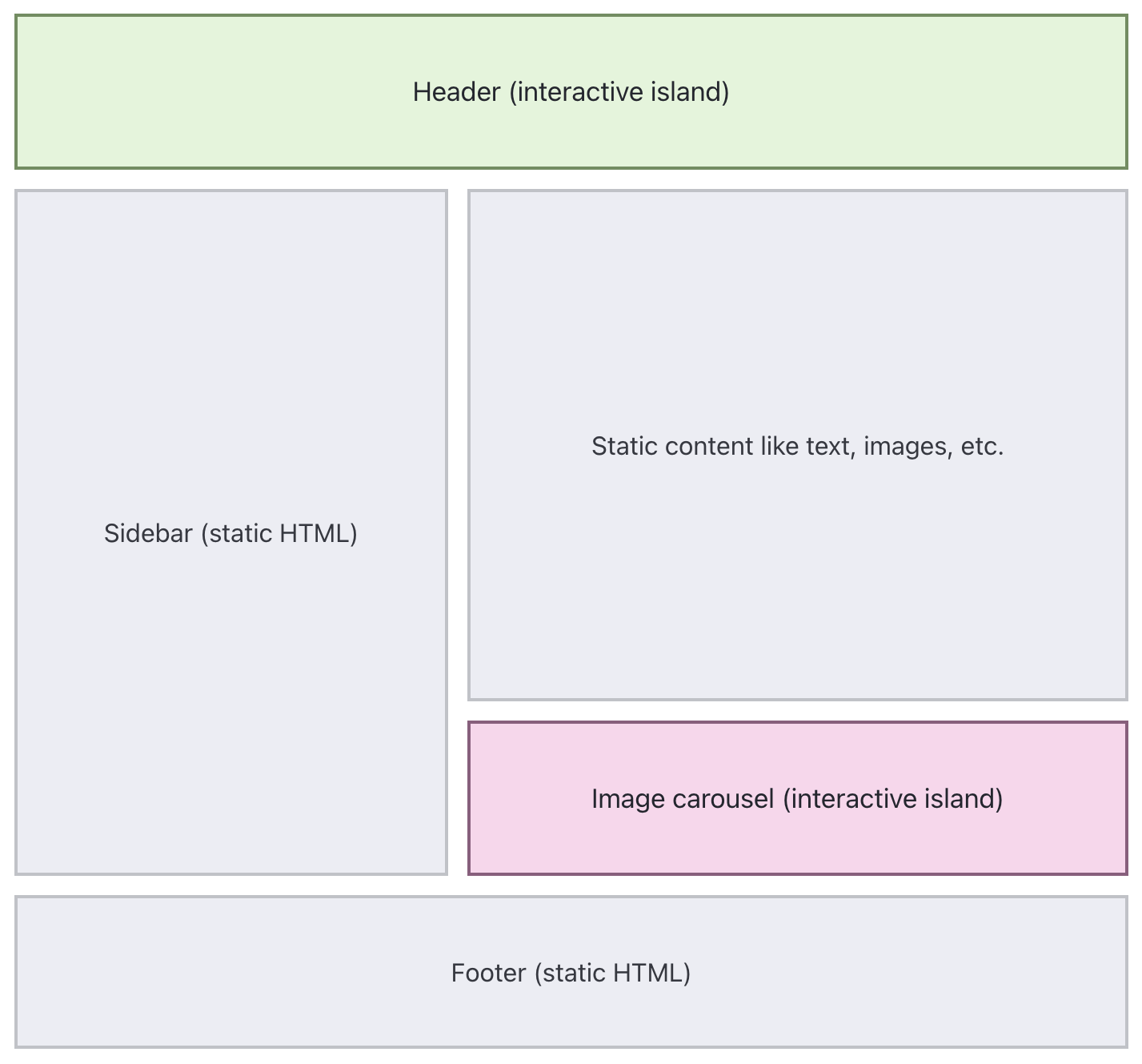
In the islands architecture pattern, the page is delivered mostly as static HTML, while small interactive components (“islands”) hydrate with JavaScript only where needed.
How it works
Developers determine which components need interactivity and JavaScript only loads for those parts. Everything else remains static HTML.
Here's what a page using islands architecture might look like:
Source: Astro
Common frameworks
Astro
Fresh
SEO implications
Because JavaScript only loads for interactive components, you get the SEO benefits of static sites with the flexibility to add interactivity exactly where you need it.
Astro, the framework that popularized this architecture, also supports server-side rendering. This means your site can display on-demand content instead of relying solely on pages prerendered at build time.
Pros
Minimal JavaScript shipped to browsers - Only interactive components load JS
Supports popular frameworks - Astro has integrations for React, Vue, Svelte, and others
Static HTML for web crawlers - Most content is prerendered and easily accessible for web crawlers
Cons
Requires planning components upfront - Must decide which parts need JavaScript during development
Less community resources - Newer approach means fewer tutorials and help, though the ecosystem is growing fast
Not ideal for highly interactive apps - This pattern was intended for content sites, making it not ideal for complex apps
When islands architecture makes sense
Islands architecture works best for content-heavy sites that need occasional interactivity without loading heavy JavaScript.
Good use cases for islands architecture:
Blogs with interactive widgets
Marketing sites with forms/calculators
E-commerce product pages
These sites are primarily static content but benefit from strategic interactivity. Most of the page doesn't need JavaScript, but specific components do.
If your site is mostly static content with a few interactive or dynamic elements throughout, islands architecture delivers optimal performance and SEO without the overhead of full CSR or SSR.
I'm actually building my personal website with Astro right now!
Dynamic rendering
With dynamic rendering, the server gives different versions of your site depending on who's requesting it. Bots get server-rendered HTML. Regular users get a client-side rendered experience.
How it works
When a request comes in, the server detects whether it's from a web crawler or a human visitor. Bots get the rendered page with full content. Users receive the standard JavaScript-powered version.
Here's the dynamic rendering process:

Source: Google Search Central
Common tools
Use a custom solution or an external tool like prerender.io
SEO implications
Dynamic rendering solves the immediate SEO problems of CSR sites by giving search engines and AI chatbots the complete page in the HTML response.
However, it's a temporary solution. Serving different versions to bots than users can create maintenance headaches and potential issues if the versions diverge.
Pros
Fixes issues for existing CSR sites - Gives prerendered HTML to search engines without rebuilding your frontend
Quick implementation - Can be set up in days rather than months of refactoring
Cons
Maintaining two paths - Must ensure bot and user versions stay in sync
Not a long-term solution - Google explicitly calls this a workaround, not a long-term solution
Extra server or tool costs - Running prerendering service adds infrastructure expenses
When dynamic rendering makes sense
Dynamic rendering works as a bridge solution when you have a CSR site that needs better SEO but can't migrate to SSR or SSG immediately.
Use dynamic rendering only as a temporary fix while planning a more sustainable rendering strategy.
Wrapping up
There's no perfect web rendering strategy. Each method comes with trade-offs.
Your job as an SEO professional isn't to dictate the solution. It's to understand the options and work with your dev team to help find what fits.
The best rendering strategy balances SEO requirements with technical realities. That only happens when you build allies with your developers and understand business goals.
Up Next: Discover hands-on techniques to test, troubleshoot, and optimize how Google and LLMs actually process your pages in Carlos Sanchez’s Advanced SEO Guide to Debugging Rendering Issues.

Matt Hollingshead is a technical SEO consultant based in Canada, specializing in large-scale audits, JavaScript SEO, and complex site migrations. When he’s not working, you’ll probably find him on the golf course.

Related Articles
 Agency Technical SEO in 2026: AMA with Tory Gray & Patrick Hathaway

 JavaScript SEO AMA with Sam Torres: 13 Questions & Answers


 These WordPress Website Mistakes Could Hurt Your Brand’s Credibility

 Sitebulb Desktop
Find, fix and communicate technical issues with easy visuals, in-depth insights, & prioritized recommendations across 300+ SEO issues.
- Ideal for SEO professionals, consultants & marketing agencies.
 Sitebulb Cloud
Get all the capability of Sitebulb Desktop, accessible via your web browser. Crawl at scale without project, crawl credit, or machine limits.
- Perfect for collaboration, remote teams & extreme scale.